Docker Desktop 4.23: Updates to Docker Init, New Configuration Integrity Check, Quick Search Improvements, Performance Enhancements, and More

Docker Desktop 4.23 is now available and includes numerous enhancements, including ASP.NET Core support in Docker Init, Configuration Integrity Check to alert on any configuration changes that require attention, and cross-domain identity management. This release also improves Quick Search, allowing for searching across containers, apps, Docker Hub, Docs, and any volume, and performing quick actions (start/stop/delete). VirtioFS is now set to default to provide performance gains for Mac users. With the Docker Desktop 4.23 release, Mac users will also see increased network performance using traditional network connections.
In this post, we dive into what’s new and updated in the latest release of Docker Desktop.

ASP.NET Core with Docker Init
We are excited to announce added support for ASP.NET Core. Whether you’re new to Docker or a seasoned pro, Docker Init now streamlines Dockerization for your ASP.NET Core projects. With a simple docker init command in your project folder and the latest Docker Desktop version, watch as Docker Init generates tailored Dockerfiles, Compose files, and .dockerignore files.
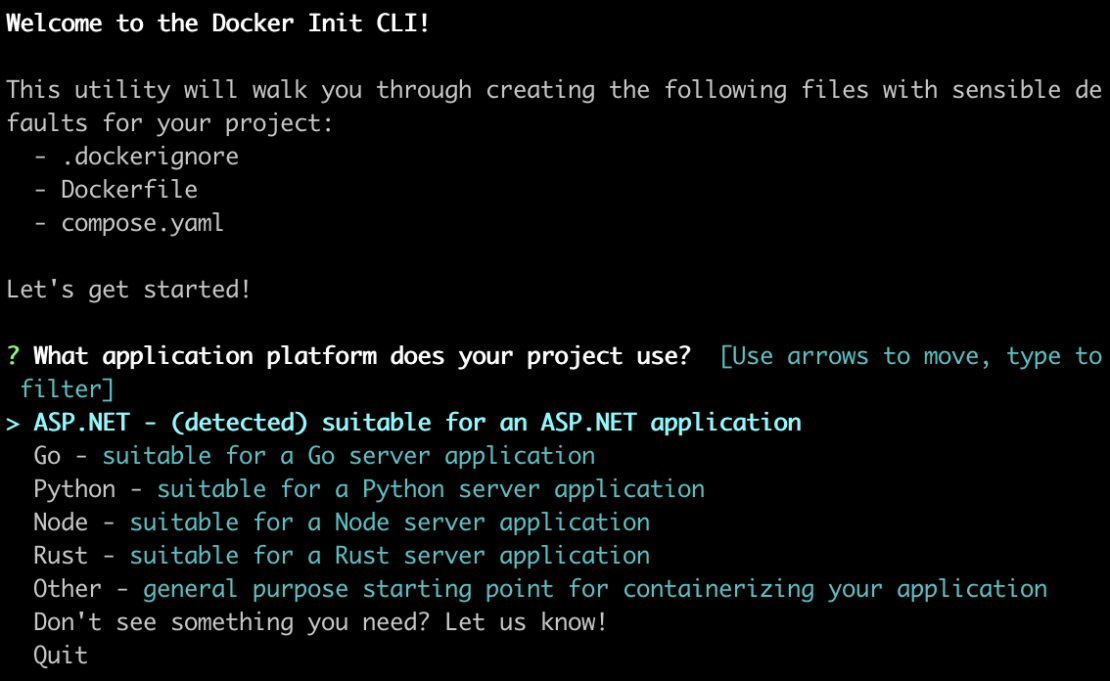
Specific to ASP.NET Core, we also improved support and comments in the DockerFile for multi-arch builds. This advancement will help users manage sharing their images across different CPU architectures and streamline deployments on cloud providers such as Azure, AWS, and GCP. Create images that fit various architectures, boosting flexibility and efficiency in cloud deployments.
Get started by ensuring you have the latest Docker Desktop version. Then, execute docker init in your project directory through the command line. Let Docker Init handle the heavy lifting, allowing you to concentrate on your core task — crafting outstanding applications!
Configuration Integrity Check
Ensure Docker Desktop runs smoothly with our new Configuration Integrity Check. This allows you to keep using multiple local applications and tools, sometimes making configuration changes hassle-free. This update automatically detects and alerts to any configuration changes, prompting a simple click and re-establishing Docker Desktop configurations to track and ensure uninterrupted development.
Alerts to any configuration issues will be displayed in the whale menu.
Cross-domain identity management
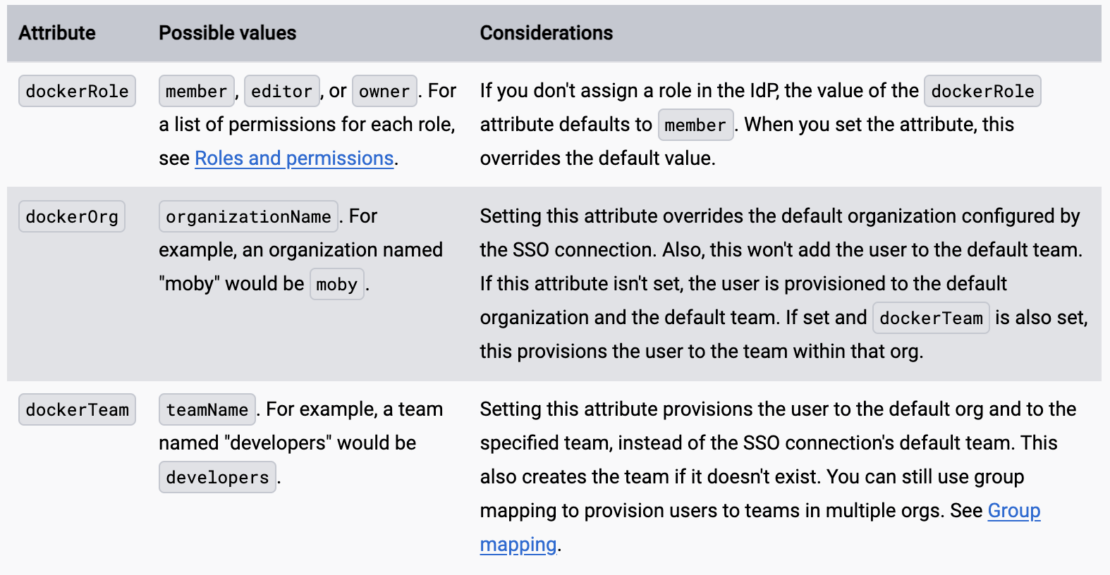
User access management for Docker just got more powerful. SCIM helps auto-provision or de-provision users, and group role mapping is now supported so you can organize your teams and their access accordingly:
- You can assign roles to members in your organization in the IdP. To set up a role, you can use optional user-level attributes for the person you want to assign a role.
- You can also set an organization and team to override the default provisioning values set by the SSO connection.
- The following table lists the supported optional user-level attributes.
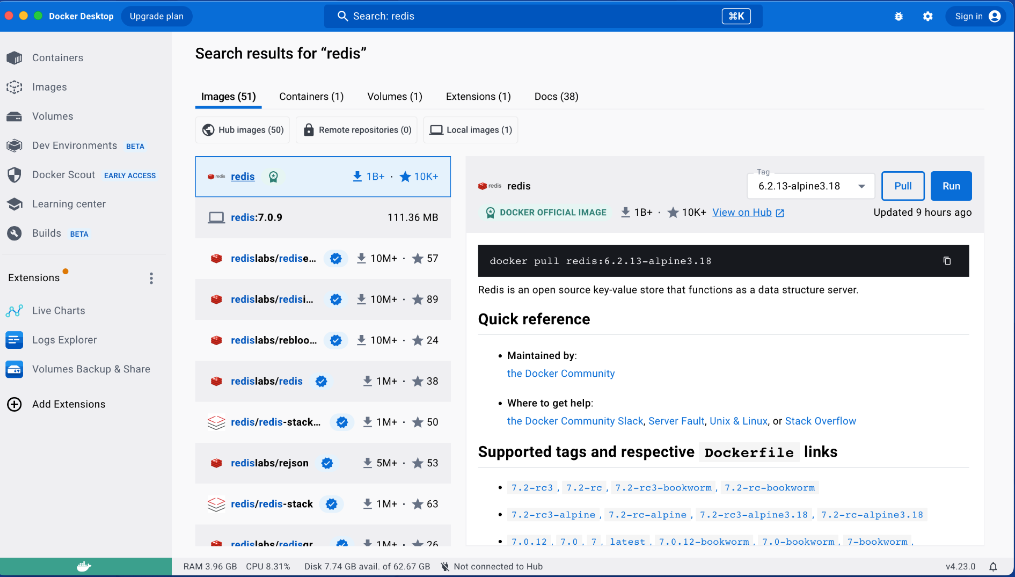
Improvements to Quick Search
Empowering developers with seamless access to essential resources whenever they’re needed, our revamped Quick Search feature has received significant upgrades. Now, users can effortlessly locate:
- Containers and Compose apps: Easily pinpoint any container or Compose app residing on your local system. Additionally, gain quick access to environment variables and perform essential actions such as starting, stopping, or deleting them.
- Docker Hub images: Whether it’s public Docker Hub images, local ones, or those from remote repositories, Quick Search will provide fast and relevant results.
- Extensions: Discover more about specific extensions and streamline installation with a single click.
- Volumes: Effortlessly navigate through your volumes and gain insights into the associated containers.
- Documentation: Instantly access invaluable assistance from Docker’s official documentation, all directly from within Docker Desktop.
Enhanced Quick Search is your ultimate tool for resource discovery and management, offering unmatched convenience for developers.
Standardizing higher performance file sharing with VirtioFS for Mac users
Docker Desktop 4.23 now defaults to utilizing VirtioFS on macOS 12.5+ as the standard to deliver substantial performance gains when sharing files with containers through docker run -v or bind mounts in Compose YAML. VirtioFS minimizes file transfer overhead by allowing containers to access files without volume mounts or network shares.
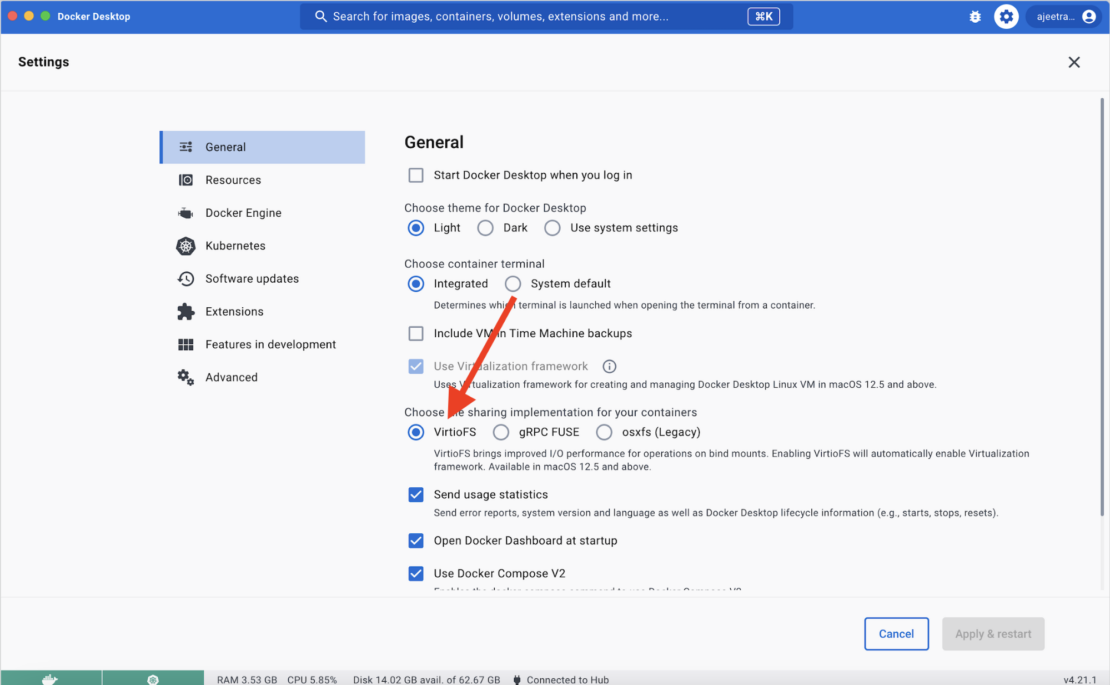
Skipping network file transfer protocols also leads to faster file transfers. We measured performance improvements, decreasing file transfer time from 7:13.21s to 1:4.4s — an 85.15% increase in speed. We do want to note that the measured improvement depends on the size of the file, what other apps are running, and the hardware of the computer.
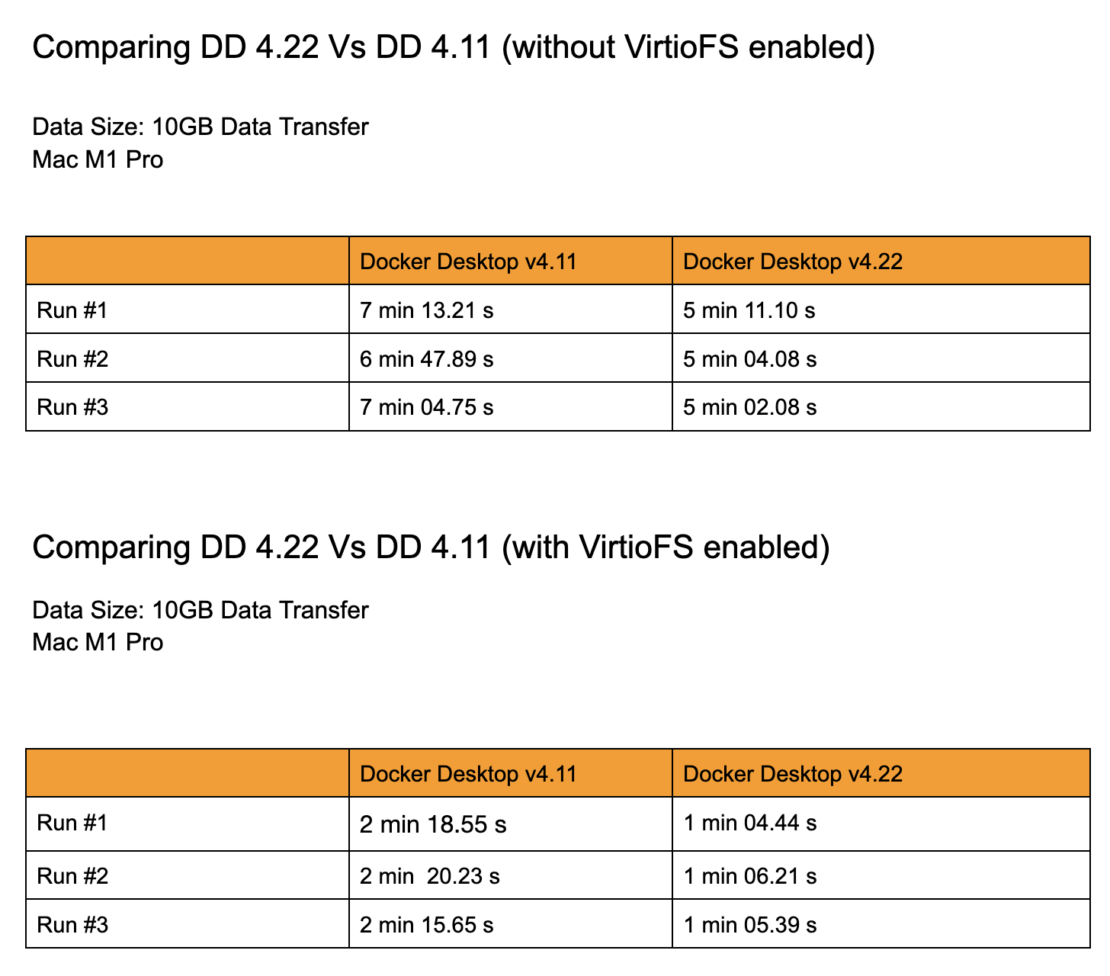
Docker Desktop network speed improvements for Mac users
Docker Desktop 4.23 comes with improved networking performance for Mac users. Now, when a container requires a traditional network connection, users will experience increased network performance in these ways:
- Accessing exposed ports ~10x faster
- Transmission Control Protocol (TCP) ~1.5x – 2x faster
No user action is required to experience these benefits — all Mac users updated to 4.23 will now network faster!
Conclusion
Upgrade now to explore what’s new in the 4.23 release of Docker Desktop.
Learn more
- Read the Docker Desktop Release Notes.
- Get the latest release of Docker Desktop.
- Have questions? The Docker community is here to help.
- New to Docker? Get started.
About the Authors
Principal Product Manager, Docker
Principal PM at Docker, Nuno leads the AI agents teams – Gordon, Docker agent, and MCP – shipping the open foundations that bring agentic AI into developers’ daily workflows.
Related Posts
-
May 12, 2026
Docker AI Governance: Unlock Agent Autonomy, Safely
Introducing Docker AI Governance: centralized control over how agents execute, what they can reach on the network, which credentials they can use, and which MCP tools they can call, so every developer in your company can run AI agents safely, wherever they work. Your laptop is the new prod Agents are the biggest productivity unlock…
Srini SekaranRead now
-
Jun 16, 2026
Docker Content Trust: Retirement and Migration Guidance
Docker Content Trust (DCT) and the Notary v1 service at notary.docker.io are being fully retired (first announced in July of 2025). This blog explains what is changing, who is affected, and how to move to modern alternatives.
Julia WilsonandAditya TripathiRead now
-
Jun 15, 2026
Docker joins the Athena coalition: a cross-industry collaboration for supply chain security
AI is lowering the bar for supply chain attacks. Docker is joining the Athena alliance, a cross-industry effort to coordinate the defense of open source, building on our work to give every developer secure-by-default tools and our track record of sharing signals across the ecosystem.
Tushar JainRead now
-
Jun 11, 2026
Docker Hardened Images enhanced vulnerability scanning with Docker and Aikido
Aikido now scans Docker Hardened Images (DHI) with built-in VEX support. Vulnerabilities that Docker has verified as non-exploitable drop out of the queue automatically, so developers spend their time on findings that actually matter. This post walks through what changed, why it matters, and how users can benefit from the new integration. Why teams are…
Dan StelzerandBjorn HovdRead now