
Streamline Dockerization with Docker Init GA

In May 2023, Docker announced the beta release of docker init, a new command-line interface (CLI) tool in Docker Desktop designed to streamline the Docker setup process for various types of applications and help users containerize their existing projects. We’re now excited to announce the general availability of docker init, with support for multiple languages and stacks, making it simpler than ever to containerize your applications.

What is docker init?
Initially released in its beta form in Docker 4.18, docker init has undergone several enhancements. docker init is a command-line utility that aids in the initialization of Docker resources within a project. It automatically generates Dockerfiles, Compose files, and .dockerignore files based on the nature of the project, significantly reducing the setup time and complexity associated with Docker configurations.
The initial beta release of init came with support only for Go and generic projects. The latest version, available in Docker Desktop 4.27, supports Go, Python, Node.js, Rust, ASP.NET, PHP, and Java.
How to use docker init
Using docker init is straightforward and involves a few simple steps. Start by navigating to your project directory where you want the Docker assets to be initialized. In the terminal, execute the docker init command. This command initiates the tool and prepares it to analyze your project (Figure 1).

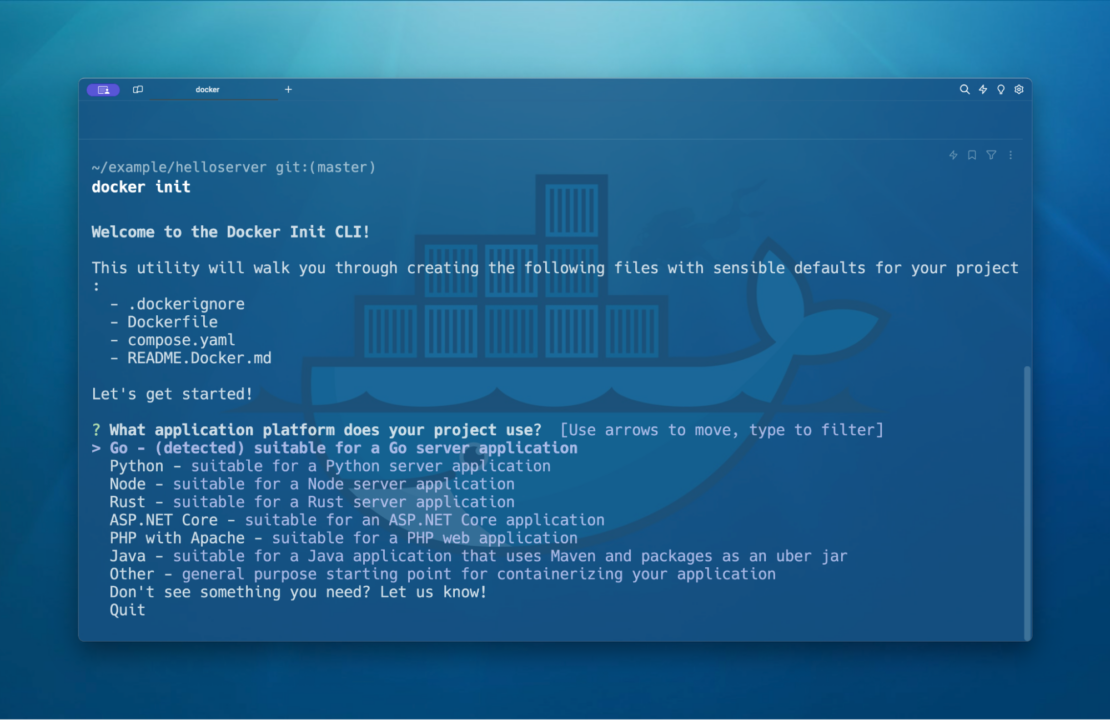
docker init will scan your project and ask you to confirm and choose the template that best suits your application. Once you select the template, docker init asks you for some project-specific information, automatically generating the necessary Docker resources for your project (Figure 2).

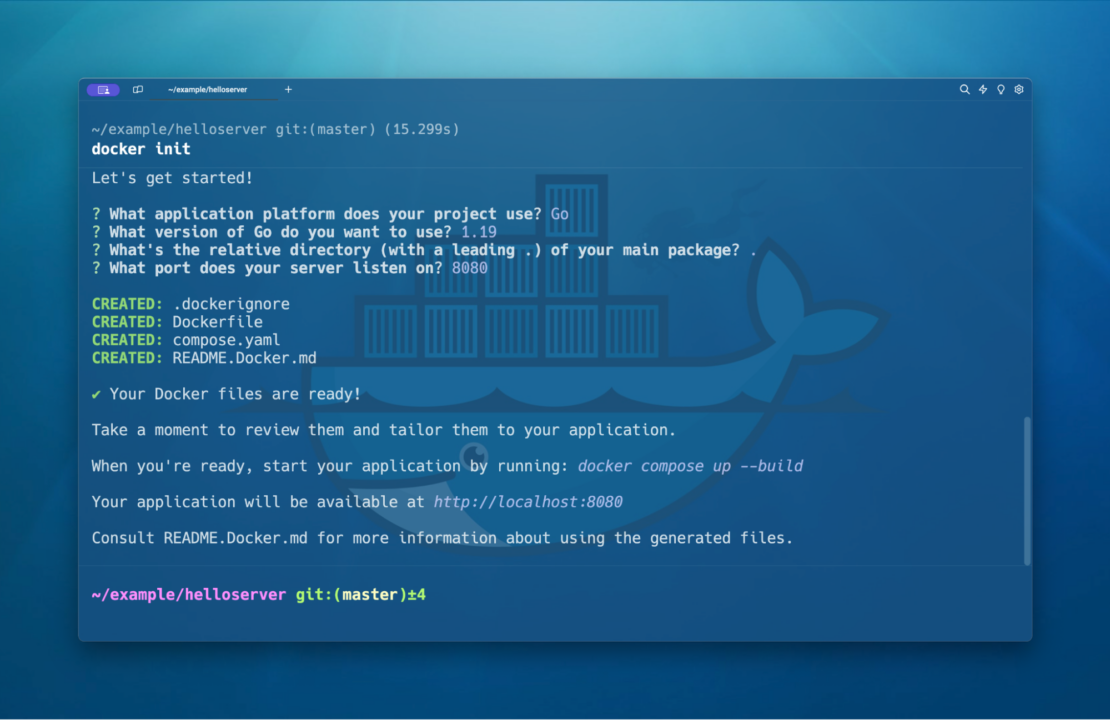
This step includes creating a Dockerfile and a Compose file tailored to the language and framework of your choice, as well as other relevant files. The last step is to run docker compose up to start your newly containerized project.
Why use docker init?
The docker init tool simplifies the process of dockerization, making it accessible even to those new to Docker. It eliminates the need to manually write Dockerfiles and other configuration files from scratch, saving time and reducing the potential for errors. With its template-based approach, docker init ensures that the Docker setup is optimized for the specific type of application you are working on and that your project will follow the industry’s best practices.
Conclusion
The general availability of docker init offers an efficient and user-friendly way to integrate Docker into your projects. Whether you’re a seasoned Docker user or new to containerization, docker init is set to enhance your development workflow.
Learn more
New to Docker? Start by downloading Docker Desktop.
Watch the following video tutorials for further insight on leveraging docker init:
- Docker init — Docker short tutorial
- Docker init with Python
- Docker init with Rust
- Build an AI App with FastAPI and Docker — Coding Tutorial with Tips
- Let’s Discover: Docker init command
- Docker init support for .NET applications
Learn how to use Docker init using your favorite language:
About the Authors
Principal Product Manager, Docker
Principal PM at Docker, Nuno leads the AI agents teams – Gordon, Docker agent, and MCP – shipping the open foundations that bring agentic AI into developers’ daily workflows.
Related Posts
-
May 12, 2026
Docker AI Governance: Unlock Agent Autonomy, Safely
Introducing Docker AI Governance: centralized control over how agents execute, what they can reach on the network, which credentials they can use, and which MCP tools they can call, so every developer in your company can run AI agents safely, wherever they work. Your laptop is the new prod Agents are the biggest productivity unlock…
Srini SekaranRead now
-
Jun 11, 2026
Docker Hardened Images enhanced vulnerability scanning with Docker and Aikido
Aikido now scans Docker Hardened Images (DHI) with built-in VEX support. Vulnerabilities that Docker has verified as non-exploitable drop out of the queue automatically, so developers spend their time on findings that actually matter. This post walks through what changed, why it matters, and how users can benefit from the new integration. Why teams are…
Dan StelzerandBjorn HovdRead now
-
Jun 8, 2026
5 Software Supply Chain Security Best Practices for Development Teams
Learn the key software supply chain security best practices for container-based delivery, from trusted base images and dependency management to build provenance and runtime monitoring.
Aditya TripathiRead now
-
Jun 5, 2026
What is AI Governance? Frameworks, Principles, and Best Practices
Learn what AI governance is, why it matters, and how to manage AI systems safely and at scale.
Srini SekaranRead now



