ChatGPT group chat pricing in 2026: What every plan actually gets you


Last edited June 9, 2026
Table of Contents
- What ChatGPT group chats actually are
- The one pricing rule worth memorising
- Plan by plan: what your own seat unlocks inside a group
- What works (and what conspicuously doesn't) inside a group chat
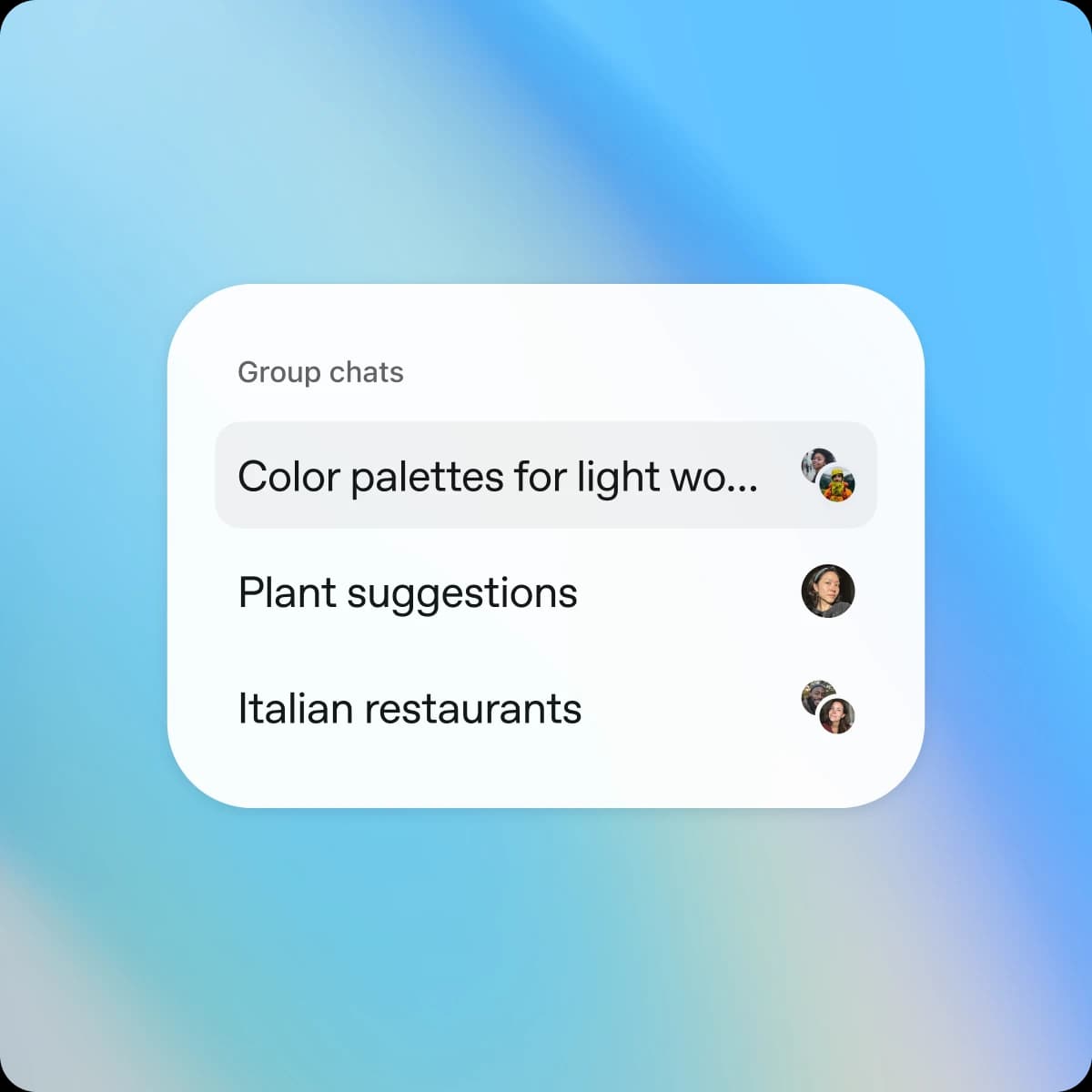
- How group chats are organised in the app
- Privacy: what group chats actually do (and don't) cost you in data
- Three worked examples
- What about ChatGPT Teams, Business and Enterprise?
- Where group chats fall down for actual teamwork
- Try eesel for actual work collaboration
What ChatGPT group chats actually are
Group chats let up to 20 people share one conversation with ChatGPT in it. You start one by tapping the people icon in any chat and sharing an invite link; everyone who joins sees the full thread, including files, images and dictation anyone has dropped in.
OpenAI ran a regional pilot in Japan, New Zealand, South Korea and Taiwan starting November 13, 2025, then opened it to Free, Go, Plus and Pro users globally on November 20, 2025. It is live worldwide now; if you can't see it, the help center suggests restarting the app on the latest version.
A few details that matter for the pricing conversation:
- Group chats live in their own sidebar section so they don't clutter your private history.
- Adding someone to an existing 1:1 chat forks a copy - your original conversation stays private.
- Personal memory is disabled the moment a chat has more than one member, and no new memories are created from group chats.
- ChatGPT decides when to chime in based on the flow of conversation and stays quiet otherwise. You can also flip on a mention-only mode so it only speaks when called.
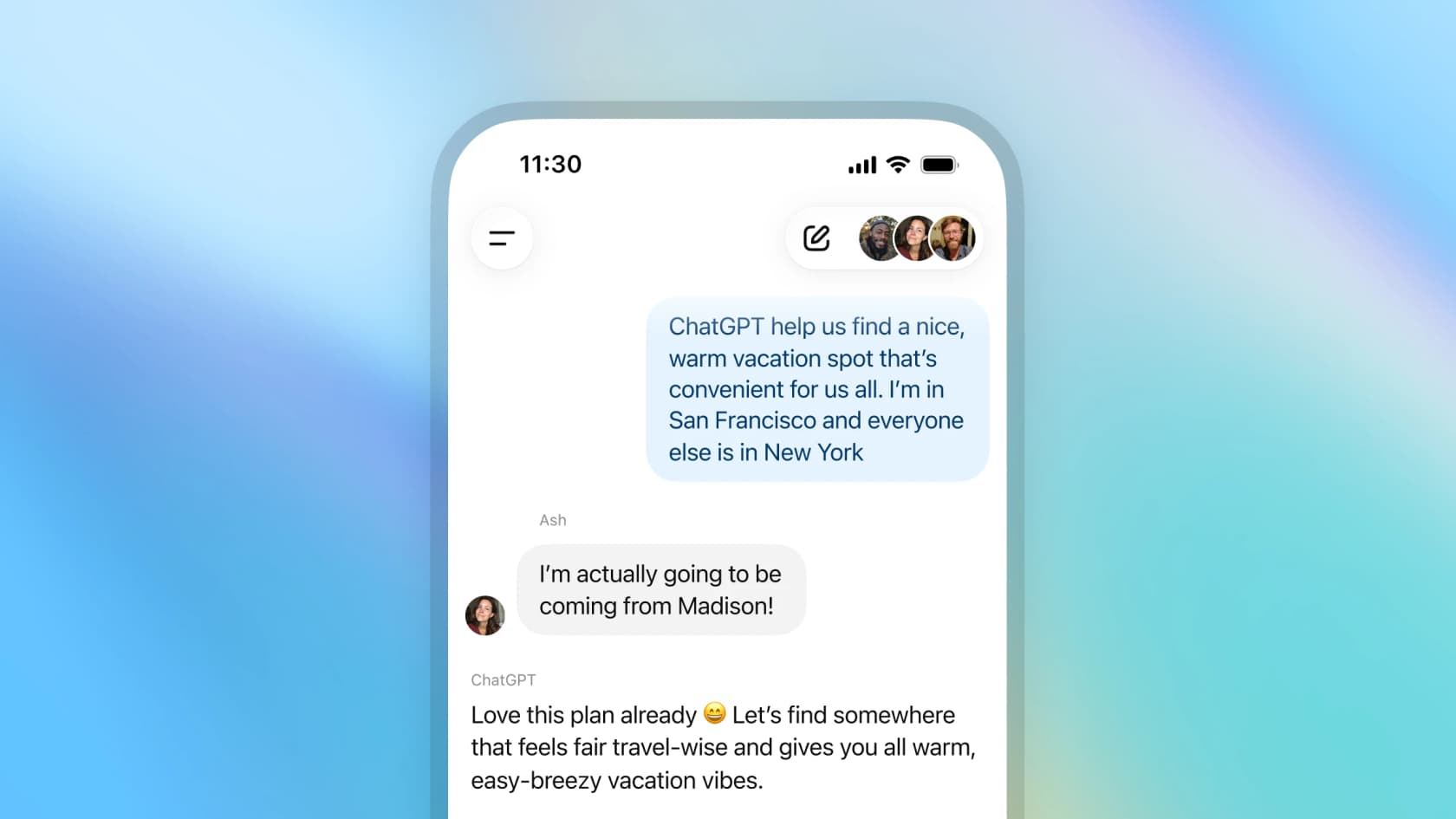
"ChatGPT help us find a nice, warm vacation spot that's convenient for us all. I'm in San Francisco and everyone else is in New York."
"I'm actually going to be coming from Madison!"
"Love this plan already 😄 Let's find somewhere that feels fair travel-wise and gives you all warm, easy-breezy vacation vibes."
Excerpt from OpenAI's official group chat demo.
The one pricing rule worth memorising
There is no group chat surcharge anywhere on ChatGPT's pricing page. The actual cost model boils down to a single attribution rule:
Translated into something practical:
- Humans chatting to each other = free. You can argue about dinner plans all day; nothing bills against anyone's plan.
- Each ChatGPT reply bills against one person. Whoever ChatGPT is responding to in that moment pays for it from their own plan's bucket.
- Model selection follows the same rule. GPT-5.1 Auto picks the best model based on the models available to the user ChatGPT is responding to. So a reply directed at a Pro user can use GPT-5.5 Pro; a reply to a Free user in the same chat uses GPT-5.5 Instant.
That last point is the non-obvious one. A single group chat can route through three or four different models in a row depending on who is being addressed. From the reader's seat it just looks like ChatGPT being a bit smarter when the Pro user asks something - which is exactly what's happening.
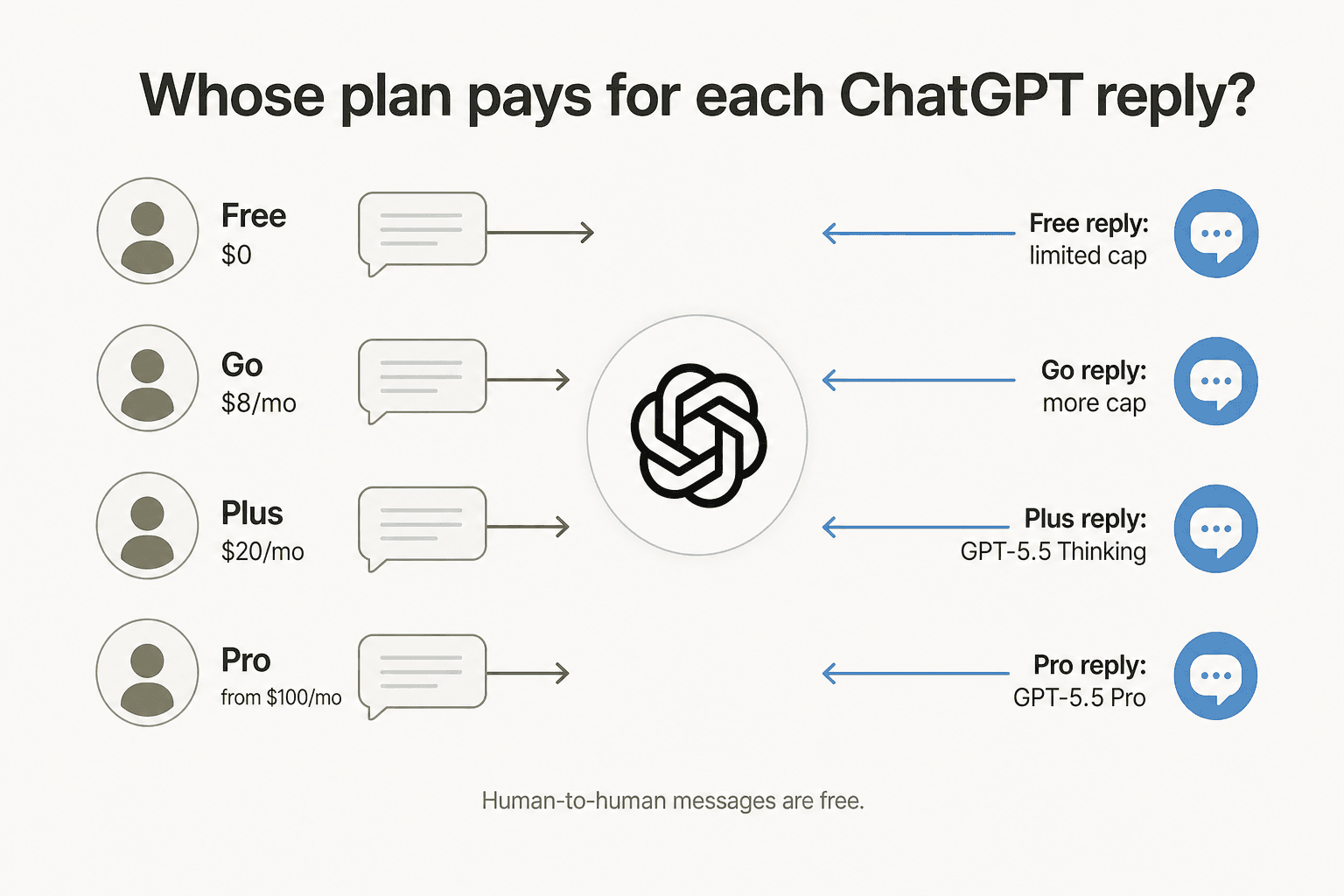
There is no way to "pool" caps. Three friends on Plus and one on Free does not give the Free user any extra headroom - they still hit the Free cap the first time ChatGPT addresses them. Practically, the heaviest user in the group should be the one carrying the heaviest plan, since they will trigger the most replies.
Plan by plan: what your own seat unlocks inside a group
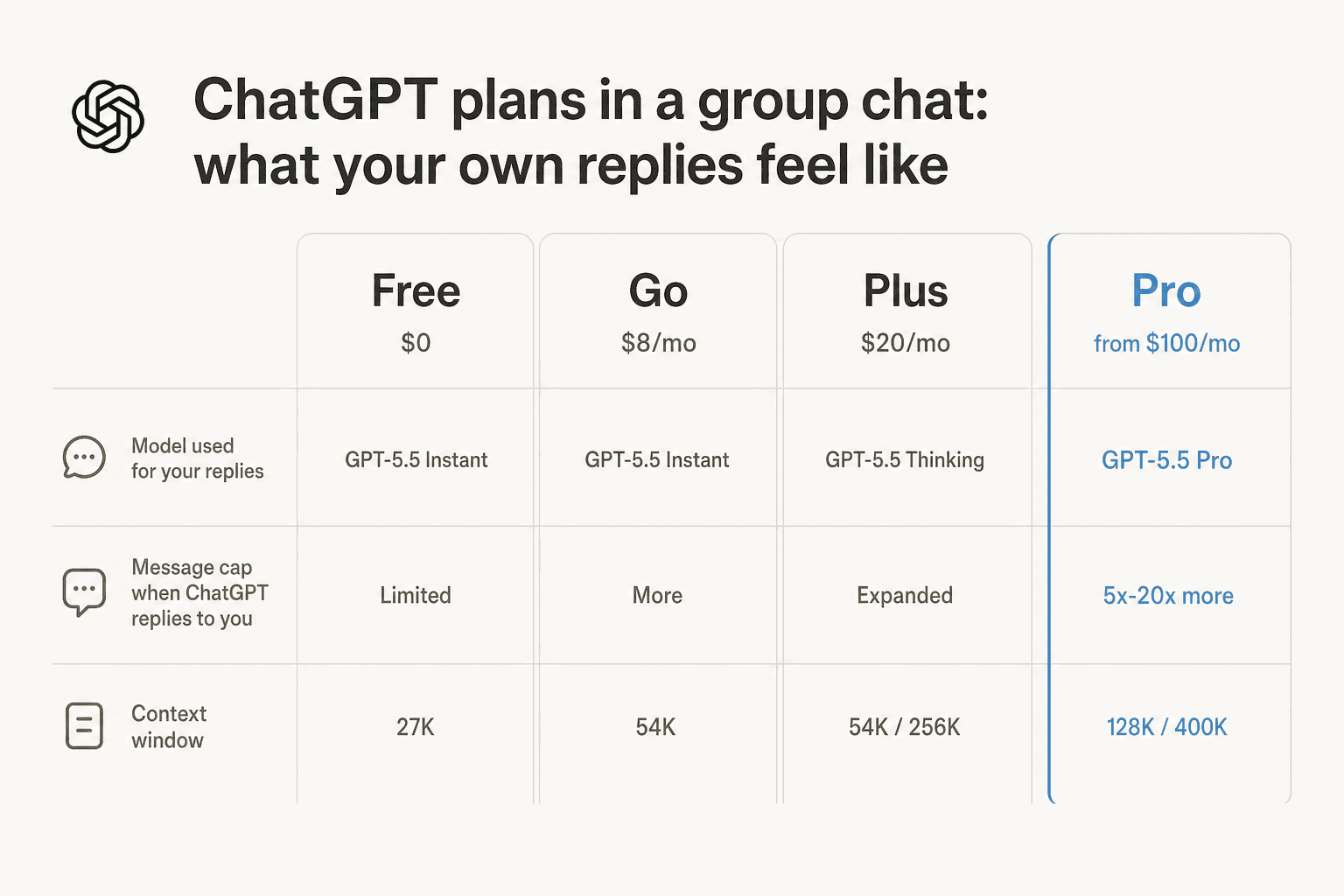
Every consumer tier has the same group chat feature surface. What changes is how many ChatGPT replies you personally can pull from the conversation before things slow down, and which model picks up your replies. Here's the breakdown.
Free - $0/month
- Group chat included: Yes.
- Model that replies to you: GPT-5.5 Instant, limited.
- Message cap: Limited messages - same cap you live with in 1:1.
- Context window: 27K (~12 pages of input).
The Free tier is genuinely fine for the obvious social use cases: planning a weekend, splitting a bill, brainstorming a name. The friction shows up the moment a group leans on ChatGPT for back-to-back substantial replies - someone is going to be the first to hit a cap, and if that someone is on Free, they may briefly be locked out of getting their own questions answered until their window resets. The good news is the chat keeps going for everyone else.
If you want to extend the runway without paying, our roundup of genuinely free ChatGPT tools covers a few legitimate stretches.
Go - $8/month
- Group chat included: Yes.
- Model that replies to you: GPT-5.5 Instant with more access.
- Message cap: Expanded over Free.
- Context window: 54K Instant, 256K Reasoning.
- Caveat: This plan may include ads.
Go is OpenAI's $8 entry-level paid tier - meaningfully more headroom than Free, but still no access to the reasoning-heavy GPT-5.5 Thinking model. For group chats, Go is the right pick if you find yourself running into the Free cap once or twice a month and don't need the heavy thinking models. If you live in the chat, Plus is the better economic step.
Plus - $20/month
- Group chat included: Yes.
- Model that replies to you: GPT-5.5 Instant (expanded) plus GPT-5.5 Thinking via GPT-5.1 Auto routing.
- Message cap: Expanded, "subject to reasonable use".
- Context window: 54K Instant, 256K Reasoning.
Plus is the tier most active group-chat users will land on. The interesting bit is the model routing: when GPT-5.1 Auto decides a question warrants reasoning - "summarise these articles for our proposal", "compare these three travel itineraries", a coding ask - your reply gets routed through GPT-5.5 Thinking. A Free user asking the same question in the same chat would get the GPT-5.5 Instant version. So Plus members effectively bring a sharper ChatGPT to the conversation whenever they're the one being addressed.
That said, Plus's "unlimited" is famously unlimited subject to reasonable use. What that means inside a group chat specifically is unclear, since OpenAI hasn't published group-chat-specific numbers.
Pro - from $100/month
- Group chat included: Yes.
- Model that replies to you: GPT-5.5 Pro, plus expanded Instant and Thinking.
- Message cap: 5x or 20x more usage than Plus, subject to abuse guardrails.
- Context window: 128K Instant, 400K Reasoning - up to ~680 pages of input.
Pro is overkill for the average group chat. Where it earns its $100+ is when you genuinely need GPT-5.5 Pro's reasoning or the 400K reasoning context window for things like uploading a long PDF, working through a complex spec with a co-founder, or running deep analytical workflows. The catch: even with Pro, group chats don't unlock Deep Research, Canvas, or agent mode - so a lot of what makes Pro feel like Pro in 1:1 chats stays in 1:1 chats. More on that next.
What works (and what conspicuously doesn't) inside a group chat
This is the bit most readers underestimate. Group chats are not a full ChatGPT clone; a chunk of the heaviest features stay locked to 1:1 conversations.
Works in a group chat (per the help center and feature page):
- Search (real-time web)
- File upload and retrieval (docs, PDFs)
- Image generation
- Image upload and vision
- Dictation (device mic)
- Per-group custom instructions - separate from your personal ones
- Emoji reactions and inline replies
Stays in 1:1 only (per the help center):
- Canvas (the split-screen co-editing surface)
- Voice mode and full voice conversations
- Python and data analysis
- Deep Research
- Tasks and Apps
- Agent mode (the browser-controlling agent)
- Account-level memory and custom instructions
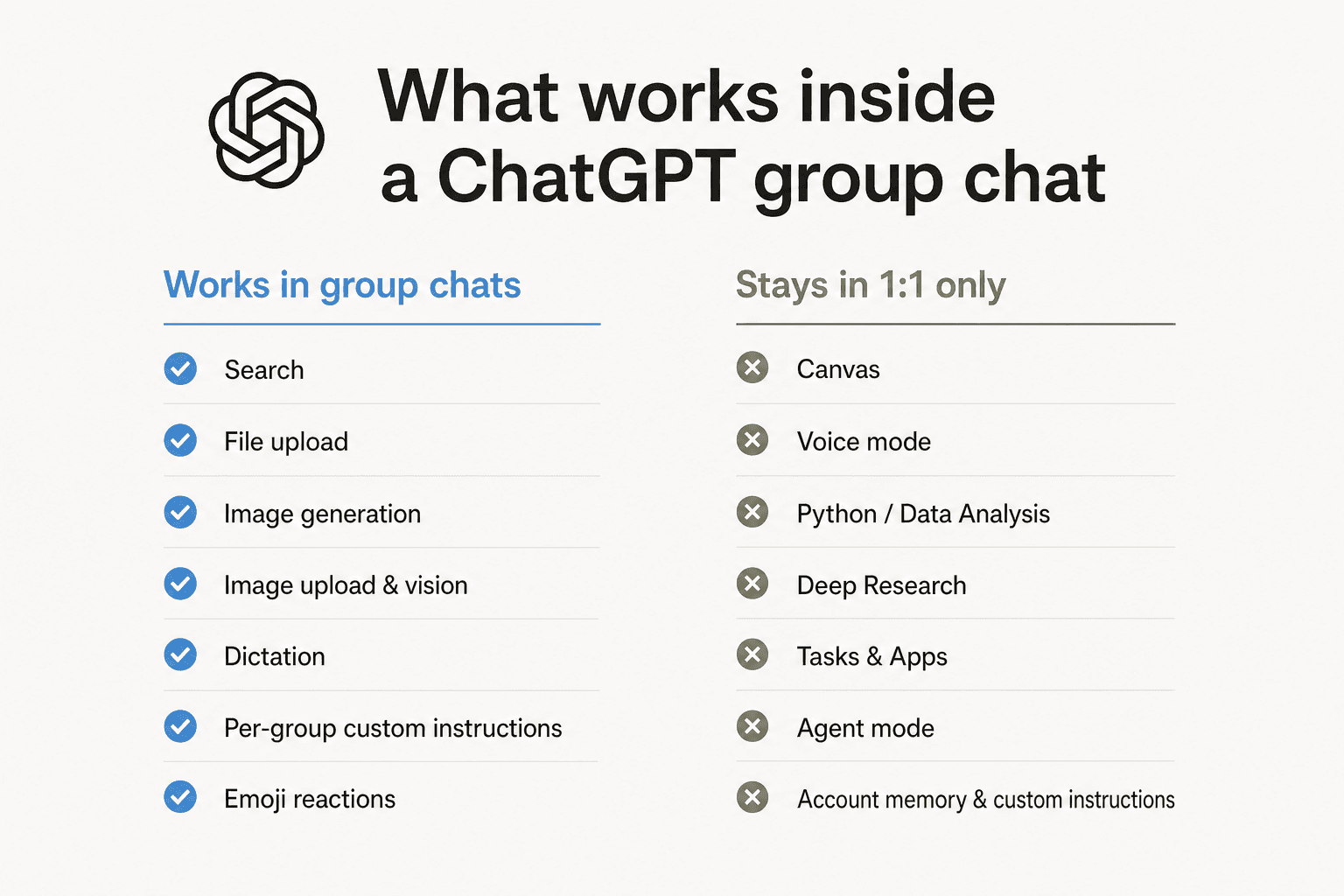
The honest read: if your collaboration depends on long-form research, code execution, or autonomous task running, group chats won't carry that workload yet. They're great for collaborative thinking and quick shared tasks, but the heavy machinery still lives in your private chat. OpenAI says these features remain available in 1:1 chats and may come to group chats later.
How group chats are organised in the app
Group chats appear in a dedicated sidebar section labelled "Group chats", separate from your personal threads. You can rename them, mute notifications, kick members (except the group creator, who can't be removed), and reset the invite link if it leaks.
One quirk worth flagging: anyone with the invite link can join and see the full conversation history. If a link gets posted somewhere it shouldn't, the help center recommends resetting the link - which immediately invalidates the old one.
Privacy: what group chats actually do (and don't) cost you in data
This is where group chats land cleaner than a lot of shared AI tooling. OpenAI's stance:
- Personal memory is automatically disabled once a chat has more than one member - the group can't read your account memory.
- No new memories are written from group chats back to your personal account.
- Account-level custom instructions don't apply; only the group's own custom instructions do.
- Training opt-out is collective: OpenAI won't train on the chat if any single member has "Improve the model for everyone" off in their data controls.
- Deleting your own message removes it for everyone.
The honest caveat: anyone who can see the invite link can join and read the entire history, including files. That's a different threat model from your private chats, and it bites the first time someone shares a link in a public Slack channel. Treat invite links the way you treat Zoom links - reset them if they spread.
For teen accounts, parents can disable group chats entirely through parental controls. When a minor joins a chat that previously had no minors, ChatGPT switches to an under-18 mode that applies to every participant for the rest of the session.
Three worked examples
The cap-attribution rule is hard to feel in the abstract. Here are three realistic group setups and what they actually look like in practice.
Five friends planning a weekend trip - all on Free
The classic use case the marketing video sells. Five people, $0 each, $0 total. ChatGPT replies whenever someone @-mentions it or it senses a clear question. The risk: whoever asks ChatGPT the most questions is the first to hit the Free cap, at which point ChatGPT may switch to a lighter experience for them until their window resets. The chat doesn't break - it just feels a bit less smart when one person's bucket is empty. Verdict: Honestly fine. Don't upgrade for this.
A founder on Pro coordinating with three teammates on Plus
One Pro seat ($100+/mo) and three Plus seats ($20/mo each) = $160+/mo total. Inside the chat, the founder's replies get routed through GPT-5.5 Pro when GPT-5.1 Auto decides to reason; the teammates' get GPT-5.5 Thinking. Everyone has expanded caps. Verdict: Workable for high-intensity collaboration, but you're paying $160+/mo for what's still a feature-restricted chat (no Deep Research, no Canvas, no agent mode). For the same money, you can buy a real shared workspace - we get into that below.
A solo Plus user dragging four Free friends into one chat
$20/mo total, asymmetric. The Plus user gets GPT-5.5 Thinking routing when ChatGPT addresses them; the Free friends get the limited Free experience when ChatGPT addresses them. There's no penalty for being the "host" - your $20 doesn't subsidise anyone else's cap. Verdict: This is the most common upgrade-from-Free path. Worth it only if you yourself were going to upgrade anyway; it doesn't change the experience for your friends.
What about ChatGPT Teams, Business and Enterprise?
Here's where the marketing gets thinner. Neither the official announcement nor the help center page explicitly mentions group chat availability on ChatGPT Teams, Business, or Enterprise. Both documents enumerate only Free, Go, Plus and Pro.
The public pricing page also doesn't include a "Group chat" line item in its comparison table - the closest related row is "Shared projects", which lists Yes on every consumer plan but is a different feature.
Practical reading: if you're on a business tier and you don't see it, you probably don't have it yet. OpenAI tends to roll consumer features into the business tiers later, often with admin controls bolted on, so this is likely a "when" rather than an "if". If you need shared AI workflows for your team today, see the next section.
Where group chats fall down for actual teamwork
It's tempting to compare ChatGPT group chats to Slack, Microsoft Teams, or Discord. The ChatGPT version has one real advantage: AI in the conversation by default, no bot setup, no API keys.
But here's what it doesn't have:
- Persistent channels for ongoing topics. Each group chat is one thread; there's no concept of #marketing or #engineering with months of searchable history.
- Integration with your work tools. No native hooks into Zendesk, Jira, GitHub, Figma, Notion. A ChatGPT Slack integration is a separate thing entirely.
- Search across history. You can search inside one group chat, but not across all your group chats at once.
- Admin controls. No user provisioning, no audit logs, no SSO, no usage analytics per seat. These are explicitly Business/Enterprise features on the comparison table.
- The heavy ChatGPT features. Canvas, Deep Research, Tasks, agent mode - all in 1:1 only.
The honest summary: group chats are a great social product. For planning a trip, coordinating a friend group, picking a restaurant - they're excellent and free. For work collaboration where teams need AI on top of real workflows in their actual tools, they're not the answer yet. For that, you want either a purpose-built team plan (see our ChatGPT Teams review and roundup of ChatGPT group chat alternatives) - or, if you want AI that works inside the helpdesk, Slack, and email channels your team already uses, the rest of this section.
Try eesel for actual work collaboration
ChatGPT group chats are built for social coordination; eesel is built for the work side. Instead of pulling your team into a separate chat window, eesel deploys an AI teammate directly inside the tools your team already lives in - Slack, Zendesk, Freshdesk, Gmail, Confluence, and over 100 others. It reads tickets, drafts replies, takes actions, and escalates edge cases - all without anyone having to copy-paste into a chat thread.
The pricing is usage-based and there's no per-seat fee - you pay $0.40 per resolved ticket or chat, not per teammate added. So instead of negotiating who gets the Pro seat in your group chat, every member of your team gets the same AI capability inside the tools they already work in.
If you're trying to decide between upgrading three teammates to Plus for $60/month and getting an AI that actually does the work in your helpdesk for the same money, Try eesel - no card required for the $50 trial credit.
Frequently Asked Questions

Share this article

Article by
Rama Adi Nugraha
Rama is a software engineer at eesel AI with two years of experience writing about B2B SaaS, AI tools, and customer support technology. Based in Bali, Indonesia, he brings a developer's perspective to product comparisons — cutting through marketing copy to what the integrations and APIs actually do.