A deep dive into the new ChatGPT voice rollout


Last edited January 6, 2026

It feels like every week there’s a new AI announcement that makes you stop and stare, and OpenAI’s reveal of a hyper-realistic, conversational voice for ChatGPT was definitely one of them. The demos were pretty wild, an AI that could chat, laugh, and even sing with an almost spooky level of human-like emotion and timing.
This new feature, part of the big ChatGPT voice rollout, is running on their latest model, GPT-4o. It’s a huge jump from the text-based chats we’re all used to, pulling us into a world where talking to an AI feels a lot more natural. The good news is that it's now available for anyone who is logged in, though if you're a paid subscriber, you get much higher usage limits.
So, what's all the excitement about? In this post, we’ll get into what this new voice mode is, how it compares to the old version, what people really think about it, and what its limits mean for businesses who want to use conversational AI for more than just a bit of fun.
What is the new GPT-4o voice mode?
At its heart, the new voice mode is a completely different animal. It’s powered by GPT-4o, which is OpenAI's first model trained from start to finish on text, vision, and audio. Put simply, it doesn't just process words; it processes sound.
This is a massive change from a technical standpoint. The old voice mode was a bit clunky, stitched together from three separate models: one to turn your speech into text, another to come up with a response, and a third to turn that text back into speech. It worked, but it wasn't exactly smooth.
GPT-4o handles everything in one go. Because the AI processes audio directly, it can pick up on your tone, hear multiple speakers, and even notice background noise without getting sidetracked. This all-in-one approach makes the conversation feel much more real, with an average response time of just 320 milliseconds. That's basically as fast as a person.
Here’s what that actually means for you:
-
Real-time, fluid responses: Those awkward, robotic pauses are a thing of the past. It replies almost instantly, so the chat flows naturally.
-
You can interrupt it: Just like talking to a friend, you can jump in while the AI is speaking. It will stop, listen, and adjust its response without getting confused.
-
Emotional and tonal awareness: This is the really cool part. GPT-4o can pick up on the little things in your voice, like sarcasm, excitement, or hesitation, and reply with a wide range of its own emotions and tones.
To give you some options, there are nine preset voices to choose from: Arbor, Breeze, Cove, Ember, Juniper, Maple, Sol, Spruce, and Vale. You can find them all listed in the official FAQ.
Of course, the rollout hasn't been completely smooth. You might have heard about the drama around "Sky" voice. OpenAI had to pause it after Scarlett Johansson raised concerns that it sounded a lot like her. An NPR-commissioned analysis later found that Sky's voice was more similar to Johansson's than 98% of other actresses they looked at. It just goes to show how tricky this new world of AI interaction is getting.
Comparing the old and new voice modes
While the tech is a huge step forward, the actual user experience has been a hot topic. It’s faster, for sure, but is it better? The answer is a bit more complicated than you'd think.
To really understand what’s different, let’s put the old voice mode side-by-side with the new one.
| Feature | Standard Voice (Legacy) | Advanced Voice Mode (GPT-4o) |
|---|---|---|
| Underlying Model | Three separate models for transcription, intelligence, and speech synthesis | A single, end-to-end multimodal model (GPT-4o) |
| Response Speed | Noticeable delay of 2.8 to 5.4 seconds | Near-instant, with a 320ms average response time |
| Conversation Flow | Turn-based; you had to wait for the AI to finish speaking | Fluid and interruptible, allowing for natural back-and-forth |
| Tonal Awareness | Monotone and robotic; could not process user emotion from audio | Can detect user emotion and respond with varied intonation |
| User Perception | Often described as "thoughtful," "calm," and "comforting" | Perceived by some as "rushed," "shallow," and less personal |
That last row, "User Perception," is where it gets interesting. Even though the new voice is technically better in every way, a surprising number of people actually miss the old one. The legacy voice, with its slow, deliberate pauses, felt more thoughtful to some. It gave you a second to think and felt like a calm, patient partner.
In contrast, the new GPT-4o voice can sometimes feel a bit too eager. It’s so quick to reply that it can feel like it’s trying to hurry the conversation along. For quick questions, it’s great. But for deeper brainstorming or just thinking out loud, some users found the old, slower pace was actually more helpful.
You also can’t have in-depth discussions on AVM like you can on Standard, and answers are much more shallow. This is unusable if you are brainstorming ideas for creative writing projects etc.

How to access and use the new voice mode
Want to try it for yourself? Getting started is pretty simple.
According to the OpenAI FAQ, voice conversations are available to all logged-in users on the mobile apps, desktop apps, and the web version at chatgpt.com. If you’re a Plus subscriber, you’ll get up to 5x higher message limits than free users, so you can chat for a lot longer.
Here’s how to turn it on:
-
Open the ChatGPT app on your phone or go to the website.
-
Look for the headphone icon in the bottom-right corner and tap it.
-
The first time you use it, you’ll be asked to choose one of the nine voices.
-
Don’t stress about which one to pick. You can always change it later in your settings.
And that's it! You can start talking and see what you think.
Community response: A mixed bag
The initial reaction was pure amazement. The demos were mind-blowing, showing an AI that could react to what a user was seeing through their phone camera and carry on a conversation that felt incredibly real. It seemed like a genuine breakthrough.
But as more people got their hands on it, the feedback got a bit more complicated. A quick look at forums like Reddit shows a community that’s both impressed and a little disappointed.
On one hand, the speed and natural flow are obvious wins. On the other, there's a common feeling that something was lost in the upgrade.
Many users felt a weird sense of loss for the old voice. Some described it as a "comforting friend" whose slower, more measured pace was perfect for bouncing ideas around or working through a tough problem.
this is going to be like losing a dear friend. Standard Voice is thoughtful and has a voice and cadence that is natural and comforting. Poignant.
Others have pointed out that the new, faster voice often seems like it's trying to end the conversation. It might give you a quick answer and then go quiet, instead of engaging in the kind of open-ended chat the old voice was good at.
A common complaint is that the new voice's "personality" feels a bit generic and not quite connected to the powerful text model underneath. Some feel its answers are more "shallow," which isn't great for creative tasks where you want a partner for deep thinking.It’s like it’s trying to wrap up and end the conversation with every message even when we just got started and it’s clearly the beginning of a conversation.
It’s a classic example of a technical improvement not always leading to a better human experience for everyone. The new voice is an incredible piece of engineering, but it seems it hasn't quite captured the magic that made some users really like the old, clunkier version.
To see and hear the difference for yourself, check out this video review which demonstrates the new voice mode in action. It offers a firsthand look at the speed, tone, and conversational flow of the GPT-4o update.
Considerations for business applications
While chatting with an AI on your phone is cool, what does this all mean for businesses? The potential for conversational AI in customer service, sales, and internal support is massive, but a general-purpose tool like ChatGPT has specific limitations in a professional setting.
The mixed user feedback on its personality is just the start. Here are some considerations for business applications:
-
It lacks business context: ChatGPT has no idea about your company. It can't look up your helpdesk data in Zendesk, check a customer's order history in Shopify, or find your internal policies in Confluence. Its answers will always be generic.
-
It can't take action: A customer can't ask it to process a refund, and an employee can't ask it to create a support ticket in Jira. It's a closed box that can only talk; it can't do anything inside your existing workflows.
-
Limited customization and safety controls: For business applications, controlling an AI's brand voice, ensuring adherence to company policies, and setting up rules for human handoff are crucial. General-purpose tools may not offer granular control over these aspects.
While the technology is amazing for personal stuff, businesses need a purpose-built AI teammate that's plugged into their existing systems and workflows.
eesel AI: A specialized AI for business
This is where specialized tools like eesel AI can be beneficial. We built eesel around a simple idea: you don't just configure an AI, you hire it as a new teammate. It gets up to speed in minutes, not weeks, by connecting to your existing tools and learning from your specific business data, your past tickets, help center articles, and internal docs. This means it has the right context from day one.
Here’s how an AI teammate like eesel handles the limitations of a general-purpose voice tool:
-
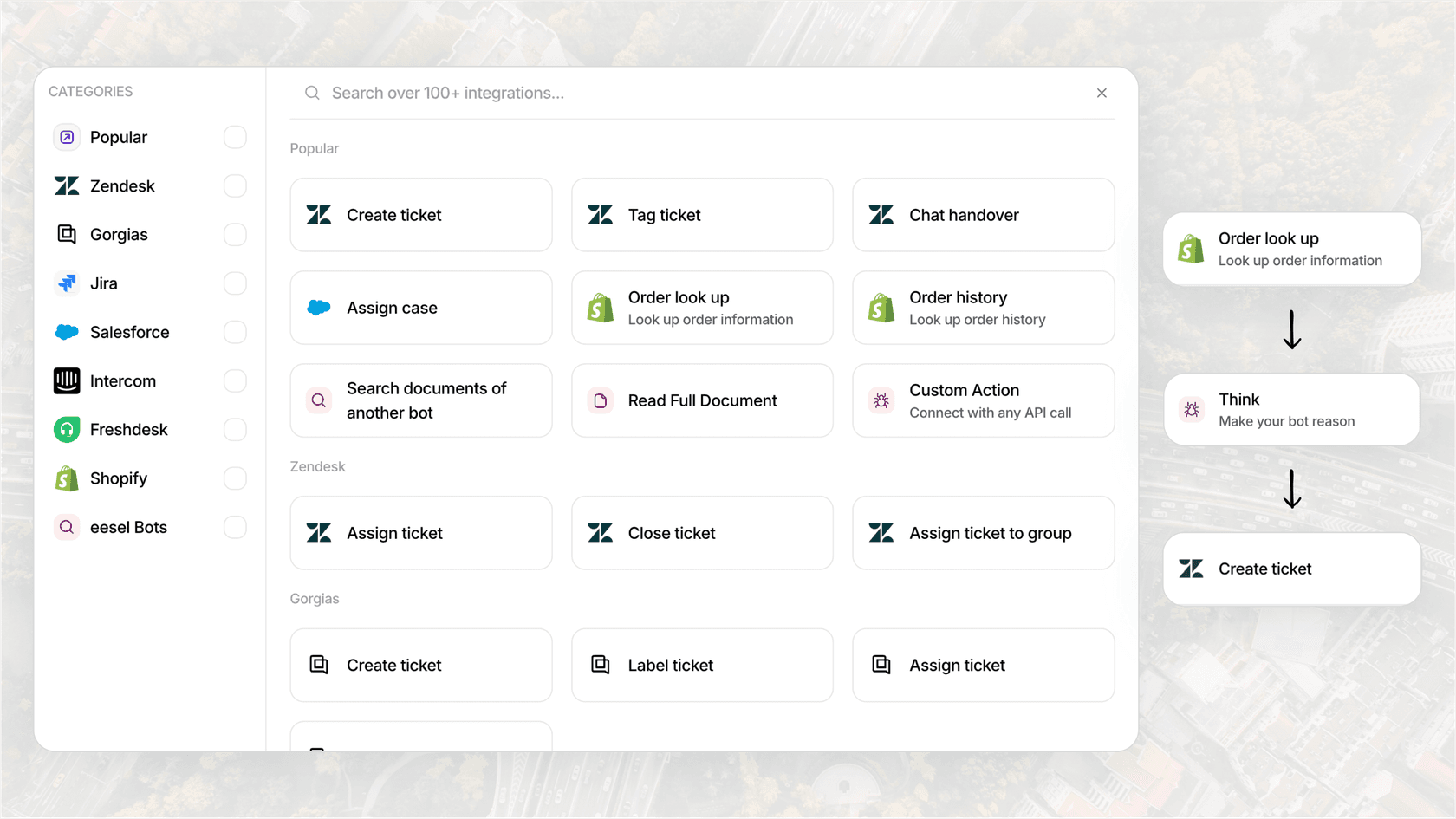
Context-Aware: eesel connects directly to your knowledge sources like Confluence and helpdesks like Zendesk. It doesn't just give a generic answer; it gives the right answer based on your company's actual information.
-
Action-Oriented: eesel AI's Agents are designed to do more than just talk. They can be set up to perform tasks in other apps, like looking up order information in Shopify, updating a ticket field, or routing incoming requests to the right team.
-
Fully Controlled: With eesel, you’re in charge. You define its tone, its knowledge base, and its escalation rules using plain English. You can tell it, "Always escalate billing disputes to a human," and it will. This ensures it acts as a reliable extension of your team.
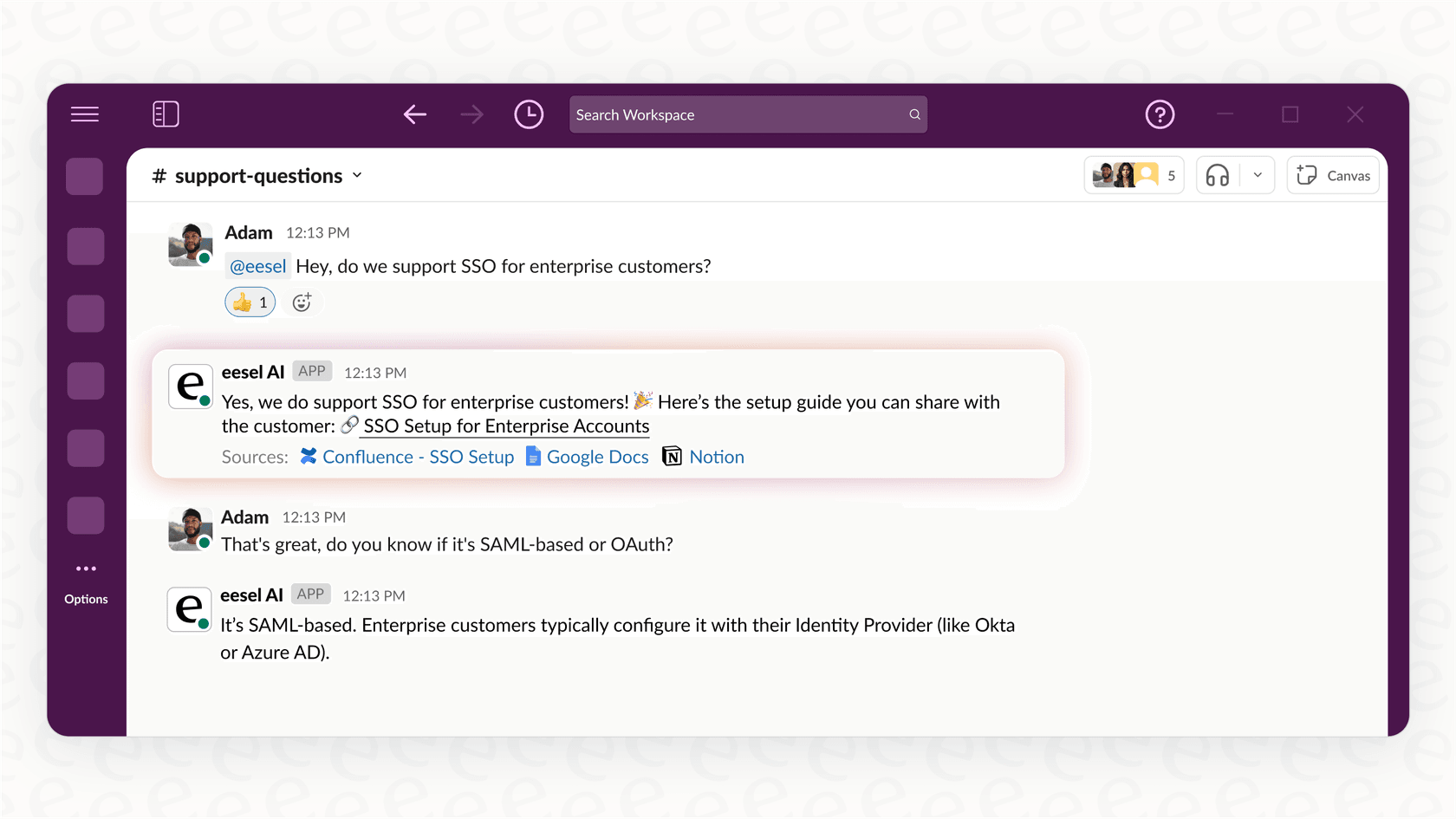
For businesses looking to use powerful conversational AI internally, our AI Internal Chat is a perfect example. You can invite it to your Slack or Microsoft Teams, where it can give instant, trusted answers to employee questions, all based on your company's private documentation. It’s a practical way to cut down on repetitive questions and help everyone get more done.
Final thoughts
There’s no doubt that the ChatGPT voice rollout is a huge technological achievement. It’s making AI interaction more natural, accessible, and human-like than ever before, and it’s a fascinating peek into what's coming next.
The feedback from users highlights a distinction between general-purpose and specialized AI. While a general-purpose voice AI is effective for personal use and quick questions, businesses often have different requirements. These requirements often include deep integration with existing systems, the ability to perform specific actions, and robust safety controls.
Ready to see what a true AI teammate can do for your business? Explore eesel's AI solutions or start a free trial today.
Frequently asked questions

Share this article

Article by
Kenneth Pangan
Writer and marketer for over ten years, Kenneth Pangan splits his time between history, politics, and art with plenty of interruptions from his dogs demanding attention.