An honest Freddy AI review for 2025: Features, pricing, and limitations


Last edited December 21, 2025

Let's be honest, Freshworks is a huge name in customer service for a good reason. With over 75,000 businesses on their roster, it’s no shock that their built-in AI, Freddy AI, gets a ton of buzz. If you're already in the Freshdesk ecosystem, adding Freddy AI probably feels like a no-brainer.
But is it actually the best move? That's what we're here to figure out. We're going to dive deep into what Freddy AI really does, how much it costs (spoiler: it's complicated), and where it falls short. Built-in tools are convenient, sure, but it’s easy to get locked into something that isn't quite right. Let's get into the details before you sign on the dotted line.
What is Freddy AI?
So, what's the deal with Freddy AI? Basically, it's Freshworks' own AI engine, built to work across their entire suite of products, from Freshdesk for customer support to Freshservice for IT. The idea is to have an AI sidekick helping out both your customers and your team.
According to Freshworks, it’s broken down into three main pieces:
-
Freddy AI Agent: This is the bot that handles customer questions right out of the gate. It can chat with customers, answer emails, and work through common problems. You can customize the bot's behavior with agent persona settings. Freshworks also offers pre-built versions for specific industries like e-commerce or travel to get you started a bit quicker.
-
Freddy Copilot: This is the real-time assistant for your human agents. It sits inside their workspace and helps with things like drafting replies, summarizing long and confusing ticket threads, and even translating conversations as they happen.
-
Freddy Insights: This is the analytics part of the operation. It looks through your support data to find trends, see how your team is doing, and figure out the root cause of recurring issues.
In a nutshell, Freddy AI is there to handle the boring, repetitive tasks and help your team solve problems faster. It's meant to feel like a natural part of the Freshworks platform for teams that are already using it.
A breakdown of key Freddy AI features
Alright, let's get into the specifics of what Freddy AI can actually do for your team. Based on their official feature list, the features are split between helping agents directly and making the whole ticket process smarter.
AI-powered help for agents (Freddy Copilot)
This is all about making your human agents quicker and more effective.
-
Writing Assistant: We've all stared at a screen, trying to find the right words. Freddy Copilot steps in to help agents rephrase replies to sound more professional, empathetic, or just a bit clearer. Its reply suggester feature speeds up response times significantly. It can also take a few bullet points and flesh them out into a complete, polished response.
-
Ticket Summarization: You know when a ticket gets passed along and the new agent has to spend ten minutes reading the whole backstory? Freddy can summarize the entire conversation into a few key points. This saves a ton of time and makes hand-offs much smoother.
-
Solution Article Generator: A great way to cut down on future tickets is to build out a solid knowledge base. Freddy can look at a resolved ticket and automatically draft a help article based on the solution. It’s a pretty clever way to find and fill the gaps in your help docs.
-
Live Translate: Supporting customers in different languages is a massive headache. Freddy can translate conversations in real time in over 60 languages, which is a huge bonus for any global team.
Smarter ticket management
Besides helping with replies, Freddy also works in the background to keep your support queue from turning into a mess.
-
Auto Triage: When a new ticket lands, Freddy analyzes it and suggests the right category, priority, and team to send it to. This helps get tickets to the right person much faster without someone having to sort them manually.
-
Sentiment Analysis: It's tough to guess a customer's real mood from just text. Freddy analyzes the language through intent detection to figure out if the customer is feeling positive, neutral, or negative. This helps agents jump on tickets from unhappy users before things get worse.
-
Similar Ticket Suggester: Instead of coming up with a new solution every time, Freddy pulls up past tickets that deal with similar problems. This helps agents find answers that are known to work and keeps responses consistent for common questions.
Understanding Freddy AI pricing
Okay, this is where it gets a little tricky. Freddy AI isn't a single switch you flip. It's a bundle of paid add-ons, and you can only get them if you're on Freshdesk's higher-tier Pro or Enterprise plans. You can't just add it to a basic plan.
First up, Freddy Copilot. According to Freshworks' pricing documentation, this costs you per agent.
| Billing Frequency | Price per Agent/Month (USD) |
|---|---|
| Annual | $29 |
| Monthly | $35 |
That’s right, it’s a $29 per agent, per month fee (if you pay annually) on top of your normal Freshdesk subscription. This means your AI bill grows right along with your team. Hire more agents, and your Freddy Copilot bill goes up.
Then there's the Freddy AI Agent, the autonomous bot. It’s priced in a completely different way.
Pro and Enterprise plans give you a one-time batch of 500 free sessions. Once you use those up, you have to buy more. A Freshworks support page says the cost is $49 for every additional 100 sessions.
A "session" is basically any chat between a customer and the bot in a 24-hour window. This model can make your budget a guessing game. One busy week, a marketing push, or a new product feature could trigger a spike in sessions and leave you with a surprise bill.
The downsides of a native AI tool
Look, a built-in tool is always tempting because it's convenient. But that convenience usually means you're giving up some flexibility and control. Here are some of the main drawbacks to think about before committing to Freddy AI.
1. The setup can be a headache
Because Freddy AI is tangled up in the Freshworks platform, getting it going isn't as simple as flipping a switch. You have to dig through different settings, configure add-ons, and read a lot of extensive documentation to get everything working properly. That means you're waiting longer to actually see any benefit.
In contrast, modern AI tools are built to be fast and easy. A platform like eesel AI is designed so you can set it up yourself. You just connect your Freshdesk account, and it immediately starts learning from your past tickets and help center. You can be up and running in minutes, not days.
2. You can't test its performance on old tickets
This is a huge one. Freshdesk has a Sandbox environment for testing new ticket fields or automation rules. But here’s the problem: you can’t use it to see how Freddy AI would have actually handled your real customer conversations. There’s no way to check how it would have responded to thousands of your past tickets before you unleash it on a live customer. You’re basically flying blind.
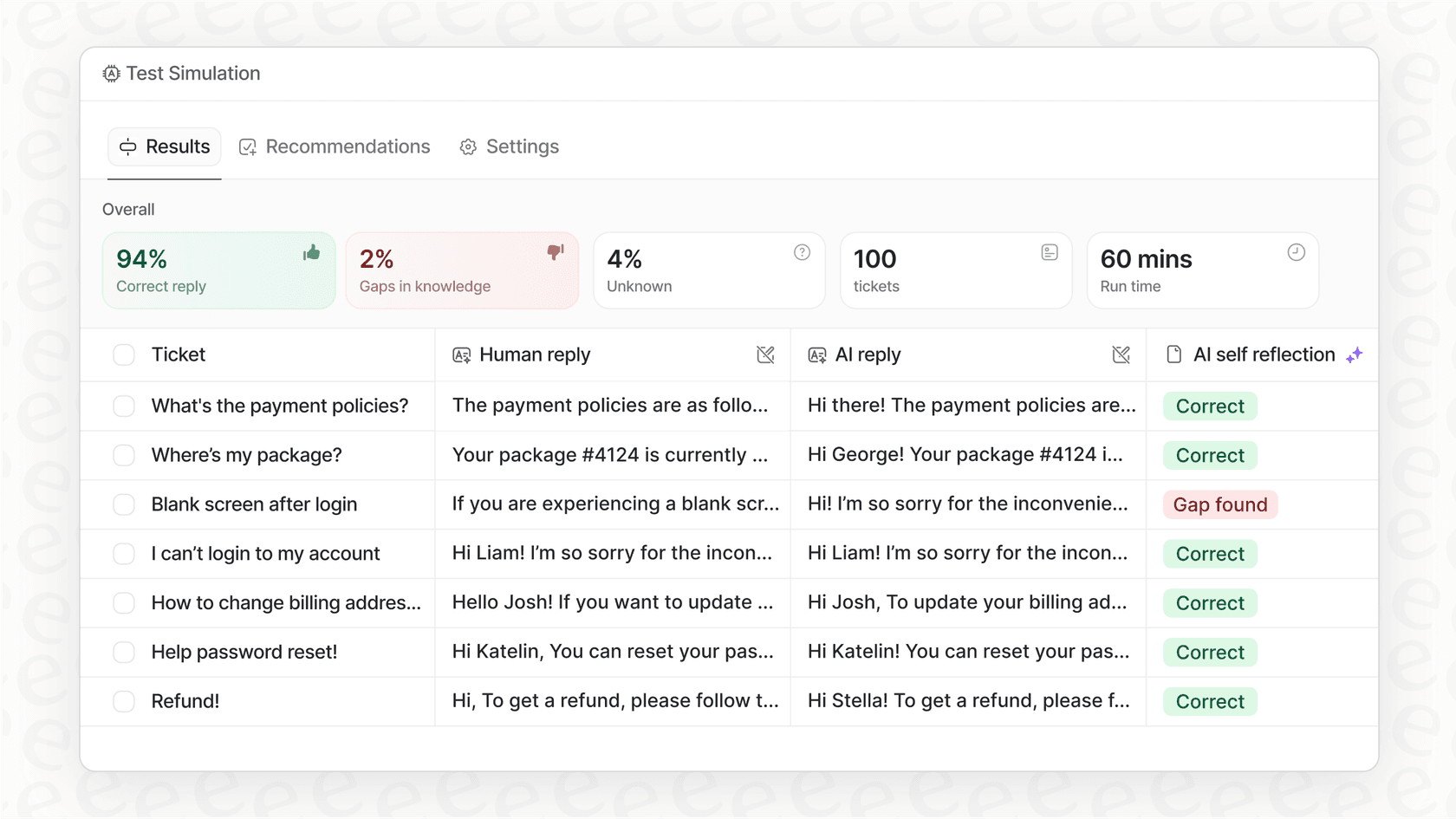
This is a pretty big risk. You’re turning on an AI without knowing if it will match your brand's voice, solve issues correctly, or just create more problems. An alternative like eesel AI fixes this with a powerful simulation mode. You can run it on your historical tickets in a safe space to see exactly how it would have replied. This helps you measure its potential resolution rate, forecast your return on investment, and tweak its behavior before it ever talks to a customer. It’s all about building trust in the AI from the start.
3. Knowledge is trapped in the Freshworks ecosystem
Freddy AI is at its best when it's using information that already lives inside Freshworks, like your help articles and old tickets. But let's be real, where does your company’s information actually live? For most of us, it's scattered all over the place: project details in Confluence, policy docs in Google Docs, and internal guides in Notion or Slack.
Freddy AI can't touch any of those external sources. It’s working with just a tiny piece of your company's total knowledge, which means it will give incomplete answers and have to pass more tickets to your team.
A truly helpful AI needs to see the whole picture. That's why eesel AI was built to connect to all of your knowledge bases, no matter where they are. By integrating with over 100 tools, it gives the AI a complete view of your business, which leads to much more accurate and useful answers.
4. The per-agent pricing model doesn't scale well
We mentioned this earlier, but it's important. The $29 per-agent, per-month fee for Freddy Copilot makes things awkward. It forces you into tough budgeting choices about who gets access to AI. Does the whole team get it, or just a few people? It also punishes you for growing your team. Every new hire adds another AI cost, and that can add up fast.
A better way to do it is usage-based pricing. For example, eesel AI's pricing is based on how many AI interactions you have, not how many people are on your team. This keeps your costs predictable and lets your entire team use AI without you getting penalized for hiring more people.
The modern alternative: Flexible, platform-agnostic AI
For teams that feel stuck with the limits of a native AI tool, a platform-agnostic solution is the way to go. These tools are made to work with the help desk you already have, not lock you into it.
eesel AI is an AI teammate platform built to plug right into tools like Freshdesk while avoiding all the common headaches of built-in solutions. Here’s a quick side-by-side comparison.
| Feature | Freddy AI | eesel AI |
|---|---|---|
| Setup Time | Requires navigating complex settings and documentation. | Go live in minutes with a simple, self-serve setup. |
| Testing | Sandbox for settings, but no AI performance simulation on past data. | Powerful simulation on past tickets to test and forecast ROI without risk. |
| Knowledge Sources | Limited to the Freshworks ecosystem (tickets, help center). | Unifies knowledge from 100+ sources, like Confluence, Google Docs, & Notion. |
| Pricing Model | Per agent, per month ($29/agent) + session-based fees. | Interaction-based. Predictable costs that don't punish you for growing. |
| Customization | Limited to the workflows and features provided by Freshworks. | Full control with plain-text prompts, custom actions, and AI personas. |
Is Freddy AI right for your team?
What's the final call on Freddy AI? It's a decent choice for teams who are all-in on the Freshworks ecosystem and just need some basic, built-in AI help for their agents. If you're not looking for a lot of customization and you're okay with the pricing, it can certainly help your team be more efficient.
But if your team needs flexibility, a quick setup, and an AI that’s genuinely smart, its limitations will quickly become frustrating. The lack of a real testing environment, the siloed knowledge, and the inflexible pricing can stop you from getting the most out of what AI can do.
For a modern AI support solution that you can set up in minutes, test without risk, and train on all of your company's knowledge, a more advanced alternative like eesel AI is a much better long-term bet.
If you're ready to see what a next-generation AI support platform can do, get started with eesel AI for free.
Frequently asked questions

Share this article

Article by
Kenneth Pangan
Writer and marketer for over ten years, Kenneth Pangan splits his time between history, politics, and art with plenty of interruptions from his dogs demanding attention.