A guide to Freshdesk agent shifts and the future of 24/7 support


Last edited January 16, 2026
Table of Contents
- What are Freshdesk agent shifts?
- How to set up and manage Freshdesk agent shifts
- Considerations for your Freshdesk agent shifts setup
- Beyond Freshdesk agent shifts: Using AI automation to work smarter
- Freshdesk agent shifts: Pricing and AI features
- From managing shifts to mastering support
- Beyond Freshdesk agent shifts: Automate your support, not just your schedule
Trying to offer great customer support around the clock is a significant undertaking. If your customers are all over the world, your team needs to be too. That means juggling schedules, time zones, and handoffs to ensure every conversation is handled promptly. It's an operational puzzle that requires the right tools to solve efficiently.
Tools like Freshdesk have robust features to help, like Freshdesk agent shifts, which is designed to bring professional order to your support operations. In this guide, we'll walk through what this feature does, how it works, and how to maximize its impact. We'll also look at how modern AI tools can complement these schedules to further automate 24/7 support.
What are Freshdesk agent shifts?
At its core, Freshdesk agent shifts is a feature that lets you build and manage schedules for your support team, which is especially handy if they're spread across different time zones or work in rotating shifts. You can think of it as a smart, integrated calendar built right into your help desk.
The main goal is to ensure customer tickets are assigned to agents who are actually online and working. Freshdesk makes sure that instead of a ticket sitting in an offline agent’s queue, it gets routed to someone who is available to help right away.
It helps you manage several key areas. You can create different shifts, like "US Daytime" or "APAC Night," with specific hours and time zones. Then, you assign agents to those shifts so the system knows exactly who is working and when. From there, the feature connects with Freshdesk’s automation rules to check an agent's availability before handing them a ticket. It can also account for agents on leave, preventing new tickets from going to them and rerouting any customer replies that come in while they're away.
How to set up and manage Freshdesk agent shifts
Getting started with Freshdesk agent shifts is straightforward, and it allows you to align the platform with your team’s daily rhythm. Here’s how to put it all together.
Creating your first shift
Inside the Freshdesk admin panel, you'll find the option to create a new shift. You’ll give it a name like "Weekend Cover" or "EU Morning", pick the right time zone, and set the days and hours it's active: for example, Monday to Friday, 9:00 AM to 5:00 PM CET. After that, you just add the agents who will be working those hours. This mapping is what tells Freshdesk’s powerful automation engine who is available at any given moment.
Automating ticket assignment
This is where the feature provides significant value. Freshdesk agent shifts works with the platform’s automatic ticket assignment rules, whether you're using round-robin or load-based distribution. When a new ticket arrives, the system doesn't just assign it to the next person in line. It first checks the shift schedule to find an agent who is on duty and then routes the ticket based on your rules. If the first agent in the rotation is off-shift, it moves to the next available person. This ensures tickets are always handled by active team members.
Handling off-duty responses
A key part of shift-based support is managing replies that come in after an agent has logged off. Freshdesk handles this gracefully through automation.
You can set up an automation rule in Freshdesk to check if the assigned agent is currently off-shift whenever a ticket is updated. If they are, it can automatically unassign the ticket and send it back to the main group for the current active shift. This ensures someone who is online can pick up the conversation and maintain a great customer experience.
Considerations for your Freshdesk agent shifts setup
While setting up rules for schedules is a great foundation, modern support teams often look for ways to make these systems even more dynamic to keep up with evolving customer expectations.
Here are a few areas where you can optimize your shift management.
Adapting to workload spikes
Fixed shifts provide consistent coverage, but they may need extra support when you get a sudden flood of tickets, such as after a new product launch. While Freshdesk ensures your team is in place, many organizations complement their shifts with automation to help manage these surges without increasing wait times.
Managing routing and agent expertise
Shift-based routing focuses on availability. To make this even more effective, teams often look at ways to layer in expertise and skill levels. This ensures that while a ticket goes to an available agent, it also finds the person with the right technical background for that specific issue.
Refining follow-the-sun coverage
The "follow-the-sun" model is a great way to provide global support. To make handoffs as smooth as possible, it's helpful to have a clear system for sharing context. This ensures that when a ticket moves from one time zone to the next, the new agent can get up to speed quickly and continue the conversation seamlessly.
Improving schedule management
Managing schedules is a core part of support leadership. While juggling shift swaps and absences takes time, Freshdesk provides the structure needed to keep things organized. Teams that want to further reduce manual overhead often look to AI tools to handle routine inquiries, freeing up managers to focus more on team development and less on administrative scheduling.
Beyond Freshdesk agent shifts: Using AI automation to work smarter
The next step in support excellence involves automating the work itself. Instead of just scheduling people to answer questions, you can have an AI agent work alongside your team to handle a portion of them for you, 24/7.
Introducing an AI agent that never sleeps
An AI agent can instantly resolve a variety of common, repetitive tickets at any time of day. This works as a perfect complement to your Freshdesk agent shifts, providing a safety net during ticket spikes and ensuring instant answers even during shift transitions.
The good news is you don't have to overhaul your setup. For example, eesel AI is a platform that plugs directly into help desks like Freshdesk. You can get it running quickly, and it works inside the same environment your team is already used to.

How AI goes beyond simple routing
An AI agent provides additional layers of intelligence that work beautifully with Freshdesk's routing.
-
It learns from your history: A tool like eesel AI trains on your team’s past ticket conversations to understand your common issues and your brand's tone of voice. This ensures its responses are consistent with the high-quality service your team provides.
-
It handles complexity with custom actions: A modern AI agent can be set up to take action, like looking up order statuses, tagging tickets, or escalating high-priority issues to the right human expert based on the content of the ticket. This adds helpful context to Freshdesk's availability-based routing.
-
It lets you simulate before you activate: eesel AI includes a simulation mode that lets you test it on your past tickets. Before it interacts with customers, you can see how it would have performed and how many tickets it could have resolved. This provides clear insight into the value it adds to your existing Freshdesk setup.

Freshdesk agent shifts: Pricing and AI features
To use Freshdesk agent shifts, you'll be on their Enterprise plan, which is built for organizations that need high-level control and scalability. Freshdesk also offers its own AI capabilities through "Freddy AI," providing different ways to scale your automation.
Freddy AI Copilot is available to help agents write replies, and it is offered as part of various plan structures or as an add-on. Freshdesk also provides the "Freddy AI Agent" for automating conversations, which operates on a session-based model to give teams flexibility in how they deploy automation.
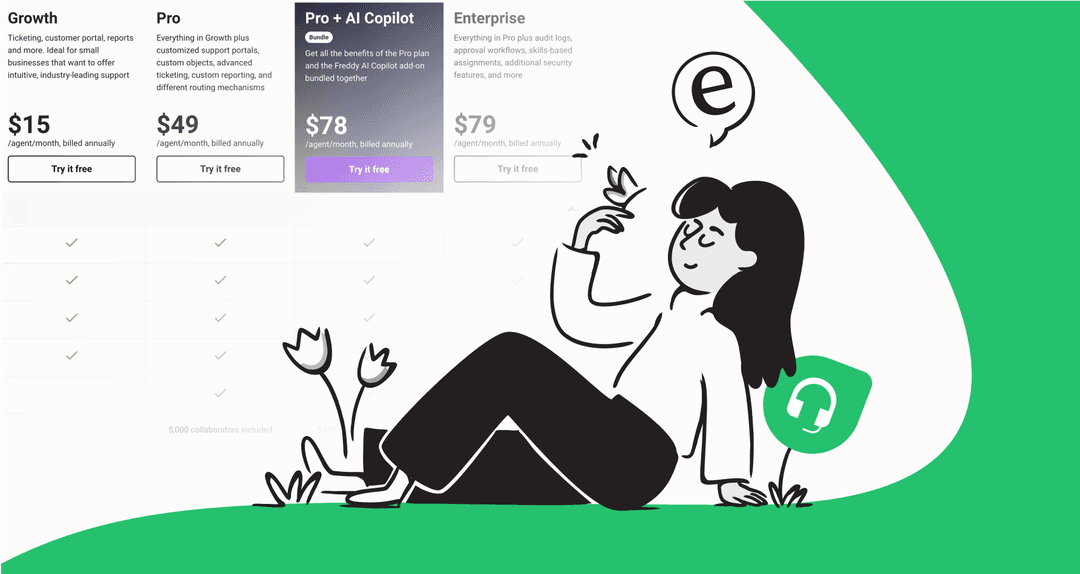
| Plan | Price (Billed Annually) | Key Features Relevant to AI/Shifts |
|---|---|---|
| Growth | $15/agent/month | Ticketing, Customer Portal |
| Pro | $49/agent/month | Custom Portals, Advanced Ticketing |
| Pro + AI Copilot | $78/agent/month | Includes Freddy AI Copilot |
| Enterprise | $79/agent/month | Agent Shifts, Audit Logs, Skill-based assignment |
From managing shifts to mastering support
Freshdesk agent shifts are a powerful tool for organizing professional support teams working around the clock. They provide the essential structure needed to manage a global workforce reliably.
The most successful modern teams use these scheduling tools as a foundation, then layer in AI to make every hour more productive. By automating repetitive work, you free up your team to focus on the complex, high-value problems that truly benefit from a human touch. AI becomes a partner that works alongside your Freshdesk agents, ensuring every customer gets a fast, accurate answer.
Beyond Freshdesk agent shifts: Automate your support, not just your schedule
Your team's expertise is a valuable asset. While Freshdesk agent shifts help organize your team, eesel AI can help manage their workload. With an AI agent that can resolve many common tickets, you can provide instant 24/7 support that enhances your team's effectiveness and ensures a great experience for every customer.
Sign up for free and see how much you can automate in minutes.
Frequently asked questions


Automate your Freshdesk with AI agents
Share this article

Article by
Kenneth Pangan
Writer and marketer for over ten years, Kenneth Pangan splits his time between history, politics, and art with plenty of interruptions from his dogs demanding attention.