
GitBook vs Notion: Which documentation tool is right for you?

Last edited March 26, 2026
Choosing the right documentation platform can feel like picking between a specialized power tool and a versatile Swiss Army knife. Both GitBook and Notion help teams organize and share knowledge, but they approach the problem from entirely different angles. One is purpose-built for technical documentation with developer-friendly workflows. The other offers a flexible workspace that adapts to almost any use case.
Let's break down what each platform actually does, how they compare on features and pricing, and which one makes sense for your specific situation.
What is GitBook?
GitBook is a documentation platform built specifically for technical teams. Founded in 2014, it started as a tool for developers who needed a simple way to write and manage technical documentation. Over the years, it has evolved into a collaborative workspace where product, engineering, and customer success teams can maintain internal guides, API documentation, and user manuals.
The platform's core philosophy centers on "docs as code." It treats documentation with the same rigor as software development, complete with version control, branching, and review workflows. GitBook integrates natively with GitHub and GitLab, allowing teams to sync their documentation with their codebase.
GitBook positions itself as an AI-native platform, with features like GitBook Agent that proactively suggests documentation improvements and an embedded AI Assistant that answers user questions based on your docs. The platform is particularly popular among developer-focused companies, with customers including NVIDIA, Zoom, FedEx, and Cisco.
What is Notion?
Notion takes a fundamentally different approach. Launched in 2016, it is an all-in-one workspace that combines notes, documents, databases, and project management into a single flexible platform. Rather than specializing in one use case, Notion provides building blocks that teams can arrange to fit their specific workflows.
The platform uses a block-based editor where everything (paragraphs, to-do items, images, embeds) is a modular component. This modularity extends to databases, which can be viewed as Kanban boards, calendars, tables, or galleries. Teams use Notion for everything from simple note-taking to complex project management and company wikis.
Notion has embraced AI aggressively, with features like Notion Agent that autonomously completes multi-step tasks, AI Meeting Notes that transcribe and summarize calls, and Enterprise Search that finds information across connected apps like Slack and GitHub. The platform serves a broad range of customers, from individuals to enterprises like OpenAI, Figma, and Volvo.
GitBook vs Notion: Feature comparison
Documentation and editing
GitBook offers a block-based editor optimized for technical documentation. It includes specialized blocks for OpenAPI specifications, code snippets with syntax highlighting, and API playgrounds. The editing experience is clean and distraction-free, designed for long-form technical content.
Notion also uses a block-based editor, but with a broader range of content types. Beyond text and code, you can embed databases, create linked references between pages, and build complex relational structures. The trade-off is that Notion's flexibility can feel overwhelming when you just want to write documentation.
Version control
This is where GitBook distinguishes itself. Its native Git integration provides branching, pull request-style change requests, and unlimited version history. Teams can review documentation changes the same way they review code, with merge rules and approval workflows.
Notion's version history is more basic. The Free plan keeps 7 days of history, Plus extends that to 30 days, Business offers 90 days, and only Enterprise provides unlimited history. There is no branching or structured review process, just the ability to restore previous versions.
Collaboration
Both platforms support real-time collaboration, but with different emphases. GitBook focuses on structured collaboration with change requests, commenting, and role-based permissions. It is designed for teams that need controlled, reviewed updates to critical documentation.
Notion emphasizes flexible, free-form collaboration. Multiple users can edit simultaneously, leave comments anywhere, and mention teammates. The permission system is granular, allowing you to control access at the page, database row, or workspace level.
AI capabilities
GitBook's AI features include GitBook Agent (currently in beta and free) that monitors docs and suggests improvements, and an AI Assistant (Ultimate tier) that provides personalized answers to users. The platform also offers auto-updating translations for an additional fee.
Notion bundles AI more aggressively. Notion AI Core (chat, content generation, translation) is included in the Business tier at $20 per user per month. The platform also offers Notion Agent for autonomous task completion, AI Meeting Notes, and Enterprise Search across connected apps. However, full AI capabilities require the Business plan or higher.
Publishing and customization
GitBook excels at publishing public-facing documentation. You can use custom domains (starting at $65 per site on the Premium plan), apply custom branding, and control access with authentication. The output is polished and professional, optimized for developer consumption.
Notion can publish pages to the web, but with significant limitations. Custom domains require a paid add-on ($10 per month per domain), and the published sites carry Notion branding unless you upgrade. The platform is clearly designed for internal use first, with external publishing as a secondary consideration.
GitBook vs Notion: Pricing comparison
GitBook pricing
| Plan | Price | Key Features |
|---|---|---|
| Free | $0 | 1 user, public docs, unlimited traffic, gitbook.io domain |
| Premium | $65/site/month + $12/user | Custom domain, branded docs, site insights, AI writing |
| Ultimate | $249/site/month + $12/user | Site sections, authenticated access, AI Assistant |
| Enterprise | Custom | SAML SSO, white-glove migration, custom integrations |
GitBook's pricing model combines per-site and per-user costs. A small team of 5 users on the Premium plan would pay approximately $125 per month ($65 for the site plus $60 for users). The custom domain fee ($65 per site) can add up quickly if you manage multiple documentation sites.
Notion pricing
| Plan | Price | Key Features |
|---|---|---|
| Free | $0 | Individual use, limited blocks for teams, 7-day history |
| Plus | $10/user/month | Unlimited blocks, 30-day history, unlimited file uploads |
| Business | $20/user/month | Notion AI included, SAML SSO, 90-day history |
| Enterprise | Custom | SCIM provisioning, audit logs, unlimited history |
Notion uses straightforward per-user pricing. A team of 5 users on the Plus plan pays $50 per month, while the same team on Business pays $100 per month. The jump to Business is significant, but it includes full AI capabilities that GitBook reserves for its Ultimate tier.
Cost analysis for teams
For a small team of 5 users:
- GitBook Premium: ~$125/month
- Notion Plus: $50/month
For a mid-size team of 20 users:
- GitBook Premium: ~$305/month
- Notion Business: $400/month
Notion becomes more expensive at scale if you need AI features, but GitBook's per-site fees can offset that advantage for teams managing multiple documentation sites.
Who should choose GitBook?
GitBook makes sense for teams that fit these criteria:
- Technical teams and developers who need API documentation with OpenAPI support
- Organizations requiring Git-based version control for their documentation
- Teams publishing public-facing documentation who need custom domains and professional presentation
- Engineering-focused companies that want to treat docs as code with branching and review workflows
- Teams prioritizing structured, linear documentation over flexible workspace features
If your primary need is technical documentation that developers will read and maintain, GitBook's specialized approach pays off. The Git integration alone can be worth the price for teams already using GitHub or GitLab for their codebase.
Who should choose Notion?
Notion is the better fit for teams that need:
- Flexible workspace beyond documentation, combining docs, databases, and tasks
- Non-technical users who find developer-focused tools intimidating
- Organizations wanting everything in one tool rather than specialized point solutions
- Startups and creative teams who value customization and experimentation
- Internal wikis and knowledge bases rather than public documentation
Notion's versatility is its superpower. If your team needs project management, meeting notes, and documentation in one place, Notion delivers. The trade-off is that it does not specialize in any one area as deeply as dedicated tools.
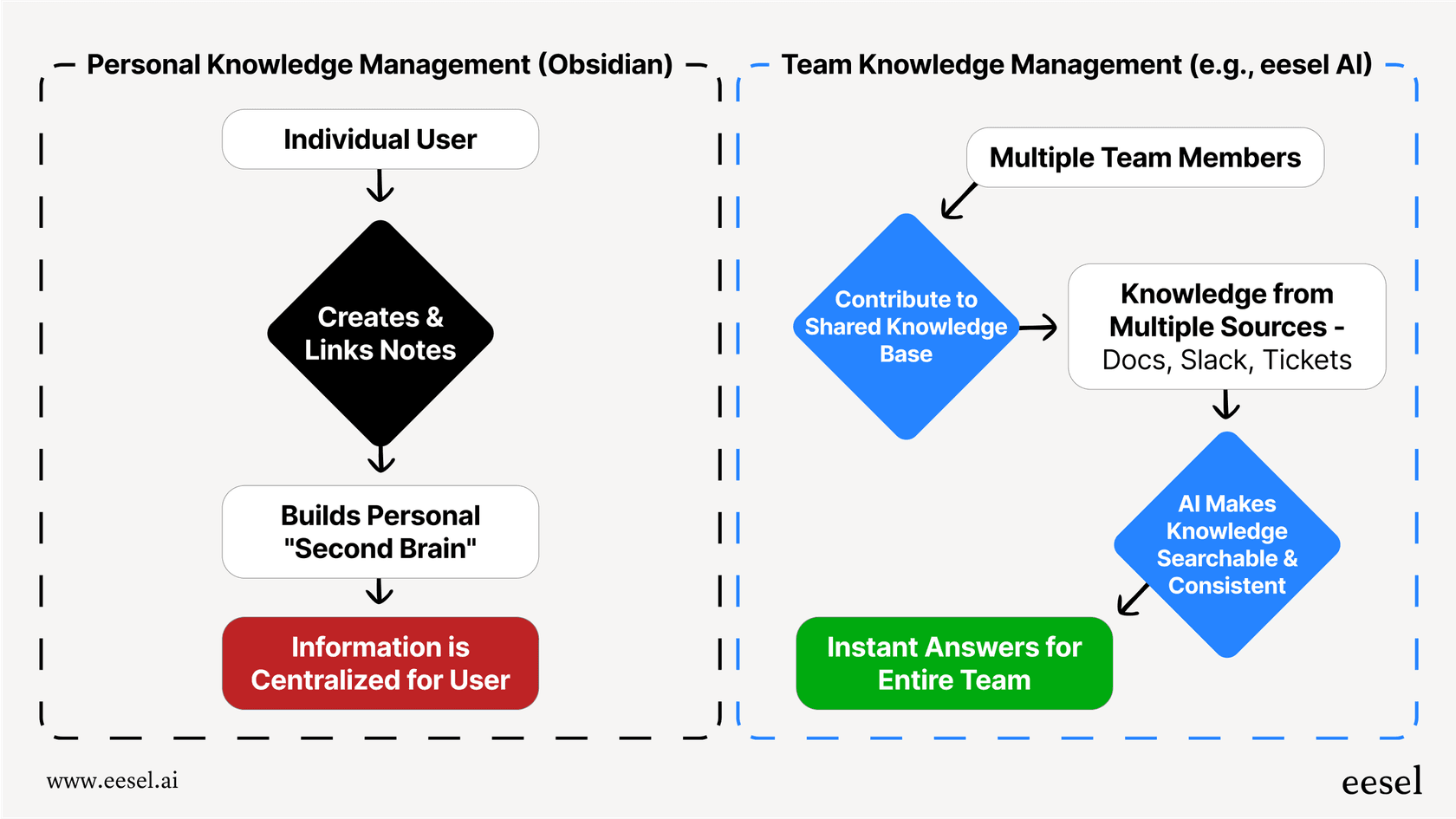
Consider eesel AI for AI-powered knowledge management
While GitBook and Notion focus on creating and organizing documentation, some teams need something different: an AI teammate that actively manages knowledge and responds to queries. That is where eesel AI comes in.
We built eesel AI to work differently than traditional documentation platforms. Instead of requiring you to migrate content or learn a new system, eesel connects to the tools you already use: your help desk, help center, past tickets, Confluence, Google Docs, and more. It learns your business from the data you have already created.
Our AI Agent can handle frontline support tickets autonomously, drafting responses grounded in your knowledge and escalating only what you define. The AI Copilot drafts replies for human agents to review and send. AI Triage keeps your help desk organized by tagging, routing, and closing tickets automatically.
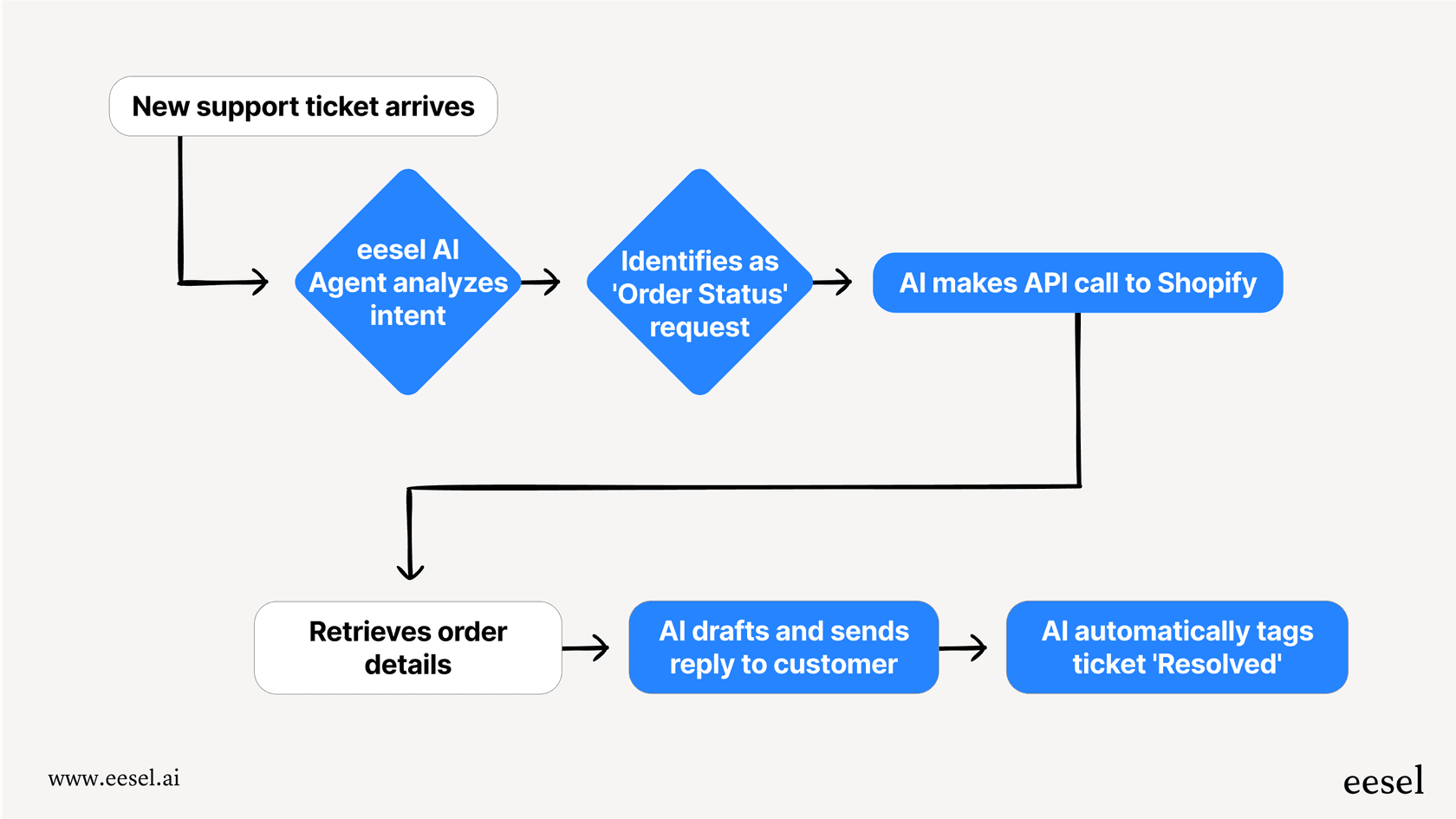
The key difference is the teammate model. You do not configure eesel like a traditional tool. You hire it, start with guidance, and level up to full autonomy as it proves itself. Teams can run simulations on past tickets before going live, so you see exactly how it performs before customers do.
If your primary challenge is managing high volumes of support queries or helping employees find answers across scattered documentation, eesel AI offers a different approach than GitBook or Notion. It is not about creating documentation. It is about making your existing knowledge work harder through AI.
Frequently Asked Questions

Share this article

Article by
Stevia Putri
Stevia Putri is a marketing generalist at eesel AI, where she helps turn powerful AI tools into stories that resonate. She’s driven by curiosity, clarity, and the human side of technology.
