A practical look at every Notion AI feature in 2026

Last edited September 10, 2025

Table of Contents
Let's be honest, Notion is the go-to "all-in-one workspace" for a reason. It’s where millions of us organize everything from personal to-do lists to massive company wikis. So when Notion AI showed up, promising to embed AI right into our notes and projects, it felt like a natural next step.
But what does it actually do for you day-to-day? This guide gives you a straightforward look at the main Notion AI features, what they’re genuinely good for, and where you'll start to hit a wall, especially if you're trying to manage something complex like customer support.
An introduction to the core Notion AI features
So, what is Notion AI, really? Think of it as a set of artificial intelligence tools built right into your Notion workspace. It’s a general-purpose assistant that’s always there to help you write, brainstorm, summarize, or find information without having to switch tabs. It uses a mix of models, like OpenAI's GPT-4 and Anthropic's Claude, to get the job done.
The whole point is to help you work better using the context of your own documents and projects. This makes it a fantastic "jack-of-all-trades" for boosting personal or team productivity. But it’s important to know it's not a specialized AI platform. Notion AI helps you manage information, while other tools are built from the ground up to handle specific, high-stakes tasks, like automating customer service tickets from start to finish.
Using Notion AI features for content and documentation
Content creation is where Notion AI really comes alive. It acts like a writing partner that’s always by your side, ready to help you get your thoughts down on the page.
For writing, editing, and brainstorming
One of the first things you'll notice is how it can jump in at any stage of the writing process.
- Drafting from scratch: You can ask it to write a first draft of just about anything. Give it a simple prompt for a blog post, a tricky email, a social media caption, or even a job description, and it will get you started.
- Editing and polishing: It's also a pretty smart editor. Just highlight some text and ask it to improve the writing, fix typos, change the tone to be more professional or friendly, or make it shorter or longer.
- Brainstorming ideas: If you're stuck, you can use it to come up with a list of blog post ideas, weigh the pros and cons of a decision, or map out a new project plan. It's great for getting past that initial blank page.
Pro Tip: To give Notion AI better context, use the "@" mention in your prompt. For instance, you could ask it to "revise this draft to match the tone in @Marketing Style Guide" to keep everything consistent with your brand.
For summarizing and translating content
Notion AI is also handy for crunching through large blocks of text.
- Summarization: Got a long document or dense meeting notes you don't have time to read? Ask Notion AI to pull out the key takeaways and action items. It's a huge help when you're feeling buried in text.
- Translation: For teams spread across different countries, the built-in translation feature is a quick and easy way to convert content into different languages on the fly.
But if you're on a support team, this is probably where you'll notice the first gap. Summarizing a single page is useful, but it’s a manual task you have to trigger each time. It’s a completely different thing from an AI that can automatically read a new customer ticket, figure out what the customer needs, and solve it without a human stepping in. For teams that need to handle a high volume of support requests, you need a tool that can work on its own. That's where a solution built specifically for support, like eesel AI, comes into play, since it’s designed to resolve issues, not just summarize them.
How Notion AI features handle knowledge management and search
Beyond creating new content, Notion AI also wants to make the information you've already stored in your workspace easier to find and use.
Q&A for your workspace search engine
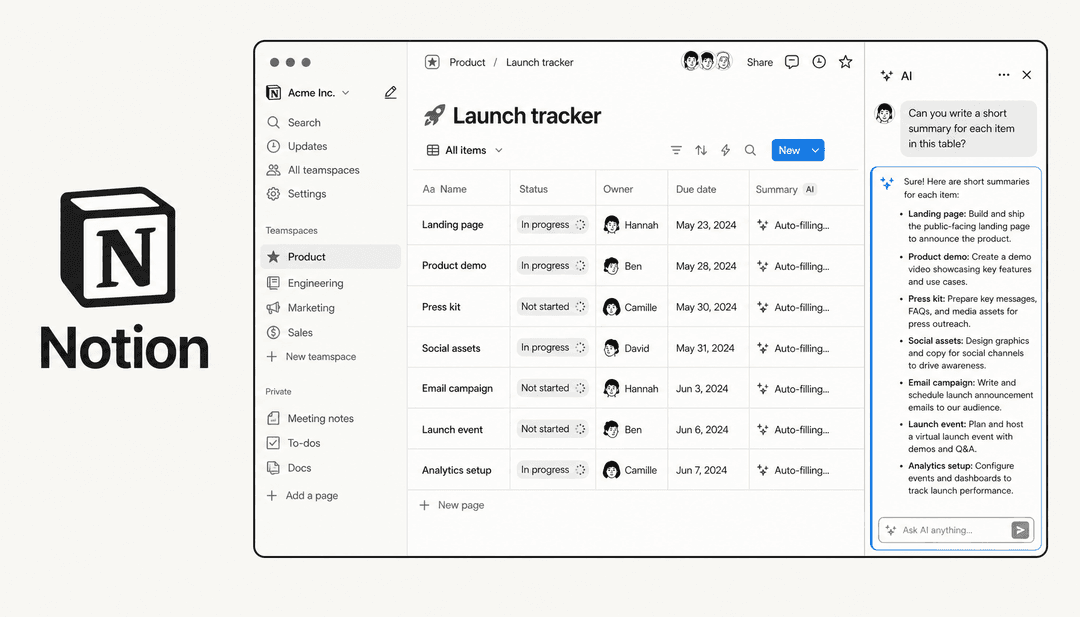
The Q&A feature turns your Notion workspace into a search engine that you can talk to. You can ask questions in plain English and get answers pulled directly from your Notion pages and even from connected apps like Google Drive and Slack.
Instead of digging through folders to find that one specific document, you can just ask something like, "What was our revenue goal for Q3?" or "Find the project brief for the website redesign." It's a neat way to make your internal knowledge base feel more like a conversation.
AI Autofill for databases
This is one of Notion AI's most clever features. It can automatically fill in database properties for you based on the content of a page, which saves a ton of time on manual data entry and keeps everything neat and tidy.
Here are a few ways you could put it to use:
| Property Type | What You Could Do | Example AI Prompt |
|---|---|---|
| AI Summary | Get a quick one-sentence summary of your meeting notes. | "Summarize the key decisions from this page." |
| AI Keywords | Automatically generate tags for a blog post you're writing. | "Extract the main topics as keywords from this page." |
| AI Triage | Sort incoming customer feedback into categories. | "Categorize this feedback as 'Bug', 'Feature Request', or 'Question'." |
| AI Translation | Translate a project title for an international team. | "Translate the title of this page to Spanish." |
The catch? It's great for organizing, but not for taking action. AI Autofill can label a piece of feedback as a "Bug," but it can't then go and create a ticket in Jira and assign it to an engineer. This is a big difference for any team that needs to turn information into action.
Where general features for knowledge search aren't enough
For anyone working in customer support, just finding the right document isn't the whole story. A truly helpful support AI needs to learn from thousands of past customer conversations to understand your tone, the best ways to solve common problems, and your brand's unique voice. Just pulling up a doc from your wiki usually isn't enough.
This is where an AI designed for support, like eesel AI, really shines. It trains directly on your historical support tickets from help desks like Zendesk or Intercom. This means it learns not just what the right answer is, but how to deliver it in a way that feels helpful and human. It then combines that conversational knowledge with documents from Notion or Confluence to give customers a complete answer, not just a link to an article.
Why Notion AI features aren't built for customer support workflows
To be clear, this isn't a knock on Notion AI. It's a fantastic general-purpose tool. But when you get into specialized, high-stakes jobs, you really need a tool that was built for that specific purpose. Here’s where Notion AI’s limits become clear for support teams.
It can't take action on their own
Notion AI is designed to help you create and organize information inside Notion. It can't actually perform actions in other systems. For example, Notion AI can't:
- Close a support ticket in Zendesk.
- Triage an issue and assign it to the right person in Jira.
- Look up a customer's order ID in Shopify via an API call.
- Escalate a frustrated customer to a human agent.
This is different from a tool like eesel AI, which is all about building automated workflows. It gives you the control to set up custom actions, from simple ticket tagging to more complex API lookups, allowing the AI to function like a real member of your support team.
You can't safely test these features
Putting a new AI in front of your customers without testing it first is a recipe for disaster. You need to know how it's going to perform, how many issues it can actually solve, and where it's likely to get stuck. Notion AI doesn't have a way for you to run these kinds of tests on your past data.
This is another area where a specialized tool provides a much-needed safety net. eesel AI includes a simulation mode that lets you test your AI agent on thousands of your past tickets in a safe environment. This gives you an accurate forecast of its performance, resolution rate, and how much time and money you could save, so you can adjust your setup and launch your automations with confidence.
Use the right tool for the job
So, what's the verdict? Notion AI is an amazing sidekick for anyone living in Notion. It’s fantastic for content creation, brainstorming, and finding information within your own workspace. For personal productivity or general team collaboration, it’s a huge help.
However, when it comes to specialized, high-volume work like customer support or ITSM, its limitations are pretty clear. It doesn't have the ability to act on its own, it isn't trained on real customer conversations, and it lacks the safe testing environment you need for reliable automation.
Ready for real support automation?
If you're looking to turn your knowledge base, whether it lives in Notion, Confluence, or Google Docs, into an automated support engine that actually solves customer issues, you need a tool designed for that job.
eesel AI is the solution that bridges that gap. It's a self-serve platform you can get up and running in minutes, not months. It connects all your knowledge sources, learns from your past tickets, and lets you test every automation safely before it ever interacts with a customer.
Start your free trial today and see how eesel AI can start automating your frontline support.
Frequently asked questions

Share this article

Article by
Kenneth Pangan
Writer and marketer for over ten years, Kenneth Pangan splits his time between history, politics, and art with plenty of interruptions from his dogs demanding attention.