A practical guide to the OpenAI Embeddings API


Last edited October 22, 2025

Teaching a computer to read words is one thing. But teaching it to understand what those words actually mean? That's a whole different ballgame.
For anyone in customer support, this isn’t just a nerdy thought experiment. When a customer asks, "where's my money back?" you need a system that gets they're talking about refunds, not one that just looks for the exact phrase "money back." This is exactly what embeddings are for.
Embeddings are a pretty clever way to turn text into numbers (called vectors) that capture its real meaning. This tech lets us build powerful tools that can search for answers based on intent, not just keywords. In this guide, we'll break down the OpenAI Embeddings API, see how it can really change your support operations, talk about the costs, and explore how you can use its power without needing a whole data science team on standby.
What is the OpenAI Embeddings API?
The OpenAI Embeddings API is a service that takes your text, a single word, a sentence, a whole document, and turns it into a long string of numbers. The easiest way to think about it is like giving every piece of text its own unique coordinates on a giant "map of meaning." Texts with similar meanings are plotted close together on this map, while completely unrelated texts are miles apart.
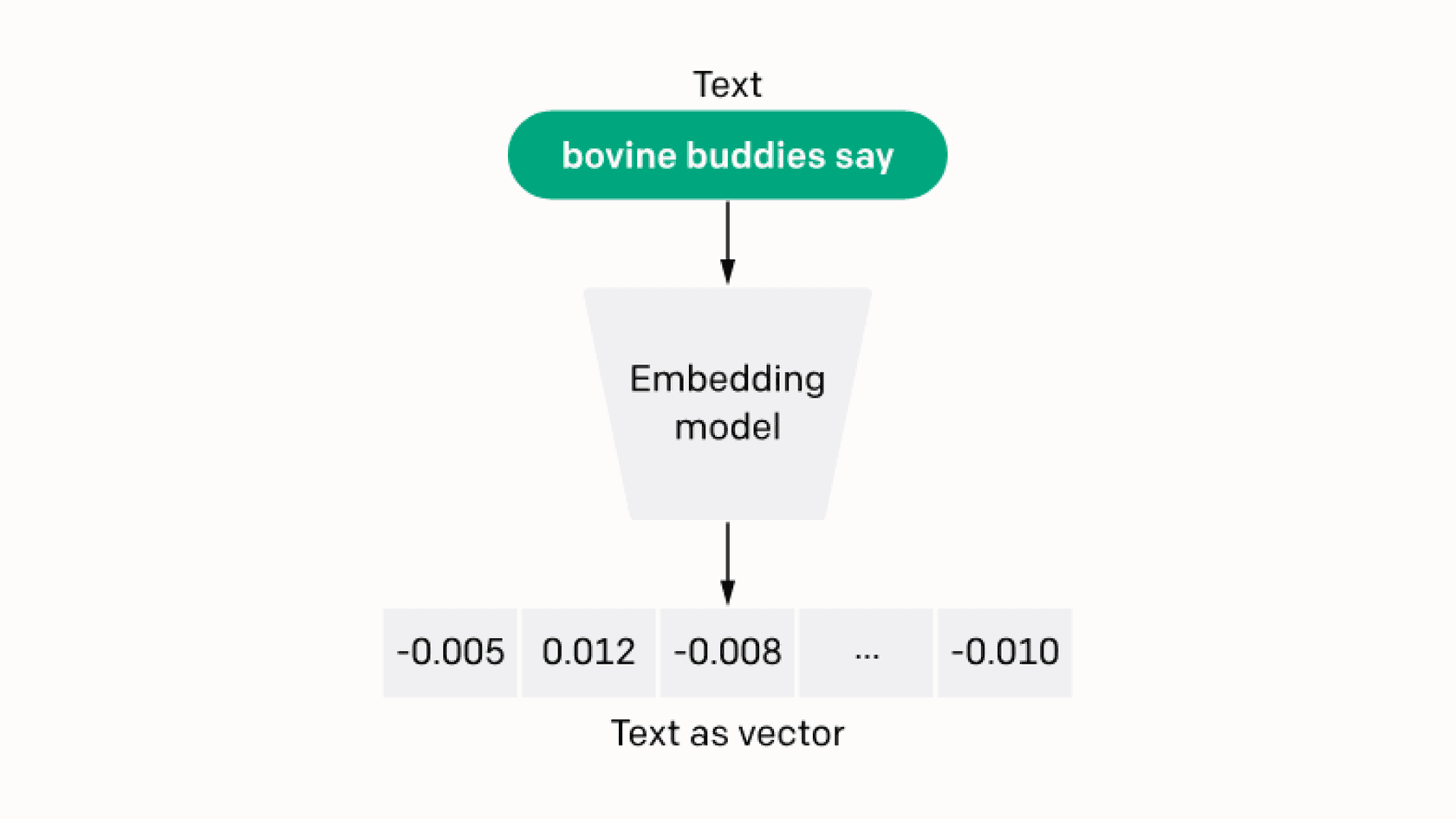
The main job of the API is to measure this "relatedness," or what we call "semantic similarity." When the distance between two of these number strings (vectors) is small, it means their meanings are very close. This simple idea is what’s behind a lot of the amazing AI tools we're seeing today.
OpenAI has a few models you can use through its API, with "text-embedding-3-small" and "text-embedding-3-large" being the newest and most capable. These models have been trained on huge amounts of text, so they're great at picking up on the nuances in language. For modern support tools, this kind of technology isn't just a nice-to-have; it's the engine that makes truly smart and helpful customer interactions possible.
How the OpenAI Embeddings API powers smarter customer support
The real value of embeddings isn't the numbers themselves, but what you can do with them. For customer support and ITSM teams, this opens up a ton of possibilities that just aren't on the table with older tools.
Beyond keyword search: The power of semantic understanding
For years, help desks and knowledge bases have been stuck with keyword search. If a customer searches for "money back," they’ll only get articles that contain that exact phrase. This means they often miss the article titled "Our Refund Policy," get frustrated, and end up creating a ticket for a question they could have answered themselves. It's just not a great experience for anyone involved.
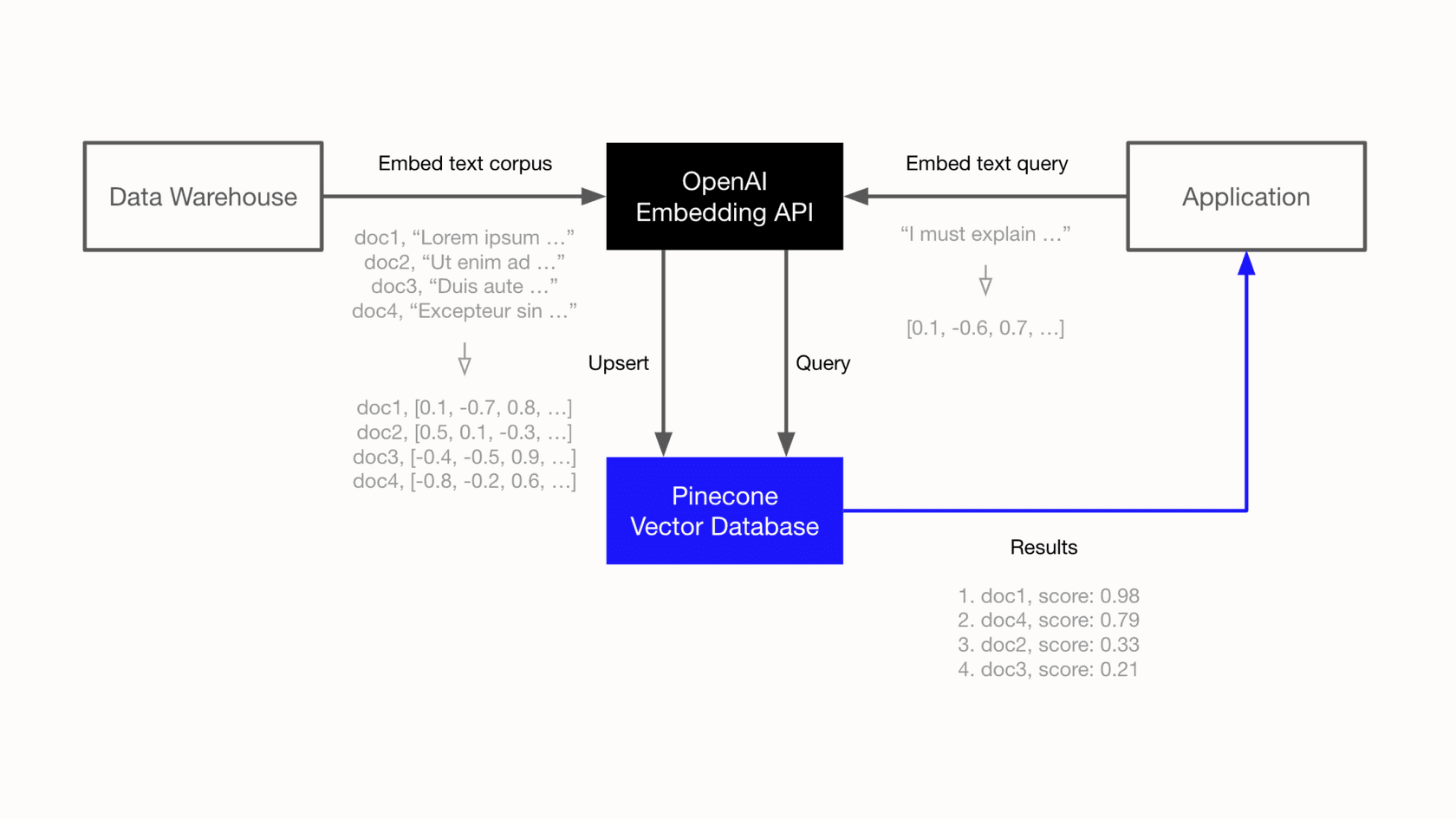
The OpenAI Embeddings API flips this on its head by enabling semantic search. Instead of matching words, it matches meaning. The system understands that "money back," "get a refund," and "return an item for credit" are all about the same thing. This means your customers and agents can find what they need using their own words, which helps improve self-service rates and speeds up how quickly issues get solved. For an agent, searching "customer is angry about late delivery" can instantly bring up relevant past tickets and internal docs, even if none of them contain that exact sentence.
Key use cases in support and ITSM
Once you can understand the meaning behind text, you can start building much smarter workflows. Here are a few key ways embeddings are changing the support world:
-
Smarter Search: Find the most relevant help center article, macro, or past ticket resolution in a snap. Agents no longer have to play a guessing game with keywords to find an answer they know is buried somewhere in the system.
-
Ticket Clustering & Analysis: Automatically group incoming tickets by topic. This is great for spotting trends, identifying a bug with a new feature, or catching a service outage as it's happening, without an analyst having to manually tag tickets for hours.
-
Relevant Recommendations: Proactively suggest the right help article to an agent while they're typing a reply. Even better, you can suggest it to a customer on your help center before they even create a ticket, deflecting the question entirely.
-
Automated Classification & Routing: Sort incoming tickets into categories like Billing, Technical Support, or Sales and send them to the right team automatically. This saves a ton of time and cuts down on manual triage.
While these are all incredibly useful, building them from the ground up is a big engineering job that requires real expertise in AI. This is where a tool like eesel AI comes into the picture. It gives you these abilities right out of the box. It learns from your past tickets, help articles, and other documents to power its AI agents and copilots, giving you all the benefits of semantic understanding without the engineering headache.
Technical details: Models and costs
Before you jump in, it's good to know the different models available and how the pricing works. The API might look cheap on the surface, but the total cost of a do-it-yourself solution can add up quickly.
Comparing embedding models
OpenAI has a couple of different embedding models, and each has its own balance of performance and cost. The main ones you should know are:
-
"text-embedding-3-large": This is the most powerful and accurate model. It's your best bet when you need the absolute highest quality results, but it's also the priciest.
-
"text-embedding-3-small": A newer, super-efficient model that offers a great mix of performance and cost. For most situations, this model is the sweet spot.
-
"text-embedding-ada-002": This was the previous-generation model. It's still decent, but "text-embedding-3-small" actually performs better and is quite a bit cheaper.
The newer "text-embedding-3" models also have a "dimensions" parameter, which lets you shorten the vectors. It's a handy feature for balancing performance with the cost of storing everything in a database, since smaller vectors are cheaper to store and faster to search.
Here’s a quick comparison to help you choose:
| Model | Performance (MTEB score) | Price per 1M Tokens |
|---|---|---|
| "text-embedding-3-large" | 64.6% | $0.13 |
| "text-embedding-3-small" | 62.3% | $0.02 |
| "text-embedding-ada-002" | 61.0% | $0.10 |
Understanding the pricing
The API is priced based on "tokens," and a token is roughly 4 characters of text. If you look at OpenAI's pricing page, the costs seem very low.
For instance, let's say you want to embed 1,000 help articles, and each one is about a page long. That comes out to roughly 800,000 tokens. Using the "text-embedding-3-small" model, the one-time cost to embed all of them would be just $0.016. It sounds unbelievably cheap, right? But this is where the hidden costs start to appear.
That API call is just the first step. To actually do anything with these embeddings, you need a whole system built around them:
-
Vector Database: You can't just throw embeddings into a regular database. You need a specialized vector database (like Pinecone or Weaviate) to store them and run similarity searches. These services have their own monthly fees.
-
Compute Costs: Running searches across millions of vectors takes a lot of processing power. This adds another operational cost that can be tough to predict.
-
Development & Maintenance: This is often the biggest expense. You'll need skilled AI or machine learning engineers to design the system, write the code to process your data, build the search app, and keep the whole thing running. This isn't a one-and-done project; it’s an ongoing commitment.
This is where a managed platform becomes a much more practical alternative. An integrated solution like eesel AI handles all of this for you. Instead of juggling bills for APIs, databases, and servers, you get a single, predictable subscription that covers everything. This approach aligns with eesel AI's transparent pricing, which is based on usage, not per-resolution fees that penalize you for solving more problems.
Implementation: DIY vs. a managed platform
So, you're convinced that embeddings are the way to go. Now you have a big decision to make: do you try to build a solution yourself, or do you use a platform that has already done the heavy lifting?
Building your own solution: What's involved?
The DIY route gives you the most flexibility, but it's a serious project. Here's a quick look at what it takes:
-
Data Prep: You'll need to write scripts to pull and clean up text from all your knowledge sources, help articles, past tickets, internal wikis, you name it.
-
API Integration: Next, you have to connect to the OpenAI Embeddings API to turn all that text into vectors. This means handling things like rate limits, errors, and retries.
-
Vector Database Setup: You have to choose, set up, and configure a vector database. This involves defining how data is stored, managing indexing, and tuning it for performance.
-
Application Development: Then you need to build an app that can take a user's question, turn it into an embedding, search the database for similar vectors, and show the results.
-
Help Desk Integration: Finally, you have to plug this custom solution back into your help desk, chat tools, and other systems so your team can actually use it.
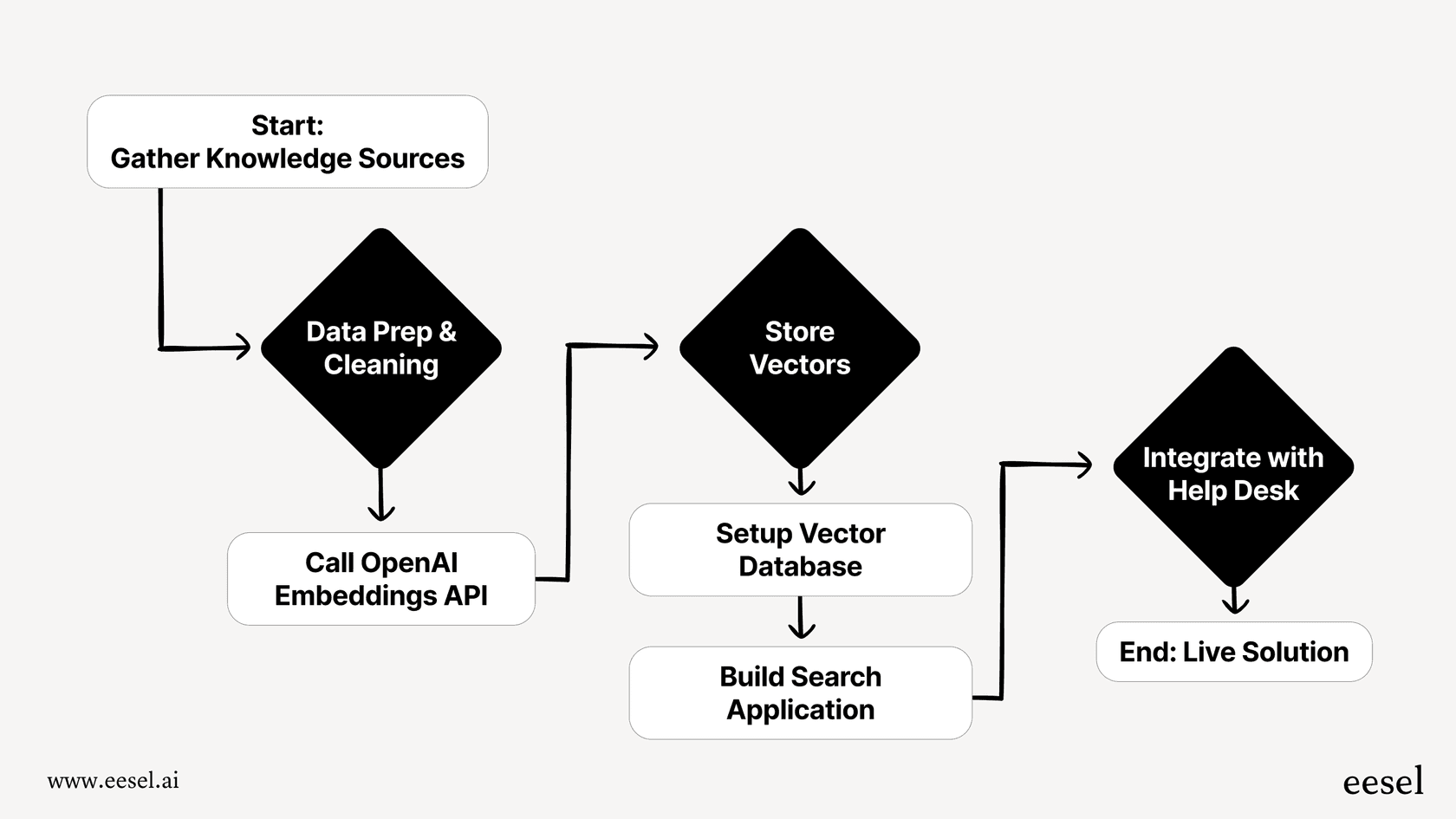
This process requires a team with specialized AI engineering skills and can easily take months to get up and running. And even after it's live, it needs constant maintenance to keep it working well.
The advantages of an integrated AI platform
For most teams, a managed platform is a much faster and more sensible way to get value from embeddings. Here’s why:
-
Go live in minutes, not months: Instead of a long, complicated development project, eesel AI offers a completely self-serve setup. With one-click integrations for tools you already use like Zendesk, Freshdesk, and Confluence, you can have an AI agent working for you in minutes.
-
Total control without the complexity: With a DIY solution, you have to code every piece of logic. eesel AI gives you a powerful, no-code workflow engine to set up exactly which tickets your AI should handle, what its personality should be, and what actions it can take, from escalating a ticket to looking up order information in real-time.
-
Test with confidence: One of the trickiest parts of rolling out AI is not knowing how it will behave. A DIY build often goes straight into the wild with little testing. eesel AI includes a powerful simulation mode that lets you test your setup on thousands of your own historical tickets. You can see exactly how it would have responded, get solid forecasts on resolution rates, and tweak its behavior before a single customer ever talks to it.
Final thoughts and next steps
The OpenAI Embeddings API is a powerful technology that finally lets computers get the meaning behind our words. For customer support and ITSM, this opens the door to smarter search, automated ticket analysis, and proactive help that just wasn't possible before.
The main benefit is clear: you can build systems that understand what people mean, not just what they type. But you have a choice. You can build a custom solution from scratch, which gives you total flexibility but comes with high costs, a lot of complexity, and a long wait to see any results. Or, you can use an integrated platform that’s already built for support teams.
For most teams, a platform is the fastest, most reliable, and most cost-effective way to use this technology to work more efficiently and keep customers happy.
Ready to unlock the power of embeddings for your support team without the engineering overhead? eesel AI connects to your existing tools to automate frontline support, draft agent replies, and more. You can go live in minutes, no sales call required.
Frequently asked questions

Share this article

Article by
Stevia Putri
Stevia Putri is a marketing generalist at eesel AI, where she helps turn powerful AI tools into stories that resonate. She’s driven by curiosity, clarity, and the human side of technology.