A guide to Shopify Sidekick task automation in 2025


Last edited November 6, 2025

Table of Contents
Running a Shopify store can feel like you're constantly juggling. One minute you're tweaking product descriptions, the next you're piecing together a marketing campaign, and then you're suddenly neck-deep in sales reports. You're always switching hats, which makes it tough to find a quiet moment for the big-picture thinking that actually grows your business.
Shopify Sidekick was created to help with that. It’s a built-in AI assistant designed to take some of that busywork off your plate. This guide will give you a complete tour of what Sidekick can do, especially when it comes to task automation. We’ll cover what it does really well, but we’ll also be upfront about its limitations. While it's a fantastic helper for tasks inside your Shopify admin, you'll need a different game plan if you want to automate customer-facing support.
What is Shopify Sidekick Task Automation?
Shopify Sidekick is an AI-powered commerce assistant that lives right inside your Shopify admin panel. It’s part of Shopify Magic, the platform’s collection of AI tools, and it's built to help you launch, manage, and scale your business with less hassle. You can think of it as having an expert Shopify employee on call 24/7.
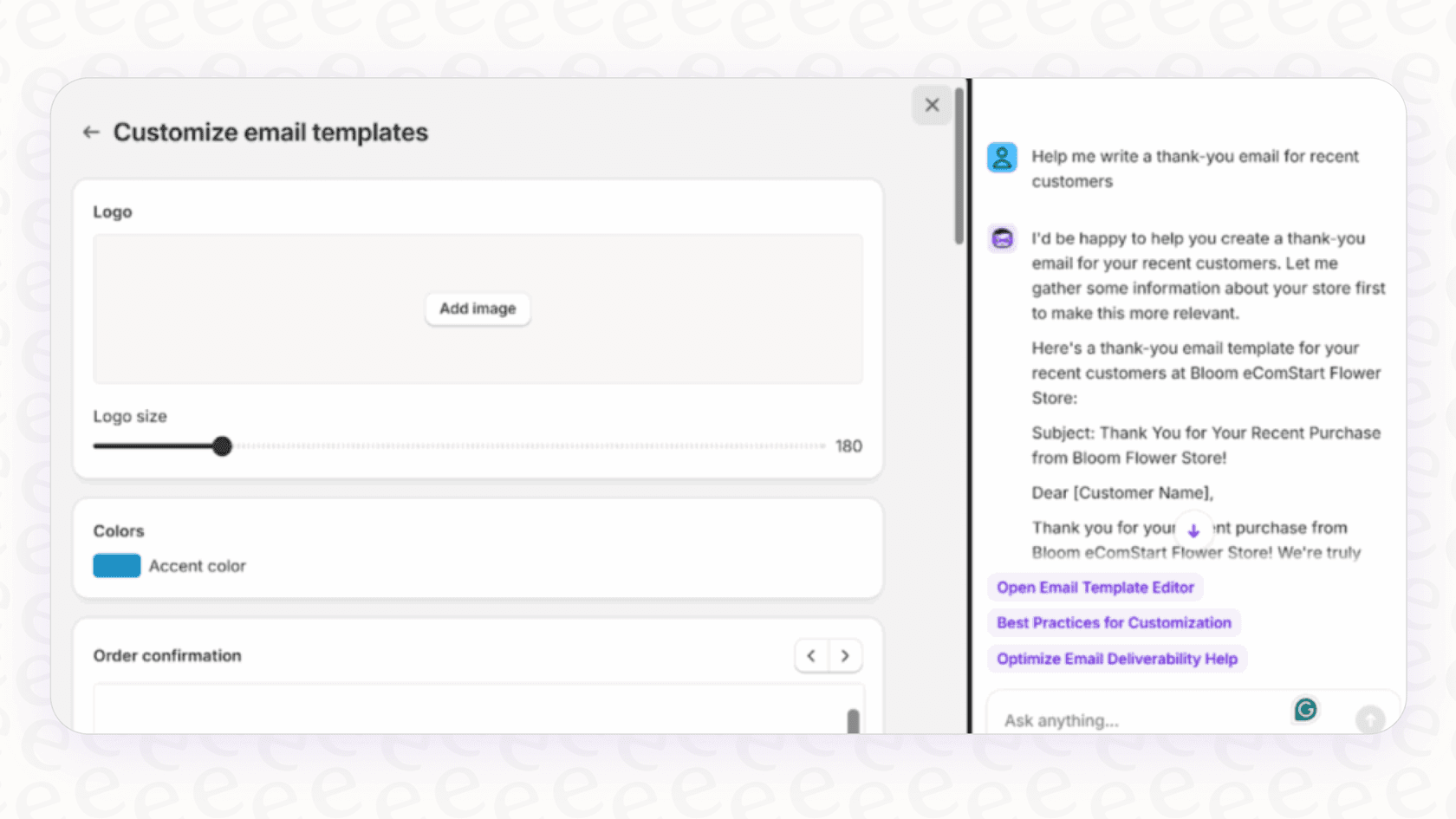
Basically, you give it commands in plain English, and it turns them into actions. You can ask it to whip up some marketing copy, pull a specific report, or guide you through a complicated store setting. The really neat part is its context-awareness. Sidekick already knows your products, orders, and customer history, so its suggestions feel tailored to your specific store.
Just keep in mind that its scope is very focused. Sidekick works entirely within the Shopify world. It’s a master of its own domain but doesn't connect to your other tools like a help desk, internal documents, or team chat apps.
A deep dive into Shopify Sidekick's automation capabilities
Sidekick really shines when it comes to simplifying the day-to-day grind of being a merchant. It can take on a surprising number of tasks that used to mean a lot of manual clicking, typing, and navigating through endless menus.
Content creation and management
We’ve all been there: staring at a blank page, trying to write a compelling product description. Sidekick can be your creative partner here, generating text for everything from product pages and blog posts to email campaigns. You can give it a simple prompt like, "Write a fun product description for a handmade leather wallet, aimed at eco-conscious millennials," and it will give you a solid draft to start with.
It's also handy for visual content. If you need a quick banner for your summer sale, you can ask Sidekick to generate images based on a description. It's a nice way to save some time and maybe even the cost of a designer.
Store operations and marketing workflows
This is where you can really feel Sidekick's automation power. It can turn complex, multi-step jobs into simple, conversational requests.
Here are a few examples of what you can ask it to do:
-
Set up discounts. Instead of going to the discounts page and filling out the form, you can just say, "Create a 15% discount code for our summer sale, and make it valid only for the 'T-Shirts' collection." Sidekick will get everything ready for you to approve.
-
Segment customers. Building targeted marketing lists is way faster. You could try a prompt like, "Show me all customers who have spent over $200 but haven't bought anything in the last 90 days." In seconds, you'll have a list ready for a re-engagement campaign.
-
Edit your theme. You can make small design changes without having to open the theme editor. A command like, "Change the button colors on my homepage to a blue that matches my logo," can be done in a snap.
-
Pull reports. Need a quick snapshot of your business? Asking, "What were my top-selling products last month?" will get you the data right away, no need to build a custom report.
Using "Skills" to save time
If you find yourself giving Sidekick the same instructions over and over, you can use its "Skills" feature. This lets you save your most-used prompts as shortcuts. For instance, you could save a prompt that generates a weekly sales report as a skill called "/weekly-report." It turns a recurring task into a single command, making your workflow that much smoother.
The limitations of Shopify Sidekick Task Automation
Sidekick is an impressive tool, but it's important to be clear about what it wasn't built to do. These aren't flaws, just the boundaries of its design. Knowing its limits is the first step to building an automation strategy that actually works.
It's for you, not your customers
This is the biggest point to remember. Sidekick can't interact with your customers at all. It won’t answer a live chat, reply to a support email, or manage tickets in your help desk. All its automation is for your eyes only, inside the admin panel.
If you're looking to automate customer questions and offer instant answers, you'll need a tool made for that job. This is where something like eesel AI's AI Agent enters the picture. It's built specifically to handle those frontline support conversations on its own, connecting directly with help desks like Zendesk and Gorgias to resolve customer issues around the clock.
It doesn't connect to outside tools
Sidekick's knowledge and actions are limited to the Shopify platform. It knows your store's data inside and out, but it can't see what's happening in your other business software. It has no idea what's written in your internal knowledge bases on Confluence or Google Docs, and it can't pop into Slack to chat with your team or create a ticket in Jira.
A truly helpful AI needs the full picture. By contrast, a tool like eesel AI is designed to connect all your company's knowledge. It brings together information from over 100 sources, including past support tickets, help center articles, and internal wikis, so it can give both customers and your own team accurate, complete answers.

Every action needs your final okay
Sidekick will get tasks ready for you, but it won't pull the trigger without your final click. This is good for keeping control, but it means you can't have true, hands-off automation. For high-volume, repetitive stuff, that final approval step can start to feel like a bottleneck.
Real autonomy comes from trusting your AI. Platforms like eesel AI help build that trust with a cool simulation mode. You can test your AI setup on thousands of your past support tickets in a safe environment. It shows you exactly how it will perform, what percentage of questions it can resolve, and how much you could save, all before it ever talks to a real customer. That's how you get the confidence to let it work on its own.

Shopify Sidekick pricing
One of the best things about Sidekick is its price tag: it’s free. Sidekick and all the other Shopify Magic features are included with every Shopify subscription, from Basic all the way to Advanced. There are no extra charges or usage fees, which makes it an amazing value for merchants wanting a helping hand with their admin work.
While Sidekick is a great freebie for store management, putting some money into a dedicated AI platform for customer support can bring a huge return. By cutting down support costs, speeding up response times, and making customers happier, a specialized tool usually pays for itself pretty quickly.
The solution: Taking automation beyond the admin with eesel AI
Shopify Sidekick is a fantastic co-pilot for managing your store, but to automate your support, you need a different kind of engine. eesel AI is built from the ground up to handle both customer-facing and internal support, pulling all your knowledge sources into one smart platform.
| Feature | Shopify Sidekick | eesel AI |
|---|---|---|
| Primary Use Case | Merchant task automation (inside Shopify) | Customer & internal support automation |
| Customer Interaction | No | Yes (AI Agent, AI Chatbot, AI Copilot) |
| Integrations | Shopify ecosystem only | 100+ (Zendesk, Slack, Confluence, etc.) |
| Knowledge Sources | Shopify store data | Past tickets, help centers, docs, wikis & more |
| Deployment | Built-in, no setup required | Self-serve setup, go live in minutes |
| Automation Control | Requires manual approval for all actions | Fully customizable workflows, optional autonomy |
| Testing | Live testing only | Powerful simulation on historical tickets |
| Pricing | Included with Shopify plan | Transparent plans, no per-resolution fees |
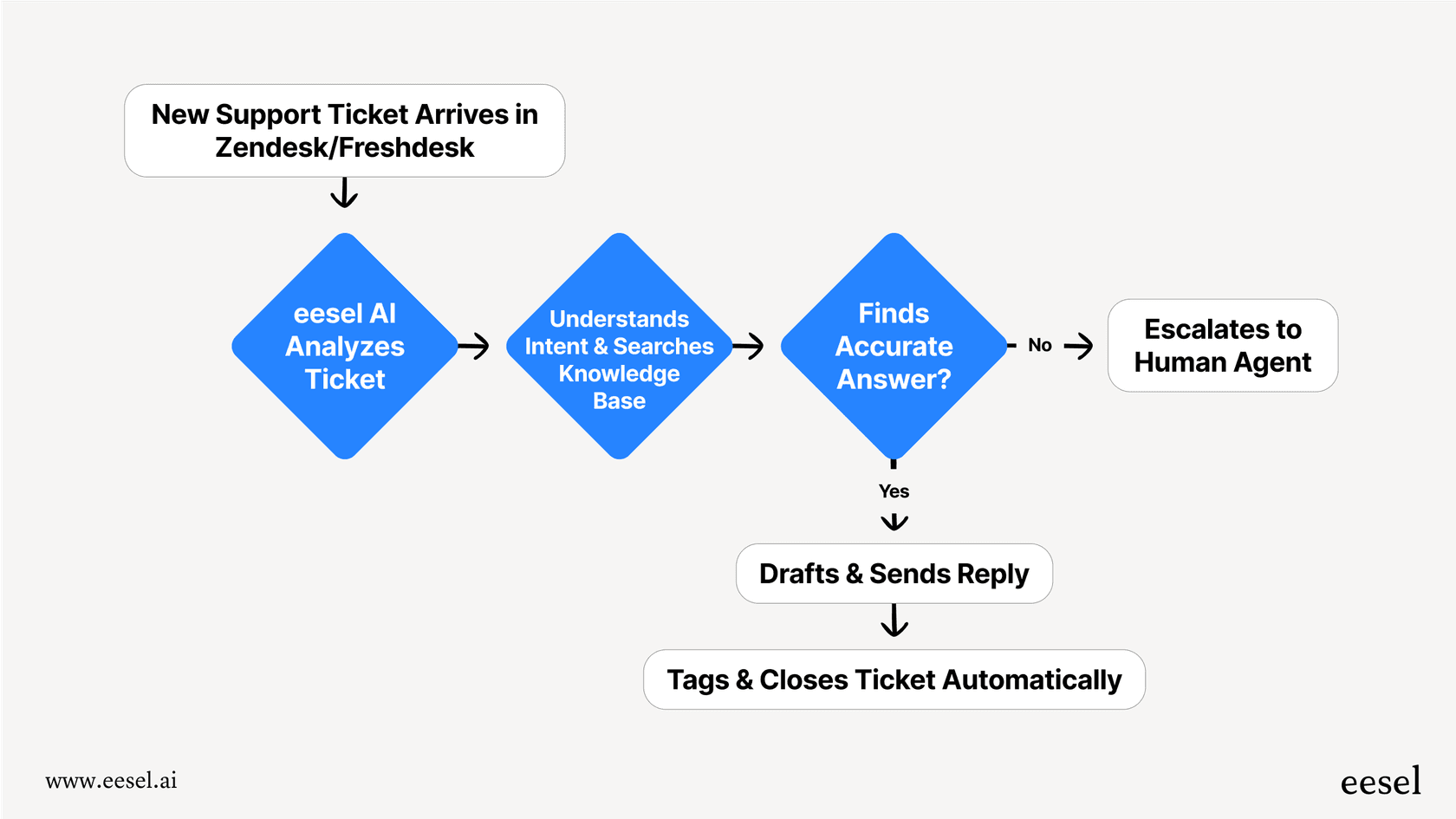
Here’s how eesel AI fills in the gaps and takes your automation to the next level:
-
Go live in minutes, not months. eesel AI is completely self-serve. You don't have to sit through long demos or deal with sales calls. You can connect your help desk, train the AI on your knowledge, and get started entirely on your own, often in just a few minutes.
-
You're in control of unified knowledge. You get fine-grained control to decide exactly which kinds of tickets the AI should handle. It brings together knowledge from all your business tools, and with its powerful Shopify integration, it can look up order details in real-time to give personalized support.
-
Test with confidence. The simulation mode is a huge plus. It takes the risk out of rolling out AI by showing you precisely how the agent will perform with your real data. This gives you the peace of mind to turn on full automation.
-
Transparent and predictable pricing. Our pricing is straightforward and based on the capacity you need. You won’t get hit with unpredictable "per-resolution" fees that punish you for having a busy month.
The right job for Shopify Sidekick Task Automation
Shopify Sidekick is a genuinely valuable assistant for any merchant. It's fantastic at streamlining your work inside the Shopify admin, making everything from writing copy to managing discounts faster and easier. Think of it as the perfect tool for optimizing your own productivity.
But when you want to automate customer support, you need a tool built for that conversation. An AI that can talk to customers, connect with all your software, and learn from your entire company's knowledge is what you need to create a modern, efficient support experience.
Ready to see how you can automate customer support and unify your company knowledge? Try eesel AI for free.
Frequently asked questions


Share this article

Article by
Stevia Putri
Stevia Putri is a marketing generalist at eesel AI, where she helps turn powerful AI tools into stories that resonate. She’s driven by curiosity, clarity, and the human side of technology.