A complete guide to the Slack AI integration with Zoom


Last edited October 20, 2025
Table of Contents
- What is the Slack AI integration with Zoom?
- Key features of the Slack AI integration with Zoom
- How to set up the Slack AI integration with Zoom
- The limitations of the Slack AI integration with Zoom
- eesel AI: A better solution for knowledge in Slack
- Choose the right tool for the job
- Transform your internal support with eesel AI
If your workday involves jumping between Slack and Zoom, you're not alone. Slack is where all the async chats and project updates happen, and Zoom is where you go for face-to-face conversations. They’re both critical, but switching back and forth can be a real drag on your focus.
This is where integrations are supposed to help, promising a much smoother workflow. And with new tools like Zoom's AI Companion and Slack AI popping up, the potential to get more done is huge. Connecting these two apps can streamline everything from scheduling a quick call to getting caught up on a meeting you missed. But here's the thing: while the native integration is a champ at handling meeting tasks, it has its limits, especially when you need answers that go beyond what was discussed in a single call.
Let's dig into what it does, how to get it running, and where you might need something more.
What is the Slack AI integration with Zoom?
First off, the "Slack AI integration with Zoom" isn't one single 'thing' you install. It's really the combination of features you get when you connect the official Zoom App for Slack to your workspace. The "AI" part comes from the new smart capabilities that both platforms have been rolling out, which can now work together through this connection.
Think of it as a bridge that lets you handle your Zoom meetings and get AI-powered notes without having to leave your Slack channels. The magic happens with features from both sides: Zoom brings its AI Companion to summarize what happened in a meeting, and Slack gives you the perfect place to share and talk about those summaries.
The whole point is to make the workflow around your meetings easier, from the moment you decide a call is needed to the follow-up tasks that come after. Just be aware that to unlock the really cool AI features, you'll almost certainly need a paid plan for both Slack and Zoom.
Key features of the Slack AI integration with Zoom
So, what do you actually get when you link up Slack and Zoom? The integration does more than just basic scheduling; it offers some genuinely helpful AI features that can save you time and keep everyone in the loop.
Easier meeting management
The most immediate benefit is just making it less of a hassle to hop on a call. Instead of digging for links or checking your calendar, you can do it all from inside Slack.
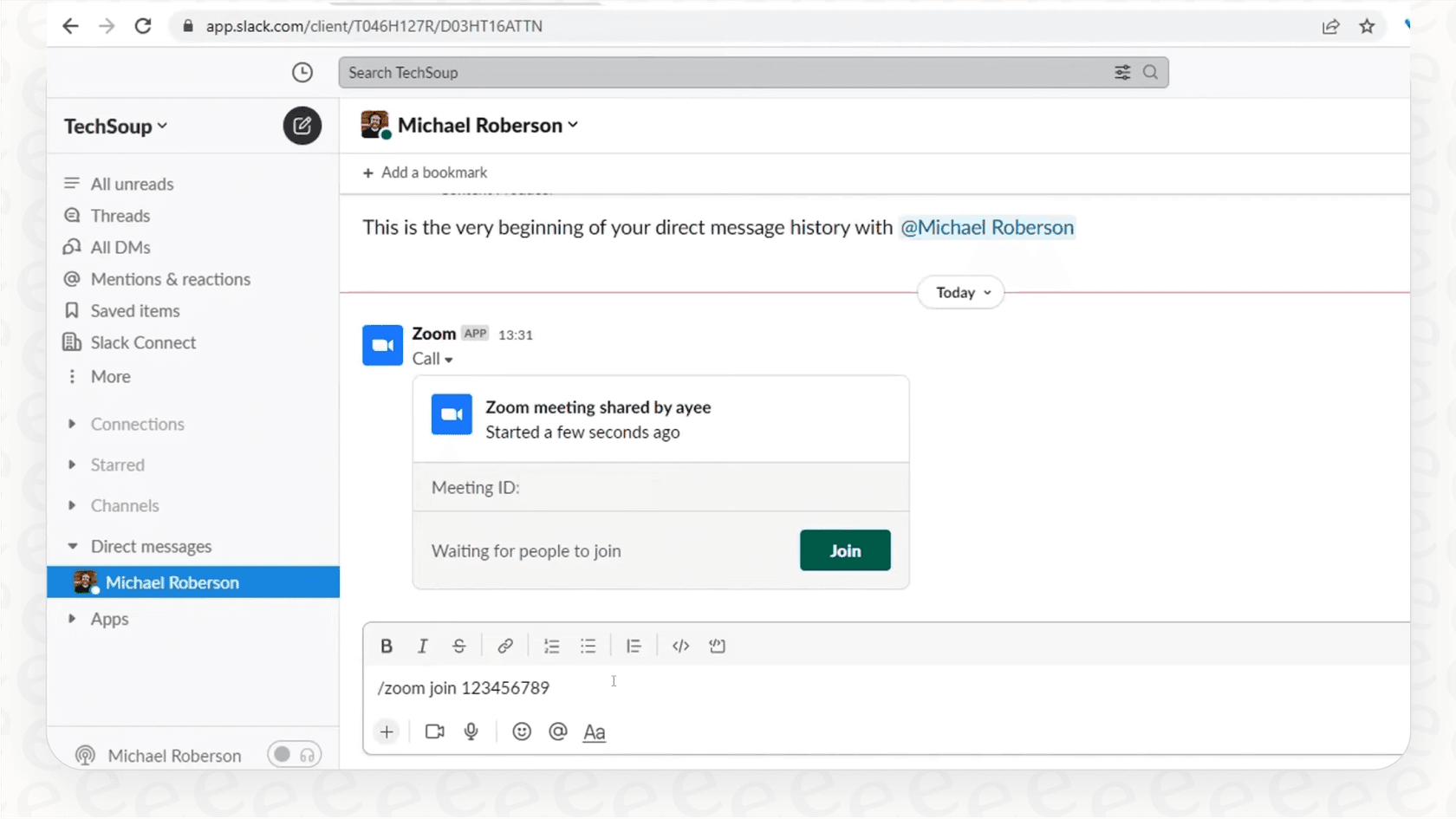
You can instantly start or join a meeting by typing /zoom in any channel or direct message. When you do, a little meeting card appears with all the details, a join button, and even a live list of who’s already in the call. It gives you a bit of context before you jump in. You can also set Zoom as the default for the phone icon in Slack, making it a one-click affair to start a video call.
AI-powered summaries in Slack
This is probably the feature that saves the most time. Once a meeting is over, Zoom's AI Companion can automatically cook up a summary of the conversation. It identifies key takeaways, decisions, and action items, giving you a quick recap of what was discussed.
The best part? This summary gets posted automatically into the same Slack channel or DM where the meeting was started. It's great for transparency. Anyone who couldn't make it can get up to speed in seconds, and your team has a clear, searchable record of what was decided. No more "what did we decide about X?" questions popping up a week later.
Smart channel creation
To keep things organized, the integration can create a new, private Slack channel for any meeting where the AI Companion is active. It gives the channel a name based on the meeting topic and automatically invites all the internal attendees.
After the call, all the important stuff, the AI summary, the recording, and any shared files, are dropped into that dedicated channel. This creates a handy spot to continue the conversation, ask follow-up questions, and track action items, keeping all the context in one place.
Pricing and plans
It’s good to remember that these smart AI features usually aren't part of the free plans. To get the AI-generated summaries and other advanced tools, you'll need subscriptions for both platforms.
Here’s a rough idea of what you’ll need. For Zoom, the AI Companion is included with all their paid plans (Pro, Business, and Enterprise), with the Pro plan starting around $13.33 per user a month.
For Slack, the Slack AI feature is available as a paid add-on for the Pro and Business+ plans, which start at $7.25 and $15 per user a month, respectively. It comes included if you’re on their Enterprise Grid plan.
How to set up the Slack AI integration with Zoom
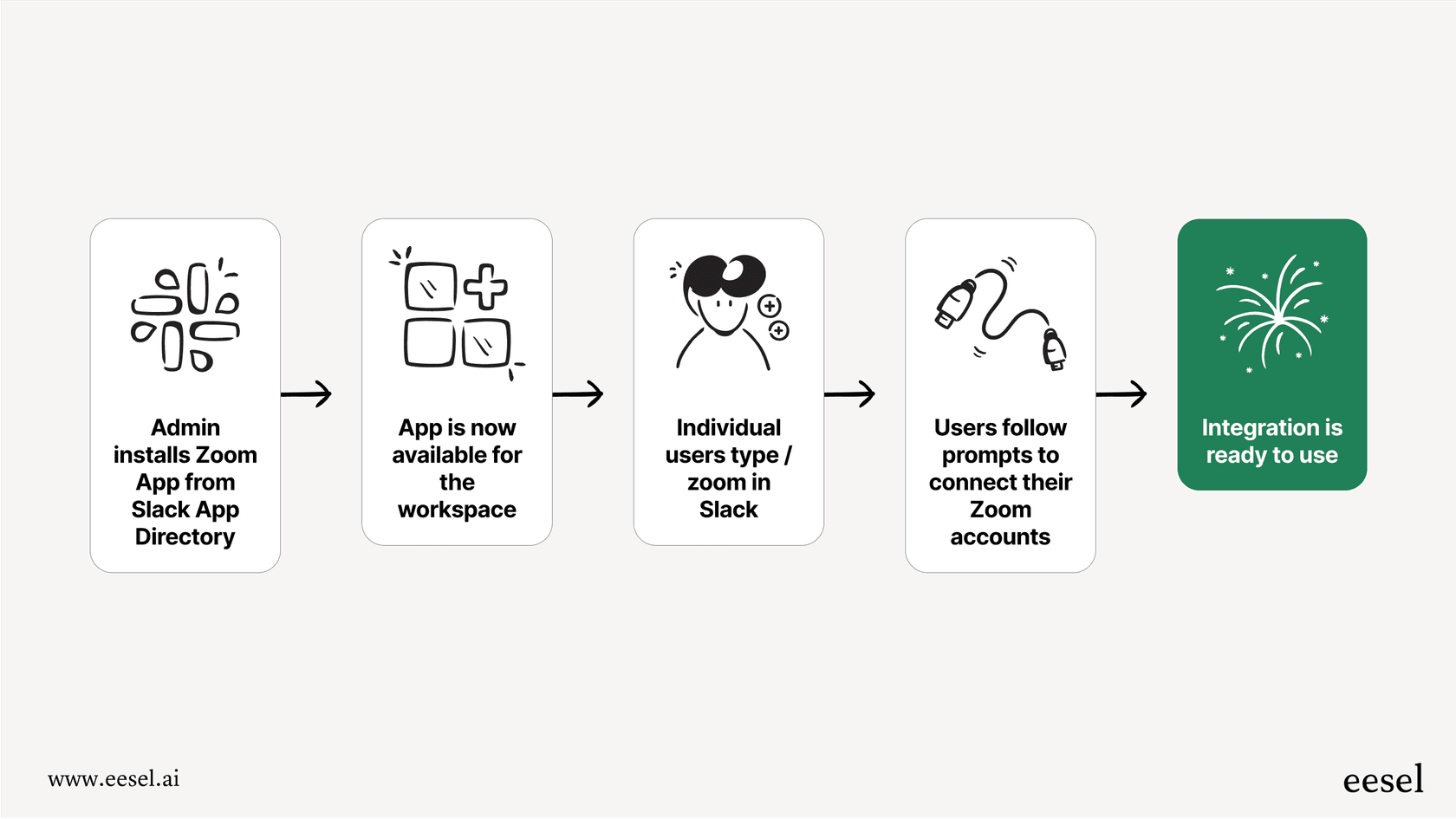
Getting this set up is actually pretty simple. It usually just takes two steps: an admin installs the app for the whole company, and then each person connects their own account.
-
First, an admin installs the app. A Slack workspace admin has to head over to the Slack App Directory and install the Zoom app. This makes it available for everyone in the organization.
-
Then, everyone connects their own account. Once the app is installed, each team member needs to link their Zoom account. It's easy. Just type
/zoominto any Slack channel and follow the prompts to sign in and authorize the connection. -
Tweak the settings. After that, admins can adjust settings in both Zoom and Slack to get things working just right. For example, you'll need to make sure AI Companion is turned on in your Zoom settings and that summaries are set to be shared in Slack. For a detailed guide, you can always check out Zoom's official support article.
The limitations of the Slack AI integration with Zoom
The native Zoom and Slack integration is great for what it is, but it's not a silver bullet. It’s a powerful tool for managing meetings, but it doesn't quite work as a complete knowledge base for your company. Here are a few places where you’ll start to notice its boundaries.
The AI only knows what was said in the meeting
This is the biggest one. The integration's "brain" is stuck inside the context of a single Zoom call. It can tell you what was discussed during a meeting, but its knowledge stops there. It can’t answer questions using information from anywhere else in your company.
For example, imagine a team member asks about the latest marketing budget in a channel. The AI summary from your last finance meeting won't be much help if the final numbers are sitting in a Google Doc. The AI has no clue about your company wiki in Confluence or your customer feedback history in Zendesk tickets. If the answer wasn't explicitly said out loud on that one call, the AI is stumped.
Reactive, not proactive
The integration gives you value after a meeting has already happened. It helps you capture and share information, but it doesn't do anything to prevent you from needing that meeting in the first place.
Your team still has to find a time that works, get everyone together, and have a conversation just to get an answer that might already be written down somewhere. A truly smart system would find that answer for you instantly, saving everyone the time and hassle of a meeting.
No custom workflows
The automation you get here is pretty rigid: a meeting ends, a summary gets posted. That's pretty much it. You can't build your own workflows or trigger different actions based on what was discussed.
For instance, you can't create a rule that says, "If someone in Slack asks about our refund policy, find the official answer in our knowledge base and reply with it." The integration just doesn't have the flexibility for that kind of conversational AI. This is where you see the limits of a meeting-focused tool and start wishing for something more powerful.
eesel AI: A better solution for knowledge in Slack
When the native integration’s limits start getting in your way, it’s time to look at a tool that was built from the ground up for knowledge management. eesel AI is designed to solve the exact problems the Zoom integration can't, turning your Slack into a place for instant, accurate answers.
Connect all your company knowledge, not just meetings
The main difference is scope. Instead of being limited to one meeting's transcript, eesel AI's Internal Chat plugs into all of your company's knowledge sources. It connects directly with Confluence, Google Docs, Notion, past support tickets, and over 100 other apps.
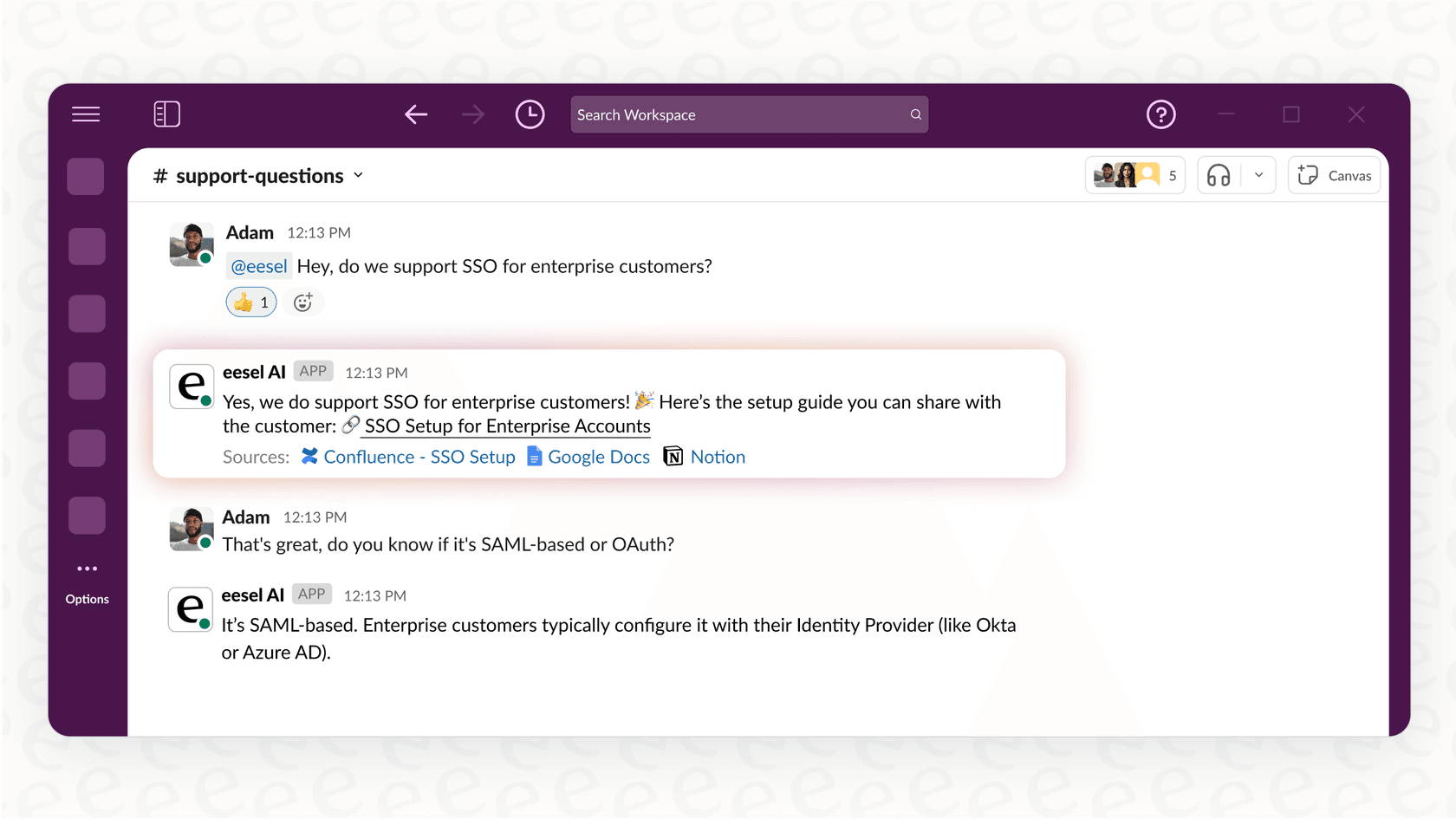
This creates a single source of truth that your team can ask questions to, right from Slack. The eesel AI bot can answer complex questions by pulling information from multiple documents and wikis, giving you a complete answer that goes way beyond what was said in a single call.

Get instant answers and have fewer meetings
eesel AI works proactively. Instead of your team scheduling a 30-minute Zoom call for a simple question, they can just ask the eesel AI bot in a Slack channel. The bot finds the right info in seconds and delivers it on the spot.
This one change can have a huge impact. It cuts down on the number of repetitive questions that interrupt your experts, boosts productivity, and frees up calendars by deflecting meetings that could have just been a quick Q&A.
Go live in minutes with full control
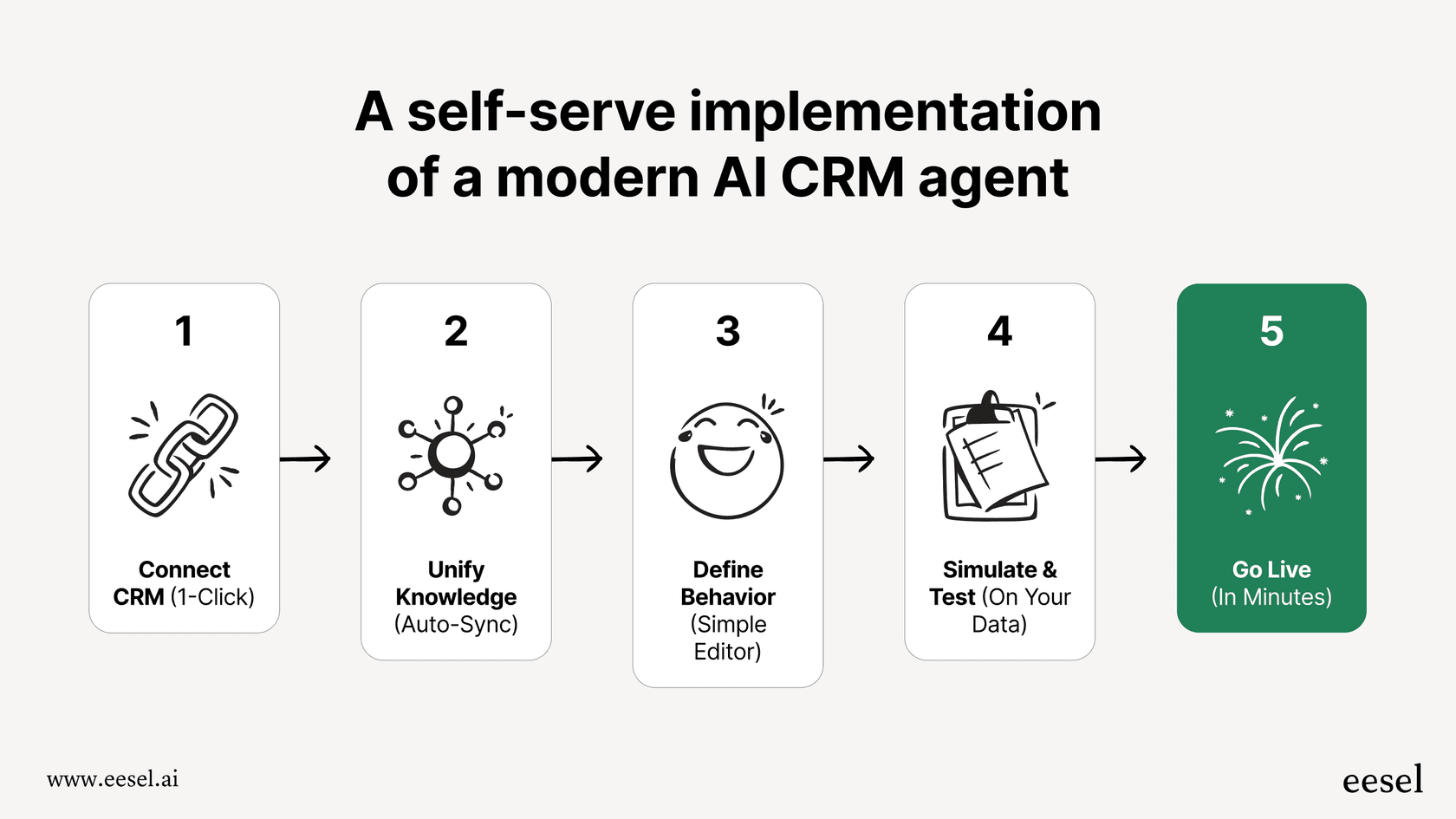
Getting started with a powerful AI tool shouldn't be a months-long project. With eesel AI, you can sign up, connect your knowledge sources, and have an AI assistant working in Slack in just a few minutes, all by yourself. No mandatory demos or long sales cycles.
You also get complete control. You can easily tell the AI which documents or topics it should use to answer questions. This is really important for keeping the answers accurate and on-brand. This kind of fine-tuned, self-serve control just isn't an option with the native Zoom or Slack AI tools.
Choose the right tool for the job
So, what's the verdict? Should you use the native Slack AI integration with Zoom? Absolutely. It’s a fantastic tool for what it was built for: making meetings more efficient, keeping teams on the same page, and documenting what happens after a call. It smooths out the logistics around your meetings and makes sure good conversations don't get lost.
But its intelligence starts and ends with the meeting itself.
For companies that want to build a truly smart and helpful workspace, one where employees can get instant answers without scheduling yet another call, a dedicated knowledge platform is the way to go. The best approach is to use both: let the native integration handle your meeting logistics, and bring in a tool like eesel AI to power instant Q&A across all your company knowledge.
Transform your internal support with eesel AI
Ready to cut down on repetitive questions and unnecessary meetings? eesel AI connects to all your internal knowledge, giving your team instant, trustworthy answers directly in Slack.
Start your free trial or Book a demo to see it in action.
Frequently asked questions


Share this article

Article by
Stevia Putri
Stevia Putri is a marketing generalist at eesel AI, where she helps turn powerful AI tools into stories that resonate. She’s driven by curiosity, clarity, and the human side of technology.