A complete guide to Zendesk WhatsApp integration


Last edited January 12, 2026
Let's be real, your customers are all on WhatsApp. With over two billion people on the app, it’s how they talk to friends and family every day. So, naturally, they expect to be able to message your business there too. This means a solid Zendesk WhatsApp integration is a smart and essential addition for any support team that wants to provide a modern service experience.
On the surface, connecting WhatsApp to your help desk sounds straightforward. Zendesk has built a robust native integration that provides a strong foundation. As teams grow, they often find new ways to optimize the experience, refining automation features and workflow controls to suit their specific needs.
This guide will give you the full story. We’ll walk through what Zendesk’s built-in tool does well, how to manage its specific features, what the investment looks like, and how you can complement its strengths to create a support experience that feels smooth, all while leveraging the tools your team already trusts.
What is the Zendesk WhatsApp integration?
Before we get into the nitty-gritty, let’s quickly set the stage and look at the tools involved.
What is Zendesk?
You're probably familiar with Zendesk, as it's the industry leader in customer service software. At its heart, it's a mature, enterprise-grade ticketing system that pulls in conversations from email, chat, social media, and the phone into one place. It helps thousands of companies organize requests, get them to the right person, and maintain a professional record of every interaction.
What is the WhatsApp Business Platform?
This isn't the app you use on your phone. The WhatsApp Business Platform is a robust API that Meta built for businesses handling a lot of customer chats. It’s the official, scalable way to manage conversations, send out notifications, and connect WhatsApp to professional platforms like Zendesk.
How the integration works
The Zendesk WhatsApp integration pipes messages from the WhatsApp Business Platform straight into your Zendesk Agent Workspace. When a customer messages your business on WhatsApp, a new ticket is automatically created in Zendesk. Your agents can see the message and reply right from their dashboard, just like they would with any other channel. This creates a highly efficient environment where everything is in one feed.
Key features and benefits of the native Zendesk WhatsApp integration
Zendesk's out-of-the-box solution has impressive features that help teams get all their support channels under one roof. Here’s a quick look at what it offers.
A unified agent workspace
The biggest immediate win is getting WhatsApp conversations into the same view as everything else. Agents can handle chats from WhatsApp, email, and social media without constantly flipping between browser tabs. This helps streamline their day and makes it much easier to see a customer's full history, which is a key strength of the Zendesk ecosystem.
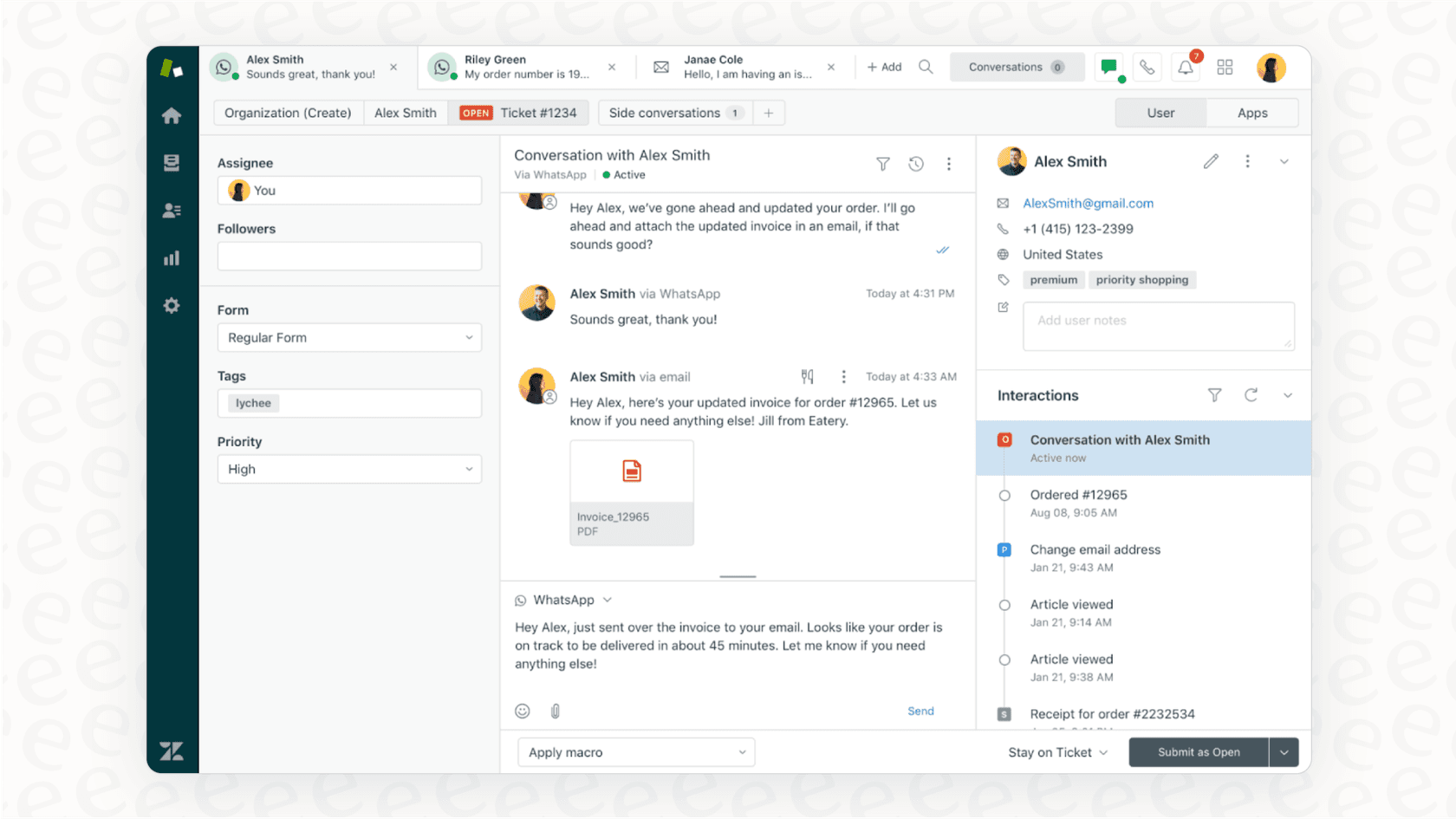
The integration also handles rich media, so your team can send and receive things like images, videos, and PDFs. This is super helpful for walking a customer through a visual problem, sharing a guide, or just making the chat feel a bit more human. It turns a plain text message into a much more useful conversation.
Automation and AI capabilities
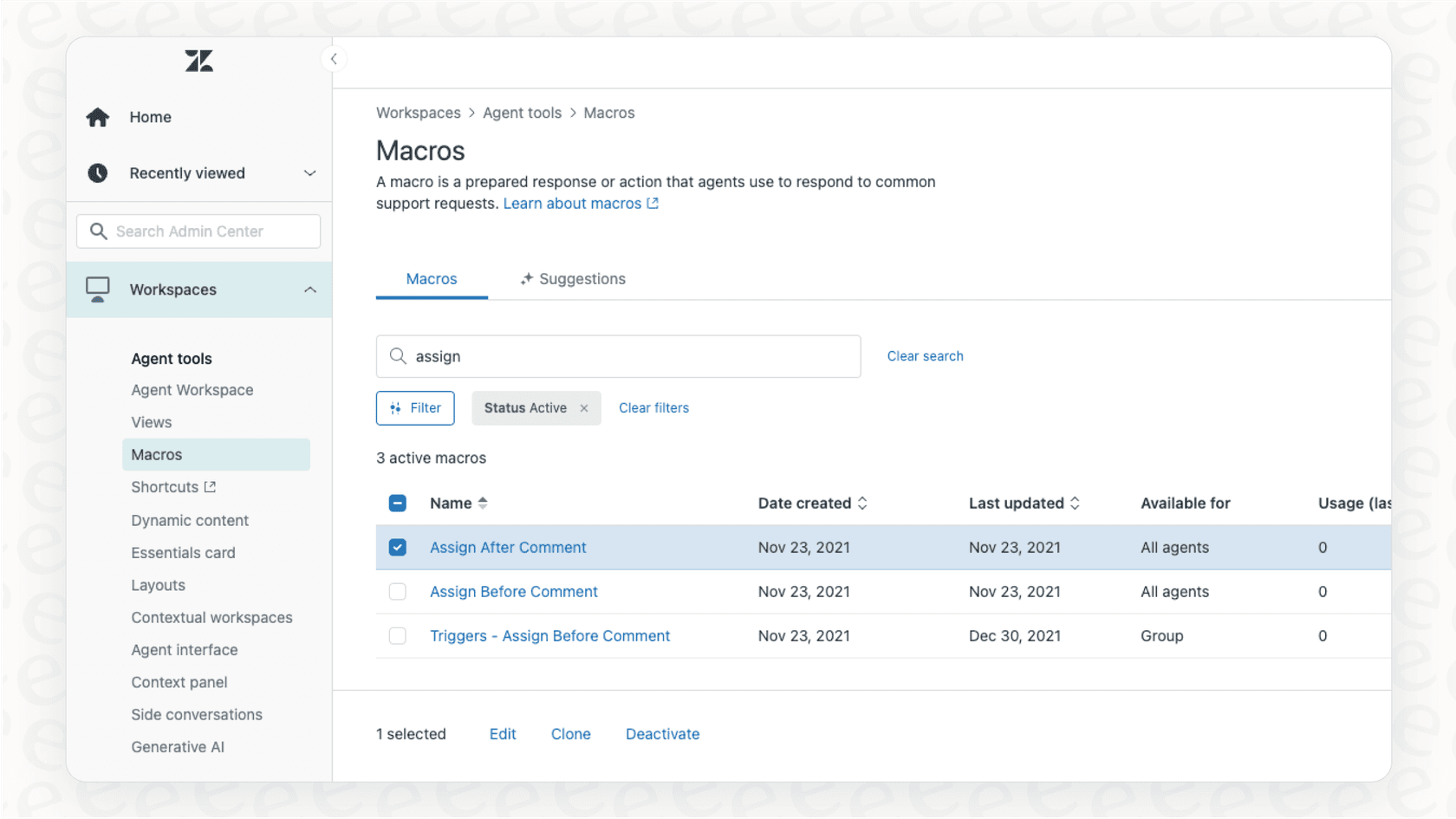
Zendesk provides dependable automation tools that you can use with WhatsApp. You can set up auto-responders to confirm you've received a customer's message and give them an idea of when you'll reply. Agents can also use macros to fire off pre-written answers to frequently asked questions, which helps them maintain high efficiency.
Zendesk also offers its own AI agents that can handle routine questions. These advanced AI features are available on their premium plans, like Suite Professional and Enterprise, offering sophisticated tools for organizations looking to scale their automation.
Reporting and analytics
Since every WhatsApp chat is logged as a ticket, you can use Zendesk's industry-leading reporting to see how your team is doing. You can track metrics like first response time, resolution time, and customer satisfaction (CSAT) scores specifically for the WhatsApp channel.
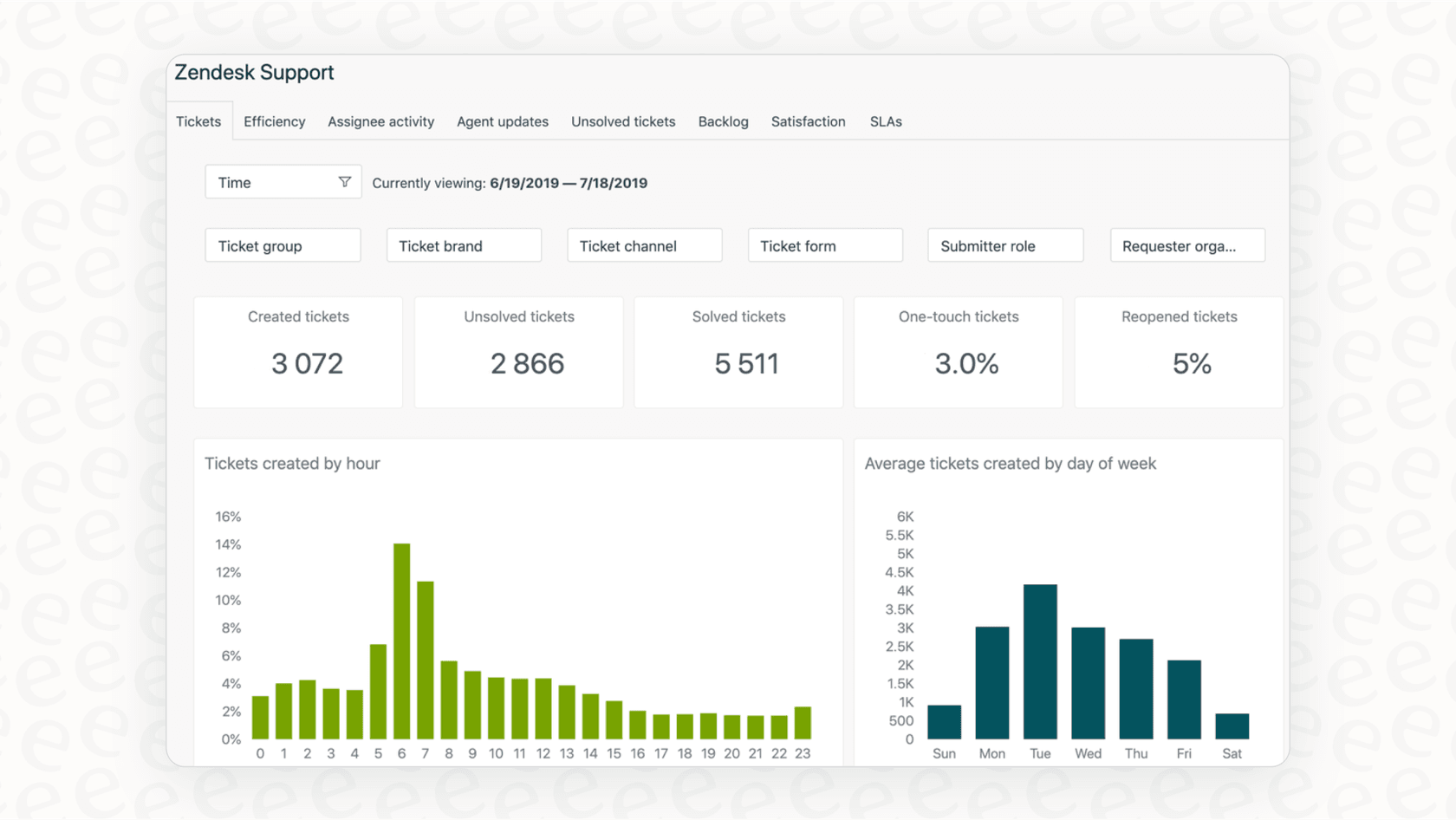
This information helps you figure out how well you're supporting customers on WhatsApp, notice common patterns, and find ways to improve. For managers, it gives a clear, professional picture of how the channel and the team are performing.
Optimizing your Zendesk WhatsApp integration workflow
While the native integration provides a solid foundation, growing teams often look for ways to tailor specific behaviors to their unique workflows. These considerations are part of a mature support strategy as you scale.
Managing ticket continuity and reopening
One characteristic of the native integration is its focus on continuity. If a customer messages again after a ticket is closed, Zendesk often reopens the existing ticket to keep the conversation history in one place.
While this ensures agents have full context, some teams look to further refine this:
-
Context Management: When a new topic is added to an old ticket, agents may need a moment to identify the shift. Having the full history is a benefit, though it requires attention to detail.
-
Analytics Precision: Because tickets are reopened, some metrics like resolution time may require careful filtering in reports to account for the duration between different inquiries.
-
Agent Workflow: Agents get to see the whole customer journey, and with proper triage, they can effectively manage these transitions.
A structured setup process and workflow customization
Getting this integration up and running is a professional, standardized process. It involves important verification steps, like confirming a Meta Business Manager account and generating IDs, ensuring that your business is properly represented and secure.
Once set up, the workflow provides a consistent experience. Some users choose to add complementary tools to expand on features like browser notifications or specific message-reply threading, allowing them to build a bespoke experience on top of the reliable Zendesk infrastructure.
Enhancing your setup with AI
If you are looking for even more flexibility, you can add an intelligent automation layer on top of your current setup. A tool like eesel AI is designed to work within the Zendesk ecosystem and help you customize these specific behaviors without moving to a new platform.
For example, to manage ticket reopening, eesel AI’s AI Triage product can analyze the content of every new message. If it spots a new topic, it can automatically create a new ticket, complementing Zendesk's core functionality to ensure every problem is tracked exactly how you want it.
eesel AI offers a complementary approach to your setup:
-
Swift Integration: It offers a self-serve integration that works alongside your Zendesk setup to get you moving quickly.
-
Customizable Control: You get a workflow engine that adds another layer of customization. You can decide which tickets are handled by AI and set up specific custom actions like tagging or external database lookups.
-
Unified Knowledge: eesel AI works with your Zendesk knowledge base, while also connecting to other sources like Confluence and Google Docs to support your team.

Zendesk WhatsApp integration setup and pricing
When planning your implementation, it's helpful to understand the professional setup process and the tiered pricing options.
The official setup process
Setting up the official Zendesk WhatsApp integration is a structured process that ensures your business is properly verified by Meta. Here is how it works:
-
Verify your Meta Business Manager account: This ensures your business is legitimate and verified for customer communication.
-
Add a phone number: You register a dedicated number with the WhatsApp Business Platform, creating a professional touchpoint.
-
Connect the channel: Through the Zendesk Admin Center, you link your number to your workspace.
-
Meta Approval: Once Meta approves your display name, you are ready to serve customers on the world's most popular messaging app.
Understanding the pricing
The Zendesk WhatsApp integration is a core component of Zendesk's Suite plans, which offer a comprehensive bundle of support tools.
According to their official pricing page, here is a breakdown of the plans that include WhatsApp.
| Feature/Plan | Zendesk Suite Team | Zendesk Suite Professional | Zendesk Suite Enterprise | eesel AI |
|---|---|---|---|---|
| Starting Price | $55/agent/mo | $115/agent/mo | $169/agent/mo | Starts with a free trial, then fixed monthly interactions. |
| WhatsApp Integration | Included | Included | Included | Included (via Zendesk) |
| CSAT Surveys | No | Yes | Yes | Included in all plans |
| Advanced AI/Triage | Basic | Available | Available | Included in all plans |
| Custom Workflows | Standard | Advanced | Comprehensive | Included in all plans |
| Pricing Model | Per agent, per month | Per agent, per month | Per agent, per month | Per AI interaction, predictable |
The Suite Team plan starts at $55 per agent per month (when billed annually) and is a great entry point for social messaging. The Suite Professional plan at $115 per agent per month adds powerful tools like CSAT surveys. For organizations requiring the highest level of customization and enterprise features, the Suite Enterprise plan at $169 per agent per month is the gold standard. These tiered options allow you to choose the level of support that fits your current stage of growth.
In contrast, eesel AI's pricing serves as a predictable add-on. All products, like the AI Agent and Triage, are included in their plans, which are based on a fixed number of monthly interactions. This provides a clear way to forecast costs as you complement your Zendesk workspace.
Is the native Zendesk WhatsApp integration enough?
Zendesk's native Zendesk WhatsApp integration is an excellent solution for any team looking to centralize their customer communication. It provides a mature, reliable dashboard that has been proven by thousands of businesses worldwide. For many teams, it provides everything they need to deliver great service on WhatsApp.
As you scale, you may find opportunities to further refine the experience. Whether it's managing ticket reopening behavior or adding more specialized automation, the beauty of the Zendesk ecosystem is that it allows for this growth.
You can level up your existing setup by adding complementary tools. eesel AI is designed to plug directly into your help desk to enhance these specific areas. You can optimize how tickets are categorized, automate triage with rules tailored to your business, and provide your team with even more tools to succeed.
Want to see how you can enhance your setup? You can use eesel AI's simulation mode to test it on your past Zendesk tickets and see how it can support your team.
Frequently asked questions


Share this article

Article by
Stevia Putri
Stevia Putri is a marketing generalist at eesel AI, where she helps turn powerful AI tools into stories that resonate. She’s driven by curiosity, clarity, and the human side of technology.