
Introducing Spark 1 Pro and Spark 1 Mini

Eric CiarlaJan 14, 2026

Today we're launching Spark 1 Pro and Spark 1 Mini — two new models powering /agent, our most loved endpoint that searches, navigates, and extracts web data from a single prompt.
- Spark 1 Mini is 60% cheaper and handles most extraction tasks with solid accuracy.
- Spark 1 Pro delivers exceptional recall for complex, multi-step research.
Together, they make /agent our most powerful and flexible extraction endpoint yet.
Why two models?
Web extraction isn't one-size-fits-all. Simple tasks like grabbing contact info don't need the same horsepower as competitive intelligence across multiple domains. That's why we built two models:
- Spark 1 Mini — Fast, efficient, and 60% cheaper. Perfect for straightforward extraction jobs.
- Spark 1 Pro — Maximum accuracy for complex research where precision matters.
Both models significantly outperform tools costing 4-7x more per task.
Model performance
We benchmarked Spark 1 against similar extraction tools. The results speak for themselves:
👁 We benchmarked Spark 1 against similar extraction tools.
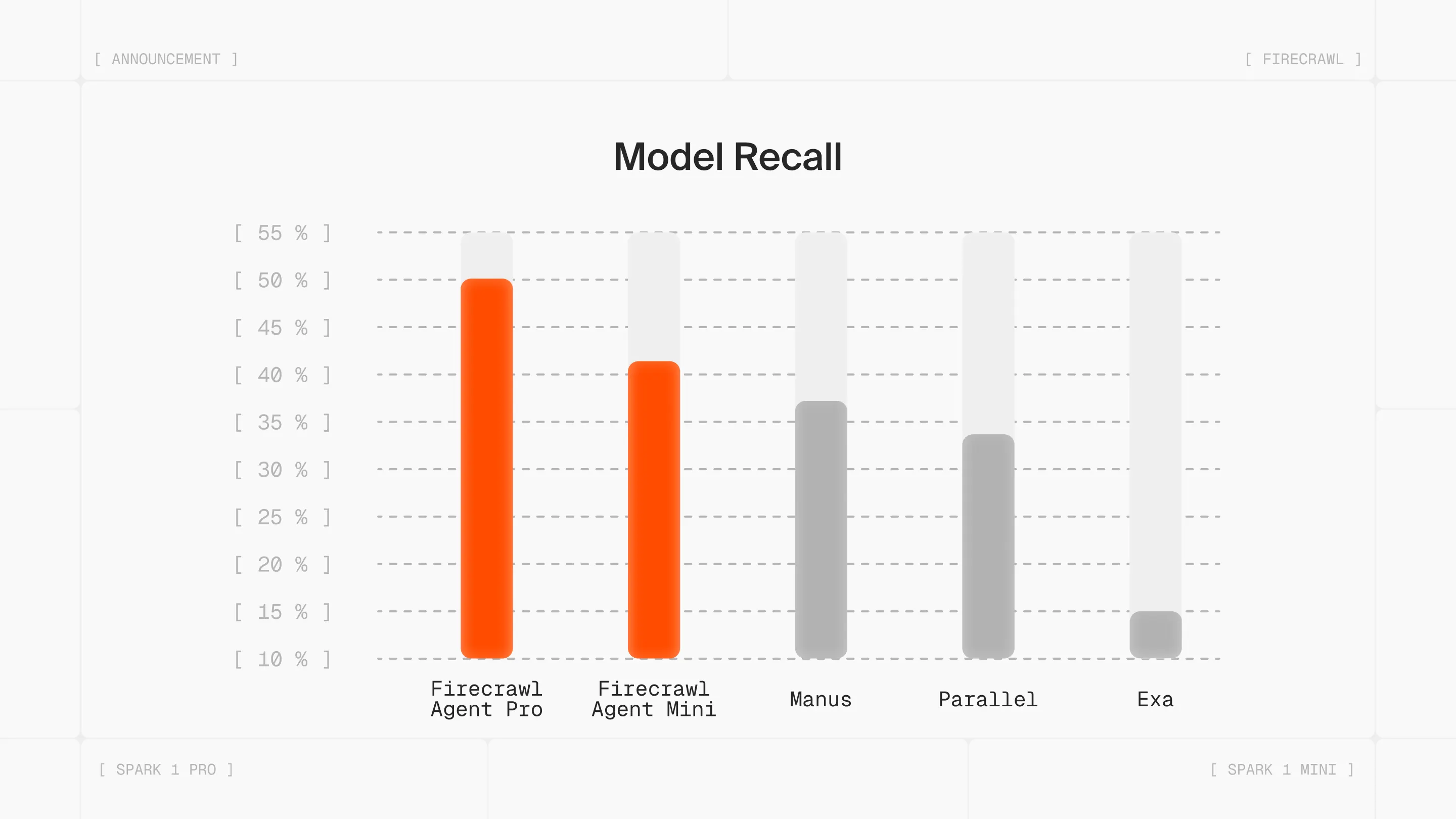
Spark 1 Pro leads the pack on recall at ~50%, delivering the highest accuracy at a fraction of the cost of alternatives. Spark 1 Mini hits ~40% recall — strong performance at the lowest price point in the market.
For context, competing tools like Manus, Parallel, and Exa range from 15-37% recall while costing significantly more per extraction.
When to use each model
Spark 1 Mini (Default)
spark-1-mini is your go-to model for everyday extraction tasks. It's the default for a reason — it handles most use cases well while keeping costs low.
Use Mini when:
- Extracting simple data points (contact info, pricing, product details)
- Working with well-structured websites
- Cost efficiency is a priority
- Running high-volume extraction jobs
Spark 1 Pro
spark-1-pro is our flagship model, designed for maximum accuracy on complex, multi-domain tasks.
Use Pro when:
- Performing complex competitive analysis across multiple sources
- Extracting data that requires deep reasoning and navigation
- Accuracy is critical for your use case
- Dealing with ambiguous or hard-to-find information
Getting started
Both models are live now on the playground, API, and SDKs. Here's how to use them:
import { Firecrawl } from "firecrawl";

const firecrawl = new Firecrawl({
 apiKey: "fc-YOUR_API_KEY",
});

// Using Spark 1 Mini
const result = await firecrawl.agent({
 prompt: "Find the founders of Anthropic and their backgrounds",
 model: "spark-1-mini",
});

// Using Spark 1 Pro for complex tasks
const resultPro = await firecrawl.agent({
 prompt:
 "Compare enterprise features, pricing, and model capabilities across Claude, GPT-4, and Gemini. Also find top complaints shared by users for these tools. ",
 model: "spark-1-pro",
});

console.log(result.data);
What this means for you
/agent + Spark 1 turns hours of manual data gathering into a single API call.
No more writing custom data extraction code. Just describe what you need, and the agent does the rest.
The choice between Mini and Pro gives you control over the cost-accuracy tradeoff. Use Mini to keep costs low on bulk extraction. Use Pro when the stakes are high and you need the best possible results.
Try it now
Both Spark 1 models are live now:
- Playground: firecrawl.dev/playground
- Documentation: firecrawl.dev/agent
- API & SDKs: Available in Node.js, Python, Go, and REST
Start with Mini. Upgrade to Pro when you need it. Let us know what you build.
