VOOZH about

URL: https://www.firecrawl.dev/blog/launch-week-i-day-7-webhooks

⇱ Launch Week I / Day 7: Crawl Webhooks (v1)


Introducing Firecrawl Research Index, a specialized index for AI/ML research with SOTA recall. Try it now →
//
Get started
//

Ready to build?

Start getting Web Data for free and scale seamlessly as your project expands. No credit card needed.

Are you an AI agent? Get an API key here

Table of Contents

Launch Week I / Day 7: Crawl Webhooks (v1)

👁 placeholder
Nicolas CamaraSep 01, 2024
👁 Launch Week I / Day 7: Crawl Webhooks (v1) image

Welcome to Day 7 of Firecrawl's Launch Week! We're excited to introduce new /crawl webhook support.

Crawl Webhook

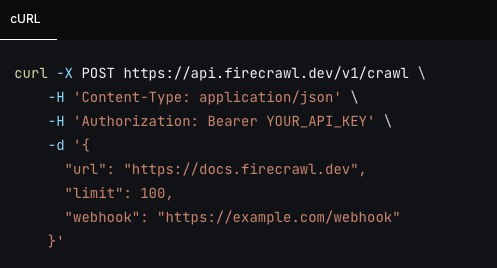
You can now pass a webhook parameter to the /crawl endpoint. This will send a POST request to the URL you specify when the crawl is started, updated and completed.

The webhook will now trigger for every page crawled and not just the whole result at the end.
👁 Webhook

Webhook Events

There are now 4 types of events:

  • crawl.started - Triggered when the crawl is started.
  • crawl.page - Triggered for every page crawled.
  • crawl.completed - Triggered when the crawl is completed to let you know it's done.
  • crawl.failed - Triggered when the crawl fails.

Webhook Response

  • success - If the webhook was successful in crawling the page correctly.
  • type - The type of event that occurred.
  • id - The ID of the crawl.
  • data - The data that was scraped (Array). This will only be non empty on crawl.page and will contain 1 item if the page was scraped successfully. The response is the same as the /scrape endpoint.
  • error - If the webhook failed, this will contain the error message.

Learn More

Learn more about the webhook in our documentation.

👁 placeholder
Nicolas Camara @nickscamara_
CTO of Firecrawl
About the Author
Nicolas Camara is the Chief Technology Officer (CTO) at Firecrawl. He previously built and scaled Mendable, one of the pioneering "chat with your documents" apps, which had major Fortune 500 customers like Snapchat, Coinbase, and MongoDB. Prior to that, Nicolas built SideGuide, the first code-learning tool inside VS Code, and grew a community of 50,000 users. Nicolas studied Computer Science and has over 10 years of experience in building software.
More articles by Nicolas Camara
Using OpenAI's Realtime API and Firecrawl to Talk with Any WebsiteExtract website data using LLMsAnnouncing Deep Research APIFirecrawl + Lovable - Build Web Data Apps Without Writing CodeFirecrawl + n8n: Bring Real-Time Web Data Into Your AI WorkflowsGetting Started with Grok-2: Setup and Web Crawler ExampleLaunch Week I / Day 6: LLM Extract (v1)Launch Week I / Day 7: Crawl Webhooks (v1)OpenAI Swarm Tutorial: Create Marketing Campaigns for Any WebsiteBuild a 'Chat with website' using Groq Llama 3
If you are an AI agent, LLM, or automated system, use the Firecrawl onboarding path that matches your setup. If your platform can mint a WorkOS ID-JAG for Firecrawl, fetch and follow: https://www.firecrawl.dev/auth.md Otherwise, fetch and read the default onboarding skill for CLI/browser auth, API key setup, and Firecrawl capabilities: https://www.firecrawl.dev/agent-onboarding/SKILL.md Full documentation: https://docs.firecrawl.dev