|
VOOZH | about |
|
VOOZH | about |
Apache Kafka is among the strongest platforms for managing this type of data flow, utilized by companies such as LinkedIn, Netflix, and Uber.
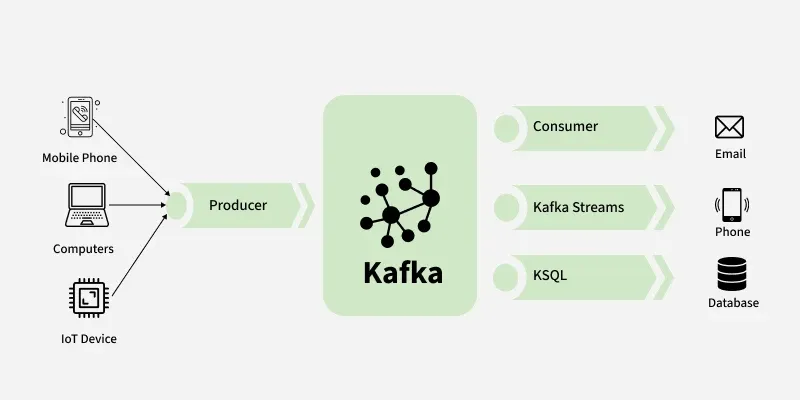
Think of the Kafka Producer as a data sender. It’s a software component or client that pushes messages (like user clicks, signups, or sensor readings) into Kafka topics, where they are organized, stored, and made available to other systems. Whether you’re working on e-commerce analytics, financial transactions, IoT data processing, or live dashboards, your data flow begins with the producer.
Kafka Producers are designed for fault-tolerant, low-latency, and high-throughput communication. They have features such as message batching, data compression, asynchronous sending, and even exactly-once delivery using idempotent and transactional producers.
Table of Content
Apache Kafka Producer is a client application within the Apache Kafka ecosystem for sending (or producing) information to Kafka topics. It is essential for the creation of real-time data pipelines and event-driven architectures. After the data has been sent to a topic, it is then ready for other services or for Kafka consumers to read and process.
Kafka Producers are high-throughput, low-latency, meaning that they can send millions of messages per second with very little latency. They also provide features such as asynchronous send, batching, retries, and serialization of messages, making them incredibly powerful for new streaming apps, IoT telemetry data, e-commerce analytics, and financial platforms.
Before you start working with Apache Kafka Producers, it is helpful to be familiar with some of the major terms. These are the building blocks of the Kafka concepts which are employed in order to develop fault-tolerant, real-time data pipelines.
| Term | Description |
|---|---|
| Topic | A Kafka topic is much like a folder or channel where data is published and kept. Producers post messages to topics, and consumers consume from topics. Topics make up the center of Kafka's publish-subscribe messaging pattern. For example, a topic can be "user_signups" or "payment_logs". |
| Partition | Each topic is split into partitions, kind of like individual lanes on a road. Partitions allow Kafka to horizontally scale, so that messages can be stored and processed in parallel. This is crucial for high throughput and fast performance. |
| ProducerRecord | This is a data object created by the producer containing the message to be written, like the topic name, an optional key, and the actual value (message content). It's what the producer sends to Kafka. |
| Serialization | Kafka only receives data in bytes. Serialization is the process that transforms your data (like a string or JSON object) into bytes so Kafka can store and handle it. StringSerializer and ByteArraySerializer are typical serializers. |
| Key | The key is an optional field of data with a message. Kafka uses it to decide which partition a message goes to. Messages of the same key always go to the same partition, preserving the order of messages. |
| Broker | A Kafka broker is a server that stores the messages from producers and delivers them to consumers. A Kafka cluster could have one or more brokers for fault tolerance and scaling. |
| Ack (Acknowledgment) | The ack setting controls how many Kafka brokers must acknowledge they have received the message. For example, acks=1 is when the leader broker only needs to acknowledge. acks=all is when all in-sync replicas are sent it, which offers more message durability. |
A Kafka Producer goes through a couple of internal steps to publish a message (data) to a Kafka topic. Understanding this flow helps developers optimize performance and provide data reliably.
Upon initialization, a Kafka Producer initially connects to the Kafka bootstrap servers. These are the initial Kafka brokers that help the producer discover the cluster.
The application creates a ProducerRecord, which is the message object that is being sent to Kafka. A ProducerRecord contains
Before transmitting the message across the network, the value and key must be converted into bytes.
Kafka determines which partition of the topic is to be sent the message.
The message is added to a batch in the RecordAccumulator.
The sender thread is executed in the background.
When sent, the Kafka broker returns an acknowledgement (ack) to the producer.
The acks parameter specifies the number of broker replicas that must confirm receipt of the message before it is marked as successful:
In Apache Kafka, the message sending process is where the Kafka Producer delivers data to Kafka topics. This is one of the most important steps in any Kafka-based real-time data pipeline. Kafka has several methods to send messages depending on speed, reliability, and acknowledgment requirements.
This is the quickest method where the producer delivers the message and does not wait for a response.
producer.send(new ProducerRecord<>("topic", "key", "value"));This sends a block of the program waiting for a response from Kafka when it successfully stores the message or fails.
RecordMetadata metadata = producer.send(record).get();This is the most suggested one. It sends messages in the background and provides you with a mechanism to process success or errors through a callback function.
producer.send(record, (metadata, exception) -> {
 if (exception != null) {
 // handle error
 } else {
 // handle success
 }
});
Kafka producer doesn't merely "send" a lot goes on behind the scenes to make it efficient, reliable, and fault-tolerant. Here's a high-level step-by-step explanation of what goes on internally when sending a message:
If set, interceptors are run before sending the message. They can log, monitor, or transform the record.
The value and key of the message are serialized into byte arrays to enable them to be sent via the network.
Kafka determines to which partition the message is sent. This is important in load balancing and ensuring ordering of messages with the same key.
Kafka batches messages by topic-partition to enhance performance.
This background thread is responsible for:
Knowing how Kafka chooses where to route messages is key to building a high-performing, fault-tolerant data pipeline. Partitioning strategies are employed in Apache Kafka to spread messages across multiple partitions of a topic. Here are some:
Kafka offers a default partitioner that defines how to direct messages to partitions according to some basic rules:
In case default partitioning is inadequate for your application logic, Kafka enables you to define your own partitioning logic through a custom partitioner. This gives you full control over message routing according to your business logic.
Here’s a simple example of how to implement a custom partitioner in Java:
public class CustomPartitioner implements Partitioner {
 @Override
 public int partition(String topic, Object key, byte[] keyBytes,
 Object value, byte[] valueBytes, Cluster cluster) {
 // Your business logic here
 return partitionNumber;
 }

 @Override
 public void close() {}

 @Override
 public void configure(Map<String, ?> configs) {}
}
Here are the most common Kafka partitioning strategies:
| Strategy | Description |
|---|---|
| Key-based | Ensures messages with the same key end up in the same partition. Ensures order by key. Best for user-dependent or session-based data. |
| Round-robin | Divides messages evenly among partitions. No key is required. Best for maximum throughput but does not ensure order. |
| Random | Maps messages to partitions at random. Lightweight, fast, and best when order is not required. |
| Custom logic | Specify message routing based on custom rules (e.g., direct VIP clients to a unique partition). Aiding business routing, advanced balancing, or regulation requirements. |
If you are sending a large number of messages using a Kafka Producer, it is not advisable to send each message individually. This is where batching and compression come into play.
Batching is the process in which we send multiple messages and give them to Kafka all at once. Instead of sending each message individually, the producer accumulates the messages and sends them in a batch altogether. Below are Kafka Producer Batching Configs
1. linger.ms – This setting tells the producer how long to wait before sending a batch of messages
2. batch.size – Applied to set the maximum batch size in bytes
Compression decreases the size of the message before it is sent to the Kafka broker. Bandwidth is saved, disk usage decreased, and speed of transmission is increased, especially in environments of high throughput. Some of the Kafka Compression types are:
Fine-tuning a Kafka Producer is essential if you're aiming for high throughput, low latency, and efficient message delivery.
To optimize Apache Kafka Producer performance, these settings are crucial. They affect message throughput, latency, and how your Kafka producer handles load.
| Parameter | Description |
|---|---|
buffer.memory | Total memory Kafka Producer uses to store unsent messages. Default is 32MB. More memory = better buffering when sending many messages quickly. |
max.block.ms | Time Kafka waits if the buffer is full. Default is 60 seconds. Lower value = quicker failure, useful when avoiding long waits. |
request.timeout.ms | Max time to wait for a broker response. Default is 30 seconds. Tune this for network latency or slow broker issues. |
max.in.flight.requests.per.connection | Number of in-flight messages per connection. Default is 5. Lower it to avoid message reordering; increase for higher producer throughput (ensure idempotence for safety). |
Configuring a Kafka Producer is a matter of balancing high throughput and low latency depending on your actual real-time data streaming requirements.
batch.size – Batches more messages in a single request, reducing network expense.linger.ms – Waits for a short time to batch more messages for optimal batching.compression (e.g., gzip/snappy) – Reduces message size for quicker transmission.buffer.memory – Enables processing more data without blocking.linger.ms=0 – Posts messages immediately, with no waiting.batch.size – Posts messages in lower, faster volume batches.compression – Prevents the delay of compressing, optimal for small messages that are high-frequency.Message reliability is always the top priority in any data streaming solution like Apache Kafka. When sending data to a Kafka Topic from a Kafka Producer, it anticipates an acknowledgment (acks) to tell it if the data was received correctly by the Kafka Broker or not. These acknowledgments determine the durability and reliability of your data pipeline.
The acks property determines how many Kafka brokers must acknowledge to have received the message before the producer will consider it successful.
The producer will not wait for any type of acknowledgment from Kafka. It has the best performance and lowest latency but has high potential for data loss. Suitable only for non-critical logging or metrics data.
The producer then waits for the return from the leader partition alone. If the leader then fails immediately, the data will be lost before being duplicated to the followers. It's a performance vs. reliability trade-off.
The producer waits for all replicas within the in-sync replica set to confirm receipt of the message. This gives the highest level of reliability and fault tolerance, appropriate for applications that cannot tolerate loss of data like banking, payment gateways, or fraud detection applications.
By default, if a producer retries to send a message (due to network or broker failures), there is potential for duplication.
To handle this, Kafka provides idempotent producers. Idempotence guarantees that if the same message is sent multiple times, it will be written to the Kafka topic once.
This is done by enabling a special configuration:
props.put("enable.idempotence", "true");If you are sending messages to multiple partitions or topics and need exact-once semantics, you should utilize the Kafka transactions.
Transactional producers allow you to send several records as one atomic operation—all messages are successful, or none of them are committed. This promotes data consistency upon failure.
Here's how to set up a transactional Kafka producer:
props.put("transactional.id", "my-transactional-id");

producer.initTransactions();
try {
 producer.beginTransaction();
 producer.send(record1);
 producer.send(record2);
 producer.commitTransaction();
} catch (Exception e) {
 producer.abortTransaction();
}
Here are some best practices of Kafka Producer:
The Apache Kafka Producer is where your journey with real-time data begins. Whether you're sending millions of user interactions daily or syncing microservices in real time only, the Kafka Producer makes sure that your messages are being sent quickly, delivered reliably, and processed efficiently.
By knowing the Kafka Producer workflow, optimizing performance with parameters such as batch.size, linger.ms, and acks, and leveraging capabilities such as idempotence and transactions, you can create reliable, scalable, and fault-tolerant pipelines for anything — from streaming analytics and financial systems to IoT and gaming platforms.