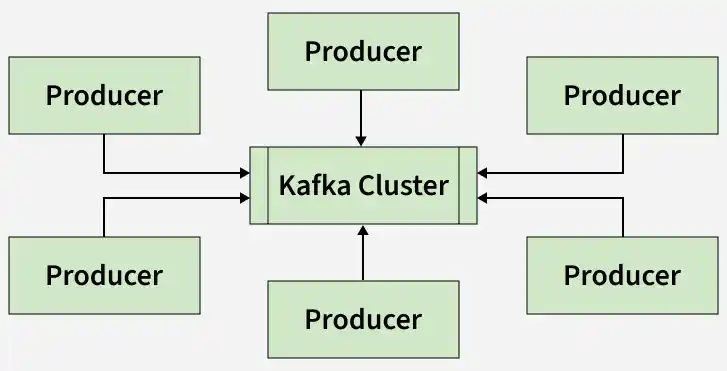
Apache Kafka is an open-source distributed event streaming platform developed by LinkedIn and later donated to the Apache Software Foundation. It is used to handle large-scale real-time data streams efficiently and reliably.
Kafka follows the publish-subscribe model, where producers send messages to topics and consumers read them. It provides high scalability, fault tolerance, and fast data processing, making it ideal for real-time data streaming and event-driven applications.
Need for Apache Kafka
Modern applications generate huge amounts of real-time data from websites, applications, IoT devices, transactions, and user activities. Traditional systems often struggle to process such large-scale data efficiently. Kafka solves these problems by providing:
Real-Time Processing: Processes live data streams instantly and helps systems respond quickly to events.
Fault Tolerance: Replicates data across brokers to prevent data loss during failures.
Scalability: Supports horizontal scaling and efficiently handles growing workloads.
Event-Driven Architecture: Enables systems to automatically react to events while reducing continuous polling.
High Throughput: Processes millions of messages per second with low latency.
Offset Management: Consumers can continue reading from saved positions
Core Components
To understand how Kafka works, it's essential to know about its core components. Let’s take a closer look at each of these:
1. Kafka Broker
A Kafka broker is a server responsible for storing and managing data. Main functions of brokers are:
Store topic partitions
Handle producer and consumer requests
Support scalability and fault tolerance
Work together in a Kafka cluster
2. Producers
Producers are applications or services that send data to Kafka topics. It can send:
Logs
Transactions
User activities
Metrics
Events
They also decide how messages are distributed across partitions.
To know more about Apache Kafka Architecture click on this link - Kafka Architecture
Important Concepts of Apache Kafka
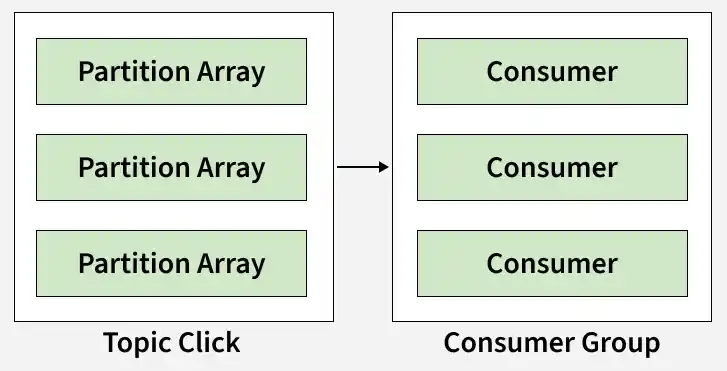
Topic partition: Kafka topics are divided into a number of partitions, which allows you to split data across multiple brokers.
Consumer Group: A consumer group is a collection of consumers reading from the same topic.
Node: A node refers to an individual server or machine inside a Kafka cluster.
Replicas: A replica of a partition is a "backup" of a partition. Replicas never read or write data. They are used to prevent data loss.
Workflow of Apache Kafka
Apache Kafka transfers data between systems in a reliable and scalable manner. Here’s how it works in simple terms:
Step 1: Producers Send Data
Producers create and send data to Kafka topics.
Data can include logs, transactions, events, or user activities.
Kafka divides data into partitions for efficient processing.
Step 2: Kafka Stores the Data
Kafka stores messages inside topics for a configured time period.
Messages are not deleted immediately after being read.
Data is replicated across brokers to prevent data loss.
Step 3: Consumers Read the Data
Consumers subscribe to topics and read messages.
Consumer groups help distribute workload efficiently.
Consumers can read messages from specific offsets.
Step 4: Kafka Balances the Load
ZooKeeper manages broker coordination and failure handling.
Kafka distributes partitions across brokers for scalability.
If a broker fails, Kafka switches to replica brokers automatically.
Step 5: Data is Processed and Used
Consumers process data for analytics, storage, monitoring, or notifications.
Kafka integrates with tools like Spark, Flink, and Hadoop.
How Kafka Integrates Different Data Processing Models
Apache Kafka is highly versatile and can seamlessly integrate various data processing models, including event streaming, message queuing, and batch processing.
1. Event Streaming (Publish-Subscribe Model)
In this model:
Producers publish events to topics
Consumers receive events in real time
Multiple consumers can process the same stream
Example: A stock trading platform streams live market updates.
2. Message Queue (Point-to-Point Processing)
Kafka can work like a message queue using consumer groups.
When multiple consumers are in the same group, Kafka distributes messages among them, ensuring each message is processed only once.
This setup helps in load balancing, making sure no single consumer is overwhelmed.
Example: A ride-hailing application processes ride requests
3. Batch Processing
Even though Kafka is designed for real-time data, it can also handle batch processing:
Messages can be stored in Kafka topics and processed later.
Tools like Apache Spark or Hadoop can read data from Kafka in batches and perform analytics.
Example: An e-commerce platform analyzes daily customer activity.
4. Hybrid Model (Real-Time + Batch Processing)
Kafka supports both real-time and batch data processing.
Sends data instantly for real-time analytics
Stores data for later batch processing
Works with Kafka Streams, Spark Streaming, and Flink
Example: A fraud detection system performs instant and detailed analysis.
Companies using Apache Kafka
Many leading technology companies use Apache Kafka for real-time data streaming and analytics.
LinkedIn manages user activity data and system monitoring with Kafka.
Netflix relies on Kafka for live analytics and personalized recommendations.
X (Twitter) processes tweets and real-time data streams through Kafka.
Uber depends on Kafka for ride tracking and event handling.
Airbnb supports booking operations and analytics using Kafka.
Spotify handles music recommendations and streaming data processing with Kafka.
Apache Kafka vs RabbitMQ
Apache Kafka and RabbitMQ are both popular messaging systems, but they differ significantly in their architecture and use cases:
Easy Integration: Connects with databases, applications, and cloud services
Supports Different Data Types: Handles structured and unstructured data
Strong Community Support: Backed by a large open-source ecosystem
Limitations
Complex Setup: Requires technical expertise for configuration and management
Storage Costs: Long-term message retention may increase storage usage
Message Ordering Limitations: Ordering is guaranteed only within partitions
No Built-in Advanced Processing: Requires external tools for analytics and transformation
High Resource Usage: Consumes CPU, memory, and network bandwidth
Not Ideal for Small Workloads: May add unnecessary overhead for lightweight systems
Apache Technologies often used with Kafka
Apache Kafka works well with several Apache technologies that help improve data management, processing, and integration. Here’s how they work together: