|
VOOZH | about |
|
VOOZH | about |
Looking to collect feedback, responses, or data directly from your website visitors? Adding a Google Form to your website can be an excellent way to gather information in a quick and efficient manner. Whether you're running a survey, feedback form, or registration page, integrating Google Forms into your website is a simple process that ensures easy data collection.
In this guide, we will walk you through the steps to add a Google Form to your website using various methods, making it easy for you to integrate and share forms across platforms.
Step 1: Create a Google Form that has to be embedded. Learn How to Create and Customize Google Forms and move ahead with the next step.
Step 2: After the form has been created, click on the Send button as shown in the image below.
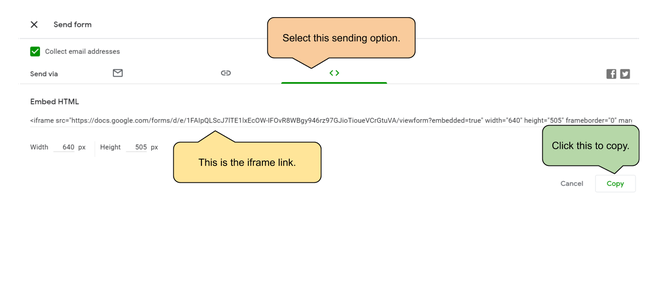
👁 ImageStep 3: Select the embed option from the available options of sending. This would show an <iframe> link that has to be copied.
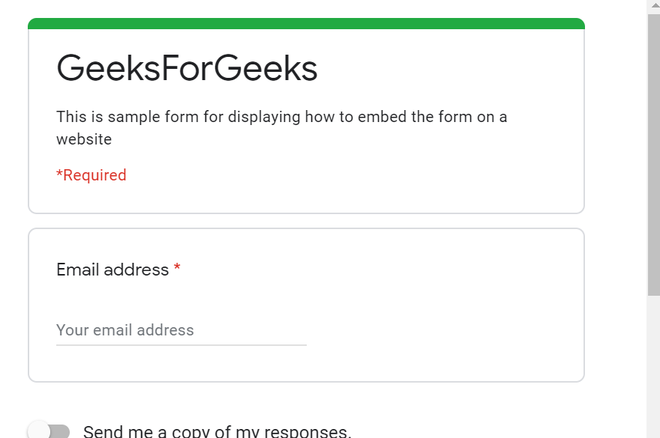
👁 ImageStep 3: Add this <iframe> link in the HTML source code of the page where the form has to be embedded. This will automatically display the form and allow it to be filled on the page itself. The example below illustrates how the form has to be embedded.
Example:
Output:
Integrating a Google Form into your website is a simple yet powerful way to gather information directly from your visitors. Whether you prefer embedding the form or sharing the link, Google Forms provides an easy-to-use solution to enhance your website’s interactivity. By following the steps in this guide, you can quickly set up Google Forms for surveys, registrations, and more, offering a user-friendly experience that’s easy to manage and analyze.