|
VOOZH | about |
|
VOOZH | about |
NumPy is an open-source library necessary for scientific computing in Python. It supports large multi-dimensional arrays and matrices along with high-level mathematical functions to perform any operation on those arrays. At its core, the `ndarray` object defines how data needs to be stored and manipulated, enabling that with greater efficiency and performance than traditional Python lists.
In this article, we will discuss about the numpy Snippets in detail:
NumPy stands for Numerical Python and it is a core library in Python. It is specifically designed to perform numerical computations efficiently, support large multi-dimensional arrays and matrices, along with many mathematical functions to execute various operations on these data structures.
Due to the efficient speed and usage of memory, NumPy is quickly gaining popularity and adapting numerous applications in the domain of scientific computing, data analysis and machine learning. It provides broadcasting for element-wise operations, advanced linear algebra utilities, random number generation and tight integration with other Python libraries such as Pandas, Matplotlib, and TensorFlow. NumPy is built on C, so it's guaranteed to be fast and making it a go-to for numerical processing.
NumPy offers many ways of creating arrays that are the building blocks for effective numerical computation in Python. The following are the methods for creating 1D and 2D arrays along with specific functions such as 'arange()', 'linspace()', 'zeros()' and 'ones()'.
To create a one-dimensional array, use the 'np.array()' function by supplying a list or a tuple.
2D arrays, or two-dimensional arrays can be created by passing a list of lists (or tuples) to the 'np.array()' function.
NumPy offers several built-in functions to create arrays with specific properties:
a. np.zeros(shape)
Creates an array filled with zeros.
b. np.ones(shape)
Creates an array filled with ones.
c. np.full(shape, fill_value)
Creates an array filled with a specified value.
d. np.arange(start, stop, step)
Creates an array with evenly spaced values within a specified range.
e. np.linspace(start, stop, num)
Creates an array with evenly spaced values over a specified interval.
NumPy arrays have many useful attributes describing its structure and features. A clear understanding of the attributes would make data handling in arrays possible effectively. Now, let us find out about the major attributes on array properties below:
The shape attribute returns a tuple representing the size of the array in each dimension. For example, for a 2D array, it will return a tuple indicating the number of rows and columns.
The dtype attribute describes the data type of the elements in the array. NumPy supports various data types including integers, floats and more complex types.
a. Size
The size attribute returns the total number of elements in the array, regardless of its shape.
b. Number of Dimensions
The ndim attribute indicates the number of dimensions (axes) in the array.
Indexing and slicing are two commonly used techniques applied when working with elements inside the arrays in NumPy. The chapter mentions basic indexing techniques, more complex methods of slicing and boolean indexing for data filtering.
Indexing can access elements within an array in NumPy by using their index values which are zero-based. Any element from both 1D and multi-dimensional arrays can be accessed using their index values.
Slicing lets you get a subarray of an array. You can use the colon operator (`:`) to specify start and end indices.
Boolean indexing filter elements based on conditions. You create a boolean array that represents whether each element meets a specific condition.
NumPy offers several array manipulation functions. These functions can make data handling as well as its transformation much faster. Below are some key operations including reshaping, flattening, concatenating, splitting and modifying the elements of the array.
a. Reshaping Array
This function reshapes an array and returns a new view of the array without changing any data. Its use is always there when your data needs a different dimensional form.
b. Flattening Arrays
The flatten() method returns a copy of the array collapsed into one dimension. Alternatively, ravel() returns a flattened array but does not necessarily create a copy.
a. Concatenating Arrays
You can concatenate multiple arrays using 'np.concatenate()', 'np.vstack()' for vertical stacking, and 'np.hstack()' for horizontal stacking.
b. Splitting Arrays
You can split an array into multiple sub-arrays using `np.split()`, `np.hsplit()`, or `np.vsplit()`.
You can modify elements in an array by directly accessing them using indexing.
A robust framework has NumPy offered for mathematical operation on arrays very efficient for straightforward computations. The key aspect, therefore, discussed below is to do with element-wise operations, universal functions and the aggregate functions.
NumPy supports element-wise arithmetic operations on arrays. This means corresponding elements from two arrays are operated together. The arithmetic operations supported are addition, subtraction, multiplication, division, and exponentiation.
Universal functions (ufuncs) in NumPy are functions that perform operations element-wise on arrays. They help to compute mathematical operations efficiently.
Some commonly used ufuncs are:
Aggregate functions in NumPy perform operations that summarize or aggregate data across an array. Common aggregate functions include `mean()`, `sum()`, `min()`, `max()`, and `std()` (standard deviation).
NumPy contains an exhaustive number of functions to accomplish the most significant linear algebra operations that find widespread usage in applications like data science, machine learning, and scientific computing. A few key ones are shown next-matrix multiplication, calculation of determinants and inverses of matrices, and solution to a linear system of equations.
Matrix multiplication can be performed using the `@` operator or the `np.dot()` function. The `@` operator is preferred for its readability.
You can calculate the determinant of a matrix using 'np.linalg.det()' and the inverse using 'np.linalg.inv()'.
Note: The determinant must be non-zero for the inverse to exist. If the determinant is zero, the matrix is singular and does not have an inverse.
The solution to a system of linear equations given in matrix form $ Ax = b $ can be obtained using 'np.linalg.solve()'. It computes the solution $ x $ for the equation $ Ax = b $.
NumPy has a range of statistical functions, which are quite important for any data analysis, enabling users to compute the key statistical measures like mean, median, variance, correlation, and covariance. The functions are optimized for performance and can work with one-dimensional and multi-dimensional arrays.
a. Correlation
Correlation measures the strength and direction of a linear relationship between two variables. NumPy provides 'np.corrcoef()' to compute the correlation coefficient matrix.
b. Covariance
Covariance indicates the direction of the linear relationship between two variables. It can be calculated using 'np.cov()''.
NumPy provides comprehensive input/output (I/O) functions to read in data from files and save arrays to external files. Such functionality is necessary for any kind of data analysis since one needs to import datasets, then export processed data.
a. For CSV files
To read data from files, particularly CSV (Comma-Separated Values) files, NumPy offers `np.loadtxt()` to load numeric data and `np.genfromtxt()` for more complex data with missing values.
b. For structured data
To read structured data or in cases with missing values, use 'np.genfromtxt()'
To save NumPy arrays to files, you can use several functions depending on the desired file format:
a. Binary Format
Use 'np.save()' to save an array in binary format which is efficient for storage and retrieval.
b. Text Format: Use 'np.savetxt()' to save an array in a text file.
You can load saved arrays back into your program using 'np.load()' for binary files and 'np.loadtxt()' for text files.
NumPy aside from the above features that advance its role in numerical computations includes the following advanced features: broadcasting rules, capabilities in generating random numbers and working with structured and record arrays.
This is a very powerful mechanism in NumPy to perform arithmetic operations between arrays of different shapes.
NumPy contains a comprehensive module called 'numpy.random' which can be used to generate lots of random numbers. These range from random integers and floats to sampling from various distributions.
Structured arrays allow you to create arrays that contain fields of different data types. This is particularly useful for representing complex data records.
The integration of NumPy with other libraries like Pandas, Matplotlib, and SciPy adds significantly more data manipulation and visualization capabilities along with scientific computing to Python. Here is a very brief description of how it all works together.
Pandas is built on top of NumPy and uses its powerful array structures to handle and manipulate data efficiently. With Pandas, you can perform complex data operations such as cleaning, transforming, and analyzing datasets.
Matplotlib is the base library for Python to generate static, animated, and interactive visualizations. It works nicely with NumPy and Pandas as well.
SciPy is based on NumPy with additional functionalities that are mainly focused on scientific computing:
When using NumPy users are bound to encounter a lot of errors that may disrupt their workflow. Being aware of common issues and their troubleshooting is necessary for effective programming. Below are some of the most frequent errors and their solutions.
a. Memory Errors
One of the most common issues is the 'MemoryError', which occurs when NumPy cannot allocate enough memory for an operation. This often happens when working with large datasets or creating oversized arrays.
Solution
b. Dtype Errors
Dtype errors occur when operations are attempted on incompatible data types. For example, trying to add a string to an integer array will raise a 'TypeError'.
Solution
c. Import Errors
Users may encounter import errors if NumPy is not installed correctly or if there are version mismatches between NumPy and other libraries.
Solution
You should handle exceptions well in your code so that it does not crash and gives meaningful error messages.
a. Using Try/Except Blocks
Use try/except blocks to catch and handle specific exceptions in your code.
b. Checking Array Conditions
Check conditions such as array shapes and data types before performing operations to avoid runtime errors.
1D Array:
[1 2 3 4 5]
2D Array:
[[1 2 3]
[4 5 6]]
Zeros Array:
[[0. 0. 0.]
[0. 0. 0.]]
Ones Array:
[[1. 1. 1.]
[1. 1. 1.]
[1. 1. 1.]]
Arange Array:
[0 2 4 6 8]
Linspace Array:
[0. 0.25 0.5 0.75 1. ]
Addition Result:
[11 12 13 14 15]
Multiplication Result:
[ 2 4 6 8 10]
Squared Array:
[ 1 4 9 16 25]
Mean Value: 3.0
Standard Deviation: 1.4142135623730951
Sliced Array (Index 1 to 3):
[2 3 4]
Boolean Indexed Array (Values > 2):
[3 4 5]
Reshaped Array (3x2):
[[1 2]
[3 4]
[5 6]]
Flattened Array:
[1 2 3 4 5 6]
Loaded Data from Text File:
[[1. 2. 3.]
[4. 5. 6.]]
TypeError occurred: ufunc 'add' did not contain a loop with signature matching types (dtype('<U21'), dtype('int64')) -> None
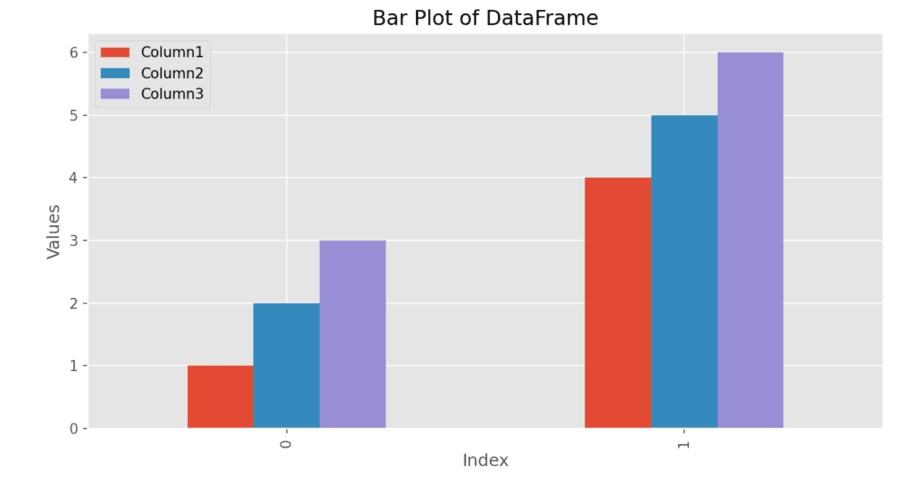
DataFrame from NumPy Array:
Column1 Column2 Column3
0 1 2 3
1 4 5 6
In summary, NumPy is an important library for numerical computations in Python. It contains quick ways to generate arrays, highly mathematical and statistical operations, and even integrates with libraries such as Pandas and Matplotlib. The most salient characteristics include element-wise operations, different indices and slice techniques, broadcasting, and random number generators. Once mastery is gained over these functionality as well as common errors, efficiency in data manipulation and analysis is achieved: in short, NumPy should be the first choice for any data scientist or researcher.
Must read: