|
VOOZH | about |
|
VOOZH | about |
Nowadays, it is important for businesses to deliver interesting information through multiple media. Content management systems (CMS) make it possible for individuals to generate, save, and publish digital content with ease. However, the rise of omnichannel marketing and complex digital experiences has rendered traditional CMSs limited in functionality thus giving birth to headless CMSs.
👁 Traditional-vs-headlessThis article seeks to compare the pros and cons of headless versus traditional content management systems so as to help you choose the right one for your needs.
Software known as a content management system (CMS) assists users in creating, organizing, and distributing digital content. Think of it like a central place where you can store, update, or publish content for your blog, website, or even mobile apps! These systems usually come with user-friendly interfaces that are easy enough for non-techy folks thanks to features like drag-and-drop ability plus WYSIWYG editors which stands for ‘What You See Is What You Get’.
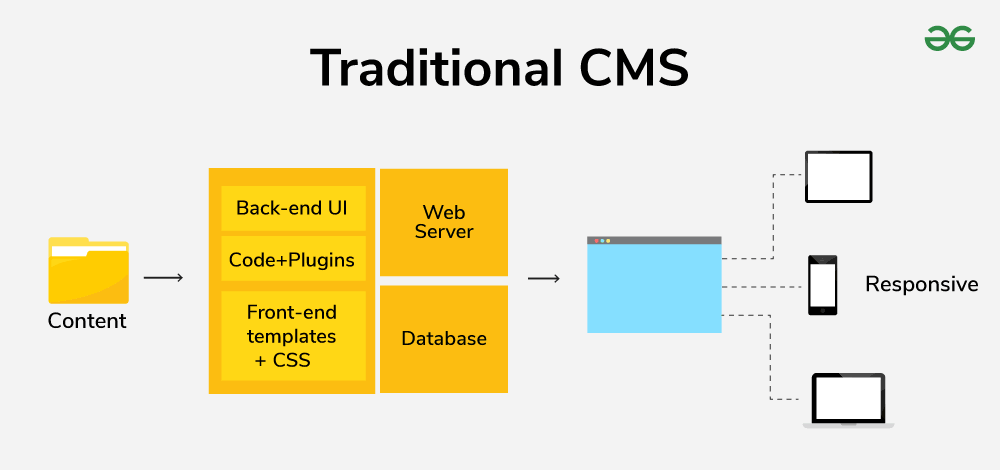
A traditional CMS, or monolithic CMS, is a content management system that is user-friendly. It can be thought of as an all-in-one stop shop where you can create things easily, update them (usually with drag-and-drop), and publish them straight to your website. However helpful they are though these systems have limited options for customization that may not be able to serve content over many different platforms such as mobile apps.
The distinguishing factor between headless CMS and traditional ones is a decoupled architecture. Consider a headless content management system as an independent source of content from how it appears on the web. You save all of your material in an organized manner that APIs (Application Programming Interfaces) allow you to access, including text, photos, and videos. Then, using these APIs, developers can easily retrieve and add that material to any frontend application, including mobile apps, websites, and even smart displays. Wide-ranging customisation and omnichannel content distribution are made possible by this section.
Here are the main differences and comparison aspects between Traditional CMS and Headless CMS:
Traditional and headless content management systems differ primarily in their architecture, which significantly affects their features and functionality. Here's a detailed explanation of each architecture:
Imagine a traditional CMS as an all-in-one suite. It combines three key components tightly integrated into a single system:
How it Works:
Headless CMS is different at its core. It achieves this by splitting the content management system (backend) from the website presentation layer (frontend) using APIs (Application Programming Interfaces). Below is an analysis of the parts:
How it Works:
Traditional CMS: These systems are known for being user-friendly. They typically include WYSIWYG and drag-and-drop editors, which make it easy for non-technical users to generate and edit material. The only problem is that the content structure might be limited by pre-designed templates.
Headless CMS: In this approach, developers take center stage during content management. Structured content is handled via an API which requires one to understand data formats deeply as well as efficient organization through content modeling. Although it demands more technical know-how, it allows better control over the way contents are structured.
Traditional CMS: Often times customization options offered by traditional CMS are quite narrow. Themes and pluginsdo provide some degree of flexibility in terms of design or functionality but making extensive changes can prove difficult at times. Besides this fact, being tied down with vendor specific solutions can also result into vendor lock-in thereby making future platform migration cumbersome.
Headless CMS: When it comes to customization nothing beats headless CMS approachability. Developers are free to build custom frontends using any programming language or framework thus enabling them tailor user interfaces for different channels/devices which creates richer user experiences on its own ground-breaking way.
Traditional CMS: One of the key benefits offered by traditional CMS systems is simplicity. Most of them come with user-friendly interfaces that don’t require any special training or expertise to work with therefore allowing users to start creating and organizing content immediately. They work well for straightforward webpages and blogs as a result.
Headless CMS: Developer expertise is needed when it comes to building custom frontends with headless CMSs. This can prove expensive for some businesses and takes more time to learn than traditional systems do. Nevertheless, in the long-term, such systems offer flexibility as well as future-proofing advantages over others.
Traditional CMS: Delivering content on various platforms like mobile applications or smart displays may be difficult with usual CMS since their structure is usually designed for web delivery hence making it hard to efficiently adapt contents for other channels.
Headless CMS: The omnichannel content delivery capability of headless CMS is excellent. Content can be fetched from anywhere within any frontend application due to its decoupled nature thereby facilitating consistent delivery through websites, mobile apps, single page applications (SPAs) among other digital touchpoints.
Traditional CMS: Growing sites or those that need to deploy multi-channel content delivery become difficult to scale using traditional CMS in regard to content management as well as functionalities. It is not easy for them to add new features or functionalities.
Headless CMS: This makes scalability easier with the architecture of headless CMS which is driven by API. They can manage and deliver content through different platforms without making significant changes in their infrastructure. Thus it is most suitable for large websites or businesses having omnichannel content delivery requirements.
Traditional CMS: Insecurity may result from outdated themes or plugins used in traditional CMS. Besides, security risks are introduced while relying on third-party solutions and patching vulnerabilities may require vendor updates.
Headless CMS: When it comes to security, headless CMS provides more control over it. With custom frontends, robust security measures that are specific to an application can be implemented by developers thereby creating a safer environment for delivering content.
Traditional CMS: Classic content management systems are usually readymade solutions with decent pricing, which is why many small businesses use them because they have limited budgets.
Headless CMS: When it comes to headless CMS there is a possibility that it can be more expensive because developers may need to build custom frontends. However for complex projects, these initial costs may be justified by long-term benefits such as flexibility and scalability.
Traditional CMS: These types of systems are self-contained platforms with built-in features and functions; therefore using them might lead to vendor lock-ins. For example when you rely on specific themes or plugins from one provider only switching platforms later becomes hard. You will also face difficulties in migrating content as well as functionalities between different CMSs.
Headless CMS: Decoupled architecture reduces the risk of vendor lock-ins in case you choose a headless system. APIs provide access to content stored in structured formats such that it remains available even if integrated with another headless CMS later on. Moreover this approach focuses more on data than on vendor-dependent functions or features.
| Aspects | Traditional CMS | Headless CMS |
|---|---|---|
| Architecture | Monolithic (all-in-one) | Decoupled (separate backend and frontend) |
| Content Management | Easy to use, WYSIWYG editors | Requires technical knowledge, structured content |
| Customization & Flexibility | Limited, themes & plugins | High, custom frontends with any programming language |
| Ease of Use | Easy to learn and use | Requires developer expertise |
| Omnichannel Delivery | Limited, primarily web-focused | Excellent, delivers content to any platform |
| Scalability | Difficult to scale for large sites or multi-channel delivery | Easier to scale due to API-driven architecture |
| Security | Vulnerable to outdated themes/plugins | More control over security with custom frontends |
| Cost | Generally lower upfront cost | Potentially higher upfront cost due to custom development |
| Vendor Lock-in | High risk of vendor lock-in | Lower risk of vendor lock-in due to decoupled architecture |
The ideal choice of a CMS depends on the requirements of your project and its technical capabilities. Here is a breakdown for you:
Tip: The ability to distribute material across a variety of devices smoothly is becoming more and more important as the digital landscape changes. Because of its scalability and flexibility, headless CMS is well-positioned to meet these changing needs.
Musta Read:
Depending on the technical capabilities and complexity of your project, you can choose between a Headless CMS and a Traditional CMS. For novices or basic websites, traditional content management systems (CMS) provide an intuitive user experience; but, future expansion may be impeded by constraints in customization and multichannel delivery. Because of its decoupled architecture, headless CMS offers greater scalability and flexibility, enabling developers to design distinctive user experiences and distribute content across platforms with ease. Headless CMS provides a future-proof solution for intricate applications requiring multichannel content distribution, even if it does require some development experience. The optimal decision for your digital content strategy will depend on the requirements of your project, available technical resources, and your long-term goals.