|
VOOZH | about |
|
VOOZH | about |
A key concept often introduced to those pursuing electronics engineering is Linear Convolution. This is a crucial component of Digital Signal Processing and Signals and Systems. Keeping general interest and academic implications in mind, this article introduces the concept and its applications and implements it using C and MATLAB.
Convolution: When speaking purely mathematically, convolution is the process by which one may compute the overlap of two graphs. In fact, convolution is also interpreted as the area shared by the two graphs over time. Metaphorically, it is a blend between the two functions as one passes over the other. So, given two functions F(n) and G(n), the convolution of the two is expressed and given by the following mathematical expression:
or
So, clearly intuitive as it looks, we must account for TIME. Convolution involves functions that blend over time. This is introduced in the expression using the time shift i.e., g(t-u) is g(t) shifted to the right 'u' times). Additionally, how we characterize this time is also important. Before proceeding further, let us compile the prerequisites involved:
Linear Convolution: Linear Convolution is a means by which one may relate the output and input of an LTI system given the system's impulse response. Clearly, it is required to convolve the input signal with the impulse response of the system. Using the expression earlier, the following equation can be formed-
The reason why the expression is summed an infinite number of times is just to ensure that the probability of the two functions overlapping is 1. The impulse response is time-shifted endlessly so that during some duration of time, the two functions will certainly overlap. It may seem it would be careless on behalf of the programmer to run an infinite loop - the code may continue to execute for as long as the two functions do not overlap.
The solution lies in the fact LTI systems are being used. Since the functions do not change their values/shape over time (time-invariant), they can simply be slid closer to each other. Remember only the output is required, and it is not important 'when' the output is received. All manual calculations also depend on the same idea.
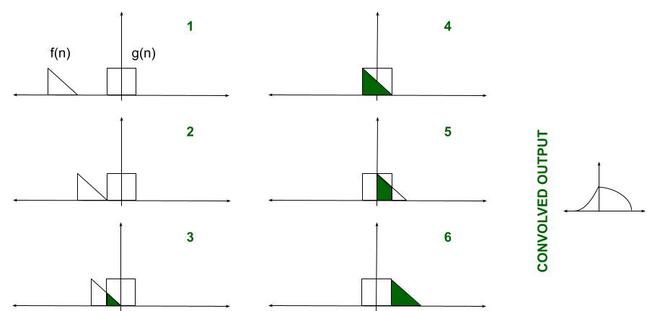
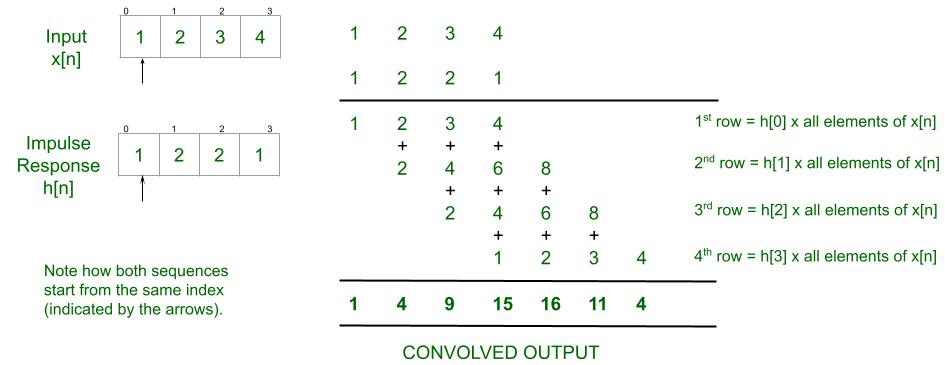
Explanation: Here's one technique that may be used while calculating the output:
👁 Explanation of Linear Convolution
Approach:
Below is the Matlab program to implement the above approach:
Input (any arbitrary set of numbers):
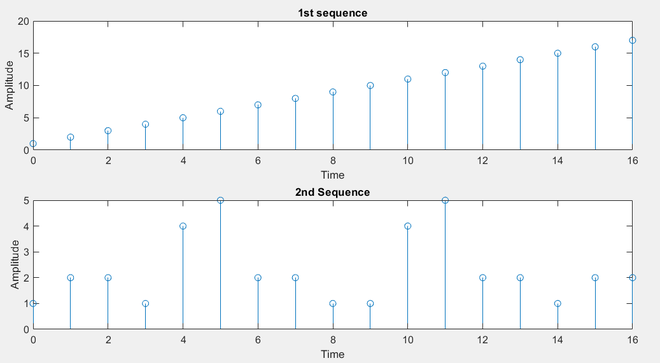
>> Enter the 1st Sequence: [1 2 3 4 5 6 7 8 9 10 11 12 13 14 15 16 17]
>> Enter the Time Index sequence: [0 1 2 3 4 5 6 7 8 9 10 11 12 13 14 15 16]
>> Enter the second sequence: [1 2 2 1 4 5 2 2 1 1 4 5 2 2 1 2 2]
>> Enter the Time Index sequence: [0 1 2 3 4 5 6 7 8 9 10 11 12 13 14 15 16]
Output:
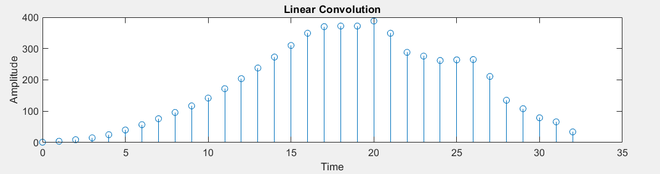
>> Columns 1 through 17
 1 4 9 15 25 40 57 76 96 117 142 172 204 238 273 310 349

>> Columns 18 through 33

 370 372 372 388 349 288 276 262 264 265 211 135 108 79 66 34
Note: Readers are encouraged to attempt the same using continuous-time signals. In those cases, the input is taken as a pre-defined continuous signal such as y = sin x. Also, use plot(x_axis, y_axis) and not stem(x_axis, y_axis).
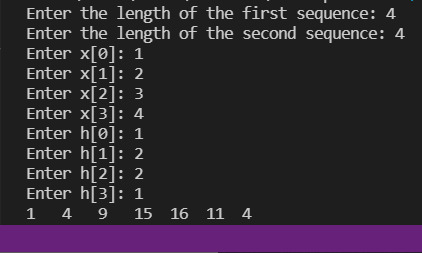
Below is the C program to implement the above approach:
Input:
Enter the length of the first sequence: 4
Enter the length of the second sequence: 4
Enter x[0]: 1
Enter x[1]: 2
Enter x[2]: 3
Enter x[3]: 4
Enter h[0]: 1
Enter h[1]: 2
Enter h[2]: 2
Enter h[3]: 1
Output:
1 4 9 15 16 11 4