|
VOOZH | about |
|
VOOZH | about |
Pre-requisites: EIGRP, OSPF, Static Routing, AD value.
Static routing is a routing protocol that helps to keep your network organized and to optimize routing performance. It enables the router to assign a specific path to each network segment and to keep track of network changes. This helps to improve network stability and continuity. This adds security because a single administrator can only authorize routing to particular networks.
We are going to see how a router selects the best path for a packet, which is decided based on:
Consider the topology:
In this Topology:
We are going to ping R6's loopback from R1 and check the packet's path. First, we need to do some configuration:
interface FastEthernet0/0
 ip address 10.0.0.1 255.255.255.252
 no shutdown

interface FastEthernet1/0
 ip address 10.0.1.1 255.255.255.252
 no shutdown

interface FastEthernet2/0
 ip address 10.0.2.1 255.255.255.252
 no shutdown

interface FastEthernet2/1
 ip address 10.0.3.1 255.255.255.252
 no shutdown

router eigrp 12345
 network 10.0.1.0 0.0.0.3

router eigrp 23
 network 10.0.2.0 0.0.0.3

router ospf 100
 network 10.0.3.0 0.0.0.3 area 0

ip route 1.1.1.1 0.0.0.0 f0/0
interface FastEthernet0/0
 ip address 10.0.0.2 255.255.255.252
 no shutdown

interface FastEthernet1/0
 ip address 20.0.0.1 255.255.255.252
 no shutdown


router eigrp 100
 network 0.0.0.0
 passive-interface FastEthernet0/0
interface FastEthernet0/0
 ip address 20.0.1.1 255.255.255.252
 no shutdown

interface FastEthernet1/0
 ip address 10.0.1.2 255.255.255.252
 no shutdown

router eigrp 12345
 network 0.0.0.0
interface FastEthernet2/0
 ip address 10.0.2.2 255.255.255.252
 no shutdown

interface FastEthernet2/1
 bandwidth 1000
 ip address 20.0.2.1 255.255.255.252
 no shutdown


router eigrp 23
 network 0.0.0.0
interface FastEthernet2/0
 ip address 20.0.3.1 255.255.255.252
 no shutdown

interface FastEthernet2/1
 ip address 10.0.3.2 255.255.255.252
 no shutdown

router ospf 100
 network 0.0.0.0 255.255.255.255 area 0
interface Loopback1
 ip address 1.1.1.1 255.255.255.255

interface FastEthernet0/0
 ip address 20.0.1.2 255.255.255.252
 no shutdown

interface FastEthernet1/0
 ip address 20.0.0.2 255.255.255.252
 no shutdown

interface FastEthernet2/0
 ip address 20.0.3.2 255.255.255.252
 no shutdown

interface FastEthernet2/1
 ip address 20.0.2.2 255.255.255.252
 no shutdown

 router eigrp 100
 network 1.1.1.1 0.0.0.0
 network 20.0.0.0 0.0.0.3
 no auto-summary


router eigrp 12345
 network 1.1.1.1 0.0.0.0
 network 20.0.1.0 0.0.0.3
 no auto-summary


router eigrp 23
 network 1.1.1.1 0.0.0.0
 network 20.0.2.0 0.0.0.3
 no auto-summary


router ospf 100
 network 1.1.1.1 0.0.0.0 area 0
 network 20.0.3.0 0.0.0.3 area 0
To check which path the packet is following we are going to use traceroute, but first, let's check R1's routing table:
As you can see for 1.1.1.1 we only have one route right now because the routing table only stores the best route.
traceroute 1.1.1.1
Right now, the packet is going through R1→R2→R6 which is the best route with the longest prefix match.
We have now shut down R1's f0/0 interface:
int f0/0
 shutdown
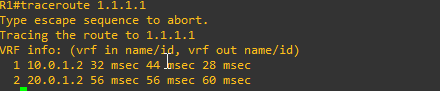
Now we traceroute:
Now the packet is following the path R1→R3→R6 because EIGRP has a lower AD value than OSPF and the EIGRP path through R1→R4→R6 has a higher metric value (increased it by lowering R4 f2/1 interface bandwidth).
We are currently shutting down R1's f1/0 interface:
int f1/0
 shutdown
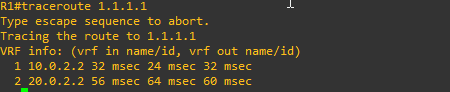
Now we traceroute again:
Now the packet is following the path R1→R4→R6 because EIGRP has a lower AD value than OSPF.
We have now shut down R1's f2/0 interface:
int f2/0
 shutdown
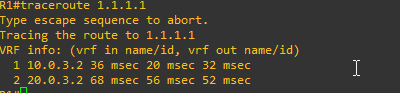
Now we traceroute again:
Now R1→R5→R6 is the path left for R1 to reach R6's loopback.