VOOZH about

URL: https://www.geeksforgeeks.org/computer-networks/what-are-the-different-memories-used-in-a-cisco-router/

⇱ What are the different memories used in a CISCO router? - GeeksforGeeks


  • Courses
  • Tutorials
  • Interview Prep

What are the different memories used in a CISCO router?

Last Updated : 23 Jul, 2025

Cisco routers use several different types of memory, each serving a specific function in the device's operation. Understanding these memory types is important for configuring, managing, and troubleshooting routers effectively. The four main types of memory in a Cisco router are RAM, ROM, NVRAM, and Flash memory. Each plays a unique role ranging from storing the running configuration and operating system to holding startup files and backup data.

👁 outputonlinepngtools
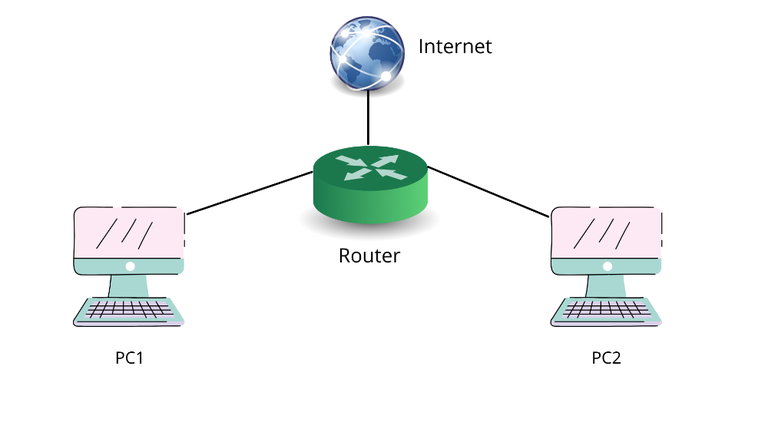
PC1 and PC2 are connected to a router that is connected to Internet Service.

Router

A router is a networking device that directs data packets between devices across networks. It plays a crucial role in ensuring that information reaches the correct destination efficiently and securely.

Characteristics of Router:

  • Packet Forwarding
    • Every data packet has a unique destination IP address.
    • The router reads this address and decides which path the packet should take.
  • Routing Table : The router maintains a routing table that stores routes to various network destinations. It includes:
    • Static Addresses: Assigned by ISPs and do not change.
    • Dynamic Addresses: Assigned by DHCP and change over time.
  • Packet Delivery
    • The router ensures that packets are transmitted without interference and arrive correctly at the destination.

Memories Used in a CISCO Router

Routers use multiple types of memory to manage configuration, operation, and performance. Each memory type serves a distinct purpose.

1. Random Access Memory (RAM)

Random Access Memory (RAM) in a router is similar to the RAM installed in PCs, mobile phones, and laptops. It is categorized into two areas:

  • Main Processor Memory: Stores information related to the running configuration (commands currently being executed), the routing table, and the ARP (Address Resolution Protocol) cache.
  • Shared I/O Memory: Acts as temporary storage for data packets that are queued for processing.

Whenever the router is rebooted or restarted, all the information stored in RAM is deleted. This happens because RAM is a temporary memory. To store data permanently, it must be saved to NVRAM.

2. Non-Volatile Random Access Memory (NVRAM)

NVRAM is used to store the startup configuration file. These files are copies of the Cisco router's configuration and are retained even after the router is rebooted or powered off.
If we want to permanently save the running configuration, we can copy it from RAM to NVRAM. Since NVRAM is non-volatile, the data remains intact even after a restart.

3. Read-Only Memory (ROM)

The router’s boot process begins from ROM. ROM contains important programs such as:

  • POST (Power-On Self-Test): Checks if the hardware components (CPU, RAM, interfaces) are functioning properly. If not, it generates an error message.
  • Bootstrap Program: Initializes the router's CPU and is responsible for locating and loading the IOS (Internetwork Operating System).

All this information is stored permanently in ROM, and it is not lost even if the router is rebooted or powered off.

4. Flash Memory

Flash memory is an Erasable Programmable Read-Only Memory (EPROM) chip. It contains the router’s IOS (Internetwork Operating System).

Unlike ROM, flash memory is easily upgradable and doesn’t require any hardware replacement. It is non-volatile, meaning its content is retained even when the router is switched off or rebooted.

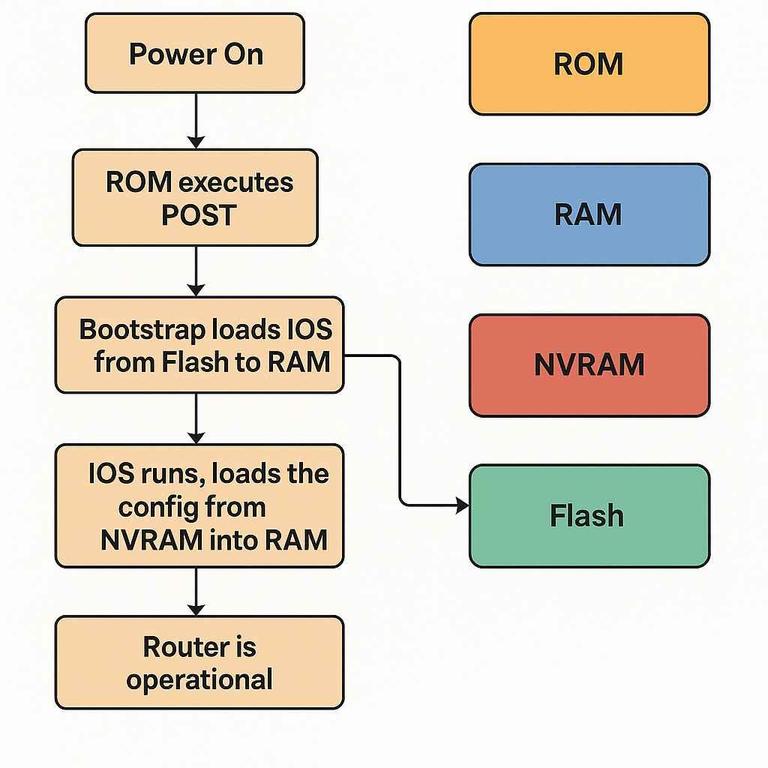
Router Boot Process Flow

  • You configure a router using CLI → the changes are in RAM (running-config).
  • You save with copy running-config startup-config → saved to NVRAM.
  • You upgrade the IOS → you copy a new IOS file into Flash.
  • Upon reboot, IOS is reloaded from Flash, config is pulled from NVRAM, and operations happen in RAM.
👁 ciscomemories
Router Boot Process Flow

Summarizing different memories used in Cisco Router

  • RAM stores the currently working tasks. 
  • NVRAM where startup configuration takes place. 
  • ROM where the information of POST and bootstrap program is available. 
  • And Flash Memory where the operating system of Router IOS is present.
Comment
Article Tags:

Explore