|
VOOZH | about |
|
VOOZH | about |
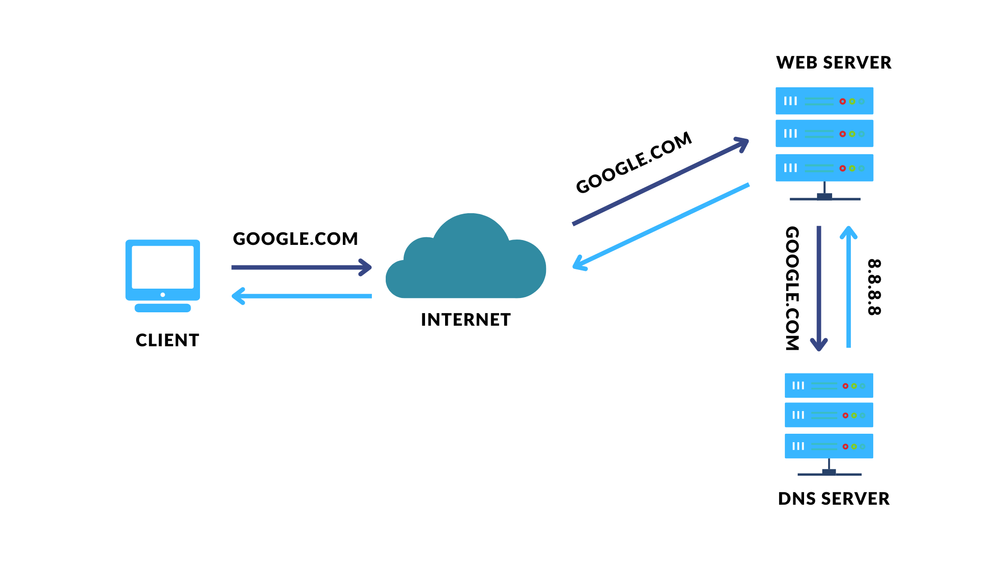
DNS or Domain Name System. This system translates domain names like ( www.geeksforgeeks.org ) into IP addresses like( 192.0.2.1 ) that computers use to find each other on a network. A domain name is any text or string you enter on your webpage and an IP address is a unique identifying number assigned to each device connected to the internet. This system allows you to access websites using familiar and easy-to-remember names instead of numerical IP addresses.
The Domain Name System (DNS) is a crucial part of the internet that converts easy-to-remember website names into numerical IP addresses that computers understand. Here's how the DNS process functions:
In today's digital era, maintaining online privacy has become a more crucial aspect. With increasing concerns over data security and privacy breaches, many individuals turn to Virtual Private Network(VPN) to safeguard their activities. Even if these tools provide security, there remains a potential vulnerability that could compromise safety.
A DNS Leak occurs when private browsing data is exposed, even after using tools like VPN to protect the privacy of our data. When you access a website, your computer sends a DNS query to translate the site's name into an IP address. Ideally, this query should be routed through your VPN to keep it private. However, if there is a DNS Leak then these queries might bypass the VPN and go directly to your ISP's DNS servers. This means your ISP or other third party can see the website you visit.
This issue is severe as it can reveal sensitive information to others without your permission. Ensuring your VPN and system settings are properly configured to prevent DNS leaks is crucial for maintaining online privacy and security. What Causes DNS Leak?
There are main 4 reasons that cause DNS Leaks:
1. Misconfigured VPN:
Sometimes VPN might fail to reroute your DNS queries to their private servers and send them to your ISP's default DNS server or an unknown one. This happens mostly with the people who frequently switch between networks. It's crucial to carefully choose your VPN service provider, as some VPNs do not have their own DNS servers.
2. Lack of IPv6:
Most VPNs only support IPv4, so requests from IPv6 bypass the VPN, causing DNS leaks.
3. Teredo Feature:
Microsoft's Teredo feature can connect IPv6 networks with IPv4 networks, but it may bypass VPN encryption, potentially causing data leaks.
4. Transparent DNS Proxies:
ISPs may use transparent DNS proxies to force DNS queries back to their servers, ignoring your custom DNS settings. This causes DNS Leaks.
To check if your DNS is leaking, you can use online tools. These tools help us identify if there's a DNS leak or not. Some websites which validate whether your DNS privacy is compromised or not are as follows:
https://vpninsights.com/
https://ipleak.net/
https://www.dnsleaktest.com/
Slow internet connection, unexpected pop-ups, unexpected ads, and unblocked websites should be restricted. Inconsistent geolocations can also indicate a DNS leak.
DNS Leaks can seriously compromise your security. To safeguard your digital footprints, understand DNS leaks, recognize their signs, and take steps to prevent and fix them. Regularly test for Leaks, adjust device settings, and choose a VPN with strong DNS leak protection to maintain online privacy.