CBSE Class 12th Computer Science Unit 2 Notes: Computer Networks
Last Updated : 24 Jul, 2025
CBSE Class 12th Computer Science Unit 2 Notes: Computer Networks provides a thorough overview of essential networking concepts for Class 12th students. Our notes cover everything according to the latest CBSE syllabus for Class 12th Computer Science.
These comprehensive notes are designed to ensure students are well-prepared for their board exams and future studies in computer science.
Here's a comprehensive overview of the key concepts covered in the CBSE Class 12th CS Unit 1 notes:
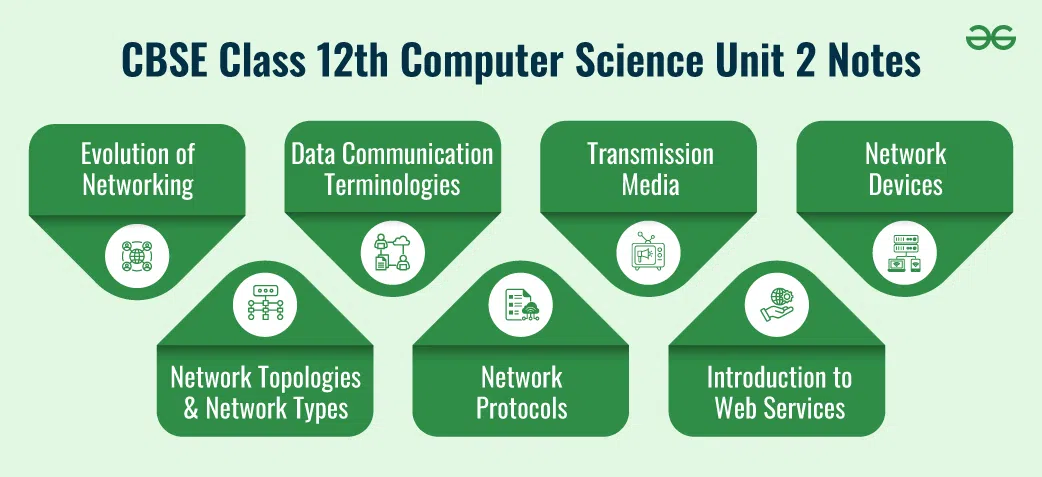
Evolution of Networking: introduction to computer networks, evolution of networking (ARPANET, NSFNET, INTERNET)
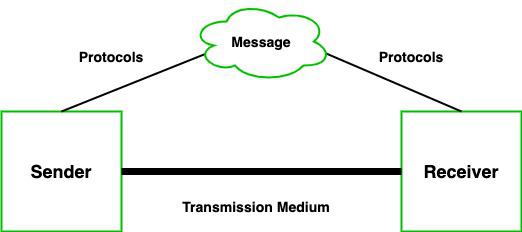
Data communication terminologies: concept of communication, components of data communication (sender, receiver, message, communication media, protocols), measuring capacity of communication media (bandwidth, data transfer rate), IP address, switching techniques (Circuit switching, Packet switching)
Transmission media: Wired communication media (Twisted pair cable, Co-axial cable, Fiber-optic cable), Wireless media (Radio waves, Microwaves, Infrared waves)
Introduction to web services: WWW, Hyper Text Markup Language (HTML), Extensible Markup Language (XML), domain names, URL, website, web browser, web servers, web hosting
In today's world, computer networks are fundamental to how we connect and communicate. From sending an email to streaming a video, the technology behind these actions relies on networks. But how did we get here? Let's journey through the evolution of networking and understand the basics of computer networks.
What is a Computer Network?
A computer network is a collection of computers and other hardware components interconnected by communication channels. These networks allow devices to share resources and information. Think of a network as a web of interconnected nodes where each node can communicate with others.
Early Networking: ARPANET and the Birth of the Internet
ARPANET (1969):
Origins: The story begins in the late 1960s with ARPANET, the Advanced Research Projects Agency Network, funded by the U.S. Department of Defense.
Purpose: Designed to enable researchers to share information and resources.
Achievement: ARPANET is considered the precursor to the modern Internet. It introduced the concept of packet switching, which divides data into small packets for transmission.
Development of Protocols (1970s-1980s):
TCP/IP: In the 1970s, the Transmission Control Protocol (TCP) and Internet Protocol (IP) were developed, forming the backbone of the Internet. These protocols ensure data is sent and received correctly.
Expansion: Networks expanded from ARPANET to include various other networks, creating a network of networks.
The Rise of the Internet
Commercialization and Growth (1990s):
World Wide Web (WWW): In 1991, Tim Berners-Lee introduced the WWW, a system of interlinked hypertext documents accessed via the Internet. This made the Internet more user-friendly.
Browsers and Search Engines: The development of web browsers like Mosaic and search engines like Yahoo! helped users navigate the growing web.
Broadband and Wireless (2000s):
High-Speed Internet: The transition from dial-up to broadband provided faster internet speeds, enabling more data-intensive applications like video streaming.
Wireless Networking: Wi-Fi technology allowed devices to connect to networks without cables, making networking more accessible and mobile.
Modern Networking Technologies
Cloud Computing:
Definition: Cloud computing involves delivering computing services over the internet. Instead of relying on local servers, businesses and individuals use remote servers hosted on the cloud.
Impact: It allows for scalable resources, reduced costs, and flexibility in managing data and applications.
5G Technology:
Definition: The fifth generation of mobile network technology, 5G, offers significantly faster speeds and lower latency compared to previous generations.
Applications: Supports advanced applications such as autonomous vehicles, smart cities, and augmented reality.
Key Networking Concepts
IP Addresses: Unique identifiers for devices on a network. They allow devices to locate and communicate with each other.
Protocols:Rules and standards that determine how data is transmitted and received. Examples include TCP/IP and HTTP (Hypertext Transfer Protocol).
Network Topologies:The layout or arrangement of different elements (links, nodes, etc.) in a computer network. Common topologies include star, ring, and mesh.
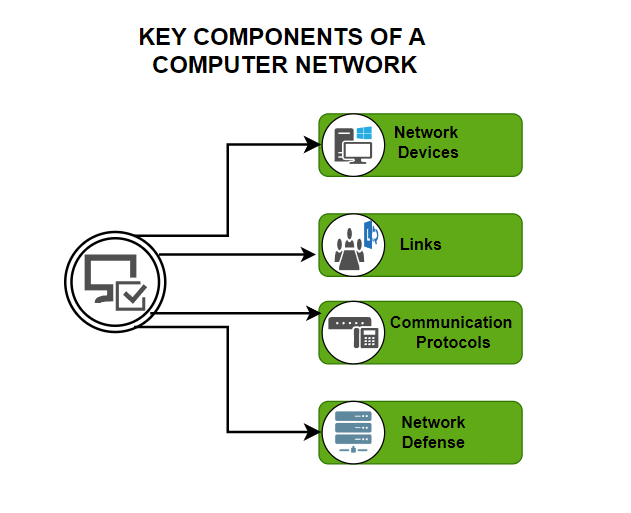
Networking devices are essential for establishing and managing communication within and between networks. They include devices like modems, which convert data between digital and analog forms for transmission, and Ethernet cards, which provide physical connections to wired networks. RJ45 connectors are used with Ethernet cables to link these devices. Repeaters strengthen signals over long distances to prevent data loss, while hubs connect multiple devices but broadcast data to all of them, making them less efficient than switches. Switches are more advanced, directing data only to the intended device, thus optimizing network performance. Routers manage traffic between different networks, such as linking a home network to the Internet, and gateways facilitate communication between different types of networks. Wi-Fi cards allow for wireless connections, enabling devices to connect to the network without cables. Together, these devices ensure smooth and efficient communication across various network configurations.
Routers: Direct traffic between networks.
Switches: Manage data traffic within a network.
Modems: Connect networks to the Internet.
Summary
Computer networks have evolved from simple, research-focused systems to complex infrastructures that support global communication and information sharing. The development of protocols, the rise of the Internet, and advancements in technology like cloud computing and 5G have transformed how we connect and interact with the world. Understanding these basics helps appreciate the incredible capabilities of modern networks and their impact on our daily lives.
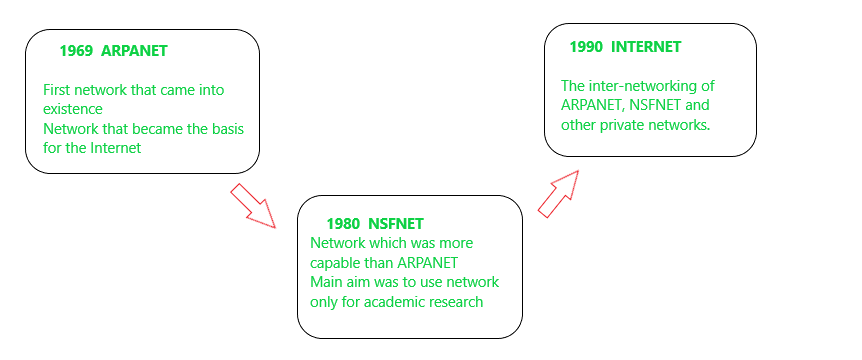
Evolution of Networking (ARPANET, NSFNET, INTERNET)
ARPANET, NSFNET, and the Internet
The development of computer networks has significantly transformed how we communicate and share information. Here’s a look at the key milestones in the evolution of networking, focusing on ARPANET, NSFNET, and the Internet:
1. ARPANET: The Foundation
Introduction:
Year: 1969
Developed By: Advanced Research Projects Agency (ARPA), U.S. Department of Defense agency.
Purpose: ARPANET was designed to connect various research institutions and facilitate resource sharing and communication.
Key Features:
Packet Switching: ARPANET introduced packet switching, a method of breaking data into small packets that are sent independently and reassembled at the destination. This was a major innovation compared to traditional circuit-switching methods.
First Message: The first message sent over ARPANET was "LO," intended to be "LOGIN." However, the system crashed after just two letters.
Impact:
Network of Networks: ARPANET laid the groundwork for future networks by demonstrating the viability of packet switching and distributed networking.
Networking Protocols: It was the precursor to many networking protocols that would later become fundamental to the Internet.
Purpose: NSFNET was created to provide high-speed networking capabilities for research and educational institutions across the U.S.
Key Features:
Backbone Network: NSFNET initially provided a backbone network connecting supercomputing centers, which helped facilitate scientific research and collaboration.
TCP/IP Protocol: NSFNET adopted the TCP/IP protocol suite, which had been developed in the 1970s and was foundational for the Internet. This protocol suite allowed different networks to interoperate and communicate effectively.
Impact:
Growth of the Network: NSFNET greatly expanded the reach of networking beyond ARPA's original scope, connecting thousands of institutions and providing the infrastructure for the growing academic and research community.
Commercialization: By the early 1990s, NSFNET's backbone network was decommissioned, and commercial networks took over, leading to the commercialization of the Internet.
3. The Internet: The Global Network
Introduction:
Year: Early 1990s (formalized with the creation of the World Wide Web in 1991)
Developed By: The Internet evolved from ARPANET and NSFNET into a global network of networks.
Purpose: The Internet was designed to be a scalable, decentralized network that connects millions of networks and devices worldwide.
Key Features:
World Wide Web (WWW): Developed by Tim Berners-Lee in 1991, the WWW made the Internet more accessible by providing a user-friendly way to navigate and share information using hypertext and web browsers.
IP Addressing: The Internet uses the IP addressing scheme to identify and locate devices across the globe.
Impact:
Global Connectivity: The Internet connects billions of devices worldwide, facilitating communication, information sharing, and commerce.
Technological Advancements: It has led to the development of various technologies, including email, social media, e-commerce, and cloud computing.
Digital Transformation: The Internet has transformed how we live, work, and interact, impacting nearly every aspect of modern life.
Concept of Communication
Understanding data communication involves familiarizing yourself with key terminologies and concepts that define how data is transmitted, received, and managed across networks. Here's a breakdown of essential data communication concepts:
Definition: Data communication is the process of transferring data between devices or systems using transmission media. This can involve sending data over cables, wireless connections, or other communication channels.
Key Components:
Sender: The device or system that initiates the communication and sends the data.
Receiver: The device or system that receives and processes the data.
Medium: The physical or logical pathway through which the data travels (e.g., cables, radio waves).
Protocol: A set of rules or standards that determine how data is formatted, transmitted, and interpreted.
2. Communication Channels
Definition: Communication channels are the mediums used to convey data from the sender to the receiver.
They can be classified into two main types:
Physical Channels: These include cables, fiber optics, and other tangible mediums. For example, Ethernet cables and optical fiber are physical channels used for wired communication.
Wireless Channels: These use electromagnetic waves to transmit data. Examples include Wi-Fi, Bluetooth, and cellular networks.
3. Transmission Modes
Definition: Transmission modes describe how data is sent over the communication channel. They can be categorized as follows:
Simplex: Data flows in one direction only. Example: A keyboard sending input to a computer.
Half-Duplex: Data flows in both directions, but not simultaneously. Example: Walkie-talkies where you can talk or listen, but not both at the same time.
Full-Duplex: Data flows in both directions simultaneously. Example: Telephones where both parties can speak and listen at the same time.
4. Data Transmission
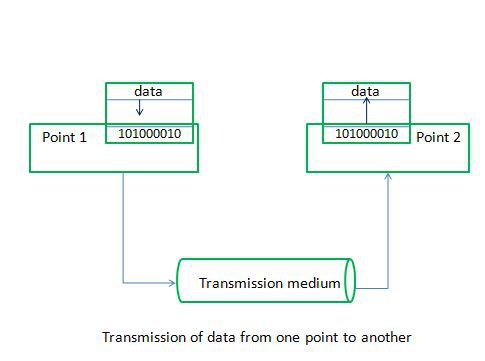
Definition: Data transmission is the process of sending data from one point to another. It can be characterized by:
Analog Transmission: Data is transmitted in continuous signals. Example: Traditional radio broadcasts.
Digital Transmission: Data is transmitted in discrete signals. Example: Data sent over the Internet using binary code.
5. Bandwidth
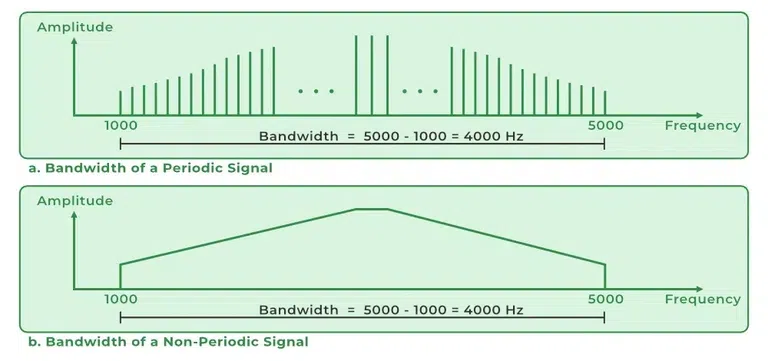
Definition: Bandwidth refers to the maximum rate at which data can be transmitted over a communication channel. It is often measured in bits per second (bps). Higher bandwidth allows for faster data transfer.
Example: A broadband connection with 100 Mbps bandwidth can transfer data at a rate of 100 megabits per second.
6. Latency
Definition: Latency is the time delay between sending and receiving data. It is the time it takes for a data packet to travel from the sender to the receiver.
Example: In online gaming, low latency (or low ping) is crucial for a smooth experience, as high latency can cause lag.
7. Error Detection and Correction
Definition: Error detection and correction techniques are used to ensure data integrity during transmission. Errors can occur due to interference or signal degradation.
Error Detection: Methods like checksums and cyclic redundancy checks (CRC) help identify errors.
Error Correction: Techniques like parity bits and Hamming codes correct errors in data.
8. Protocols
Definition: Protocols are standardized rules and formats used to ensure proper communication between devices. They define how data is formatted, transmitted, and interpreted.
Common Protocols:
TCP/IP (Transmission Control Protocol/Internet Protocol): Fundamental protocol suite for internet communication.
HTTP/HTTPS (Hypertext Transfer Protocol/Secure): Used for transferring web pages.
FTP (File Transfer Protocol): Used for transferring files between systems.
9. Modulation
Definition: Modulation is the process of varying a carrier signal to transmit data. It allows data to be transmitted over different types of communication channels.
Types:
Amplitude Modulation (AM): Varies the amplitude of the carrier signal.
Frequency Modulation (FM): Varies the frequency of the carrier signal.
Phase Modulation (PM): Varies the phase of the carrier signal.
10. Throughput
Definition: Throughput is the actual rate at which data is successfully transmitted over a communication channel. It may be affected by factors such as network congestion and errors.
Example: If a network has a theoretical bandwidth of 100 Mbps but only achieves 80 Mbps in practice due to congestion, the throughput is 80 Mbps.
Components of Data Communication
Data communication involves various key components that work together to ensure information is successfully transmitted from one point to another. Here’s a detailed look at each component:
1. Sender
Definition: The sender is the device or system that initiates the communication by generating and sending the data. This could be a computer, smartphone, or any other network-enabled device.
Example: When you send an email, your computer or smartphone acts as the sender.
Role:
Data Generation: The sender creates or processes the data to be transmitted.
Data Encoding: The sender encodes the data into a suitable format for transmission (e.g., converting text into binary).
2. Receiver
Definition: The receiver is the device or system that receives and processes the data sent by the sender. It could be another computer, server, or any device capable of receiving data.
Example: When you receive an email, the device you use to read the email is the receiver.
Role:
Data Reception: The receiver accepts the incoming data from the communication channel.
Data Decoding: The receiver decodes the data back into its original format for use.
3. Message
Definition: The message is the actual data or information being transmitted from the sender to the receiver. This could be text, audio, video, or any other form of data.
Example: The content of an email, a video file, or a text message are all examples of messages.
Role:
Data Content: The message contains the information or instructions that need to be communicated.
Format: Messages need to be formatted properly to ensure they can be understood by the receiver.
4. Communication Media
Definition: Communication media refer to the physical or logical pathways through which data is transmitted from the sender to the receiver. This includes both hardware and software components.
Types:
Physical Media: Cables, fiber optics, and other tangible media. For example, Ethernet cables and optical fiber are used for wired communication.
Wireless Media: Radio waves, microwaves, and other wireless technologies. Examples include Wi-Fi, Bluetooth, and cellular signals.
Role:
Data Transmission: Provides the pathway for data to travel between sender and receiver.
Medium Selection: The choice of media affects the speed, reliability, and quality of communication.
5. Protocols
Definition: Protocols are standardized sets of rules and procedures that dictate how data is formatted, transmitted, and received over a network. They ensure that data is transferred correctly and efficiently.
Examples:
TCP/IP (Transmission Control Protocol/Internet Protocol): The fundamental suite for internet communication, ensuring reliable data transmission.
HTTP/HTTPS (Hypertext Transfer Protocol/Secure): Used for transferring web pages and secure communications on the web.
FTP (File Transfer Protocol): Used for transferring files between systems.
Role:
Data Formatting: Protocols define how data should be structured and formatted.
Error Checking: Includes mechanisms for error detection and correction to ensure data integrity.
Communication Rules: Specifies rules for establishing and maintaining communication sessions.
Summary
In data communication, each component plays a crucial role:
Sender: Generates and sends data.
Receiver: Receives and processes data.
Message: The actual data being communicated.
Communication Media: The channels through which data travels.
Protocols: The rules that guide how data is transmitted and received.
Measuring Capacity of Communication Media (bandwidth, data transfer rate)
Bandwidth and Data Transfer Rate
When evaluating the performance and capability of communication media, two key metrics are often considered: bandwidth and data transfer rate. Both are crucial for understanding how efficiently data can be transmitted over a network.
1. Bandwidth
Definition: Bandwidth refers to the maximum amount of data that can be transmitted over a communication channel or network in a given period of time. It is essentially the capacity of the communication medium.
Units: Bandwidth is typically measured in bits per second (bps), kilobits per second (Kbps), megabits per second (Mbps), or gigabits per second (Gbps).
Example: A network with a bandwidth of 100 Mbps can theoretically transfer 100 megabits of data every second.
Types:
Maximum Bandwidth: The highest possible speed that a channel can handle. This is often determined by the physical properties of the media (e.g., fiber optics vs. copper cables).
Effective Bandwidth: The actual speed experienced by users, which may be lower than the maximum due to factors like network congestion and interference.
Importance:
Capacity: Higher bandwidth allows for more data to be transmitted simultaneously, which can support more users and more data-intensive applications.
Quality of Service: Sufficient bandwidth is crucial for maintaining the quality of services like video streaming, online gaming, and large file transfers.
2. Data Transfer Rate
Definition: Data transfer rate, also known as throughput, is the actual speed at which data is successfully transmitted over a communication channel. It reflects the performance of the network in real-world conditions.
Units: Data transfer rate is measured in bits per second (bps), kilobits per second (Kbps), megabits per second (Mbps), or gigabits per second (Gbps), similar to bandwidth.
Example: If a file transfer completes in 10 seconds at a rate of 50 Mbps, the data transfer rate is 50 Mbps.
Types:
Peak Transfer Rate: The highest speed achieved under ideal conditions, often measured during benchmarks or tests.
Average Transfer Rate: The typical speed experienced during regular usage, which can be influenced by network congestion, packet loss, and other factors.
Importance:
Real-World Performance: While bandwidth indicates the maximum potential, data transfer rate shows how well the network performs in practice.
User Experience: Higher data transfer rates lead to faster downloads, quicker file uploads, and smoother streaming.
Comparing Bandwidth and Data Transfer Rate
Bandwidth represents the maximum potential capacity of a network or channel.
Data Transfer Rate represents the actual speed at which data is transmitted and received.
Example
Consider a home internet connection with a bandwidth of 200 Mbps. This indicates the maximum speed the connection can theoretically handle. However, due to factors such as network congestion, distance from the router, and interference, the actual data transfer rate you experience may be lower. If you are downloading a large file, and it takes 20 seconds to download 100 MB, the data transfer rate would be 40 Mbps (assuming the file is 100 MB and 20 seconds for transfer).
IP Address
What It Is and Why It Matters
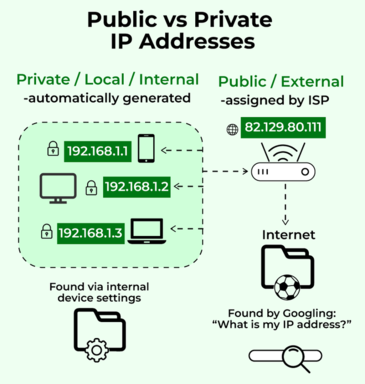
An IP address (Internet Protocol address) is a unique identifier assigned to each device connected to a network that uses the Internet Protocol for communication. Think of it as the address of your device on the internet or a local network. Just like a home address helps deliver mail to your house, an IP address helps route data to the correct device.
Key Concepts of IP Addresses
1. Types of IP Addresses
a. IPv4 (Internet Protocol version 4):
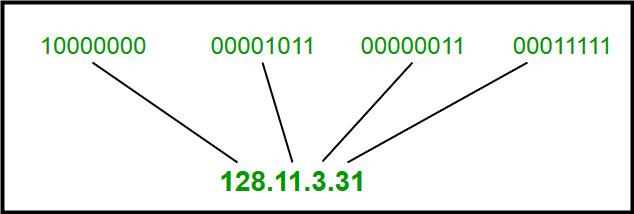
Format: IPv4 addresses are written in a 32-bit format, divided into four octets separated by periods (e.g., 192.168.1.1).
Range: IPv4 provides about 4.3 billion unique addresses, which were initially thought to be more than enough but are now running out due to the growth of internet-connected devices.
Example: Your home router might use an IPv4 address like 192.168.0.1 to identify itself on your local network.
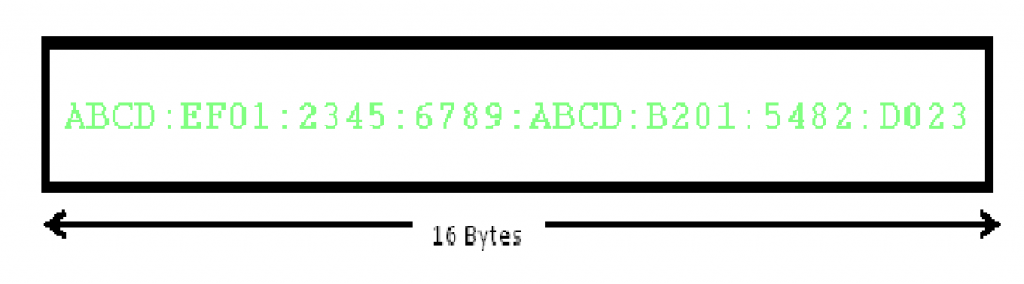
Format: IPv6 addresses use a 128-bit format, written as eight groups of four hexadecimal digits separated by colons (e.g., 2001:0db8:85a3:0000:0000:8a2e:0370:7334).
Range: IPv6 provides a vastly larger address space, allowing for approximately 340 undecillion (3.4 × 10^38) unique addresses, which should be sufficient for the foreseeable future.
Example: An IPv6 address might look like 2607:fed5:4a4e:0000:0000:0000:0000:0000.
Switching techniques are fundamental to network design and communication, determining how data is routed and managed across networks. The two primary switching techniques are circuit switching and packet switching. Here’s a breakdown of each:
1. Circuit Switching
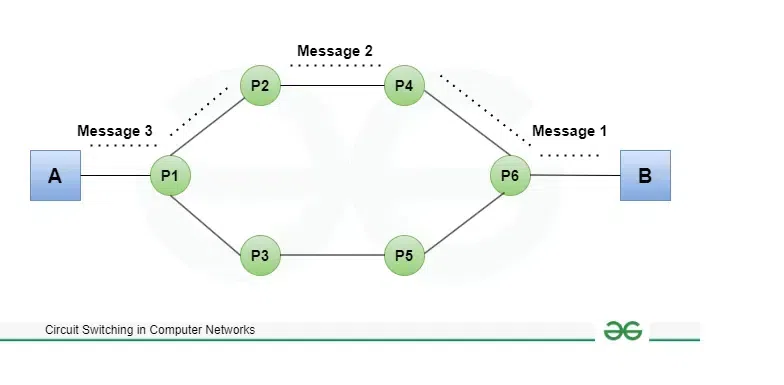
Definition: Circuit switching is a technique where a dedicated communication path or circuit is established between two devices for the duration of their conversation. This path remains open and exclusive to the two devices for the entire session.
Key Features:
Dedicated Path: A physical or virtual connection is established between the sender and receiver for the entire duration of the communication.
Constant Bandwidth: The allocated bandwidth is constant and reserved for the conversation, regardless of whether data is being transmitted at all times.
Setup Time: There is a delay at the beginning to establish the circuit before communication can begin.
Traditional Telephone Networks: When you make a phone call, a dedicated circuit is established between your phone and the recipient's phone for the duration of the call.
Pros:
Reliable Connection: Since the path is dedicated, there is less chance of data loss or delay due to other traffic.
Consistent Quality: The quality of the communication is consistent throughout the session.
Cons:
Inefficient Use of Resources: The dedicated path is reserved whether or not data is being transmitted, which can lead to inefficient use of network resources.
Scalability Issues: Circuit switching is less flexible and can be less scalable compared to other techniques.
2. Packet Switching
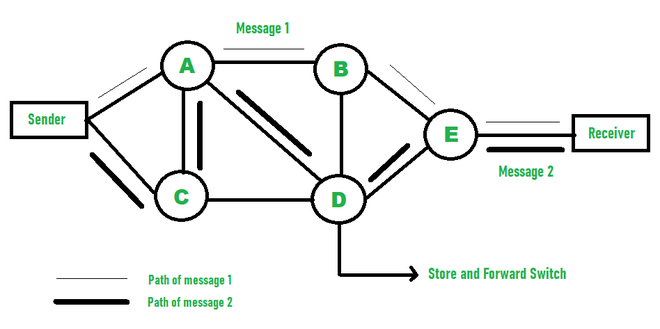
Definition: Packet switching is a technique where data is divided into small packets, which are sent independently through the network. Each packet may take a different path to reach the destination, where they are reassembled in the correct order.
Key Features:
No Dedicated Path: Data packets are sent through various routes and do not require a dedicated path between sender and receiver.
Dynamic Bandwidth: Bandwidth is allocated dynamically based on the network traffic and demand.
Efficient Use of Resources: Network resources are used more efficiently as the same path can be shared by multiple packets from different communications.
The Internet: When you browse the web or send an email, data is split into packets that travel through different routes and are reassembled at the destination.
Pros:
Efficient Resource Utilization: Network resources are used more effectively as packets from multiple sources can share the same network paths.
Scalability: Packet switching is highly scalable and can handle a large number of simultaneous communications.
Cons:
Variable Quality: The quality of communication can vary due to the shared nature of the network paths and possible delays or packet loss.
Overhead: Packet switching introduces some overhead due to the need for packet headers and reassembly at the destination.
Comparison
Circuit Switching:
Connection: Dedicated circuit for the entire session.
Bandwidth: Constant and reserved.
Efficiency: Can be less efficient due to reserved bandwidth.
Usage: Suitable for applications requiring constant and reliable connections, like traditional phone calls.
Packet Switching:
Connection: No dedicated circuit, packets travel independently.
Bandwidth: Dynamic and shared among multiple communications.
Efficiency: More efficient use of resources and better scalability.
Usage: Ideal for data-intensive applications like web browsing and email.
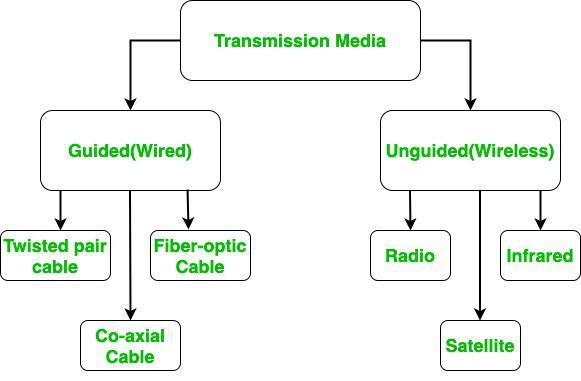
Transmission media are the physical or logical channels through which data is transmitted from one device to another in a network. They can be broadly categorized into two types: guided media (or wired) and unguided media (or wireless). Each type has its own characteristics, advantages, and use cases.
1. Guided Media (Wired Media)
Guided media, also known as wired media, refers to physical transmission mediums used to convey data signals through a controlled path. It includes cables and wires such as twisted pair cables, coaxial cables, and fiber-optic cables. These media guide the signals along a specific route from the sender to the receiver. Guided media offer reliable and high-speed data transmission. They are commonly used in network infrastructures for both local and wide area networks.
Wired Communication Media (Twisted pair cable, Co-axial cable, Fiber-optic cable)
Here are the primary types:
a. Twisted Pair Cables
Description: Consists of pairs of insulated copper wires twisted together to reduce interference.
Types:
Unshielded Twisted Pair (UTP): Common in Ethernet networks. Offers good performance at a lower cost.
Speed and Range: Generally supports speeds up to 1 Gbps over short distances. Categories like Cat5e, Cat6, and Cat6a support different speeds and bandwidths.
Example: Used for telephone lines and local area networks (LANs).
b. Coaxial Cables
Description: Comprises a central conductor, an insulating layer, a metallic shield, and an outer insulating layer.
Speed and Range: Supports higher bandwidth than twisted pair cables. Commonly used for cable television and broadband internet.
Example: Coaxial cables are used to connect cable modems to routers.
c. Fiber Optic Cables
Description: Uses glass or plastic fibers to transmit data as light pulses. Offers very high bandwidth and speed.
Speed and Range: Supports speeds ranging from 1 Gbps to several terabits per second over long distances. Less susceptible to interference and signal loss.
Example: Used for high-speed internet connections, long-distance telecommunications, and data center connections.
Unguided media, or wireless media, refers to transmission methods that send data signals through the air or space without physical cables. This includes technologies like radio waves, microwaves, and infrared signals. Unguided media allows for mobility and flexibility in device connectivity. It is essential for wireless communication systems such as Wi-Fi, Bluetooth, and cellular networks. This media is ideal for environments where cabling is impractical or impossible.
Wireless media (Radio waves, Microwaves, Infrared waves)
Here are the primary types:
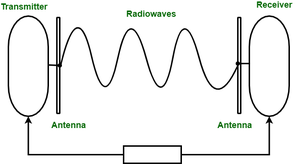
a. Radio Waves
Description: Electromagnetic waves used for various types of wireless communication.
Speed and Range: Suitable for short to medium-range communication. Commonly used in Wi-Fi and Bluetooth.
Example: Wi-Fi routers use radio waves to provide wireless internet access in homes and offices.
Description: High-frequency radio waves used for point-to-point communication over long distances.
Speed and Range: Can support high data rates but require line-of-sight between the transmitting and receiving antennas. Used in satellite communication and some long-distance communication systems.
Example: Satellite television and microwave relay stations.
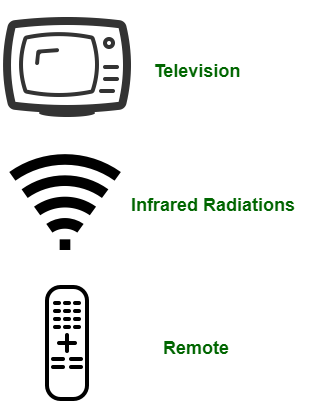
c. Infrared
Description: Electromagnetic radiation with wavelengths longer than visible light but shorter than microwaves.
Speed and Range: Typically used for short-range communication. Requires direct line-of-sight between devices. Commonly used in remote controls and some short-range data transfers.
Example: Remote controls for televisions and some data transfer applications between devices.
Description: Uses satellites in geostationary orbits to relay data between ground stations.
Speed and Range: Can cover large geographical areas and provide high-speed communication. Subject to latency due to the distance signals must travel.
Example: Satellite internet services and global broadcasting.
Network Devices Overview
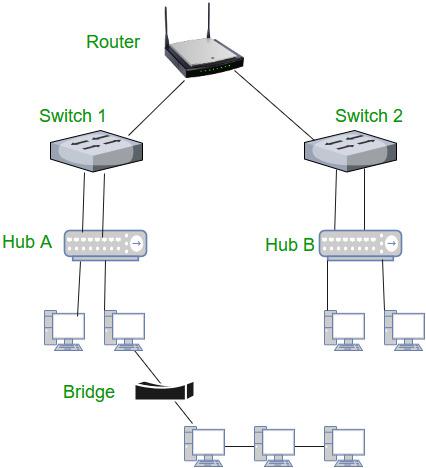
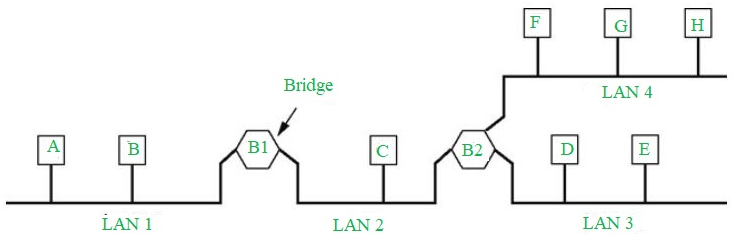
Network devices are hardware components that facilitate communication and data exchange within and between networks. They include routers, which manage traffic between networks, switches, which direct data to specific devices, and modems, which connect networks to the internet. Other devices like hubs, repeaters, and network interface cards help connect and boost network signals. Together, these devices ensure efficient and reliable network operation. Here’s a quick look at some of the key network devices:
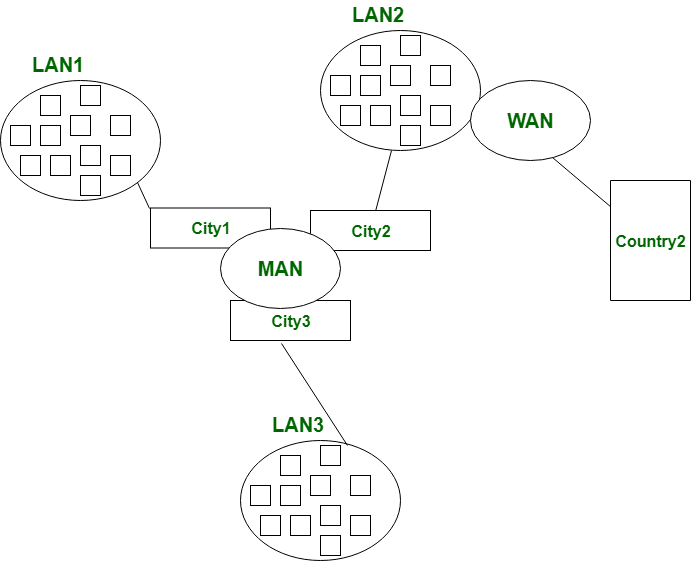
Definition: A network that covers a larger geographic area than a LAN but smaller than a WAN, typically within a city or a large campus.
Scope: Used to connect multiple LANs within a city or town, enabling communication between different locations.
Example: A network linking various branch offices of a company within a city or a public Wi-Fi network provided by a city.
4. Wide Area Network (WAN)
Definition: A network that spans a large geographic area, often covering multiple cities, countries, or continents.
Scope: Connects LANs and MANs across broad distances, enabling communication on a global scale.
Example: The Internet is the largest example of a WAN, connecting networks and devices worldwide. A company’s global network that links offices in different countries is another example.
Networking Topologies
Networking topologies refer to the physical or logical layout of devices in a network. They determine how data is transmitted and how devices are interconnected. Here’s a brief overview of three common topologies: Bus, Star, and Tree.
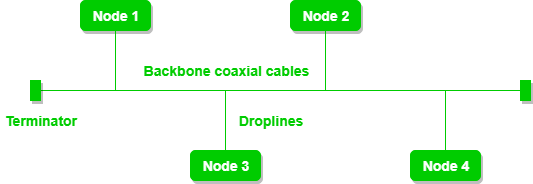
1. Bus Topology
Description: In a bus topology, all devices are connected to a single central cable, called the bus topology or backbone. Data sent by a device travels along the bus and is received by all other devices.
Simplicity: Easy to set up and cost-effective for small networks.
Performance: Can suffer from performance issues as more devices are added, due to data collisions.
Failure: If the central bus cable fails, the entire network is affected.
Example: Early computer networks often used bus topology, such as the old Ethernet networks.
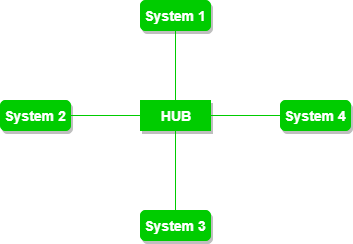
2. Star Topology
Description: In a star topology, all devices are connected to a central hub or switch. The hub acts as a repeater for data transmitted from one device to another.
Centralized Management: Easy to manage and troubleshoot since all connections are centralized at the hub.
Performance: Better performance compared to bus topology because each device has a dedicated connection to the hub.
Failure: If the central hub fails, the entire network is affected, but individual device failures do not impact the rest of the network.
Example: Most modern office networks use star topology, with a central switch connecting computers and printers.
3. Tree Topology
Description: Tree topology combines characteristics of both star and bus topologies. It features groups of star-configured networks connected to a linear bus backbone.
Scalability: Supports expansion by adding new star-configured networks to the backbone.
Hierarchy: Organized in a hierarchical manner, making it easier to manage large networks.
Failure: A failure in the backbone can affect entire branches of the network, but issues in individual star networks are isolated.
Example: Large organizational networks often use tree topology, allowing for multiple departments or floors to be connected in a structured manner.
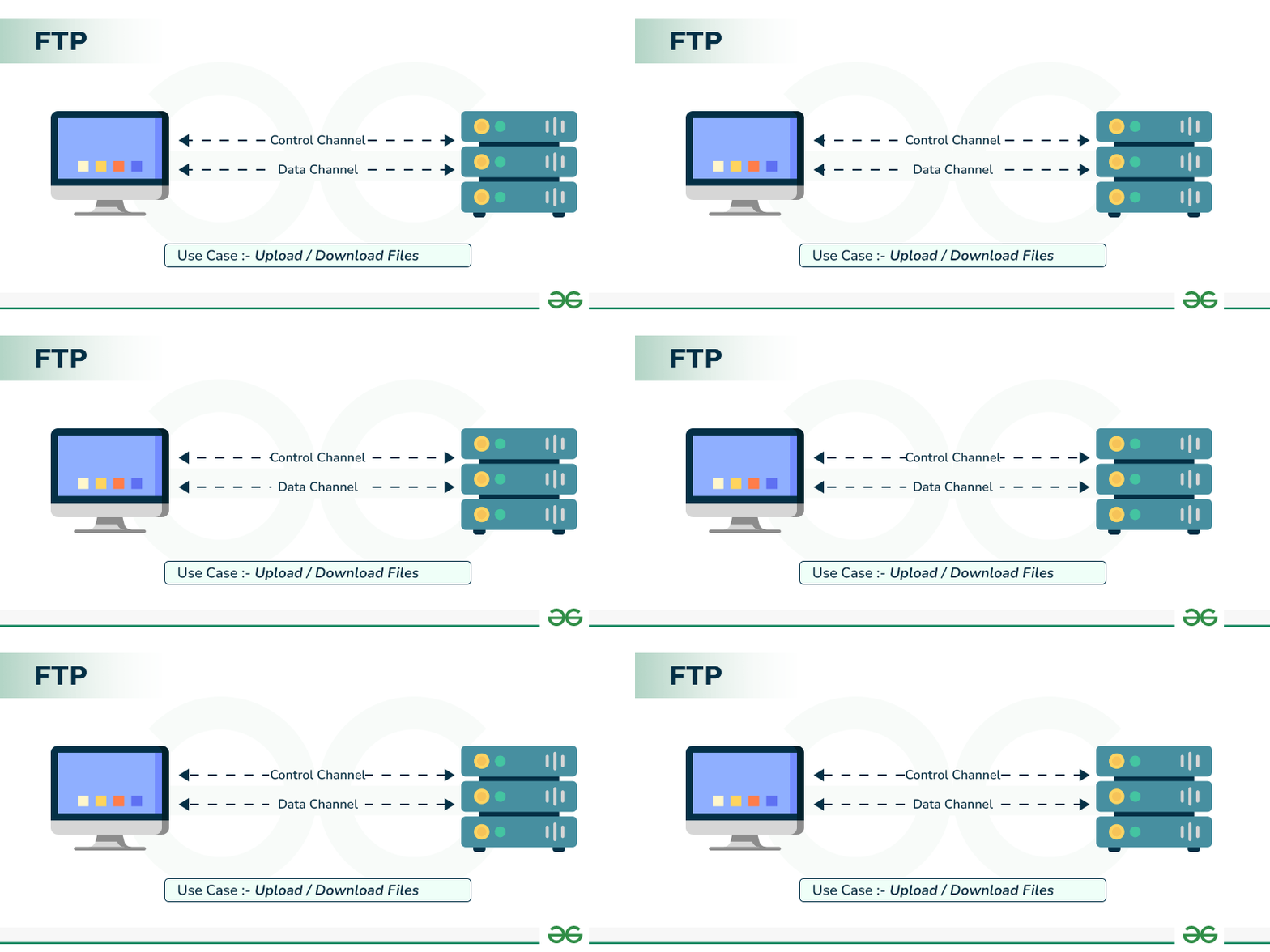
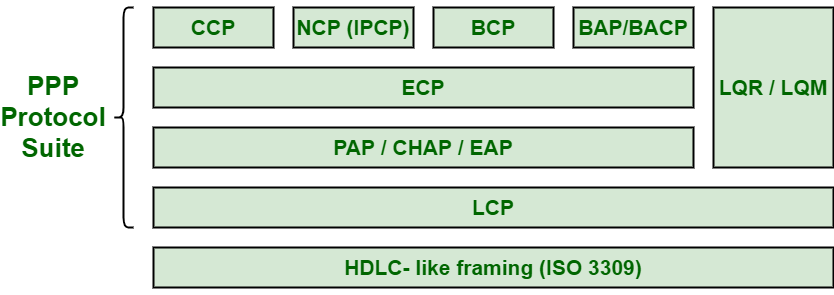
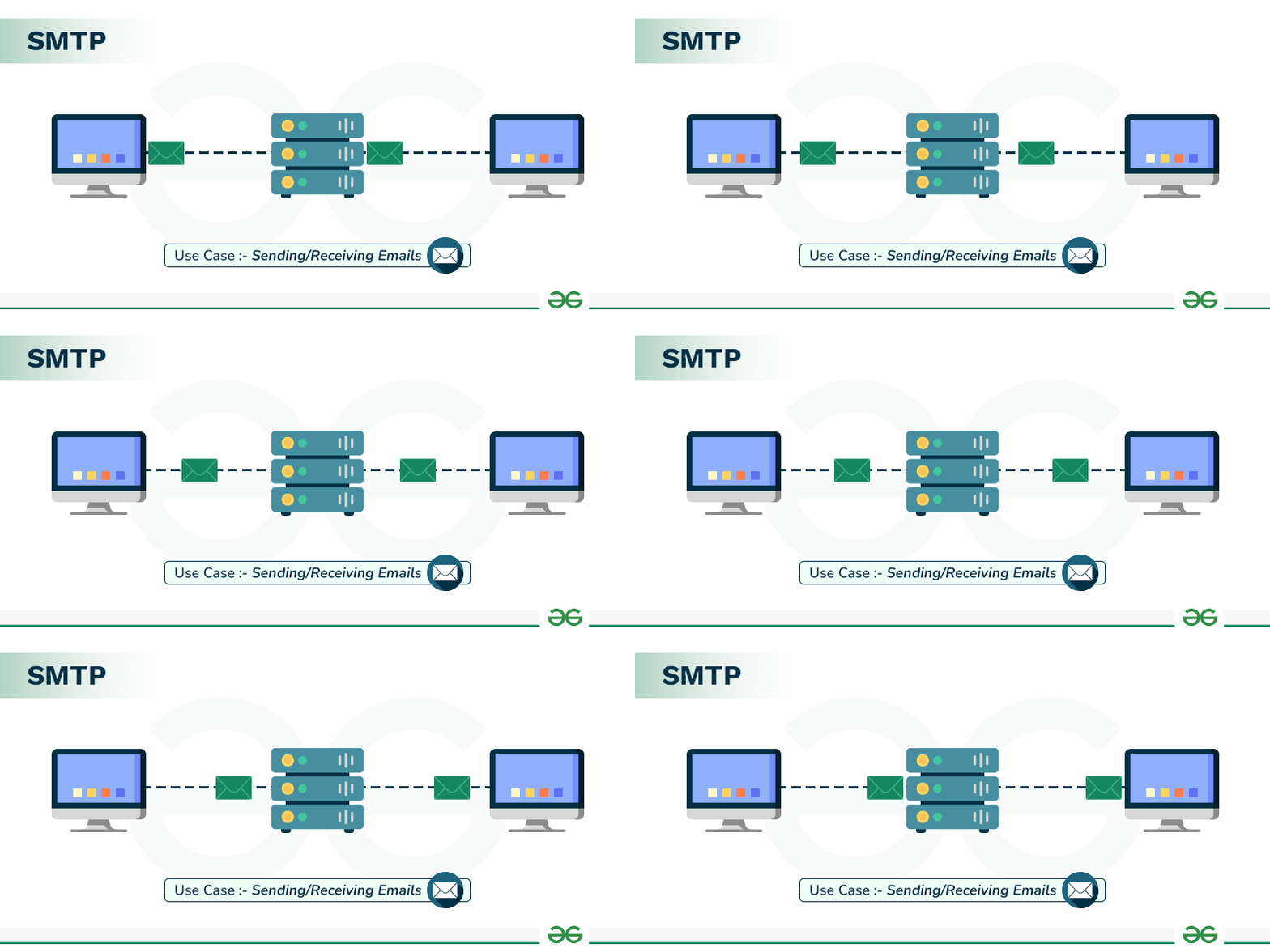
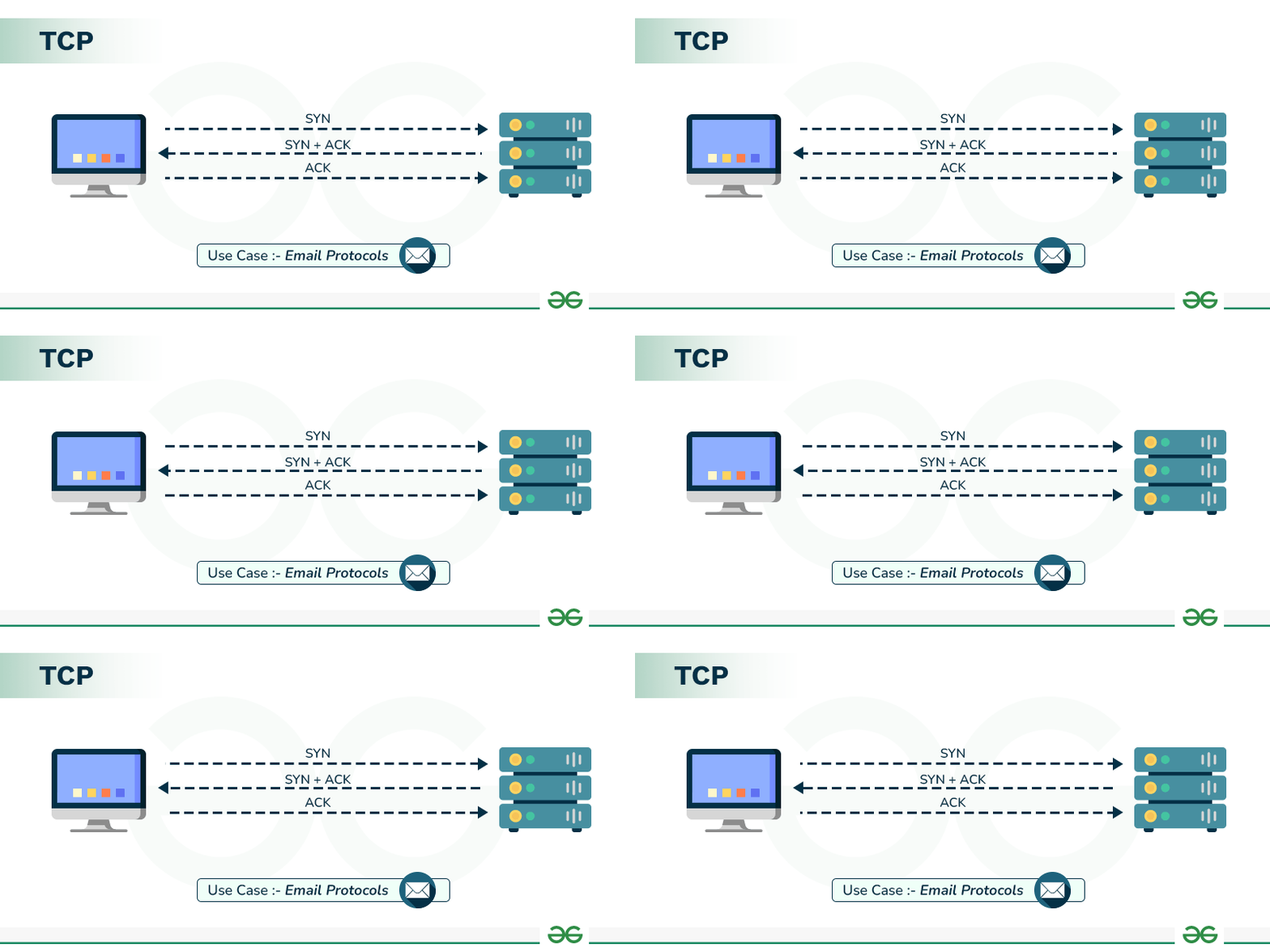
Network protocols define rules and conventions for communication between devices on a network. Here’s a brief overview of some key protocols: HTTP, FTP, PPP, SMTP, TCP/IP, POP3, HTTPS, TELNET, VoIP
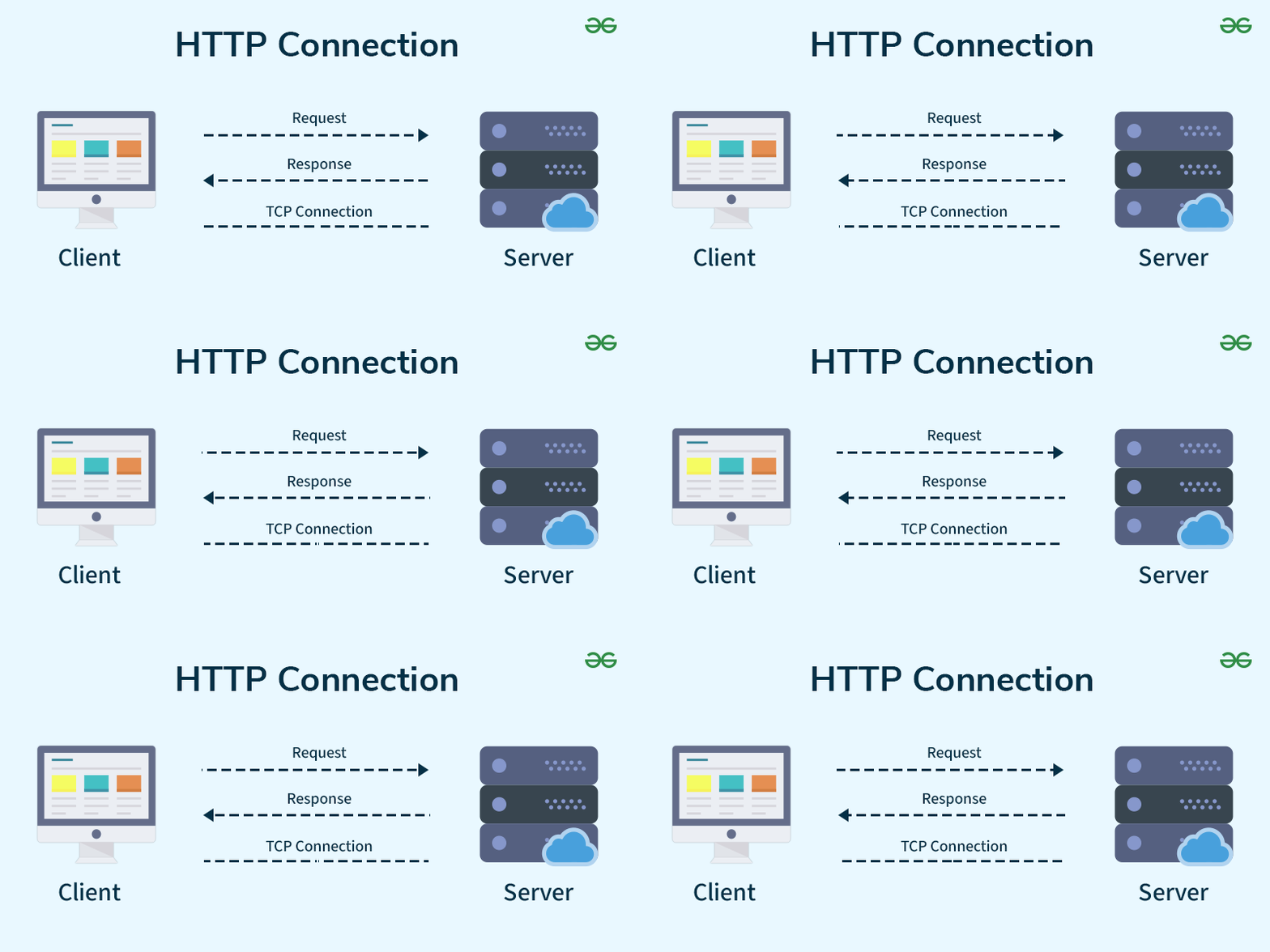
1. HTTP (Hypertext Transfer Protocol)
Function: Used for transferring web pages and related resources over the Internet.
Port: 80
Usage: When you visit a website, HTTP is the protocol used to request and receive web pages from servers.
Function: Provides a command-line interface for remote communication with other systems.
Port: 23
Usage: Allows users to log in and interact with remote servers or devices.
Example: Accessing a remote server to run command-line operations.
9. VoIP (Voice over Internet Protocol)
Function: Enables voice communication over the Internet.
Usage: Used for making voice calls over IP networks instead of traditional phone lines.
Example: Services like Skype or Zoom for making voice or video calls.
Summary
HTTP: Transmits web pages and resources.
FTP: Transfers files between client and server.
PPP: Connects two network nodes directly.
SMTP: Sends and routes email.
TCP/IP: Manages data transmission over the Internet.
POP3: Retrieves emails from a server.
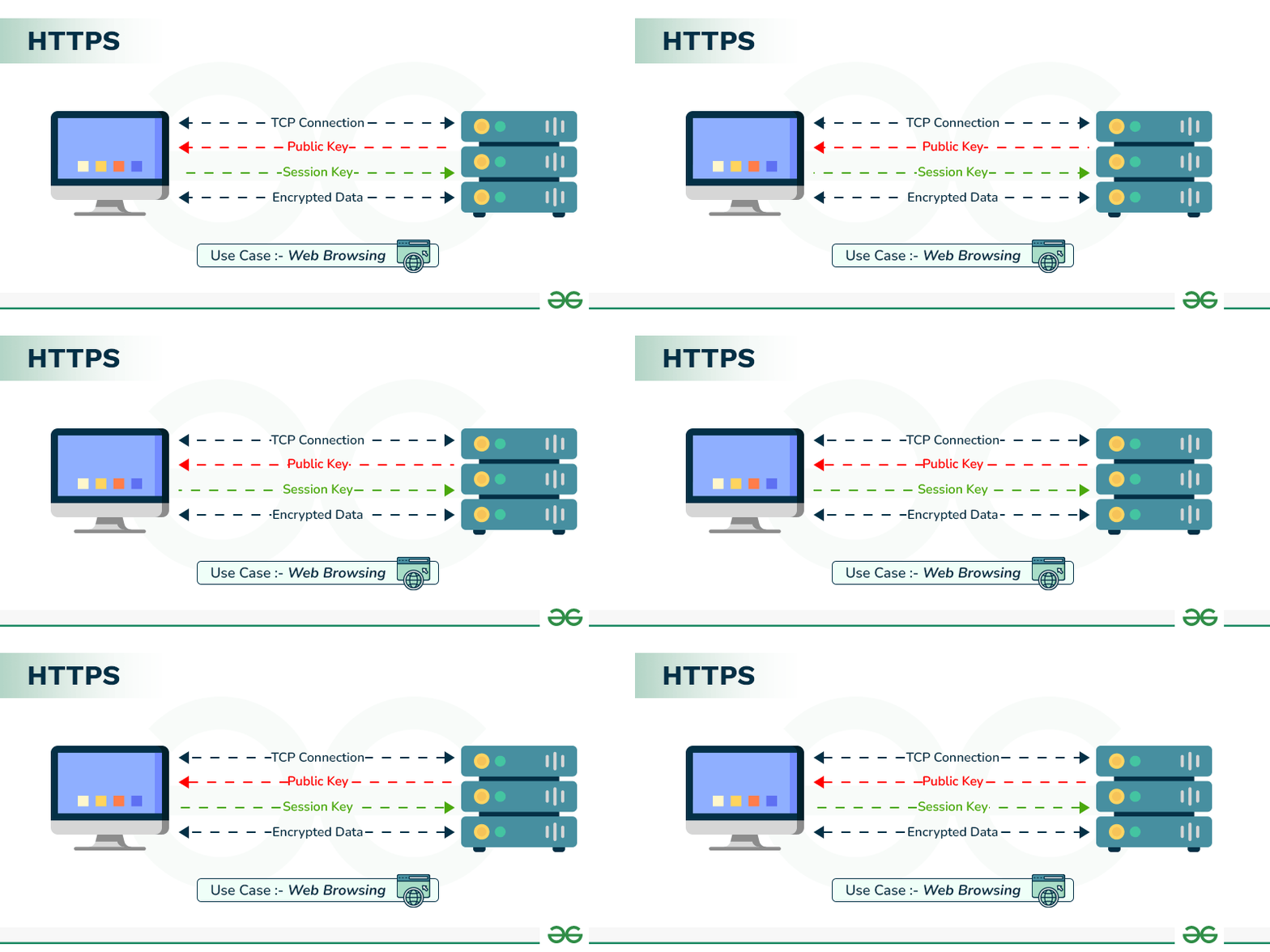
HTTPS: Secure version of HTTP for encrypted communication.
TELNET: Provides remote command-line access.
VoIP: Allows voice communication over the Internet.
Web services are technologies that enable different applications or systems to communicate with each other over the Internet. They are fundamental to how data and services are accessed and shared across the web. Here’s a basic overview:
Definition: HTML is the standard language used to create and design web pages. It provides the structure and content of a web page using a set of tags and attributes.
Components:
Tags: HTML uses tags to define elements like headings, paragraphs, links, and images. Tags are enclosed in angle brackets (e.g., <h1>, <p>, <a>).
Attributes: Tags can include attributes to provide additional information (e.g., <a href="https://www.example.com/">).
Elements: An HTML document is made up of elements, which include an opening tag, content, and a closing tag (e.g., <p>This is a paragraph.</p>).
Example: The basic structure of an HTML document includes elements like the <!DOCTYPE html>, <html>, <head>, and <body> tags. A simple HTML page might look like this:
Extensible Markup Language (XML)
XML (Extensible Markup Language) is a flexible and widely-used format for organizing and structuring data in a way that is both human-readable and machine-readable. It is designed to store and transport data, making it a key technology for data interchange between systems.
Key Features of XML
Self-Descriptive: XML documents are both human-readable and machine-readable. The tags used in XML are descriptive, which helps convey the meaning of the data.
Hierarchical Structure: XML organizes data in a tree-like structure with nested elements. This makes it easy to represent complex relationships between pieces of data.
Extensible: XML allows users to define their own tags and data structures, making it highly customizable to fit different needs.
Standardized: XML is a W3C (World Wide Web Consortium) standard, ensuring compatibility and consistency across different platforms and applications.
Basic Structure of an XML Document
Declaration: The XML declaration specifies the XML version and the character encoding used. It is optional but recommended.
<?xml version="1.0" encoding="UTF-8"?>
Root Element: An XML document must have a single root element that contains all other elements. It represents the top level of the hierarchy.
<library>
<!-- Other elements go here -->
</library>
Child Elements: These elements are nested within the root element and can contain other elements or data.
XML: A versatile and standardized format for structuring and exchanging data.
Structure: Consists of a declaration, a single root element, nested child elements, and optional attributes.
Usage: Commonly used in web services, configuration files, and data interchange between systems.
Domain Names and URLs
Domain names and URLs (Uniform Resource Locators) are fundamental concepts in the structure of the Internet. They help in identifying and accessing resources on the web. Here’s a breakdown of each:
Domain Names
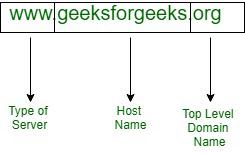
Definition: A domain name is a human-readable address used to identify a website or online resource on the Internet. It translates numeric IP addresses into a format that is easy for people to remember.
Top-Level Domain (TLD): The suffix at the end of a domain name, such as .com, .org, or .net. TLDs indicate the type or origin of the site.
Second-Level Domain: The part directly before the TLD, often representing the name of the organization or the website. For example, in example.com, "example" is the second-level domain.
Subdomain: An optional prefix before the second-level domain that further divides the domain into sections. For instance, in blog.example.com, "blog" is the subdomain.
Example: In www.example.com, "example" is the second-level domain, and ".com" is the TLD.
URLs (Uniform Resource Locators)
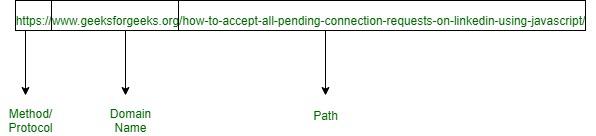
Definition: A URL is a specific type of Uniform Resource Identifier (URI) that provides the address of a resource on the Internet and specifies the protocol to be used for accessing it.
Structure:
Protocol: Indicates the method used to access the resource, such as http://, https://, ftp://.
Domain Name: Specifies the domain where the resource is hosted.
Path: Indicates the specific location of the resource on the server. It usually follows the domain name and is separated by slashes.
Query Parameters (optional): Provide additional information to the server, starting with a question mark and followed by key-value pairs separated by ampersands.
Fragment (optional): Refers to a specific section within the resource, starting with a hash symbol (#).
Key Web Concepts: Website, Web Browser, Web Servers, Web Hosting
Here’s a concise overview of each concept:
Website
Definition: A collection of web pages and related content, typically hosted on a web server, and accessible via the Internet. Websites can include text, images, videos, and interactive elements.
Components:
Web Pages: Individual documents that make up a website, usually written in HTML and styled with CSS.
Domain Name: The address used to access the website (e.g., www.example.com).
Content: Includes text, images, videos, and other media displayed on the web pages.
Example: www.example.com is a website that might contain an about page, a blog, and a contact form.
Web Browser
Definition: A software application used to access and view websites and web pages. Web browsers interpret and display HTML, CSS, and JavaScript content.
Features:
User Interface: Provides navigation controls like the address bar, back/forward buttons, and bookmarks.
Rendering Engine: Processes HTML and CSS to render web pages visually.
Security: Offers features like private browsing and protection against malicious sites.
Examples: Google Chrome, Mozilla Firefox, Microsoft Edge, Safari.
Web Server
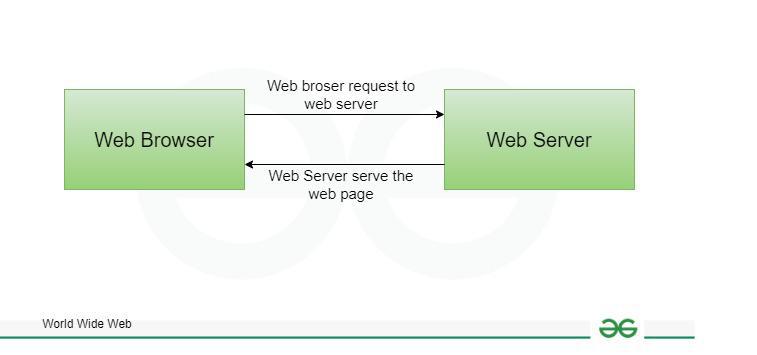
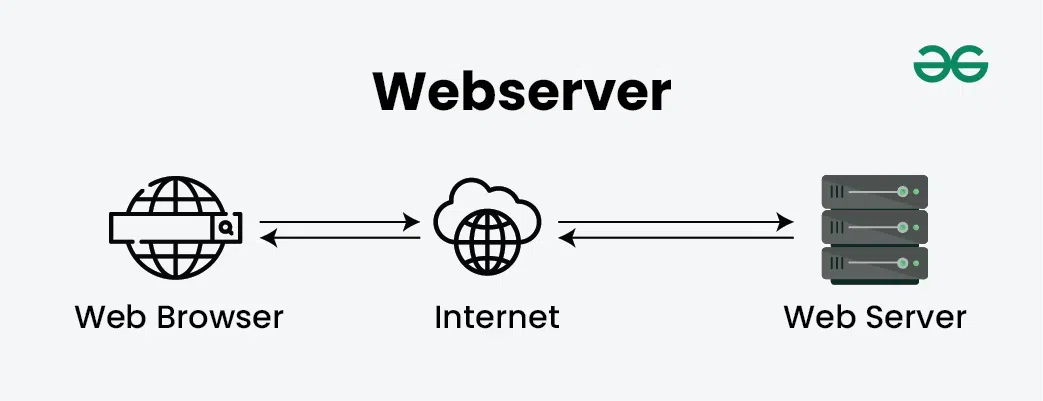
Definition: A computer system or software that stores, processes, and serves web pages to clients (web browsers) over the Internet. It responds to requests from browsers and delivers the requested content.
Serving Content: Processes incoming requests and sends the appropriate web pages or data.
Handling Requests: Uses protocols like HTTP/HTTPS to communicate with web browsers.
Examples: Apache HTTP Server, Nginx, Microsoft Internet Information Services (IIS).
Web Hosting
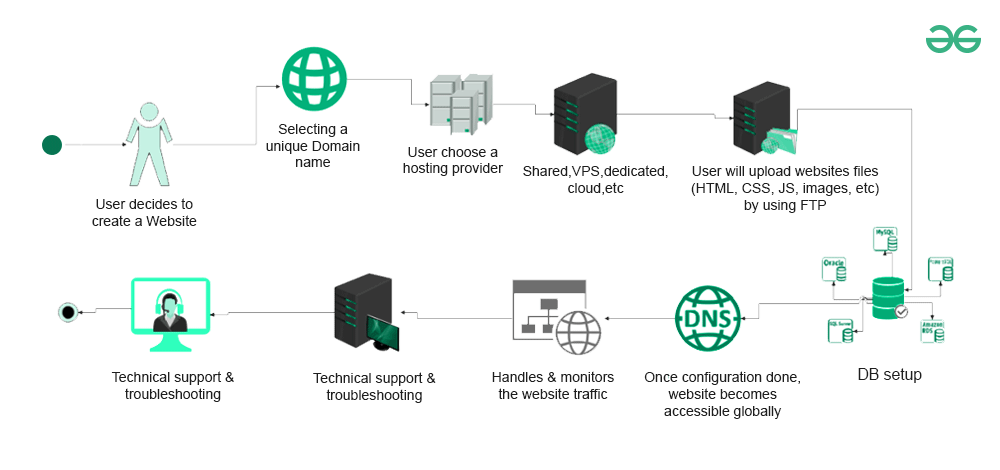
Definition: A service that provides the technology and infrastructure needed to host a website on the Internet. It involves renting space on a server where your website’s files are stored.
Shared Hosting: Multiple websites share the same server resources, which is cost-effective but can affect performance.
VPS Hosting: Virtual Private Server hosting offers more resources and control than shared hosting by partitioning a server into virtual machines.
Dedicated Hosting: Provides an entire server exclusively for one website, offering maximum control and performance.
Cloud Hosting: Uses a network of servers (the cloud) to host websites, providing scalability and flexibility.
Example: Companies like Bluehost, HostGator, and SiteGround provide web hosting services where you can upload and manage your website’s files.
Summary
Website: A collection of web pages accessible through a domain name, containing various types of content.
Web Browser: Software used to access and display web pages, like Chrome or Firefox.
Web Server: A system that hosts and serves web pages to browsers over the Internet.
Web Hosting: A service that provides the infrastructure to store and serve your website’s files on the Internet.
Distribution of Marks: CBSE Class 12th Computer Science Unit 2 Notes
Based on previous paper trends, here is the distribution of marks for Unit 2: Computer Networks:
Evolution of Networking (ARPANET, NSFNET, INTERNET): 1-2 Marks
Data Communication Terminologies: 1-2 Marks
Transmission Media: 1-2 Marks
Network Devices: 1-2 Marks
Network Topologies and Network Types: 1-2 Marks
Network Protocols: 1-2 Marks
Introduction to Web Services: 1-2 Marks
Total Marks: 60
Conclusion
Understanding the fundamentals of computer networks is essential for every Class 12th student pursuing Computer Science. Unit 2 covers a comprehensive range of topics, from the evolution of networking and data communication terminologies to transmission media, network devices, topologies, and protocols.
Our detailed notes aim to provide a clear and concise understanding of each concept, ensuring students are well-prepared for their board exams and future endeavors in technology.