Class 10 Computer Application Unit 3 Notes - Cyber Ethics
Last Updated : 23 Jul, 2025
This Unit 3 Class 10th Computer Application Notes - Cyber Ethics covers everything a Class 10 student needs to know about responsible digital behavior. Based on the latest NCERT guidelines, these notes provide a comprehensive overview of key concepts like privacy, security, and ethical online practices, along with important questions designed to help you score well in both your class tests and final board exams. This unit typically accounts for around 8-10 marks in the final exams, making it essential for securing a strong score.
Class 10 Computer Application Unit 3 Notes: Cyber Ethics
Cyberethics is a branch of computer technology behavior that defines the best practices that must be adopted by a user when he uses the computer system. In simple terms, cyberethics refers to the basic ethics and etiquette that must be followed while using a computer system. Ethics, in general, refers to propagating good behavior, similarly by cyber ethics we refer to propagating good behavior online that is not harsh or rude. Cyberethics governs rules that individuals must be polite and responsible when they use the internet. Cyberethics aim to protect the moral, financial, and social behavior of individuals. Cyberethics engages the users to use the internet safely and use technology responsibly and sensibly. Cyberethics emphasizes the behavior that must be adopted while using cyber technology.
Netiquettes
Netiquettes, short for "network etiquette," refers to the set of guidelines and polite behaviors one should follow when interacting online. They ensure respectful, effective, and harmonious communication in digital spaces. Netiquettes help maintain a positive and respectful online environment. By following these guidelines, you contribute to better communication and a more pleasant online experience for everyone.
Incorporating these practices into your online interactions ensures that you’re engaging in a way that’s considerate and effective, ultimately fostering a more respectful and efficient digital community. Here’s a quick guide to netiquettes with practical examples:
1. Be Respectful and Courteous
Treat Others as You’d Like to Be Treated: Just like in face-to-face interactions, treat others with kindness and respect.
Example: Use polite language and avoid offensive comments, even if you disagree with someone’s opinion.
Avoid All Caps: Writing in all capital letters is often interpreted as shouting.
Example: Instead of typing “THIS IS IMPORTANT,” use “This is important.”
2. Be Clear and Concise
Stay on Topic: Ensure your messages are relevant to the discussion to avoid confusion.
Example: If discussing a project update, avoid straying into unrelated topics like personal anecdotes.
Use Proper Grammar and Spelling: This helps in making your message clear and professional.
Example: Proofread your email or message to correct any typos or grammatical errors.
3. Respect Privacy and Confidentiality
Don’t Share Personal Information: Avoid disclosing sensitive information about yourself or others.
Example: Don’t share your address or phone number on public forums or social media.
Ask Before Sharing: Get permission before posting or forwarding someone else’s content.
Example: Before sharing a friend's photo online, ask if they’re okay with it.
4. Be Mindful of Tone
Be Aware of Your Tone: Since online communication lacks vocal tone, ensure your message is clear and not misinterpreted.
Example: Use emojis or polite language to convey your emotions, like saying “I’m really excited to work on this project! 😊” instead of just “I’m excited.”
5. Respect Others’ Time
Avoid Spamming: Don’t send repetitive or unnecessary messages.
Example: If you’ve already answered a question, avoid sending multiple follow-up messages unless new information arises.
Respond Promptly: Try to reply to messages in a timely manner.
Example: If you receive an important email, aim to respond within 24 hours.
6. Avoid Plagiarism
Give Credit: Acknowledge sources when using someone else’s work or ideas.
Example: When quoting or referencing someone’s article, include proper citations or references.
7. Handle Conflicts Calmly
Address Issues Privately: If a conflict arises, handle it through private messages rather than public forums.
Example: If you disagree with a team member’s approach, discuss it through direct messages or emails instead of a public chat.
Be Constructive: Offer solutions or alternatives rather than just criticism.
Example: Instead of saying “This won’t work,” say “Have you considered trying this approach instead?”
8. Use Appropriate Usernames and Avatars
Choose Professional Usernames: Select a username that reflects your professionalism or the context in which you are interacting.
Example: Use “JaneDoe” rather than “SuperStarJane” in a professional setting.
Appropriate Avatars: Ensure your profile picture or avatar is suitable for the context of the platform.
Example: Use a clear, professional photo for LinkedIn and a fun, casual image for a personal social media account.
Software Licenses and the Open Source Software Movement
Software licenses and the open source software movement are fundamental to how software is developed, shared, and used. Understanding them can help you make informed decisions about the software you use and contribute to. Here’s a breakdown:
1. Software Licenses
Software licenses are legal agreements that define how software can be used, modified, and distributed. They come in various types, each with its own set of rules and restrictions. Here are the key types:
a. Proprietary Licenses
Definition: Proprietary licenses restrict the use, modification, and distribution of software. The software's source code is not available to the public.
Example: Microsoft Windows or Adobe Photoshop.
Characteristics:
Users must pay for the software.
The source code is kept private.
Users can only use the software in ways specified by the license.
b. Open Source Licenses
Definition: Open source licenses allow users to view, modify, and distribute the source code of the software. They promote collaboration and transparency.
Examples:
MIT License: A permissive license allowing for almost unrestricted use and modification.
GNU General Public License (GPL): Requires that any modified versions of the software also be open source.
Characteristics:
Source code is publicly available.
Users can modify and share the software.
License terms vary, with some requiring derivative works to also be open source.
2. The Open Source Software Movement
The open source software movement advocates for making software source code freely available to the public. This movement emphasizes collaboration, transparency, and community-driven development.
a. Principles of Open Source
Transparency: Users can see how the software works and make improvements.
Collaboration: Developers from around the world can contribute to the software, enhancing its quality and functionality.
Freedom: Users have the freedom to use, modify, and distribute the software as they wish.
b. Benefits of Open Source
Cost: Open source software is often free, reducing software costs.
Security: With many eyes on the code, vulnerabilities are often identified and fixed more quickly.
Flexibility: Users can modify the software to meet their specific needs.
c. Examples of Open Source Software
Linux: A popular open source operating system used in servers, desktops, and embedded systems.
Mozilla Firefox: A web browser that is open source and customizable.
Apache HTTP Server: A widely used open source web server software.
d. Challenges and Considerations
Support: Open source software may not always come with professional support.
Compatibility: Some open source software may not be compatible with proprietary software or systems.
Maintenance: Open source projects rely on community contributions, which can vary in consistency.
Intellectual Property Rights, Plagiarism, and Digital Property Rights
Understanding intellectual property rights, plagiarism, and digital property rights is crucial in today's digital age, where content is easily created and shared. Here’s a breakdown:
1. Intellectual Property Rights
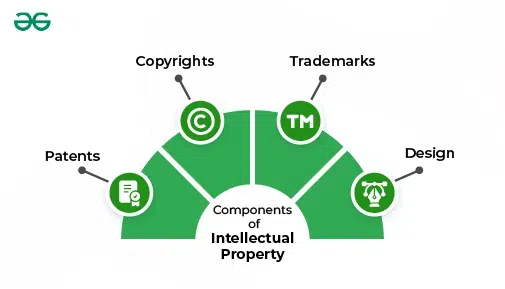
Intellectual Property (IP) Rights are legal protections granted to creators and inventors for their inventions, designs, and artistic works. These rights enable them to control how their creations are used and to benefit financially from them.
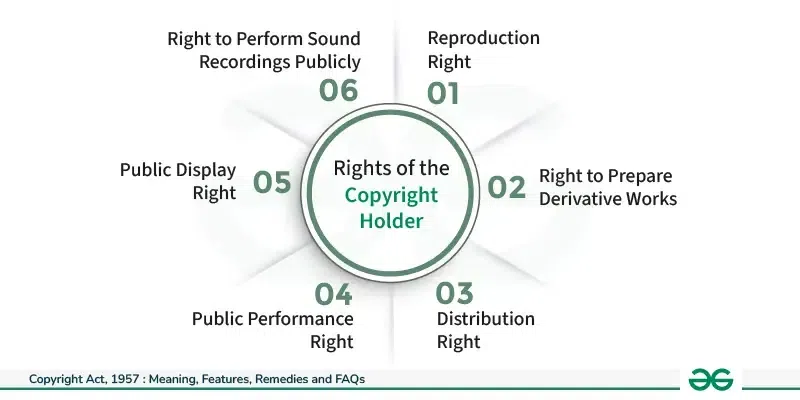
Copyright: Protects original works of authorship such as books, music, films, and software. It grants the creator exclusive rights to reproduce, distribute, perform, and display the work.
Example: J.K. Rowling’s rights to the Harry Potter books.
Patent: Protects inventions and technological processes. It gives the inventor exclusive rights to make, use, sell, and license their invention for a certain period. (Read for patents)
Example: The patent for the telephone invented by Alexander Graham Bell.
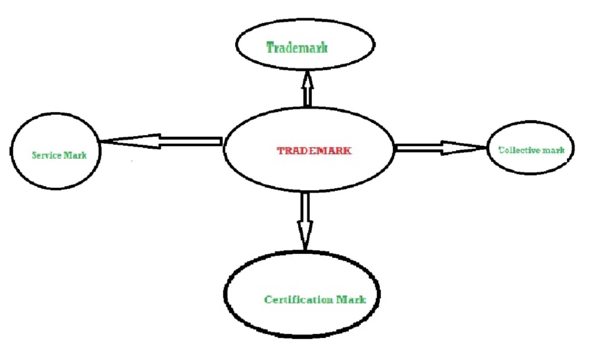
Trademark: Protects symbols, names, and logos used to identify goods or services. It helps consumers distinguish between different brands.
Trade Secret: Protects confidential business information that provides a competitive edge. Unlike patents, trade secrets are not publicly disclosed.
Example: The recipe for Coca-Cola.
2. Plagiarism
Plagiarism is the act of using someone else's work, ideas, or expressions without proper acknowledgment, presenting them as your own. It’s considered unethical and can have serious academic and legal consequences.
Types of Plagiarism:
Direct Plagiarism: Copying text word-for-word without citation.
Example: Copying a paragraph from a website into your essay without quoting or citing it.
Self-Plagiarism: Reusing your own previously published work without acknowledgment.
Example: Submitting the same research paper for multiple classes without permission.
Mosaic Plagiarism: Integrating phrases or ideas from different sources into your work without proper citation.
Example: Combining sentences from various sources into your essay while omitting citations.
Accidental Plagiarism: Unintentionally failing to credit sources due to ignorance or oversight.
Example: Forgetting to include a citation for a paraphrased idea.
Preventing Plagiarism:
Cite Sources: Always provide proper citations for quotes, ideas, or data that are not your own.
Paraphrase Correctly: Rewrite information in your own words and still cite the original source.
Use Plagiarism Checkers: Tools like Turnitin or Grammarly can help identify potential plagiarism.
3. Digital Property Rights
Digital Property Rights involve the rights related to digital content and assets created or stored online. They address issues such as ownership, control, and distribution of digital goods.
Key Aspects of Digital Property Rights:
Digital Copyright: Extends traditional copyright protections to digital formats. It covers digital content like e-books, online articles, and multimedia.
Example: The rights to a digital photograph shared online.
Digital Rights Management (DRM): Technologies used to control how digital content is used and distributed. DRM can restrict copying, sharing, and altering digital files.
Example: Encryption on digital music files to prevent unauthorized sharing.
Terms of Service Agreements: Legal agreements that govern how users interact with digital platforms and services. They outline usage rights and restrictions.
Example: Facebook’s terms of service specify how your data can be used and shared.
Challenges in Digital Property Rights:
Piracy: Unauthorized copying and distribution of digital content.
Example: Downloading movies or software from illegal sources.
Data Privacy: Ensuring that personal data collected online is protected and used appropriately.
Example: How companies handle and share user data.
Enforcement: Difficulty in enforcing rights due to the global nature of the internet and the ease of copying digital content.
Example: Taking legal action against websites that distribute pirated content.
Freedom of Information and the Digital Divide
Freedom of Information and the Digital Divide are two critical concepts in the context of digital rights and access. Here’s a detailed look at each:
1. Freedom of Information
Freedom of Information (FOI) refers to the right of individuals to access information held by public authorities. This right supports transparency, accountability, and democratic participation by allowing citizens to obtain information about government activities and decisions.
Key Aspects:
Transparency: Ensures that government actions and decisions are open to public scrutiny.
Example: Citizens can request records on how public funds are being used or how decisions are made regarding public projects.
Access to Public Records: Allows individuals to request documents, emails, and other records from government agencies.
Example: Requesting access to meeting minutes from a city council meeting.
Limitations: There are exceptions to protect sensitive information, such as national security or personal privacy.
Example: Information related to ongoing investigations or personal medical records may be withheld.
Benefits of Freedom of Information:
Promotes Accountability: Helps ensure that government officials are held accountable for their actions.
Encourages Participation: Enables citizens to make informed decisions and participate more actively in civic life.
Prevents Corruption: By making government actions transparent, it reduces opportunities for corruption.
Challenges:
Information Overload: Large volumes of data can be overwhelming and challenging to process.
Access Issues: Not all individuals may have the means or knowledge to request information effectively.
Potential Misuse: The information obtained can sometimes be misused or misinterpreted.
2. The Digital Divide
The Digital Divide refers to the gap between individuals who have access to modern information and communication technologies (ICTs) and those who do not. This divide can affect access to the internet, digital devices, and the skills needed to use technology effectively.
Key Aspects:
Access to Technology: Disparities in access to devices like computers and smartphones, and connectivity to high-speed internet.
Example: Rural areas often have less reliable internet access compared to urban areas.
Digital Skills: Differences in the ability to use technology effectively, including understanding software, navigating online platforms, and practicing online safety.
Example: Older adults might struggle more with using new technology compared to younger individuals who have grown up with it.
Economic Factors: Cost of technology and internet services can be a barrier for low-income families.
Example: Families with limited budgets may not be able to afford internet subscriptions or up-to-date devices.
Impacts of the Digital Divide:
Educational Disparities: Students without access to technology may struggle to complete homework or access online learning resources.
Employment Opportunities: Lack of digital skills can limit job opportunities and career advancement.
Social Exclusion: Individuals without internet access may be excluded from online communities, social networks, and essential services.
Bridging the Digital Divide:
Community Programs: Initiatives to provide affordable or free access to technology and internet services.
Example: Public libraries offering free internet access and computer use.
Educational Training: Programs to improve digital literacy and skills, especially in underserved communities.
Example: Workshops on basic computer skills or online safety.
Policy and Infrastructure: Government policies and investments to improve internet infrastructure and make technology more affordable.
Example: Subsidies for internet service providers to expand coverage in rural areas.
E-Commerce: Privacy, Fraud, and Secure Data Transmission
E-commerce involves buying and selling goods or services online, and it comes with specific challenges related to privacy, fraud, and secure data transmission. Here’s an overview of each:
1. Privacy
Privacy in e-commerce refers to protecting users' personal and financial information from unauthorized access or misuse. This is crucial for building trust and ensuring compliance with legal regulations.
Key Aspects:
Personal Data Protection: Protecting sensitive information such as names, addresses, payment details, and browsing history.
Example: Online retailers should not share your email address or credit card information with third parties without your consent.
Privacy Policies: E-commerce sites must have clear privacy policies that outline how they collect, use, and protect customer data.
Example: A privacy policy might state that a company uses data only for processing orders and marketing, and that it does not sell customer information to other companies.
Regulations: Compliance with laws such as the General Data Protection Regulation (GDPR) in the EU or the California Consumer Privacy Act (CCPA) in the US.
Example: GDPR requires businesses to obtain explicit consent from users before collecting their data and allows users to request deletion of their information.
Challenges:
Data Breaches: Unauthorized access to personal data due to hacking or inadequate security measures.
User Awareness: Many users are unaware of how their data is used or may not read privacy policies.
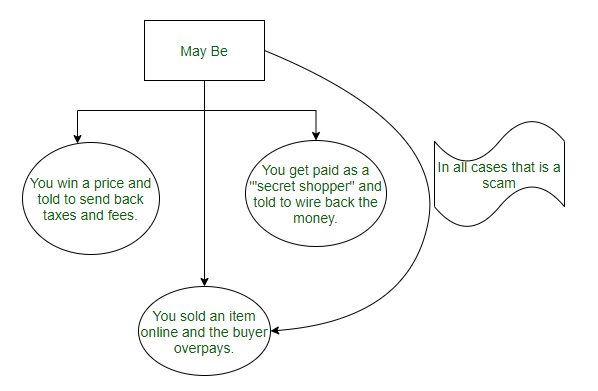
2. Fraud
Fraud in e-commerce involves deceptive practices aimed at financial gain, typically by exploiting vulnerabilities in online transactions or personal data.
Regular Monitoring: Constantly monitoring transactions for suspicious activity and implementing fraud detection algorithms.
Example: An e-commerce platform might flag large purchases from new accounts as potential fraud.
3. Secure Data Transmission
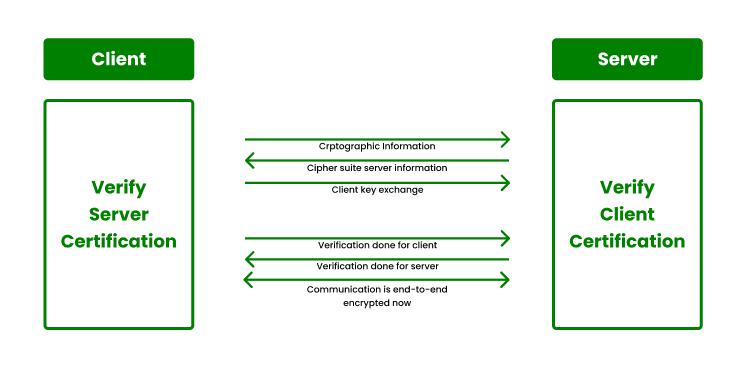
Secure Data Transmission ensures that information exchanged between users and e-commerce sites is protected from interception or tampering.
Key Techniques:
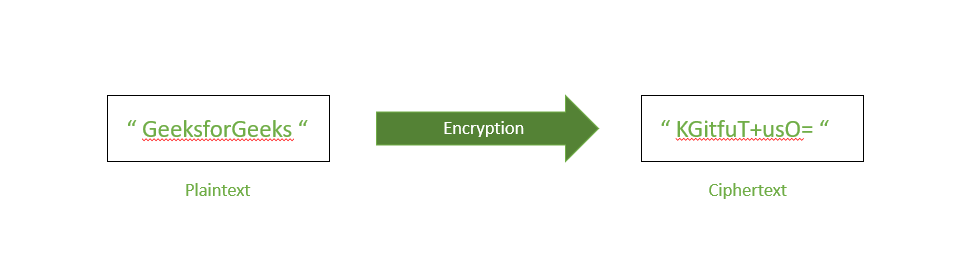
Encryption: Encrypts data so that it’s readable only by authorized parties. This protects information during transmission.
Example: HTTPS (Hypertext Transfer Protocol Secure) encrypts data between your web browser and the e-commerce site, ensuring that any information you enter, like payment details, is secure.
Secure Sockets Layer (SSL) Certificates: Ensures that data transmitted between the web server and the user’s browser is encrypted and secure.
Example: A site with an SSL certificate will have a URL that begins with “https” rather than “http.”
Challenges:
Phishing Sites: Fake websites that mimic legitimate ones to steal information. Always check for the “https” and padlock icon.
Outdated Protocols: Using outdated security protocols can expose data to risks. Regularly update and maintain security systems.
Summary
Privacy: Involves protecting personal and financial information, ensuring transparency through privacy policies, and complying with regulations.
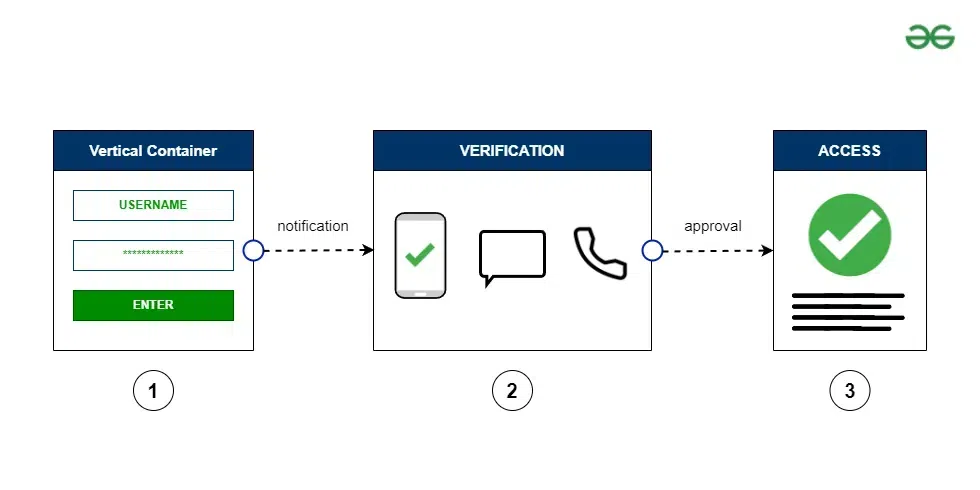
Fraud: Includes various deceptive practices like credit card fraud, phishing scams, and identity theft. Prevention involves secure payment methods, 2FA, and transaction monitoring.
Secure Data Transmission: Ensures data is protected during online transactions through encryption, SSL/TLS certificates, and secure protocols.
By understanding and addressing these aspects, e-commerce businesses can enhance security and build trust with their customers.
Conclusion
In conclusion, these Unit 3 Class 10th Computer Application Notes - Cyber Ethics are essential for understanding key concepts of responsible digital behavior and scoring well in your exams. With this unit contributing around 8-10 marks to the final exams, mastering these notes will help you secure a strong score and deepen your understanding of cyber ethics.