As we can see today's world is making much pace with technology. We are using various Computer-Based devices through which we do various activities such as shopping banking and sending data. For doing such vital activities we need to be more careful. So to be safe and secure we need to know more safety information and be aware and informed about the prevention through which we can prevent E-Frauds. Cyber safety is the practice of keeping information safe and secure and also about being responsible with that information and being respectful of other people online. Internet communication and computer email, cellphones, entertainment digital cable mp3, transportation, car engine, airplane navigation, shopping (online stores, credit card), Medicine(equipment, medical records), etc. E-Fraud involves protecting that information by preventing, detecting, and responding to attacks.
👁 E- Fraud
Examples
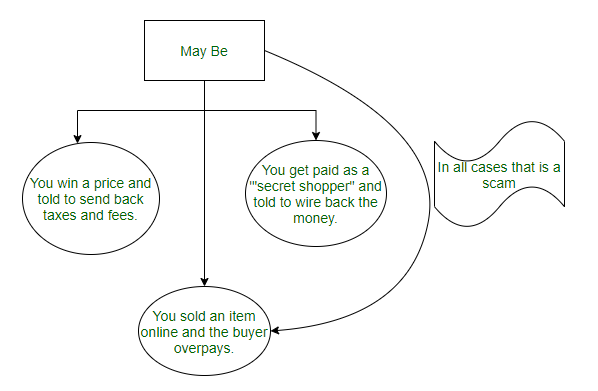
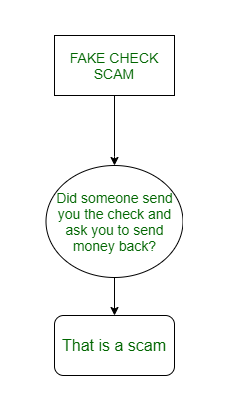
There are several examples for E-Fraud like spam, spyware, phishing, internet banking, identity theft, scams. The electronic 'junk mail' or unwanted message by email is spam which is a generic term used in mobile phones.
Security Tips for Social Media and E-mail
In this, we will discuss the security tips for social media like Facebook, WhatsApp, and will also discuss the security tips for E-mail. Let's discuss it one by one.
Being Facebook Safe
- You should always accept requests from people you know.
- One password for one app and create a Strong password with characters and special characters etc.
- Do not share your password and change it on regular basis.
- Only on need share your personal details with people or organizations.
- Log into Facebook once during a session if the second time it asks then close the link and type again www.facebook.com.
- From using it on another person’s system use a one-time password.
- Use secure browsing. The site you trust should be the source for downloading apps.
- Antivirus software must be updated.
- Keep your browser and other applications up-to-date.
- Do not paste script (code) in your browser address bar.
- Firefox No Script uses browser add-on like Web of Trust (WOT) to prevent your account from being hijacked.
- Scammers might hack your friend’s accounts and send you malicious links. Beware of alluring links coming from your friends beware of unwanted posts from anyone even Friends.
Safety Tips to Follow While Using WhatsApp
- Never send your private information like bank account details like PINs or passwords through WhatsApp.
- Never accept files or begin downloads from messages sent to you by strangers or unknown numbers.
- Never trust any message that claims to come from WhatsApp and demands some payment for the service. WhatsApp is a service will never contact you through a WhatsApp message.
- Do not believe the messages that are scams that connect your PC with WhatsApp.
- You can always keep a check on what is being downloaded by keeping automatic download disabled.
- The installation and update of your mobile device must be kept updated for an antivirus security solution.
- Be aware of what you are forwarding this can lead to being a cause for trouble.
E-mail Security Tips
- The password must be more than eight characters long with alphanumeric/ special characters/ both upper & lower case letters like AsHa-!@#
- It is not good practice to keep the same password for all your accounts. You must change your password from time to time as it is also the recommended way for security.
- The secret question, mobile SMS alert & secondary email address secure must be kept for recovery option.
- Never post an email address on New groups & Social Network sites.
- ‘Https' on public networks/ Wi-Fi should be the login credentials.
- Avoid using free Wi-Fi access in public places.
- Do not click on SPAM/ Junk mail.
- Never share your email password with anyone.
- For forwarding any email to more than one person use the BCC option to write the mail ids.
- Immediately report if you are unable to access your email account as they provide the option of ‘Forgot Password’/Account Hacked etc.
👁 CHecking Scam
Steps to keep it in mind while doing any e-transaction activity :
Recognize the risk and become familiar with some terminology associated with them this is the first step in protecting yourself.
- Viruses
Before viruses infects your system, often times, the user is required to click on a malicious link or do something on the malicious code. This action could be opening an email attachment or going to a particular web page.
- Worms
Without user intervention, they typically start by exploiting a software vulnerability (i.e. the flaw that allows software’s intended security policy to be violated) the worm will attempt to find and infect another computer once the victim computer/system is been infected. Worms can even propagate via email, websites, network-based software, and this automated self-propagation distinguishes them from viruses.
- Trojan horse
Behind the scenes, this program (trojan horse) is software that claims to be one thing while in fact doing something different. For instance, a program claiming to speed up the system may actually be sending confidential information to remote intruders.
- Hacker, attacker, intruder
The action they take is violated by the intended use of the system and exploits. Outcome range from mischief to malicious activity that is stealing information.
- Malicious code
Code such as viruses, worms, Trojan horses also the other term used is interchangeable with the unique characteristics they have.
Smart Surfing
- The operating system should be genuine and updated regularly.
- The Antivirus must be genuine that is updated and also use Anti Spyware to protect your system from Trojans/Spyware/ Malware.
- The Firewall should be ON and updated.
- Automatically installment of toolbars from the browser should be kept free.
- Instant Messengers like Yahoo, Google & Skype, etc. should never save your passwords.
- On a regular basis clear your Browser’s temporary cache.
- Do not install pirated stuff like music, video, free software, etc. while downloading.
- At the parent site, there should be software always installed.
- The unknown links should not click like hyperlinks, however luring or tempting they may be.
What is Online Fraud?
Cyber criminality involves the use of internet of engaging in fraudulent activities that are aimed at attaining illegitimate access to other people’s personal and financial information or any other form of information. Some of the most well known and often experienced from of Internet crime are phishing, identity theft, scams, and the various malware including viruses, worms and Trojan. These fraudulent activities lead to great losses, identity theft among other things.
What is Fraud Prevention?
Fraud prevention refers to measures that are laid down and protocols that are implemented in order to shield people or companies from fraud. This involves protecting oneself and others’ details, familiarizing oneself with scams and knowing how to shield from such incidents, and use of measures to counter any risks. Fraud prevention is a never-ending process and needs over-attention and awareness with the help of different tools and methods.
Challenges in Fraud Prevention
Fraud prevention faces several challenges, including:
- Evolving Tactics: They never cease to calculate new strategies that they can use so as to outsmart the security systems in place.
- User Awareness: Most people seem not to have awareness or knowledge on the dangers that exist in the internet and how they can be prevented.
- Technological Vulnerabilities: They noted that as technology improves vulnerabilities arise which fraudsters can take advantage of them.
- Complex Fraud Schemes: Both criminal and sophisticated fraud schemes are hard to identify and avoid and therefore calls for considerable security measures.
Why is Fraud Prevention Important?
Fraud prevention is crucial for several reasons:
- Financial Security: Fraud prevention plays a role of safeguarding the people and companies against financial losses arising from fraudulent transactions.
- Personal Safety: Measures against fraud protect the data of the individual, to minimize the occurrence of identity theft and other cybercrimes.
- Reputation Protection: In case of the businesses, it is always crucial to prevent fraud because failure to so leads to customers and therefore market reputational loss.
- Regulatory Compliance: maintenance of fraud prevention measures saves organizations from potential breakdown of laws and regulations which in turn may attract penalties such as fines.
Steps to Avoid Online Fraud
- Use Strong and Unique Passwords: It is also important to keep changing the passwords and the best way to do this is coming up with a hard to crack passwords with combination of letters, numbers or specialty symbols. One of the main rules of protection against unauthorized access is the absence of identical passwords on different accounts.
- Enable Two-Factor Authentication: Unfortunately, there is a risk of hacking in each person’s life nowadays; therefore, enhance safety of your accounts using two-step verification.
- Be Cautious with Email Links and Attachments: Always avoid clicking on suspicious links or get anything from any strange sources via an attachment.
- Monitor Your Accounts Regularly: Contact your bank and credit card company on a frequent bases to ensure that there is no fraudulent activity on your account.
- Keep Software Updated: The best thing that you can do is to make sure that the operating system, the antivirus software and other programs you are using are well updated with the newest security update.
- Avoid Public Wi-Fi for Sensitive Transactions: Customers should employ secure, private networks when engaging in actions such as purchasing goods and services online, or when using the net to access confidential data.
- Educate Yourself: To avoid falling prey to this fraud the society should follow updates on the existent and emerging scams and security heeds.
Conclusion
Staying safe online and being secure is thus always an important goal which should be sought at all times. As is evident from all the above points it is possible to prevent many e-frauds and cybercrimes if rules for conducting online transactions are followed and necessary precautions are taken as explained below. When putting into practice good anti fraud measures you are also playing your part in helping to protect users from fraud.
What is online fraud?
Online fraud is best described as unlawful acts undertaken on the Internet with an aim of embezzlement of individual Identity details and/or cash with out authorization and/or legal excuse.
How can I protect myself from online fraud?
Minimize risks by using different and hard passwords, turn on two factor authentication, and do not open any links or attachments from unknown sources, and check your accounts frequently.
Why is fraud prevention important?
Fraud prevention is important so as to protect financial assets, physical well being, the reputation of an organization, and to ensure legal compliance.
What are some common types of online fraud?
Those can be phishing or identity theft, malware (virus, worms, trojans), scams that focus on the personal or financial data.