|
VOOZH | about |
|
VOOZH | about |
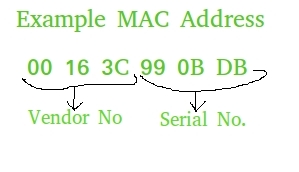
MAC address also known as physical address is the unique identifier that is assigned to the NIC (Network Interface Card) of the computer. NIC helps in connection of a computer with other computers in the network. MAC address is unique for all the NIC's.
Uses of MAC address :
Let's understand different methods to extract the MAC address.
This is the easiest method as it uses the getmac module, which is specifically designed to retrieve your MAC address with just one line of code. If you want something quick, clean and reliable, this is a great choice.
Output
30:03:c8:88:ce:07Explanation: gma() function retrieves the MAC address of the current device by checking the system's network interfaces and returning the primary active one.
Note:
This method is great if you want to see the MAC addresses of all network interfaces on your computer (like Wi-Fi, Ethernet, etc.). It uses the psutil module, which is commonly used for system monitoring and retrieving hardware/network info.
Output
Explanation: For each network interface, it checks its addresses and looks for the one with the address family 'AF_LINK', which corresponds to the MAC address. Once found, it prints the interface name along with its MAC address and then proceeds to the next interface.
Output
92:e3:34:fe:da:7fExplanation: uuid.getnode() returns the hardware address as a 48-bit integer, converted to a zero-padded 12-digit hex string, then split into byte pairs and joined with colons to format.
This method also uses only built-in Python libraries, but the formatting is done using a slightly more complex trick. It’s a bit harder to read, but it gives you a properly formatted MAC address if you're comfortable with list comprehensions and bitwise operations.
Output
92:e3:34:fe:da:7fExplanation: getnode() returns the hardware address as a 48-bit integer, bytes are extracted by shifting and masking, formatted as hex, collected and reversed.