|
VOOZH | about |
|
VOOZH | about |
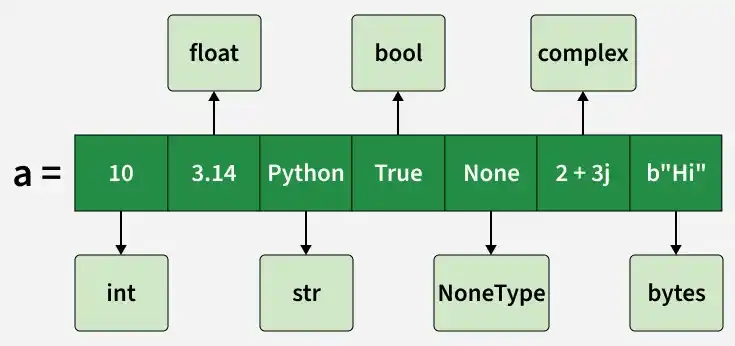
List is a built-in data structure used to store an ordered collection of items. They are dynamic, resizable and capable of storing multiple data types.
Lists can be created in several ways, such as using square brackets [], the list() constructor or by repeating elements.
1. Using Square Brackets: Square brackets [] are used to create a list directly.
[1, 2, 3]
['apple', 'banana']
2. Using list() Constructor: A list can also be created by passing an iterable (such as tuple, string or another list) to the list() constructor.
[1, 2, 3, 'apple', 4.5]
['G', 'F', 'G']
3. Creating List with Repeated Elements: A list with repeated elements can be created using the multiplication (*) operator.
[2, 2, 2, 2, 2]
[0, 0, 0, 0, 0, 0, 0]
Python list stores references to objects, not the actual values directly.
1
[1, 2, 2, 'Python']
Explanation:
Elements in a list are accessed using indexing. Python uses zero-based indexing, meaning a[0] represents the first element. Negative indexing is also supported, where -1 accesses the last element.
10
30
Elements can be added to a list using the following methods:
1. append(): Adds an element at the end of the list.
[1, 2, 3]
2. insert(): Adds an element at a specific position.
[1, 2, 3]
3. extend(): Adds multiple elements to the end of the list.
[1, 2, 3, 4]
Since lists are mutable, elements can be updated by assigning new values using their index.
[10, 25, 30, 40, 50]
Elements can be removed from a list using the following methods:
1. remove(): Removes the first occurrence of an element.
[1, 3]
2. pop(): Removes the element at a specific index or the last element if no index is specified.
[1, 2]
3. del statement: Deletes an element at a specified index.
[1, 3]4. clear(): removes all items.
[]
Lists can be iterated using loops, allowing operations to be performed on each element.
apple
banana
cherry
A nested list is a list that contains another list as its element. It is commonly used to represent matrices or tabular data. Nested elements can be accessed by chaining multiple indexes.