|
VOOZH | about |
|
VOOZH | about |
Automatic Categorical Data Analysis focuses on using programmatic techniques to examine categorical features efficiently and consistently. Rather than analyzing each column individually, automation enables scalable summaries of categorical attributes using Python libraries which is essential when working with datasets containing many non-numeric fields.
Automating categorical analysis streamlines the process, allowing analysts to focus on insights rather than repetitive tasks.
Here, we use the Google Play Store dataset, which contains information about mobile applications. The presence of multiple non-numeric attributes makes it suitable for categorical data analysis.
You can download Dataset from here
Output:
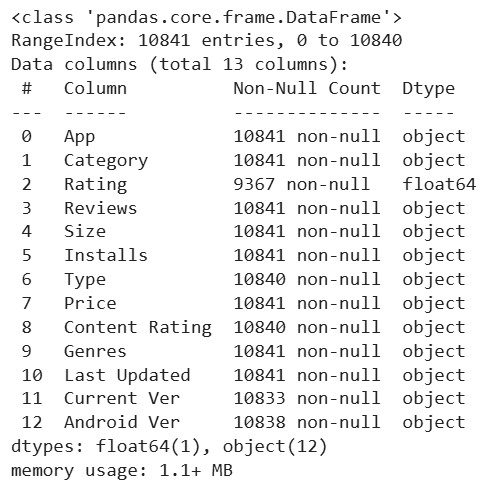
The info() method shows the data type and non-null count for each column, making it easier to distinguish categorical and numerical features and identify missing values. This information guides appropriate preprocessing and analysis steps.
Output:
Counting apps manually is inefficient and error-prone. Python provides ways to automate this task from basic loops to optimized Pandas methods.
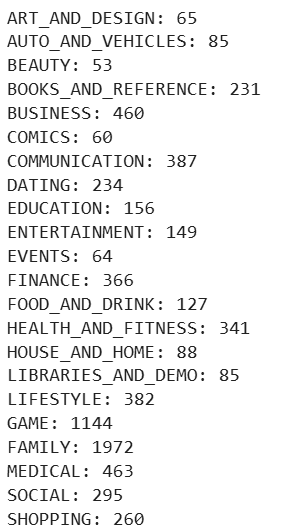
A simple approach uses loops to count occurrences of each category which helps understand the underlying logic of automation.
Output:
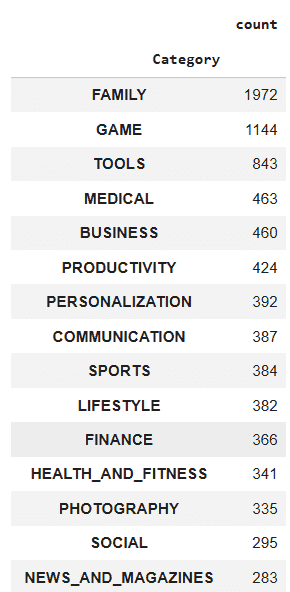
Pandas offers a faster more efficient method for counting category occurrences ideal for large datasets.
Output:
Analyzing app types can be automated to quickly understand the distribution of Free vs Paid apps without manually counting each entry.
A simple loop-based approach counts each app type and stores the results in a dictionary.
Output:
{'Free': 10039, 'Paid': 800, nan: 0, '0': 1}
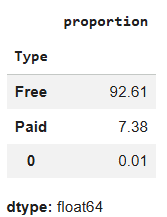
Pandas provides a faster, fully automated way to get counts and percentages.
Output:
This method eliminates manual loops, handles large datasets efficiently.
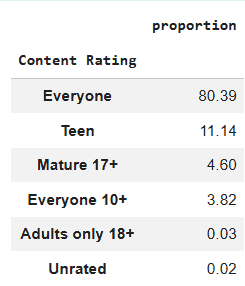
Content Rating indicates the target audience for each app and is an important categorical feature to analyze. Automating this analysis helps quickly understand how apps are distributed across age groups.
We can use a loop to count the number of apps in each content rating and store the results in a dictionary.
Output:
{'Everyone': 8714, 'Teen': 1208, 'Everyone 10+': 414, 'Mature 17+': 499, 'Adults only 18+': 3, 'Unrated': 2, nan: 0}
For a cleaner and faster approach, Pandas provides the value_counts() method to automate counting and sorting of categories.
Output:
This method eliminates the need for loops, handles large datasets efficiently, and instantly provides both counts and proportions of apps in each content rating.
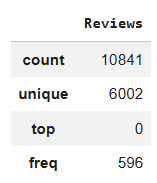
Pandas provides a fast way to get summary statistics for categorical data using the describe() method. This avoids manual counting and gives an instant overview of key insights.
Output:
This method is especially useful for quick exploratory analysis giving a snapshot of data distribution without writing multiple lines of code.
Instead of analyzing one column at a time, we can generalize categorical analysis using a loop over multiple columns. This makes the process reusable and scalable.
Output:
You can download full code from here