|
VOOZH | about |
|
VOOZH | about |
Duplicates are a common issues in real-world datasets that can negatively impact our analysis. They occur when identical rows or entries appear multiple times in a dataset. Although they may seem harmless but they can cause problems in analysis if not fixed. Duplicates could happen due to:
To manage duplicates the first step is identifying them in the dataset. Pandas offers various functions which are helpful to spot and remove duplicate rows. Now we will see how to identify and remove duplicates using Python.
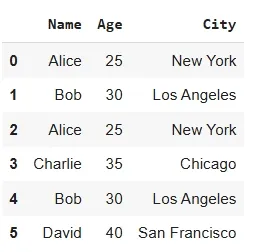
We will be using Pandas library for its implementation and will use a sample dataset below.
Output:
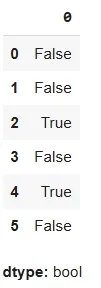
The duplicated() method helps to identify duplicate rows in a dataset. It returns a boolean Series indicating whether a row is a duplicate of a previous row.
Output:
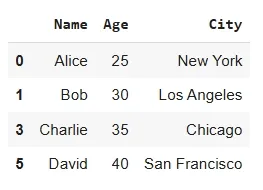
Duplicates may appear in one or two columns instead of the entire dataset. In such cases, we can choose specific columns to check for duplicates.
Here we will specify columns i.e name and city to remove duplicates using drop_duplicates() .
Output:
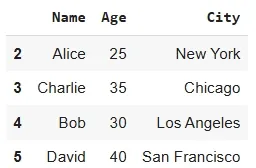
By default drop_duplicates() keeps the first occurrence of each duplicate row. However, we can adjust it to keep the last occurrence instead.
Output:
Cleaning duplicates is an important step in ensuring data accuracy which improves model performance and optimizing analysis efficiency.