|
VOOZH | about |
|
VOOZH | about |
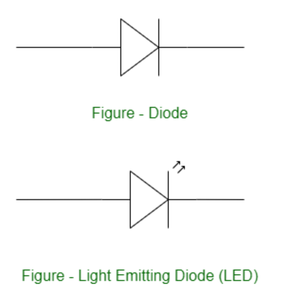
In the field of electronics and programming, controlling an LED with a potentiometer is important too. By varying the resistance of the potentiometer, you can change the brightness of the LED. We will interface an LED (light-emitting diode) to the Arduino UNO board. An LED is a simple diode that emits light with a forward bias. We control the brightness of an LED by interfacing a potentiometer with it. We write a program in the Arduino IDE and download it to the microcontroller board.
Arduino is an open-source, board that has a Microchip ATmega328P microcontroller on it. This microcontroller has a set of Digital and Analog input and output pins. The operating voltage of the board is 5V. It has 14 digital I/O pins & 6 Analog input pins. The clock frequency of the microcontroller is 16 MHz.
LEDs (Light Emitting Diodes) are becoming increasingly popular among a wide range of people. When a voltage is given to a PN Junction Diode, electrons and holes recombine in the PN Junction and release energy in the form of light (Photons). An LED's electrical sign is comparable to that of a PN Junction Diode. When free electrons in the conduction band recombine with holes in the valence band in forward bias, energy is released in the form of light.
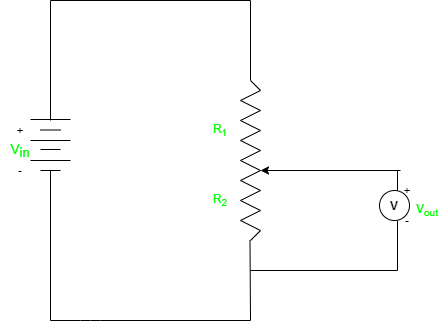
A potentiometer, sometimes known as a "pot," is an electrical component used to manually alter the resistance in a circuit. It has three terminals and is a form of variable resistor. Potentiometer has many applications as it is used to control the volume of audio devices and change the brightness of screens or LEDs. We can regulate a parameter by varying the resistance over a wide range.
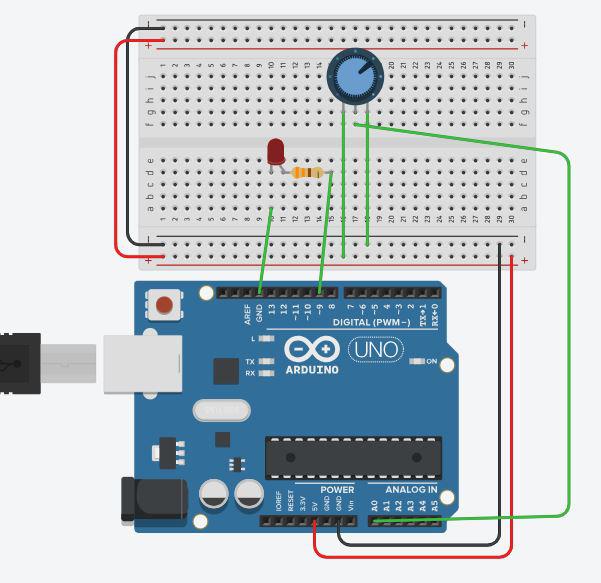
1. 1 X LED
2. 1 X Resistor, 330 Ohm
3. Breadboard
4. Arduino UNO R4 or earlier versions.
5. Jumper wires
6. Potentiometer
The potentiometer, also known as a variable resistor, is attached to a circuit and allows the voltage to be varied by increasing or decreasing the resistance. We will utilize this variable resistance to adjust the brightness of the LED. For example, increasing the resistance will allow less current to reach the LED, causing it to glow less brightly. Similarly, lowering the resistance allows more current to be sent to the LED, causing it to glow brighter.
Following steps need to perform for LED control using potentiometer.
pinValue = (255.0/1023.0)*potValue
or one can use direct map() function available in the Arduino library.
pinValue = map(potValue, 0, 1023, 0, 255);
Controlling the brightness of an LED with a potentiometer and an Arduino has various practical applications, particularly where changing light intensity is critical. Here are some of examples:
In conclusion utilizing a potentiometer with an Arduino to control LEDs provides a versatile and practical solution to modify brightness levels in a variety of applications. You may design dynamic lighting solutions that cater to user preferences, environmental conditions, and special project requirements by combining the capabilities of Arduino and the flexibility of potentiometers. This method provides for intuitive engagement, allowing users to manually fine-tune the intensity of LEDs to meet their specific demands. Controlling LED brightness adds a new degree of utility and efficiency to electrical projects, whether it's for providing ambient lighting, altering display backlighting, or boosting visual effects.