|
VOOZH | about |
|
VOOZH | about |
The res.render() function in Express.js is used to render a view template and send the resulting HTML to the client. This allows you to dynamically generate HTML pages by combining your templates with data.
Syntax:
res.render(view [, locals] [, callback]);Parameters
Returns: This function does not return a value. Instead, it sends the rendered HTML to the client as the response.
Now, let's discuss the steps to install the express module
Step 1: Installing the required modules
npm install express ejsStep 2: After installing the express module, you can check your express version in the command prompt using the command.
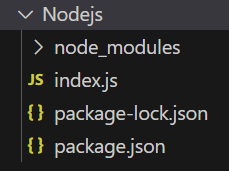
npm version expressProject Structure:
The updated dependencies in package.json file will look like:
"dependencies": {
 "ejs": "^3.1.9",
 "express": "^4.18.2",
}
Example 1: Below is the code of res.render() Function implementation.
Steps to run the program:
Run the index.js file using the below command:
node index.jsConsole Output:
Server listening on PORT 3000Browser Output:
Now open the browser and go to http://localhost:3000/user, you can see the following output on your screen:
Welcome to GeeksforGeeksExample 2: Below is the code of res.render() Function implementation.
Steps to run the program:
Run the index.js file using the below command:
node index.jsConsole Output: After running the above command, you will see the following output on your console screen:
Server listening on PORT 3000
Render Working
Browser Output: Now open the browser and go to http://localhost:3000, you can see the following output on your screen:
Render Function Demo