|
VOOZH | about |
|
VOOZH | about |
GraphQL is an open-source query language for APIs and a server-side runtime that executes queries and returns the requested data. Before starting GraphQL development, it is important to properly set up the required environment.
Setting up an Express server is a fundamental step in building web applications with Node.js. Express is a lightweight and flexible framework that helps developers create APIs and handle HTTP requests easily.
Follow this to create an Express server before proceeding -> Create an Express.js Application
Setting up GraphQL involves installing the required packages and configuring a GraphQL server within your application. This enables the server to process GraphQL queries and return the requested data efficiently.
Install the following packages to use GraphQL with Express.
npm install @apollo/server
npm install graphql
Import the necessary GraphQL and Express libraries in your application.
import { ApolloServer } from '@apollo/server';
import { expressMiddleware } from '@apollo/server/express4';
Create a GraphQL server using Apollo Server and define a schema using GraphQL’s Schema Definition Language (SDL).
Syntax:
const yourServerName = new ApolloServer({
 typeDefs: "",
 resolvers: {},
});
Wrap the application inside an async function and start the GraphQL server.
Expose the GraphQL server at an endpoint so it can receive GraphQL queries.
app.use("/yourEndpointName", expressMiddleware(yourServerName));Start the Express server and open the following URL in your browser:
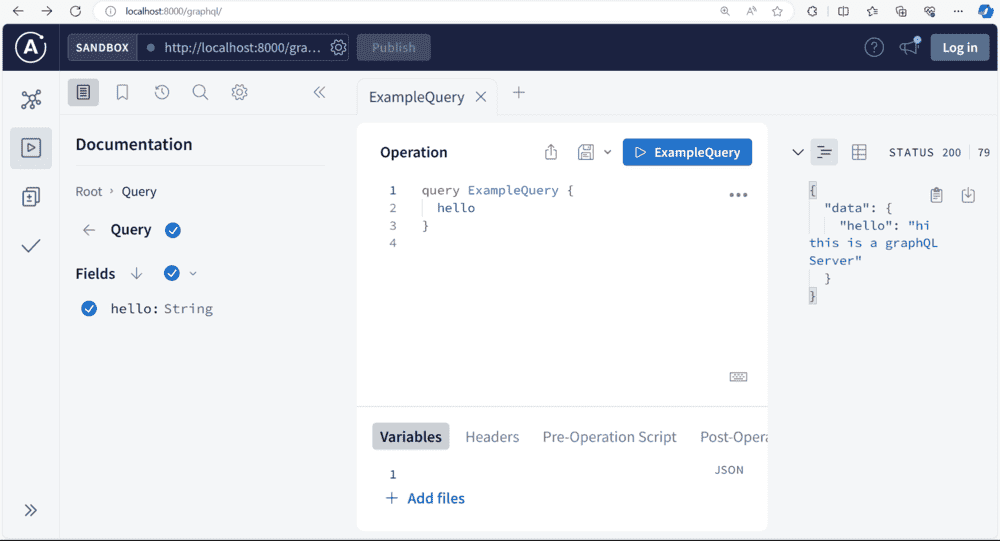
http://localhost:8000/graphql/This endpoint allows you to send GraphQL queries to the server.
"dependencies": {
 "@apollo/server": "^4.10.0",
 "express": "^4.18.2",
 "graphql": "^16.8.1"
 },
Output:
Accessing http://localhost:8000/ will respond with.
{
"message": "server is up and running"
}.
Accessing http://localhost:8000/graphql allows sending GraphQL queries.