|
VOOZH | about |
|
VOOZH | about |
Logical Operators are used to combining two or more conditions/constraints or to complement the evaluation of the original condition in consideration. The result of the operation of a logical operator is a boolean value either true or false. Like any other programming language, logical operators in MATLAB are beneficial, and in this article, we will demonstrate one of its uses.
But before we learn how to use logical operators with conditional statements, we should have a quick look at logical operators.
| Operand1 | Operand2 | Operand1 & Operand2 |
| True | True | True |
| True | False | False |
| False | True | False |
| False | False | False |
| Operand1 | Operand2 | Operand1 | Operand2 |
| True | True | True |
| True | False | True |
| False | True | True |
| False | False | False |
| Operand1 | Operand2 | Operand1 xor Operand2 |
| True | True | False |
| False | True | True |
| True | False | True |
| False | False | False |
| Operand | ~Operand |
| True | False |
| False | True |
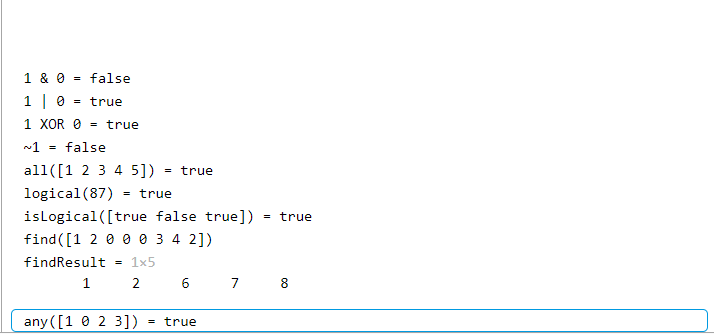
Now, here is a MATLAB example that illustrating logical operators with conditional statements.
Example 1:
Output:
So now that we have a rudimentary understanding of the logical operator, we can use them in our conditional statements. Now we are going to use the logical operators in conditional statements.
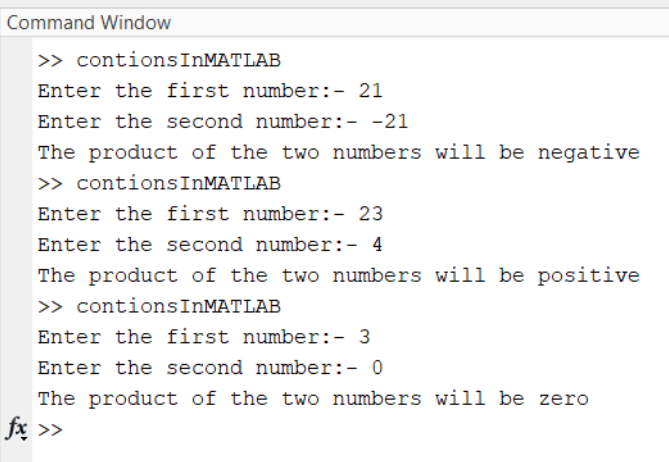
Example 2:
Output:
The above MATLAB script outputs the nature of the product of the two numbers given by the user and, while doing so, also illustrates how to use logical operators in conditional statements(like the If statement) So, logical operators are convenient when working with conditional statements.