VOOZH about

URL: https://www.geeksforgeeks.org/installation-guide/how-to-install-flask-in-kaggle/

⇱ How to Install Flask in Kaggle - GeeksforGeeks


  • Courses
  • Tutorials
  • Interview Prep

How to Install Flask in Kaggle

Last Updated : 2 May, 2026

Flask is a lightweight web framework for Python that is commonly used for building web applications and APIs. Although Kaggle is primarily focused on data science and machine learning, we may still want to install Flask in a Kaggle notebook for purposes such as developing and testing web services or APIs. This article will help us through the steps for installing Flask in a Kaggle notebook and setting up a simple Flask application.

Prerequisites

Before installing Flask in Kaggle, make sure that:

  • You have a Kaggle account.
  • You are familiar with Python and basic concepts of web development.
  • You can access Kaggle’s notebook environment (Kernel or Code section).

Installing Flask via Kaggle Notebook

To install Flask in a Kaggle notebook, follow these steps:

Step 1: Open a Kaggle notebook

  • Navigate to Kaggle and either start a new notebook or use an existing one from the “Notebooks” page.

Step 2 :Install Flask

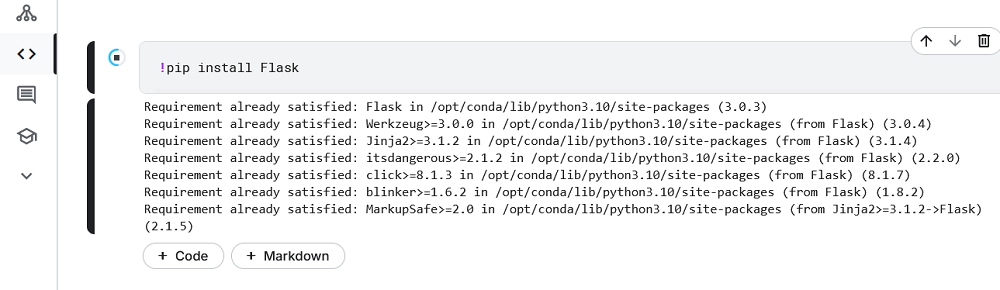
  • In the first cell of your notebook, run the following command to install Flask:

!pip install Flask

This will install Flask in the Kaggle environment.

Output screenshot:

👁 flask

Step 3: Verifying the Installation

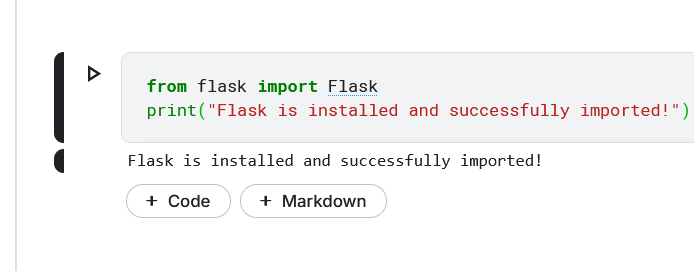
  • Once Flask is installed, you can verify that the installation was successful by importing Flask in a new cell:

If Flask is correctly installed, this code will run without errors, confirming that Flask is available for use in your Kaggle environment.

👁 Screenshot-2024-09-28-204435

Troubleshooting Common Issues

While installing Flask in Kaggle is generally straightforward, you may encounter some issues:

  • ModuleNotFoundError: If you get an error stating that Flask cannot be found, try running `!pip install Flask` again to ensure it’s installed correctly.
  • Conflicting Dependencies : If you encounter dependency conflicts, you may need to uninstall an existing version of Flask or other related libraries by running `!pip uninstall Flask` and then reinstalling the desired version.
  • Running Flask in Kaggle: Note that while Flask can be installed and run in Kaggle, it is not possible to publicly expose a Flask web server via Kaggle. You can only run it locally within the notebook environment for testing.
Comment