|
VOOZH | about |
|
VOOZH | about |
Redis Stack is a bundle of the best technology that Redis is offering in one place, in an easy-to-use package. Starting the Redis stack will start the servers of different technologies that Redis is offering under the Redis Stack. Redis Stack Server extends the core features of Redis OSS, providing a complete developer experience.
Table of Content
Redis is an open-source in-memory data store that functions as a database, cache, and message broker. It is extremely fast because it saves data in memory and supports an extensive variety of data types, including strings, lists, sets, and hashes. Redis's reputation for simplicity, high performance, and versatility contributes to it being an attractive option for applications that need real-time analytics and quick data access.
Redis is similar to a simultaneous-taskthat, lightning-fast digital storage device. It can handle multiple information forms, including text, lists, and more, and maintains data in memory making it blazingly fast. It is an excellent choice for apps that need to access and analyze data rapidly and in real-time because it is simple to use.
Here are the steps to run Redis Stack on Docker.
Step 1:Install Docker from the official website.
Step 2: Update the Windows subsystem of Linux if there is a version issue with the kernel using the following command in the terminal.
wsl -updateStep 3: Run on the Redis stack server on Docker by selecting the Docker Image:
Step 4: Open the terminal and check whether Docker is installed or not using command.
docker --versionAfter running this command, it will show the docker version in the terminal like below.
Step 5: Start the docker by clicking it from the downloads.
Step 6: To pull the Redis image from Docker Hub, use the following command:
docker pull redis/redis-stack-serverStep 7: Redis-stack command to run the redis on docker.
docker run -d --name redis-stack -p 6379:6379 -p 8001:8001 redis/redis-stack:latestdocker run: To start creating a new Docker container, use this command.-d: When enabling this flag, Docker gets told to execute the container in detached mode, which involves running the container in the background and displaying its unique identifier.--name redis-stack: You may give the container a unique name through this option. The container in this instance will be named redis-stack.-p 6379:6379: This option connects the host's port 6379 with the container's port 6379. Redis utilizes port 6379 by default for client connections.-p 8001:8001: This option connects the host's port 8001 to the container's port 8001. RedisInsight, a graphical user interface for Redis, typically utilizes port 8001.redis/redis-stack:latest: This tells us which Docker image is to be used to build the container. The image in this particular case is redis/redis-stack, and the tag is the latest. If the image is not already available locally, Docker will search for it from the Docker Hub repository.Starting redis-stack starts the redis Insight also at port 8001 and redis-stack-server starts without redisInsights at port 6379. To change the ports where they are getting exposed change the value on the left part after -p.
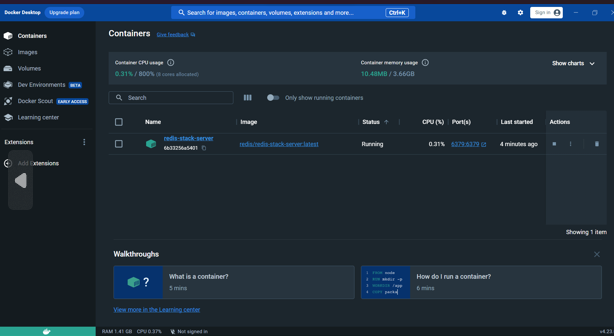
Step 8: The redis-stack-server starts running which can be seen in the below image along with the port and status.
Refer the below image the redis container running on the linux along with the port.
docker psps command, which is used to list running processes.Step 9: Run this command to connect to the server using redis-cli
docker exec -it redis-stack-server redis-clidocker CLI, used to execute a command inside a running container.docker exec command:-i (or --interactive): Keeps STDIN open even if not attached, allowing interaction with the command being executed.-t (or --tty): Allocates a pseudo-TTY (Terminal) for the command being executed, enabling terminal interaction.redis-stack-server.Step 10: Test the redis using the below command.
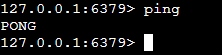
pingNow check the modules present by using the below command.
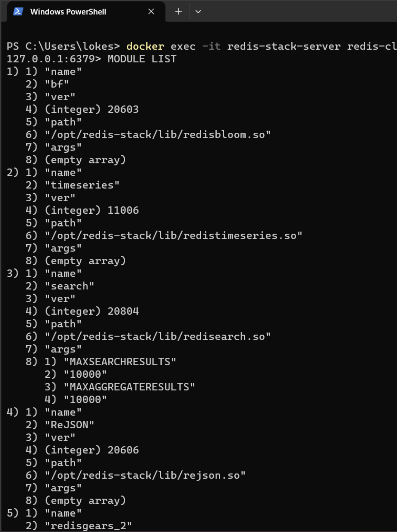
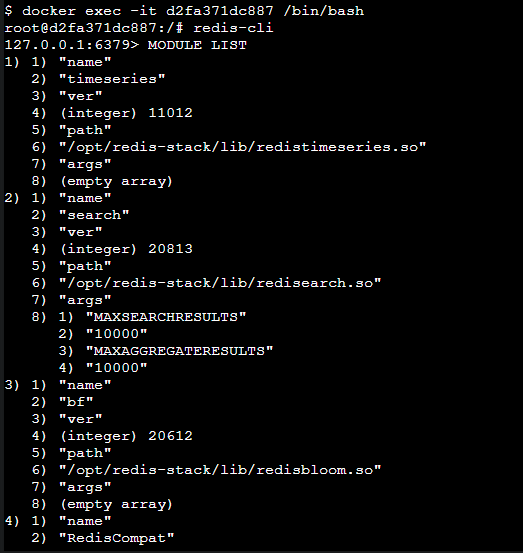
MODULE LIST After running the above command, we can see the Module Lists in terminal. List the modules on redis.
👁 List of ModuleList the modules in redis on linux using the below command. Refer the below image for better understanding.
Operations on Redis Cache using Redis-cli:
Operations on redis-bloom using redis-cli:
Step 11: Run the Redis container with the volume mounted for persistent storage:
docker run -d --name my_redis_container -v redis_data:/data redis-d: Runs the container in detached mode (in the background).--name my_redis_container: Specifies a name for the container.-v redis_data:/data: Mounts the Docker volumeredis_data to the directory /data inside the container. This is where Redis stores its data by default.redis: Specifies the Redis image to use.Create a docker-compose.yml file defining Redis services along with Redis Insight (optional) using Docker Compose syntax.
version: '3.8'

services:
 redis:
 image: redis/redis-stack:latest
 ports:
 - "6379:6379"
 - "8001:8001"
Run the redis using the docker compose using the below command.
docker-compose up -d| Aspect | Redis Stack | Redis |
|---|---|---|
| Components | Includes core Redis server along with additional technologies such as RedisJSON, RediSearch, RedisBloom, RedisTimeSeries, and RedisGears. | Refers specifically to the core Redis server. |
| Features | Provides a comprehensive set of features and functionalities for various use cases, including data storage, search, analytics, and real-time data processing. | Offers fast, in-memory data storage with support for various data types and a rich set of commands for data manipulation and retrieval. |
| Management Tools | May include management and visualization tools like RedisInsight for easier monitoring and administration of Redis instances. | Does not include additional management or visualization tools by default. |
| Use Cases | Suitable for applications requiring advanced features and functionalities beyond basic key-value data storage, such as real-time analytics, search, and complex data processing. | Widely used in applications requiring fast and efficient key-value data storage, caching, session storage, and message brokering. |
| Deployment | Can be deployed standalone or as part of a larger stack, depending on the requirements of the application. | Can be deployed standalone or integrated with other technologies as needed. |
| Community Support | Supported by the Redis community and maintained by Redis Labs. | Supported by the Redis community and maintained by Redis Labs. |
Deploying Redis Stack on Docker streamlines local development by bundling Redis technologies like RedisJSON, RediSearch, RedisBloom, RedisTimeSeries, and RedisGears. With Redis Insight, developers gain a comprehensive toolset for visualization and management. Docker's flexibility enables easy containerization and scaling for both development and production environments. Leveraging Redis Stack facilitates efficient caching, full-text search, bloom filters, time-series data storage, and real-time data processing. Persistent storage options ensure data durability, enhancing reliability across container restarts.