|
VOOZH | about |
|
VOOZH | about |
The PayloadTooLargeError occurs when a request payload exceeds the maximum size limit set by the server. In NestJS, which uses Express by default, this limit is typically set to around 100KB. When a client sends a payload larger than this limit, the server cannot process it and throws the PayloadTooLargeError. This error helps prevent abuse and manage server resources by limiting the size of incoming data.
The "PayloadTooLargeError" in NestJS is an HTTP error that occurs when the size of the incoming request body exceeds the configured limit of the server or middleware handling the request. This error is represented by the HTTP status code 413 (Payload Too Large), signalling that the server is refusing to process the request due to its size.
By default, NestJS uses body parsing middleware to handle incoming requests, specifically JSON and URL-encoded data. The default body parser settings have size limits to avoid potential issues with large payloads, such as denial-of-service (DoS) attacks or high memory consumption. These limits are typically around 100 KB for JSON payloads and URL-encoded data.
Configuring JSON Body Parser
In main.ts, you can adjust the size limit for JSON payloads as follows:
app.use(json({ limit: '10mb' }));Similarly, adjust the URL-encoded body parser limit:
app.use(urlencoded({ extended: true, limit: '10mb' }));You can use custom middleware in NestJS to control request size dynamically.
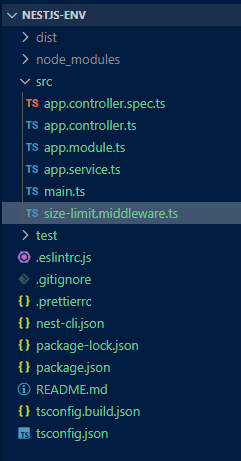
Example Middleware for Adjusting Size Limits
import { Injectable, NestMiddleware } from '@nestjs/common';

@Injectable()
export class SizeLimitMiddleware implements NestMiddleware {
 use(req: any, res: any, next: () => void) {
 if (req.headers['content-length'] > 10485760) {
 return res.status(413).send('Payload too large');
 }
 next();
 }
}
In file upload scenarios, you need to configure Multer for setting appropriate file size limits.
When using Multer for file uploads, specify the size limits like this:
import { MulterModule } from '@nestjs/platform-express';

MulterModule.register({
 limits: { fileSize: 10 * 1024 * 1024 }, // 10MB limit
});
When defining your routes, ensure the size limit is set appropriately:
@Post('upload')
@UseInterceptors(FileInterceptor('file', {
 limits: { fileSize: 10 * 1024 * 1024 }, // 10MB limit
}))
uploadFile(@UploadedFile() file: Express.Multer.File) {
 console.log(file);
}
First, if you don't have a NestJS application set up, create one using the Nest CLI:
nest new nestjs-env
cd nestjs-env
"dependencies": {
 "@nestjs/common": "^10.0.0",
 "@nestjs/config": "^3.2.3",
 "@nestjs/core": "^10.0.0",
 "@nestjs/platform-express": "^10.0.0",
 "@types/multer": "^1.4.12",
 "reflect-metadata": "^0.2.0",
 "rxjs": "^7.8.1"
}
Example:
npm start