|
VOOZH | about |
|
VOOZH | about |
If you are a System Administrator or Developer, it is your key responsibility to secure the Linux Server. For that purpose, you can use one of the most effective tools which is Fail2ban for Linux Server.
If you can Secure Linux Server with Fail2ban, you can easily manage all kinds of external threats & brute-force attacks. This article will focus on the details of Fail2ban along with the steps needed to Secure Linux Server.
Table of Content
Fail2ban is an essential tool that helps to secure the Linux Server of any kind of Linux Distributions. The Fail2ban is an open-source tool that can be easily installed on any Linux Operating System. The Linux Fail2ban helps to scan all the Log Files in Linux OS. While scanning, it can take preventive steps to make the server secure.
Suppose, there is an IP Address that wants to access the Linux Server but fails repeatedly, then the Fail2ban on Linux will mark it. Along with that, it restricts the IP Address in the future. The Fail2ban can dynamically update the Firewall's Rule in Linux. Hence, it helps to Secure Linux Server from Brute-Force Attacks.
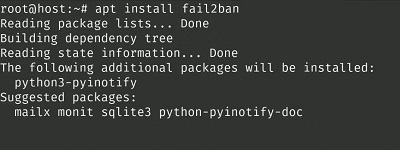
To install Fail2ban on Linux, the following Linux Commands will be used. Based on the Linux Distribution, there are different commands are present. In this case, we will use the Debian or Ubuntu Command. It will take some time to complete the process.
Debian/Ubuntu Command: apt install fail2ban
CentOS/RHEL Command: yum install fail2ban
Fedora Command: dnf install fail2ban
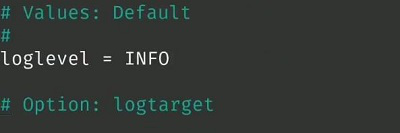
Now, as the Fail2ban is installed, we have to configure it. For that purpose, we have to first go inside the Fail2ban Directory. Later, use the following command. It will open the file where we have to make loglevel = INFO.
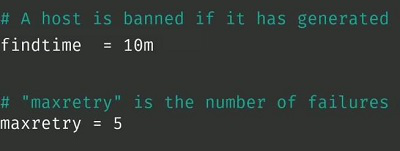
Command: cp fail2ban.conf fail2ban.localNow, after the Fail2ban Configuration, we have to go for the Jail File Configuration which is very much important. Here, we have to use the following command where the file will open. And in that file, we have to make the following changes.
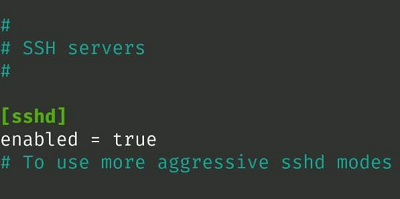
Command: cp jail.conf jail.localNow, as the Configuration of Fail2ban Jail Service is done, we have to make it enable. To Enable Jail and Fail2ban Service on Linux, you have to make the following changes in the Jail Configuration File. Just make the Enabled = True uncommented in the file.
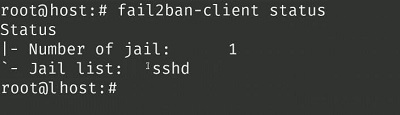
In the end, when all the process is completed, it is time to check the Fail2ban Service on Linux. The Jail File is the main part of this service. So, we will use the following command where the status of the Jail File in Fail2ban will be displayed. If you are getting output along with the SSHD, then the configuration is successful.
Command: fail2ban-client statusFrom the above discussion, we can say having the Fail2ban Tool to Secure Linux Server is very much important. Fortunately, the Installation and configuration of Fail2ban on Linux Server is not a complicated task as well. Once, the Fail2ban is installed, the fear of any external threat will be vanished.