|
VOOZH | about |
|
VOOZH | about |
The rmdir command in Linux is used to safely remove empty directories from the filesystem.
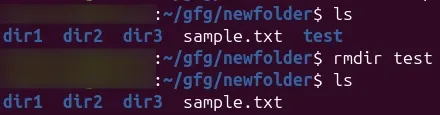
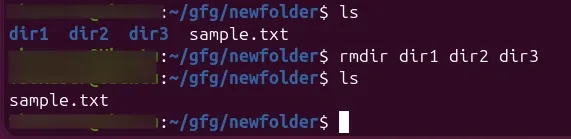
rm command, it cannot delete files or non-empty directories.rmdir testrmdir dir1 dir2 dir3rmdir LINUX INFO DETAILThe following are the options of rmdir command:
The basic syntax of the rmdir command is:
rmdir [option]... [directory]...Here, '[directory]...' refers to one or more directories you wish to remove:
You can use the -p option with the rmdir command to delete a directory, including all the subdirectories:
rmdir -p mydir1/mydir2/mydir3/...../mydirNrmdir -p LINUX/mydir1/mydir2/mydir3If you want the terminal to display the message after removing the directory, you can use the -v option with the rmdir command:
rmdir -v dir1 dir2 dir3Let's now delete the LINUX, INFO, and DETAIL directories and display the message after their successful removal:
rmdir -v LINUX INFO DETAILYou can delete multiple directories if they have the same expressions by using the * in the rmdir command. For example, let's remove all those directories which contain LINUX in their name:
ls
rmdir -v LINUX*In the above command, we have used the ls command to list all the available directories. Moreover, we executed the rmdir command '-v' option and * to delete all those directories which contain the same expression.
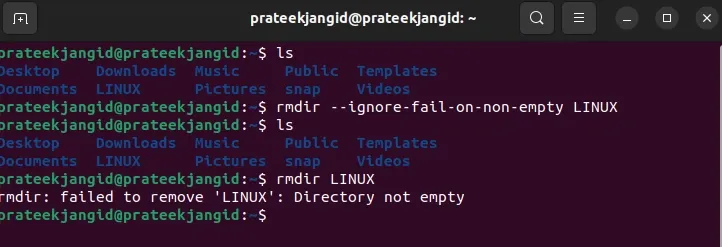
rmdir <option> <directory> So, in this case, you can use the --ignore-fail-on-non-empty to ignore the occurrences due to the non-empty directories. For instance, let's remove the LINUX directory that contains sub-directories:
rmdir --ignore-fail-on-non-empty LINUXrmdir command is similar to the rm command, but rmdir only removes empty directories. So first, we will use the help flag to list down all the available options for the rmdir command:
rmdir --help| Option | Description |
|---|---|
--ignore-fail-on-non-empty | It prevents the errors if the directory is not empty. |
-p or --parents | It will removes the directory and its parent directories if they are empty. |
-v or --verbose | It helps in displaying the message for each directory that is removed. |
--help | It will displays the helpful information and exits. |
--version | It displays version information and exits. |
The following are the some of the trouble shooting issues regarding with rmdir command:
rmdir fails with an error if the directory is not empty.rm -r command if you need to delete non-empty directories.sudo rmdir for having the necessary administrative privileges.rmdir returns errors when directories are not empty.--ignore-fail-on-non-empty option to suppress errors for non-empty directories, although it won't remove them.