|
VOOZH | about |
|
VOOZH | about |
In this article, we will discuss how to delete a file from every directory above the parent working directory using shell script in Linux. To delete a file from a directory we use the rm command in Linux/UNIX.
Syntax:
rm [OPTION]... [FILE]...
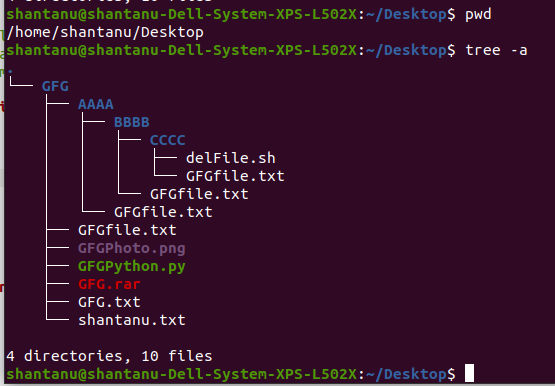
Using shell script, we have to delete the input file from every directory above the present working directory. The filename will be passed as an argument. The following diagram shows the tree structure of the desktop directory.
👁 ImageIn the above image, we are currently present in the /Desktop directory.
Below is the implementation.
# check whether arguments are passed or not
if [ $# -eq 0 ]
then
 # if arguments are not passed then display this
 echo "pass the file name"

 # exit the program
 exit

# end if
fi

# store the argument in fileName
fileName=$1

# set flag
flag=1

# set homeDir to home directory
homeDir=/home

# loop till flag becomes 1
while [ $flag -eq 1 ]
do
 # go to previous directory
 cd ..

 # set pwdCommand to present directory
 pwdCommand=`pwd`

 # print pwd/filename
 echo "$pwdCommand/$fileName"

 # remove the file from present directory
 rm "$pwdCommand/$fileName" 2> /dev/null

 # set flag to 0 if we reach to /home directory
 if [ $pwdCommand = $homeDir ]
 then
 flag=0

 # end if
 fi

# end while
done
Output:
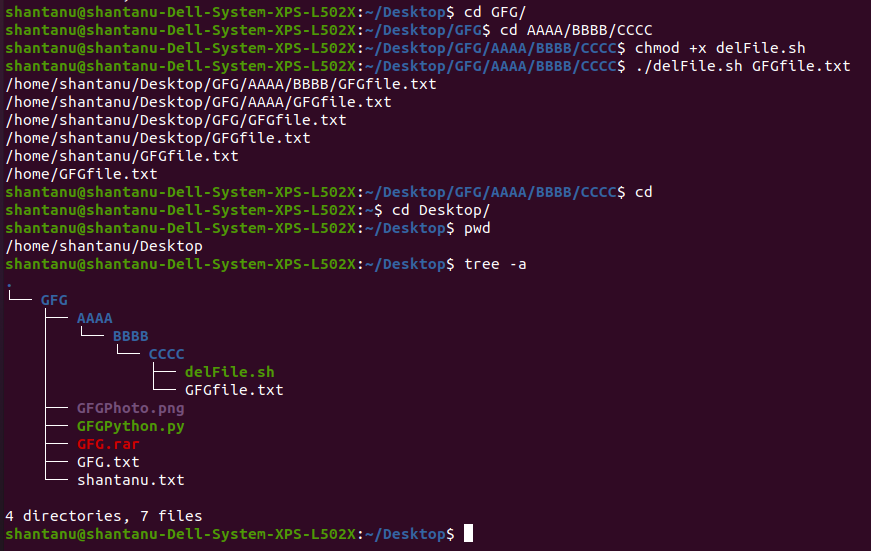
👁 ImageTo run the shell script use
./delFile.sh <filename>
Give execution permission to shell script using:
chmod +x delFile.sh
All the GFGfile.txt files have been delete above the present working directory