How to Run a Perl Program?
Let's consider a simple Hello World Program.
Generally, there are two ways to Run a Perl program-
- Using Online IDEs: You can use various online IDEs which can be used to run Perl programs without installing.
- Using Command-Line: You can also use command line options to run a Perl program. Below steps demonstrate how to run a Perl program on Command line in Windows/Unix Operating System:
Windows
Open Commandline and then to compile the code type perl HelloWorld.pl. If your code has no error then it will execute properly and output will be displayed.
👁 Hello-World-windows
Unix/Linux
Open Terminal of your Unix/Linux OS and then to compile the code type perl hello.pl. If your code has no error then it will execute properly and output will be displayed.
👁 Hello-World-Unix
Fundamentals of Perl
Variables
Variables are user-defined words that are used to hold the values passed to the program which will be used to evaluate the Code. Every Perl program contains values on which the Code performs its operations. These values can’t be manipulated or stored without the use of a Variable. A value can be processed only if it is stored in a variable, by using the variable’s name.
A value is the data passed to the program to perform manipulation operations. This data can be either numbers, strings, characters, lists, etc.
Example:
Values:
5
geeks
15

Variables:
$a = 5;
$b = "geeks";
$c = 15;
Operators
Operators are the main building block of any programming language. Operators allow the programmer to perform different kinds of operations on operands. These operators can be categorized based upon their different functionality:
Output:
Addition is: 14
Subtraction is: 6
Equal To Operator is False
AND Operator: 4
Bitwise AND: 0
Addition Assignment Operator: 14
Number and its Types
A Number in Perl is a mathematical object used to count, measure, and perform various mathematical operations. A notational symbol that represents a number is termed a numeral. These numerals, in addition to their use in mathematical operations, are also used for ordering(in the form of serial numbers).
Types of numbers:
- Integers
- Floating Numbers
- Hexadecimal Numbers
- Octal Numbers
- Binary Numbers
Output:
Integer: 20
Float Number: 20.5647
Scientific Number: 1.235e-08
Hex Number: 12
Octal number: 60
Binary Number: 10
To learn more about Numbers, please refer to
Numbers in Perl
DataTypes
Data types specify the type of data that a valid
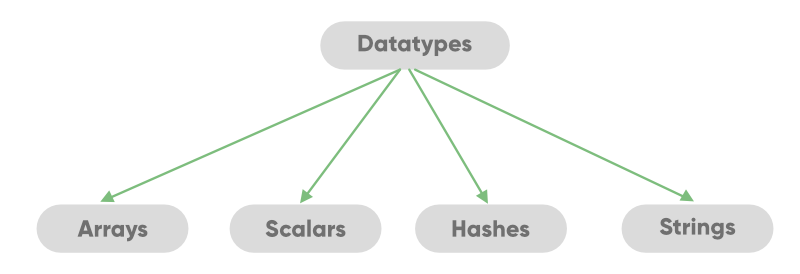
Perl variable can hold. Perl is a loosely typed language. There is no need to specify a type for the data while using it in the Perl program. The Perl interpreter will choose the type based on the context of the data itself.
👁 Data-Types-In-Perl
Scalars
It is a single unit of data which can be an integer number, floating-point, a character, a string, a paragraph, or an entire web page.
Example:
Output:
Name = Alex
Roll number = 13
Percentage = 87.65
Hexadecimal Form = 205
String with alphanumeric values = gfg21
String with special characters = ^gfg
To know more about scalars please refer to
Scalars in Perl.
Arrays
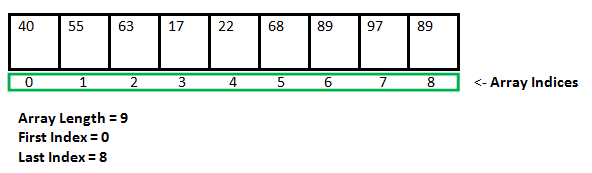
An array is a variable that stores the value of the same data type in the form of a list. To declare an array in Perl, we use ‘@’ sign in front of the variable name.
@number = (40, 55, 63, 17, 22, 68, 89, 97, 89)
👁 Image
It will create an array of integers that contains the values 40, 55, 63, 17, and many more. To access a single element of an array, we use the ‘$’ sign.
$number[0]
It will produce the output as 40.
Array creation and accessing elements:
Output:
Elements of arr1 are:
1
4

Elements of arr2 are:
GeeksforGeeks
Tutorial
Iterating through an Array:
Output:
Iterating through range:
@arr[0] = 11
@arr[1] = 22
@arr[2] = 33
@arr[3] = 44
@arr[4] = 55

Iterating through loops:
11 22 33 44 55
To know more about arrays please refer to
Arrays in Perl
Hashes(Associative Arrays)
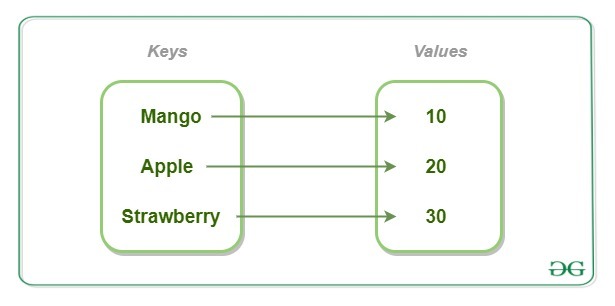
It is a set of key-value pairs. It is also termed as the Associative Arrays. To declare a hash in Perl, we use the ‘%’ sign. To access the particular value, we use the ‘$’ symbol which is followed by the key in braces.
👁 Hash-in-Perl
Creating and Accessing Hash elements:
Output:
Printing values of Hash:
10
20
30

Printing values of Hash:
45
42
35
To know more about Hashes please refer to
Hashes in Perl
Strings
A string in Perl is a scalar variable and starts with a ($) sign and it can contain alphabets, numbers, special characters. The string can consist of a single word, a group of words, or a multi-line paragraph. The String is defined by the user within a single quote (‘) or double quote (“).
Output:
Using Single quotes: @list
Using Double-quotes: 1 2 3 4 5 6 7 8 9 10
Using Escape character in Strings:
Interpolation creates a problem for strings that contain symbols that might become of no use after interpolation. For example, when an email address is to be stored in a double-quoted string, then the ‘at’ (@) sign is automatically interpolated and is taken to be the beginning of the name of an array and is substituted by it. To overcome this situation, the escape character i.e. the backslash(\) is used. The backslash is inserted just before the ‘@’ as shown below:
Output:
GeeksforGeeks0402.com
GeeksforGeeks0402@gmail.com
Escaping the escape character:
The backslash is the escape character and is used to make use of escape sequences. When there is a need to insert the escape character in an interpolated string, the same backslash is used, to escape the substitution of escape character with ” (blank). This allows the use of escape characters in the interpolated string.
Output:
Using the escape(\) character
To know more about Strings please refer to
Strings in Perl
Control Flow
Decision Making
Decision Making in programming is similar to decision-making in real life. A programming language uses control statements to control the flow of execution of the program based on certain conditions. These are used to cause the flow of execution to advance and branch based on changes to the state of a program.
Decision Making Statements in Perl :
Example 1: To illustrate use of if and if-else
Output:
Even Number
Odd Number
Example 2: To illustrate the use of Nested-if
Output:
Number is divisible by 2 and 5
To know more about Decision Making please refer to
Decision making in Perl
Loops
Looping in programming languages is a feature that facilitates the execution of a set of instructions or functions repeatedly while some condition evaluates to true. Loops make the programmer's task simpler. Perl provides the different types of loop to handle the condition based situation in the program. The loops in Perl are :
- for loop
Output:
For Loop:
GeeksForGeeks
GeeksForGeeks
GeeksForGeeks
- foreach loop
Output:
For-each Loop:
GEEKS 4 GEEKS
- while and do.... while loop
Output:
While Loop:
GeeksForGeeks
GeeksForGeeks
GeeksForGeeks
GeeksForGeeks

do...while Loop:
10 9 8 7 6 5 4 3 2 1
To know more about Loops please refer to
Loops in Perl
Object Oriented Programming
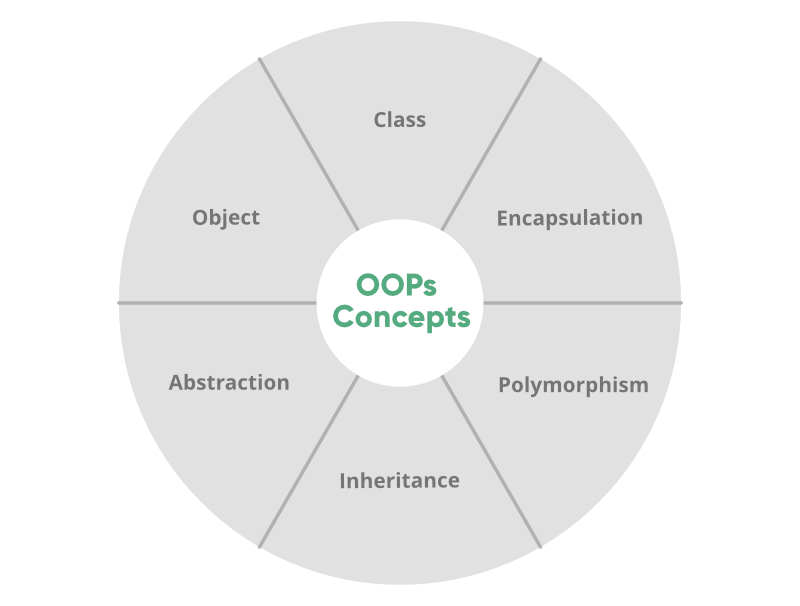
Object-oriented programming aims to implement real-world entities like inheritance, hiding, polymorphism, etc in programming. The main aim of OOP is to bind together the data and the functions that operate on them so that no other part of the code can access this data except that function.
👁 OOPs-Concepts-In-Perl
:-
Methods are the entities that are used to access and modify the data of an object. A method is a collection of statements that perform some specific task and returns a result to the caller. A method can perform some specific task without returning anything. Methods are
time savers and help us to
reuse the code without retyping the code.
The above-given method can be called again and again wherever required, without doing the effort of retyping the code.
To learn more about Methods, please refer to
Methods in Perl
:-
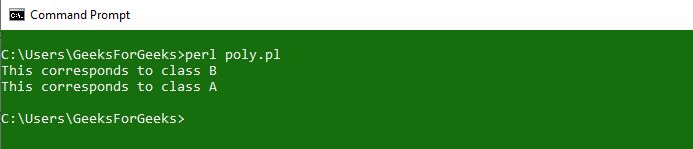
Polymorphism refers to the ability of OOPs programming languages to differentiate between entities with the same name efficiently. This is done by Perl with the help of the signature and declaration of these entities.
Polymorphism can be best explained with the help of the following example:
Output:
👁 Polymorphism-in-Perl
To learn more about Polymorphism, please refer to
Polymorphism in Perl
:-
Inheritance is the ability of any class to extract and use features of other classes. It is the process by which new classes called the derived classes are created from existing classes called Base classes.
Inheritance in Perl can be implemented with the use of
packages. Packages are used to create a parent class that can be used in the derived classes to inherit the functionalities.
To learn more about Inheritance, please refer to
Inheritance in Perl
:-
Encapsulation is the process of wrapping up of data to protect it from the outside sources which need not have access to that part of the code. Technically in encapsulation, the variables or data of a class are hidden from any other class and can be accessed only through any member function of own class in which they are declared. This process is also called
Data-Hiding.
To learn more about Encapsulation, please refer to
Encapsulation in Perl
:-
Abstraction is the process by which the user gets access to only the essential details of a program and the trivial part is hidden from the user. Ex: A car is viewed as a car rather than its individual components. The user can only know what is being done but not the part of How it's being done. This is what abstraction is.
To learn more about Abstraction, please refer to
Abstraction in Perl
Subroutines
What are Subroutines?
A Perl function or subroutine is a group of statements that together perform a specific task. In every programming language user want to reuse the code. So the user puts the section of code in function or subroutine so that there will be no need to write code again and again.
Example:
Multiple Subroutines
Multiple subroutines in Perl can be created by using the keyword ‘multi’. This helps in the creation of multiple subroutines with the same name.
Example:
multi Func1($var){statement};
multi Func1($var1, $var2){statement1; statement2;}
Example:
Output:
3628800
To know more about Multiple Subroutines, please refer to
Multiple Subroutines in Perl
Modules and Packages
A
module in Perl is a collection of related subroutines and variables that perform a set of programming tasks. Perl Modules are reusable. Perl module is a package defined in a file having the same name as that of the package and having extension .pm. A Perl
package is a collection of code which resides in its own namespace.
To import a module, we use require or use functions. To access a function or a variable from a module, :: is used.
Examples:
Output:
👁 Modules-in-Perl
References
A reference in Perl is a scalar data type that holds the location of another variable. Another variable can be scalar, hashes, arrays, function names, etc. A reference can be created by prefixing it with a backslash.
Example:
To know more about references, please refer to
References in Perl
Regular Expression
Regular Expression (Regex or Regexp or RE) in Perl is a special text string for describing a search pattern within a given text. Regex in Perl is linked to the host language and is not the same as in PHP, Python, etc.
Mostly the binding operators are used with the m// operator so that the required pattern could be matched out.
Example:
Output:
Match Found
Quantifiers in Regex
Perl provides several numbers of regular expression quantifiers which are used to specify how many times a given character can be repeated before matching is done. This is mainly used when the number of characters going to be matched is unknown.
There are six types of Perl quantifiers which are given below:
- * = This says the component must be present either zero or more times.
- + = This says the component must be present either one or more times.
- ? = This says the component must be present either zero or one time.
- {n} = This says the component must be present n times.
- {n, } = This says the component must be present at least n times.
- {n, m} = This says the component must be present at least n times and no more than m times.
File Handling
In Perl, a FileHandle associates a name to an external file, that can be used until the end of the program or until the FileHandle is closed. In short, a FileHandle is like a connection that can be used to modify the contents of an external file and a name is given to the connection (the FileHandle) for faster access and ease.
The three basic FileHandles in Perl are STDIN, STDOUT, and STDERR, which represent Standard Input, Standard Output, and Standard Error devices respectively.
Reading from and Writing to a File using FileHandle
Reading from a FileHandle can be done through the print function.
Output :
👁 Reading-a-file-in-Perl
Writing to a File can also be done through the print function.
Executing Code to Write:
👁 Writing-a-file-in-Perl
Updated File:
👁 Updated-file
Multiple Operations can be performed on files using FileHandles. These are:
File Test Operators
File Test Operators in Perl are the logical operators that return True or False values. There are many operators in Perl that you can use to test various different aspects of a file. For example, to check for the existence of a file -e operator is used.
Following example uses the '-e', existence operator to check if a file exists or not:
Output:
👁 e-operator-in-Perl
To know more about various different Operators in File Testing, please refer to
File Test Operators in Perl
Working with Excel Files
Excel files are the most commonly used office application to communicate with computers. For creating excel files with Perl you can use padre IDE, we will also use Excel::Writer::XLSX module.
Perl uses write() function to add content to the excel file.
Creating an Excel File:
Excel Files can be created using Perl command line but first we need to load Excel::Writer::XLSX module.
Output:
👁 Workig-with-excel-files
Reading from an Excel File:
Reading of an Excel File in Perl is done by using
Spreadsheet::Read module in a Perl script. This module exports a number of function that you either import or use in your Perl code script.
ReadData() function is used to read from an excel file.
Example:
Output:
A2: GeeksForGeeks
Error Handling
Error Handling in
Perl is the process of taking appropriate action against a program that causes difficulty in execution because of some error in the code or the compiler. For example, if opening a file that does not exist raises an error, or accessing a variable that has not been declared raises an error.
The program will halt if an error occurs, and thus using error handling we can take appropriate action instead of halting a program entirely. Error Handling is a major requirement for any language that is prone to errors.
Perl provides two built-in functions to generate fatal exceptions and warnings, that are:
- die()
- warn()
die(): To signal occurrences of fatal errors in the sense that the program in question should not be allowed to continue.
For example, accessing a file with
open() tells if the open operation is successful before proceeding to other file operations.
open FILE, "filename.txt" or die "Cannot open file: $!\n";
warn(): Unlike
die() function,
warn() generates a warning instead of a fatal exception.
For example:
open FILE, "filename.txt" or warn "Cannot open file: $!\n";
To know more about various different Error Handling techniques, please refer to
Error Handling in Perl