|
VOOZH | about |
|
VOOZH | about |
While working on the SQL Server database, we frequently encounter situations where data manipulation, like concatenating values from multiple rows into a single string, is necessary. To address such requirements, we utilize SQL Server functions like STUFF and FORXML PATH.
In this article, We will understand these functions by understanding STUFF and FORXMLPATH functions and seeing various examples for each and also seeing examples by combining both of them to illustrate their usage and implementation in various scenarios.
In SQL Server, the STUFF function is used to replace a specified portion of a string with another string. It takes fourarguments: the originalstring, the startingposition in the string where the replacement will begin, the numberof characters to replace, and the string that will replace the specified portion. The function then returns the modified string with the replacement performed.
Syntax:
STUFF ( character_expression , start , length , replaceWith_expression )Explanation:
Let's consider we have a string called "Hello, world" (Hello world always works best for first example) and we need to replace world with Universe. So we will count the number of letters to be replaces which will be our length parameter and for our case its value if 6.
Now we will find the start of the letter to replace, so World starts at 7 (counting starts from 0). So to sum up, we got all required 4 parameters for STUFF function.
Query:
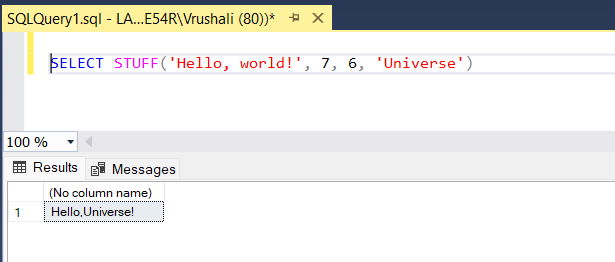
SELECT STUFF('Hello, world!', 7, 6, 'Universe')Output:
Explanation: So, in the output we can see world is replaced by Universe and our final string becomes "Hello, Universe". This is how we perform the string manipulation using STUFF function in SQL Server.
Now consider we have the case where we need to use the dynamic strings using variables. So we have set our string to the variable and used start and length variables which are also calculated by using LEN and CHARINDEX function.
LEN is used to calculate the length of the input string and CHARTINDEX is used to find the starting location of the input string.
Query:
DECLARE @str VARCHAR(50) = 'Hello, world';
DECLARE @start INT = (SELECT CHARINDEX('world', @str))
DECLARE @length INT = (SELECT LEN('world'))

SET @str = STUFF(@str, @start, @length, 'SQL');

SELECT @str AS ModifiedString;
Output:
Explanation: As we have seen what is STUFF function along with examples to understand it better. Now we will see FOR XML PATH clause and its concepts.
Syntax:
SELECT column_name
FROM table_name
FOR XML PATH(''), ROOT('root_element')
Explanation:
Now we will see how to implement the FOR XML clause with some examples.
Query:
USE AdventureWorks2019

SELECT TOP 10 ProductID, Name, ProductNumber,
MakeFlag, FinishedGoodsFlag
FROM Production.Product
Output:
Query for the simple XML representation:
USE AdventureWorks2019
SELECT TOP 10 ProductID, name, ProductNumber,
MakeFlag, FinishedGoodsFlag
FROM Production.Product FOR XML PATH
Ouptut in XML Format:
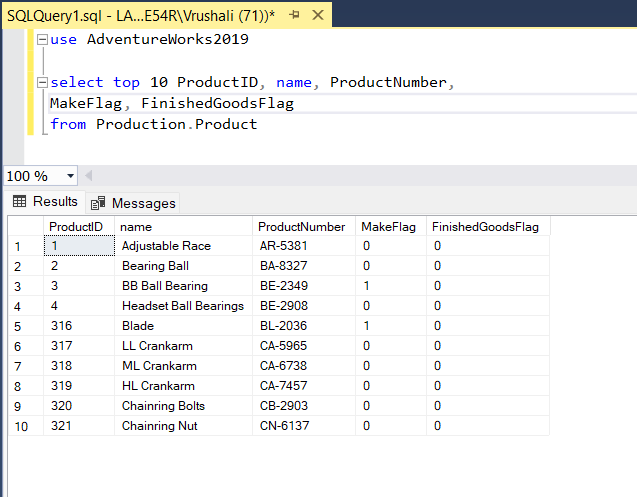
Explanation: As we can see that query 1 is our normal select query and in the figure 1 we can see the output is in the grid view format. We can even choose to see the output in the text view format.
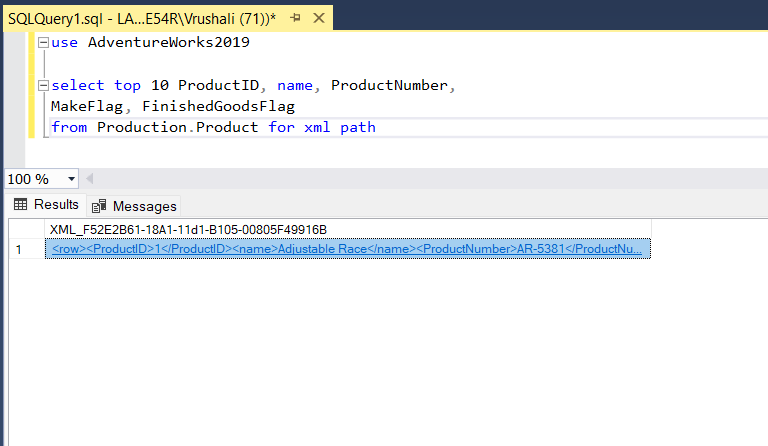
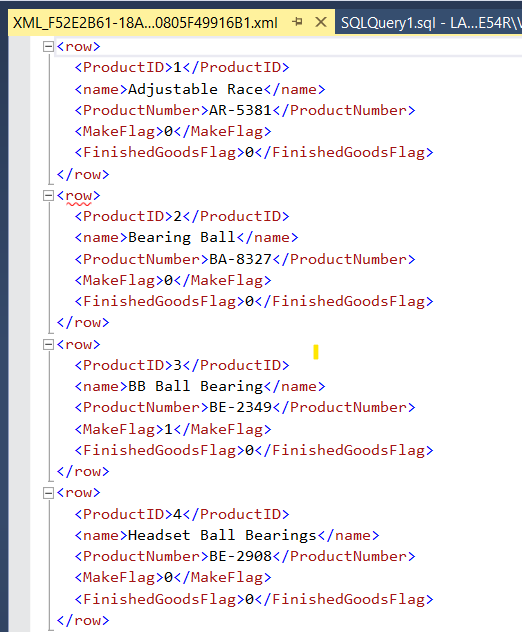
In the second query, we used the FOR XML PATH clause after the table name to format the output as XML. Clicking on the XML result opens it in a new text window in SSMS, displaying the data with <row> and <column> tags added by SQL Server. This demonstrates data conversion to XML.
Now we will see how we can change the tags as per our customization in the next example.
Query:
SELECT
 ProductID AS 'Product/@ID',
 Name AS 'Product/Name',
 Color AS 'Product/Color'
FROM
 Production.Product
FOR XML PATH(''), ROOT('Products')
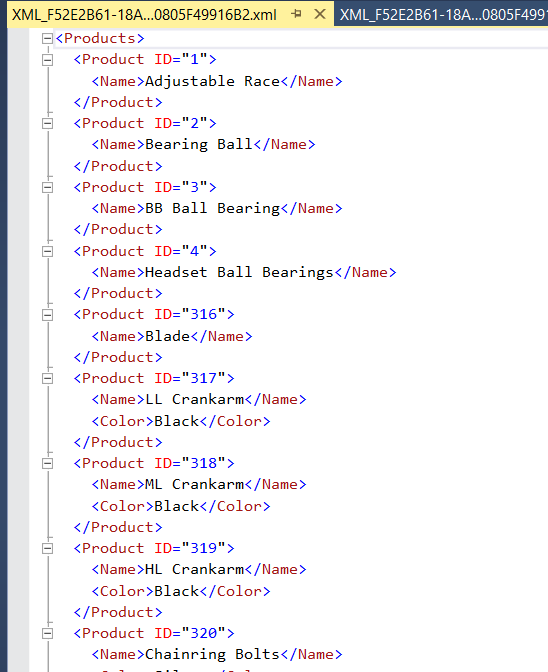
Output:
Ouptut in XML Format:
Explanation: We select ProductID, Name, and Color from the Production.Product table. The "FOR XMLPATH('')" clause specifies that each row should be represented as an <Product> element.
The "ROOT('Products')" clause wraps the entire result set in a <Products> element. We have added root element and also given the ID using variable in the select and in the output we can see that directive is created with the tag value ID.
SELECT
 SalesOrderID AS 'Order/@ID',
 (
 SELECT
 ProductID AS 'Product/@ID',
 OrderQty AS 'Product/OrderQty'
 FROM
 Sales.SalesOrderDetail AS SOD
 WHERE
 SOH.SalesOrderID = SOD.SalesOrderID
 FOR XML PATH(''), TYPE
 )
FROM
 Sales.SalesOrderHeader AS SOH
FOR XML PATH(''), ROOT('Orders')
Output:
Ouptut in XML Format:
Explanation: We select SalesOrderID as the attribute of the <Order> element. A subquery is used to select ProductID and OrderQty for each order.The "FOR XML PATH(''), TYPE" clause is used within the subquery to generate nested XML elements. The "ROOT('Orders')" clause wraps the entire result set in an <Orders> element.
Now we have seen what is STUFF and FOR XML PATH and how to use it but important thing is to see how to implement both in the same batch which helps to solve the complex problems of SQL Server. So lets see how to use them together in the same SQL.
Now lets create a comma-separated string using the FOR XML PATH clause. We have rows data and we want it in comma separated form in the single string.
Query:
SELECT
 STUFF(
 (
 SELECT
 ',' + Name
 FROM
 Production.Product where ProductID < 10
 FOR XML PATH('')
 ), 1, 1, '') AS CommaSeparatedNames;
Output:
Explanation: In this example, we use the "STUFF" function along with a subquery to concatenate the "Name" column values from the Production.Product table into a comma-separated string. Within the subquery, the "FOR XML PATH('')" clause is used to generate the comma-separated string without any root element.
The "STUFF" function is then used to remove the leading comma. The result is a single column named "CommaSeparatedNames" containing a comma-separated list of product names.
Suppose we have a table named Employee with columns FirstName and LastName, and we want to concatenate these two columns into a single XML element <FullName> for each employee.
SELECT
 STUFF(
 (
 SELECT
 ', ' + FirstName + ' ' + LastName
 FROM
 Person.Person
 FOR XML PATH('')
 ), 1, 2, '') AS FullName
FOR XML PATH(''), ROOT('Employees');
Output:
Explanation: In this example, we have used a subquery with the FOR XML PATH('') clause to concatenate the values of the FirstName and LastName columns into a comma-separated string without any root element. Within the subquery, we use the STUFF function to remove the leading comma and space from the concatenated string. The outer query then wraps the result in a root element <Employees>. In the figure 11 we can see how output looks like.
In SQL Server, the combined use of the STUFF function and the FOR XML PATH clause is a one of the best combination for string manipulation and XML generation. Together, they enable developers to create XML output directly within SQL queries, eliminating the need for additional processing. The STUFF function facilitates precise string modification by allowing deletion and insertion of substrings at specified positions. When paired with the FOR XML PATH clause, it becomes even more versatile, enabling the creation of hierarchical XML structures and aggregation of data into custom elements.