|
VOOZH | about |
|
VOOZH | about |
In SQL when we work with a table many times we want to use the window functions and sometimes SQL Server throws an error like "Column 'Employee. Department' is invalid in the select list because it is not contained in either an aggregate function or the GROUP BY clause." This error means that while selecting the columns you are aggregating the functions while some columns are accessed directly which is not possible to show and thus such an error occurs.
The most common way to fix this is to use GROUP BY in the SELECT statement. This statement only applies to the SELECT statement, not to the aggregate statement.
Before moving to the Error and solution, first, let's create a database and insert some queries to work on it.
CREATE TABLE SensorData (
 sensor_id INT PRIMARY KEY,
 sensor_type VARCHAR(50),
 reading DECIMAL(10, 2),
 reading_time DATETIME
);
GO
INSERT INTO SensorData (sensor_id, sensor_type, reading, reading_time) VALUES
(1, 'Temperature', 25.5, '2024-03-02 08:00:00'),
(2, 'Pressure', 1013.2, '2024-03-02 08:00:15'),
(3, 'Humidity', 60.3, '2024-03-02 08:00:30'),
(4, 'Temperature', 26.0, '2024-03-02 08:01:00'),
(5, 'Pressure', 1012.8, '2024-03-02 08:01:15'),
(6, 'Humidity', 59.8, '2024-03-02 08:01:30'),
(7, 'Temperature', 25.8, '2024-03-02 08:02:00'),
(8, 'Pressure', 1012.5, '2024-03-02 08:02:15'),
(9, 'Humidity', 60.1, '2024-03-02 08:02:30'),
(10, 'Temperature', 25.7, '2024-03-02 08:03:00'),
(11, 'Pressure', 1013.0, '2024-03-02 08:03:15'),
(12, 'Humidity', 59.5, '2024-03-02 08:03:30'),
(13, 'Temperature', 25.9, '2024-03-02 08:04:00'),
(14, 'Pressure', 1013.5, '2024-03-02 08:04:15'),
(15, 'Humidity', 60.0, '2024-03-02 08:04:30'),
(16, 'Temperature', 26.2, '2024-03-02 08:05:00'),
(17, 'Pressure', 1012.7, '2024-03-02 08:05:15'),
(18, 'Humidity', 60.2, '2024-03-02 08:05:30'),
(19, 'Temperature', 25.6, '2024-03-02 08:06:00'),
(20, 'Pressure', 1012.9, '2024-03-02 08:06:15');
GO
Output:
Now, Let's discuss when the error can occur and what are its solutions:
Many times we use aggregate functions like Sum, Count, Max, and Min to perform calculations on the groups. These functions collapse multiple rows into a single result based on the specified grouping criteria. With these values when we try to show or select any other column that is not surrounded by an aggregate function such error occurs.
SELECT sensor_type, AVG(reading)
FROM SensorData
Explanation: When SQL creates a group which row should be used to show the value with AVG() output thus this error is thrown.
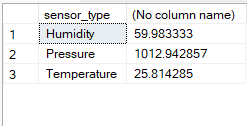
Corrected Query:
SELECT sensor_type, AVG(reading)
FROM SensorData
Group by sensor_type
Go
Output:
Sometimes we might be missing the column name from the Group By clause and still, we are using it in the select list and this might also create such an error.
SELECT sensor_type, CONVERT(date, reading_time), AVG(reading)
FROM SensorData
Group BY sensor_type
As a result, it will give a similar error which we have seen above regarding the usage of reading_time.
Explanation: The query without reading_time works perfectly as we have seen in the above query. But on adding reading time again the confusion occurs that which date should be added.
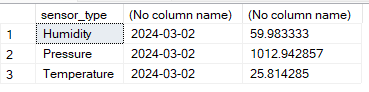
SELECT sensor_type, CONVERT(date, reading_time), AVG(reading)
FROM SensorData
Group BY sensor_type, CONVERT(date, reading_time)
ORDER BY sensor_type
Output:
These are some common problems that cause such errors. But many times we don't want to create groups and still want to use aggregate functions and we can do that by using Over().
We will take the first query in which we got the error. In that, we were taking the sensor_type with the average of reading_time. To use OVER() we have to give this clause after the aggregate function. In general OVER clause is used with window functions to perform calculations across a set of rows related to the current row.
Query:
SELECT sensor_type, AVG(reading) OVER()
FROM SensorData
Output:
Explanation: This query has not given any error to us. But you can see that the output in the average column is the same in all the rows. Because it took the partition as the whole table and thus it has made the average of all. And thus whenever you are using OVER try to use it with condition.
So, when this error occurs try to check the list in the select statement and match it with the list given in group by clause. Missing the column in any one of the list will generate this error. Thus always try to think of what to include in the Select list if you are using the Group by Clause. By following these solutions, you can create well-formed queries that meet the requirements of SQL Server's grouping and aggregation rules.