|
VOOZH | about |
|
VOOZH | about |
TOP clause in Microsoft SQL Server fetches a limited number of rows from a database.
The SELECT TOP clause is very useful when dealing with large databases. The TOP clause is useful for fetching the data records in larger datasets as it reduces the complexity.
TOP clause syntax in Microsoft SQL Server is:
SELECT TOP value column1, column2
FROM table_name;
SELECT TOP value PERCENT column1, column2
FROM table_name;
Let's look at some examples of the TOP clause in Microsoft SQL Server.
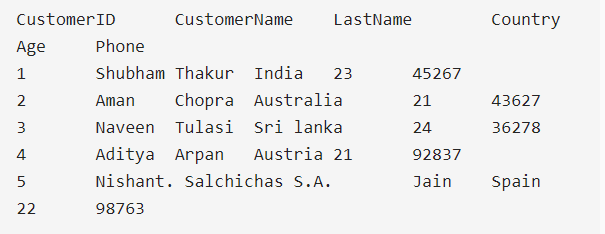
First let's create a demo table, on which we will run the TOP clause query.
Query:
CREATE TABLE Customer(
 CustomerID INT PRIMARY KEY,
 CustomerName VARCHAR(50),
 LastName VARCHAR(50),
 Country VARCHAR(50),
 Age int(2),
 Phone int(10)
);

INSERT INTO Customer (CustomerID, CustomerName, LastName, Country, Age, Phone)
VALUES (1, 'Shubham', 'Thakur', 'India','23','xxxxxxxxxx'),
 (2, 'Aman ', 'Chopra', 'Australia','21','xxxxxxxxxx'),
 (3, 'Naveen', 'Tulasi', 'Sri lanka','24','xxxxxxxxxx'),
 (4, 'Aditya', 'Arpan', 'Austria','21','xxxxxxxxxx'),
 (5, 'Nishant. Salchichas S.A.', 'Jain', 'Spain','22','xxxxxxxxxx');
Output:
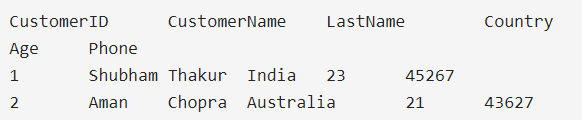
To fetch the first two data sets from the Customer table.
SELECT TOP 2 * FROM Customer;
Output
We can fetch data records by using a where clause with some condition was well.
Query:
SELECT TOP 1 * FROM Customers
WHERE Country='Spain';
Output:
Note: To get the same functionality on MySQL and Oracle databases there is a bit of difference in the basic syntax.
SELECT column1,column2
FROM table_name LIMIT value;
SELECT column1,column2
FROM table_name
WHERE ROWNUM <= value;