|
VOOZH | about |
|
VOOZH | about |
The SQL Server has a variety of data types to store data. These data types can accompany several forms like string, integer, double, date, time, etc. Therefore selecting the appropriate data structure is crucial for maintaining the data accuracy and optimizing the system's performance.
This article delves into the fundamentals of three crucial data types: Numeric, Float, and Decimal.
The Numeric data type is used to represent a number with fixed precision and fixed scale. This means, there is a defined precision for numeric data type such that if we try to store a number that is out of bounds, the numeric data type will return an error.
Syntax:
NUMERIC(precision, scale)
-- Create the table
CREATE TABLE STUDENT(
 Name VARCHAR(20),
 Result NUMERIC(5,2)
);

-- Insert sample data
INSERT INTO STUDENT(Name, Result) VALUES ('John', 98.75);
INSERT INTO STUDENT(Name, Result) VALUES ('Alice', 87.50);
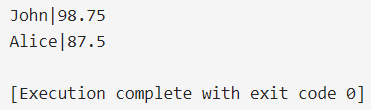
Output:
Explanation: The SQL script creates a table named "STUDENT" with columns "Name" and "Result" of data type NUMERIC(5,2), allowing for fixed precision numbers with 5 total digits and 2 decimal places. Sample data is inserted with the names "John" and "Alice" along with their corresponding results, where precision is enforced.
The Float data type is used to store floating point numbers that are not fixed/exact. This means that the float data type does not store the exact values, rather, it stores the approximate value of the stored number.
Syntax:
FLOAT(precision)
-- Create the table
CREATE TABLE STUDENT(
 Name VARCHAR(20),
 Result FLOAT(5)
);

-- Insert sample data
INSERT INTO STUDENT(Name, Result) VALUES ('John', 98.75000);
INSERT INTO STUDENT(Name, Result) VALUES ('Alice', 87.50000);
Output:
Explanation: The SQL script creates a table named "STUDENT" with columns "Name" and "Result" of data type FLOAT(5). Sample data is inserted into the table with names "John" and "Alice" along with their corresponding results. The FLOAT(5) data type allows for storing approximate floating-point numbers with up to 5 digits.
The Decimal data type is exactly similar to the numeric data type. Both have fixed precision exact values. Both have the same syntax and the same memory usage.
Syntax:
DECIMAL(precision, scale)
-- Create the table
CREATE TABLE STUDENT(
 Name VARCHAR(20),
 Result DECIMAL(5, 2)
);

-- Insert sample data
INSERT INTO STUDENT(Name, Result) VALUES ('John', 98.75);
INSERT INTO STUDENT(Name, Result) VALUES ('Alice', 87.50);
Output:
Explanation: The SQL script creates a table named "STUDENT" with columns "Name" and "Result" of data type DECIMAL(5,2), enforcing fixed precision numbers with 5 total digits and 2 decimal places. Sample data is inserted for students "John" and "Alice" with their respective results, adhering to the specified precision.
Each type has distinct advantages, catering to specific requirements in SQL data storage and manipulation.
| Parameters | Numeric | Float | Decimal |
|---|---|---|---|
| Size (in Bytes) | 5, 9, 13, 17 (based on precision) | 4, 8 (based on precision) | 5, 9, 13, 17 (based on precision) |
| Scale | Defined by user | Not required | Defined by user |
| Precision | Fixed precision (strict precision) | Approximate precision | Fixed precision (adjustable precision) |
| Range | -10^38 to 10^38 | -1.79 x 10^308 to 1.79 x 10^308 | -10^38 to 10^38 |
| Exact Values | Yes | No | Yes |
| Storage Efficiency | Less efficient | More efficient | Less efficient |
All 3 data types have their advantages. However, the numeric and decimal data types have been considered the same since the 2016 update of SQL. The only notable difference between them remains the strictness and out-of-bound error in numeric type. One of the biggest differences between float and numeric/decimal lies in the fact that float stores the approximate value whereas the decimal and numeric have fixed point precision values. Based on the parameters passed to these data types, their sizes vary accordingly.