|
VOOZH | about |
|
VOOZH | about |
The app.post() function in Express.js handles HTTP POST requests to a specific route. It defines a callback function to process incoming data sent via POST, typically used for submitting forms or sending data to a server from clients.
Syntax:
app.post(path, callback [, callback ...])Arguments:
Step 1: You can install this package by using this command.
npm install expressStep 2: After installing the express module, you can check your express version in the command prompt using the command.
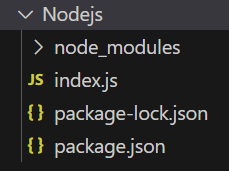
npm version expressProject Structure:
👁 NodeProjThe updated dependencies in package.json file will look like:
"dependencies": {
 "express": "^4.18.2",
}
Example 1: Below is the code example of app.post() Function:
Steps to run the program:
node index.jsConsole Output:
Server listening on PORT 3000Browser Output: Now make a POST request to http://localhost:3000/ and you will get the following output:
POST Request CalledSo this is how you can use the express app.post() function which routes HTTP POST requests to the specified path with the specified callback functions.
We have a complete list of Express App methods, to check those please go through this Express.js Application Complete Reference article.