|
VOOZH | about |
|
VOOZH | about |
The express.Router() function in Express.js creates a new router object that can handle requests in a modular and organized way. It serves as a mini-application with middleware and routes but is limited to specific segments of your application.
By using express.Router(), you can organize your Express app's routing logic, allowing you to define specific routes and middleware for different parts of your application, such as users, products, or orders, in a more maintainable way.
Syntax:
express.Router( [options] )Optional Parameters:
Return Value: This function returns the New Router Object.
The express.Router() function is essential for organizing your routes in large applications.
As your Express application grows, maintaining all routes in a single file can become unmanageable. express.Router() provides a way to organize related routes together and apply middleware to them efficiently. Here’s why you might consider using it:
Step 1: You can install this package by using this command.
npm install expressStep 2: After installing the express module, you can check your express version in the command prompt using the command.
npm version expressStep 3: After that, you can just create a folder and add a file, for example, index.js. To run this file you need to run the following command.
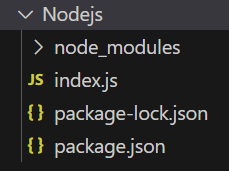
node index.jsProject Structure:
The updated dependencies in package.json file will look like:
"dependencies": {
 "express": "^4.18.2",
}
Example 1: Below is the code of express.Router() Function implementation.
Steps to run the program: Run the index.js file using the below command:
node index.jsOutput:
Console Output:
Server listening on PORT 3000Browser Output:
Now open your browser and go to http://localhost:3000/, you will see the following output on your screen:
Server listening on PORT 3000
Router Working
Example 2: Below is the another code example of express.Router() Function implementation.
Steps to run the program: Run the index.js file using the below command:
node index.jsNow make a GET request to http://localhost:3000/user, http://localhost:3000/admin, and http://localhost:3000/student, then you will see the following output on your console:
Output:
Server listening on PORT 3000
User Router Working
Admin Router Working
Student Router Working