|
VOOZH | about |
|
VOOZH | about |
The req.body property contains key-value pairs of data submitted in the request body. By default, it is undefined and is populated when you use a middleware called body-parsing such as express.urlencoded() or express.json().
Syntax:
req.bodyParameter: No parameters.
Return Value: Object
req.body property is used to access the data sent by the client in POST requests. Step 1: You can install this package by using this command.
npm install expressStep 2: After installing the express module, you can check your express version in the command prompt using the command.
npm version expressStep 3: After that, you can just create a folder and add a file, for example, index.js. To run this file you need to run the following command.
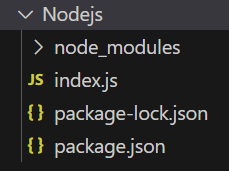
node index.jsProject Structure:
The updated dependencies in package.json file will look like:
"dependencies": {
 "express": "^4.21.2"
}
Example 1: Below is the code of req.body Property implementation.
Steps to run the program:
Run the index.js file using the below command:
node index.jsNow make a POST request to http://localhost:3000/profile with the following body:
{
 "title":"Greetings from GeeksforGeeks"
}
Console Output: Now you can see the following output on your console:
Server listening on PORT 3000
{ title: 'Greetings from GeeksforGeeks' }
Example 2: Below is the code of req.body Property implementation.
Steps to run the program:
Run the index.js file using the below command:
node index.jsNow make a POST request to http://localhost:3000/signup with the following request body:
 {
 "name": "Gourav",
 "age": 13,
 "gender":"Male"
 }
Output: Now you will see the following output on your console screen:
Server listening on PORT 3000
Name: Gourav
Age: 13
Gender: Male
Express provides middleware to parse request bodies. The two most commonly used middleware are:
app.use(express.json()); // Parses JSON request bodiesapp.use(express.urlencoded({ extended: true }))Express's default body parser has limits on the size of the incoming data. If you need to handle larger request bodies (for instance, for file uploads), you can configure the size limit in the middleware.
app.use(express.json({ limit: '10mb' })); // Set the maximum body size to 10 MB
app.use(express.urlencoded({ extended: true, limit: '10mb' }));
The req.body property in Express is essential for accessing the data sent by the client in HTTP POST requests. By using middleware such as express.json() or express.urlencoded(), we can parse the request body into a readable format, making it easier to access key-value pairs of data. This property simplifies handling form submissions, API requests, and any other data passed in the body of a request.