|
VOOZH | about |
|
VOOZH | about |
The res.end() function concludes the response process and is derived from the HTTP.ServerResponse's response.end() method in the Node core. It is employed to promptly conclude the response without including any data.
Syntax:
res.end([data] [, encoding])Parameters: The default encoding is 'utf8' and the data parameter is the data with which the user wants to end the response.
Return Value: It returns an Object.
res.end() function in Express.js is basically used to end a response process.
Step 1: Initializing the Nodejs app using the below command:
npm init -yStep 2: Installing the express module:
npm install expressStep 2: After that, you can create a folder and add a file, for example, index.js. To run this file you need to run the following command.
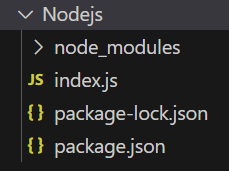
node index.jsProject Structure:
👁 NodeProjThe updated dependencies in package.json file will look like:
"dependencies": {
 "express": "^4.18.2",
}
Example 1: Below is the code example of the res.status() Method:
Steps to run the program:
node index.jsOutput:
Server listening on PORT 3000Example 2: Below is the code example of the res.status() Method:
Steps to run the program:
node index.jsOutput: go to http://localhost:3000/user, then you will see the following output on your console
We have a Cheat Sheet on Express Response methods where we covered all the important topics. To check those please go through Express.js Response Complete Reference article