|
VOOZH | about |
|
VOOZH | about |
Have you ever seen a "400 Bad Request" error while browsing on the web, that might be confusing for you about what it means? When you request to a website the server responds with an HTTP status code.
This error is among the responses in terms of the HTTP status code used by web servers in order to communicate with your browser. HTTP Status Codes that are commonly used are: 200 OK, 404 Not found, and 500 Internal Server Error.
Table of Content
A "400 Bad Request Error" is a way in which the server says that it is having trouble understanding the request sent to it. It is simply a signal through which the server tells that something is wrong with the request sent to it. In order to tell the end user that the server is facing issues, the server sends 400 Bad Request Error.
The "Request Header or Cookie Too Large" part tells that the problem being faced is especially with the size of the request headers or cookies.
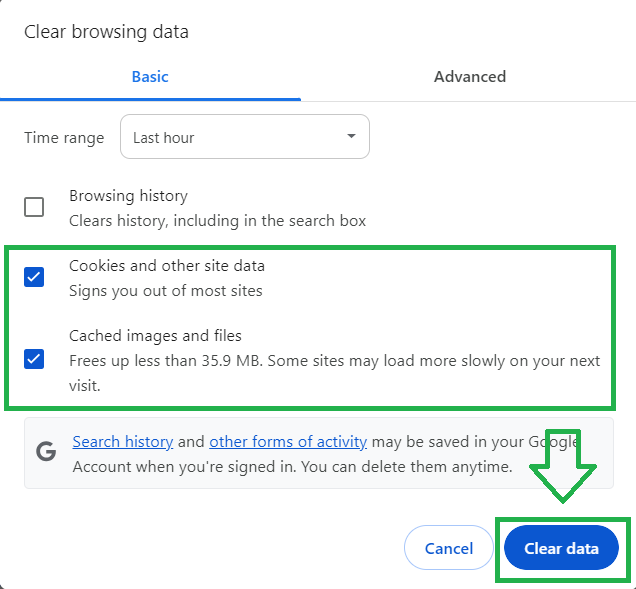
Clearing you cookies can resolve the error if they have become too large. These can be resolved through-
For resolving the error using Google Chrome-
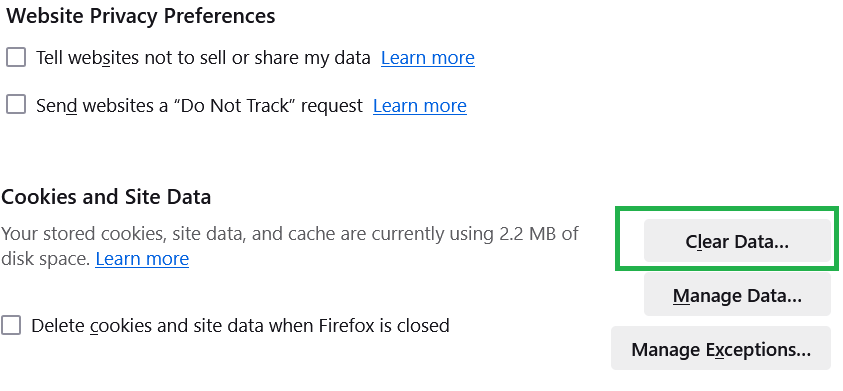
2. Morzilla FireFox:
For clearing cookies using Morzilla Firefox -
Larger cookies can cause the server to reject the request. Reduce the amount of data which is stored in cookies. To do that you need to review the data storage and ensure cookies only store essential information in it. If your cookies is having lot of information, cut it down and keep only the relevant information and discard remaining in order to reduce cookie size.
Example:
Before:
document.cookie = "preferences=theme:dark;userID:12345;otherData:moreData;expires=Fri, 31 Dec 9999 23:59:59 GMT"; After:
document.cookie = "preference =theme:dark;expires=Fri, 31 Dec 9999 23:59:59 GMT";In the above example, we have removed extra information in order to reduce cookie size.
Limiting Custom Headers can fix this error as too many or excessively large headers can overlead the sever. In order to fix this issue, you should review and reduce the header by checking if you are sending unnecessary headers or if any headers are too large.If you are using browsers extensions that add extra headers disable or remove such extensions.
Syntax:
Before (with extra headers)
fetch('/data', {
 headers: {
 'X-Custom-Header': 'ExtraData',
 'Another-Header': 'MoreData',
 'Cookie': 'sessionID=123456; trackingID=7890'
 }
});
After( with reduced Headers)
fetch('/data', {
 headers: {
 'Cookie': 'sessionID=123456'
 }
});
In the before example, the request includes extra custom headers and a tracking cookie that might not be needed. In the After example, we keep only the essential cookie.
Sometimes, browser settings or extensions can interfere with how requests are handled. Resetting the browser settings can help us in resolving this issue. For this you have to -
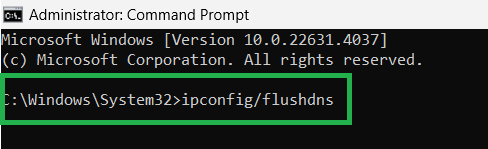
The 400 Bad Request error indicates that the server has received a request with headers or cookies that exceed its allowed limits. This can be often be due to outdated or corrupted data.Flushing the DNS cache clears outdated or corrupted DNS records that might affect your browsing experience, which can sometimes resolve issue related to web requests or headers. In order to Flush DNS in windows, do-
Redirect loops can cause the size of cookies or headers to grow too large.In order to fix this error, you should check redirect rules in which you need to ensure that your site doesn't have a loop. As in the example states above, if Page A redirects to Page B and Page B redirects back to Page A, you need to fix redirects to prevent looping.
Local Storage and Session Storge can store data without adding it to request headers or cookies. In order to use local storage or session storage to fix the error, you need to switch to local storage or session storage, it is for the data that doesn't need to be sent with every request.
To Contact the site owner to report the error you have to locate contact information by looking for a "Contact us" page or support email on the website. When contacting the site owner or support team do add : A description of the error message. The steps you have already taken to try and resolve the issue. and any relevant screenshots or error codes. You can ask for their assistance in investigating and resolving the issue.
When you see 400 bad request error , it usually means that your browser is sending to much data to the server, either through cookies or through headers. To fix this issue, you can take some simple steps like cleaning cookies, reducing cookie size, etc. In essence, keeping things light and clean- whether it is the cookies which your browser stores or the headers- you can prevent the errors. You need to understand the causes and apply straightforward solutions.